# ELK Stack to EKK Stack (Elastic, Kibana, and Apache Kafka®): COVID-19 Data Analysis
[Blog](/blog/)>[Technology](/blog/category/technical/)>ELK Stack to EKK Stack (Elastic, Kibana, and Apache Kafka®): COVID-19 Data Analysis
ELK Stack to EKK Stack (Elastic, Kibana, and Apache Kafka®): COVID-19 Data Analysis
===================================================================================
October 15, 2020 | By [ Instaclustr ](https://www.instaclustr.com/blog/author/instaposting/)
[ ](https://x.com/intent/tweet?text=ELK%20Stack%20to%20EKK%20Stack%20(Elastic,%20Kibana,%20and%20Apache%20Kafka%C2%AE):%20COVID-19%20Data%20Analysis&url=https://www.instaclustr.com/blog/elk-stack-to-ekk-stack-elasticsearch-kafka-kibana/) [ ](https://www.linkedin.com/shareArticle?mini=true&url=https://www.instaclustr.com/blog/elk-stack-to-ekk-stack-elasticsearch-kafka-kibana/&title=&summary=ELK%20Stack%20to%20EKK%20Stack%20(Elastic,%20Kibana,%20and%20Apache%20Kafka%C2%AE):%20COVID-19%20Data%20Analysis&source=)
A lot of people new to data science don’t know what to do after they write their first Python or R script. While that web scraper may have run well on your laptop—one time, you need to think about a streaming architecture that can handle multiple datasets. You need to not only store the results but you want to visualize them and transform and merge the data to derive meaningful results. Thinking about your data as a stream where you can pipe in multiple datasets is a useful way of thinking about it. You also want to architect a solution that is scalable, pluggable, and reusable.
Recently I’ve been seeing, and using myself, an EKK stack (Elastic, Kibana, and Kafka) instead of ELK stack to solve problems like these. Pairing Elasticsearch and Kibana with the enterprise connectivity and event-driven and powerful ETL features of Kafka yields a very robust and adaptable stack. Below I’ll work with some COVID-19 data using the EKK stack.
The Problem
-----------
The general task at hand is to make sense of a wide variety of JSON datasets, visualize them, and transform the data into resulting streams. To solve this problem, first we use Docker to remove the overhead of setting up the environment. Once everything is Dockerized, we have to figure out how to connect the various technologies for our workflow engine.
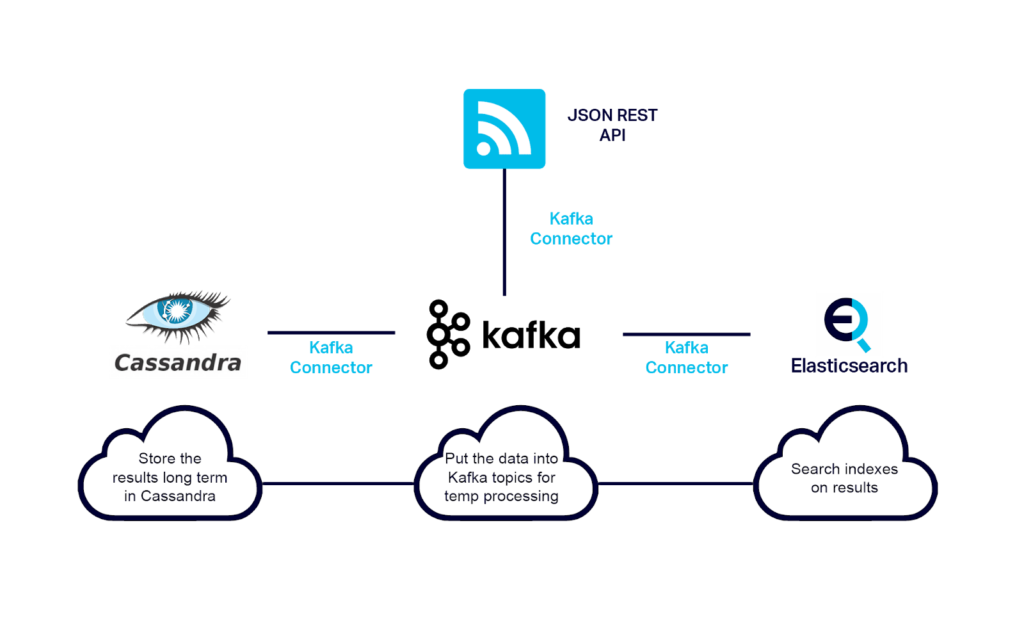
The Technology Stack: EKK stack and more
----------------------------------------
- **Python:** the industry standard for most data science
- **Kafka:** the industry standard for a streaming platform/application messaging/distributed commit log
- **Kafka Connectors:** these allow us to move data cleanly between various data systems and with zero maintenance overhead
- **REST connector**: pull data from a REST API and put into **Kafka**
- **Elasticsearch** Sink Connector: read data from Kafka and put into **Elasticsearch**
- **Elasticsearch:** arguably the industry open source standard for big data pattern recognition and visualization engines
- **Kibana:** the main **Elasticsearch** visualization engine
Technology Overviews
--------------------
### Kafka and Connectors
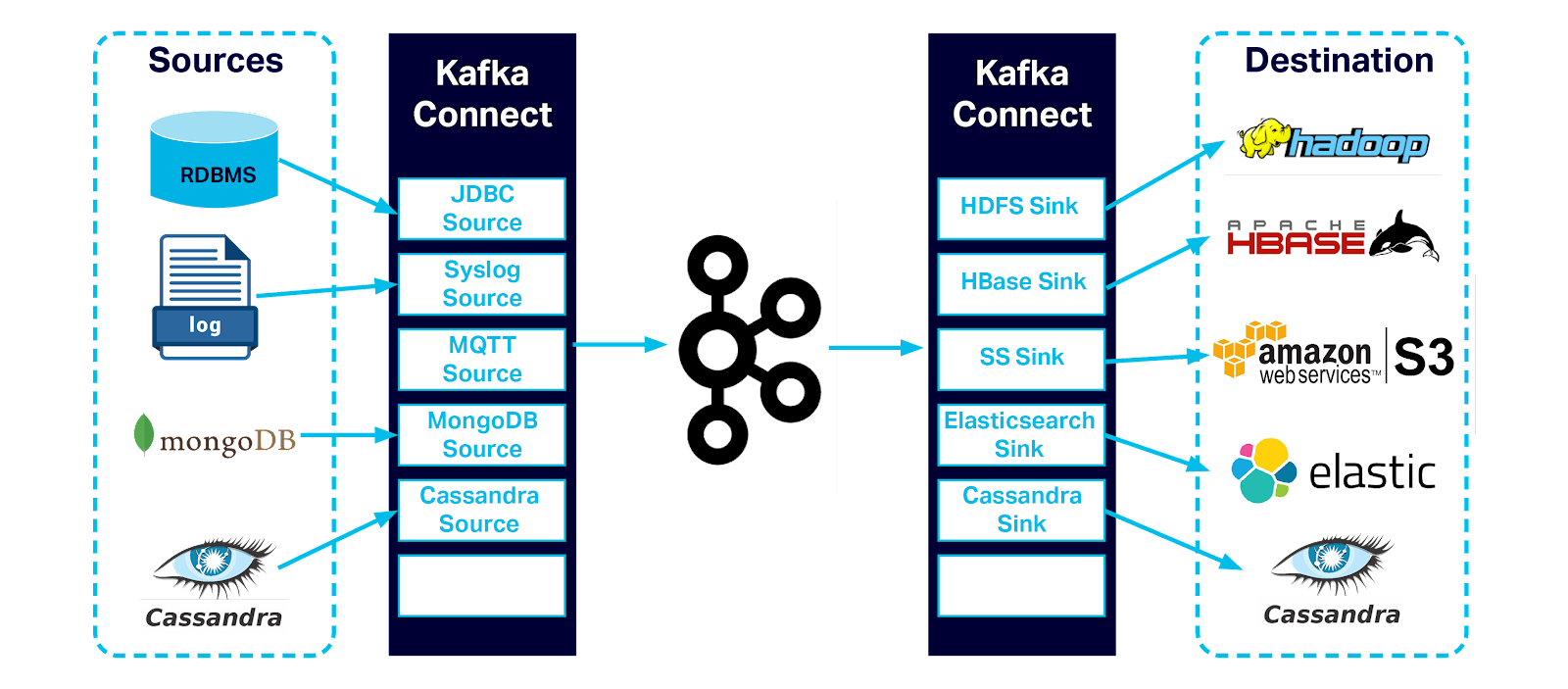Kafka is a real time streaming platform based on a distributed commit log. You can store any kind of data in it and read it with any programming language. This is a reliable highway infrastructure system. Producers write data to Kafka and Consumers read data from Kafka.
Kafka Connectors are mature and purpose built producers/consumers for specific data systems. There is a connector for reading/writing data from Elasticsearch to Kafka. There is also a connector for reading from web API(s) and storing the data in a Kafka topic.
### A move to EKK from ELK Stack – Elasticsearch + Kibana
Kafka Replaces Logstash in the Classic ELK WorkflowIn this workflow we use Elasticsearch as our pattern recognition engine and its built-in Kibana as our visualization frontend. Elasticsearch is an open source scalable search engine used for monitoring, alerting, and pattern recognition. Elasticsearch works with highly structured JSON documents which are placed into an index. You interact with Elasticsearch using a REST API.
### Writing a Data Scrubber
In this exercise, we will be using Python 3 to clean the data stored in Kafka and place it into Elasticsearch. You can use any Kafka client library, however, Python is very easy to use and is readable to anyone.
Solution Architecture Overview
------------------------------
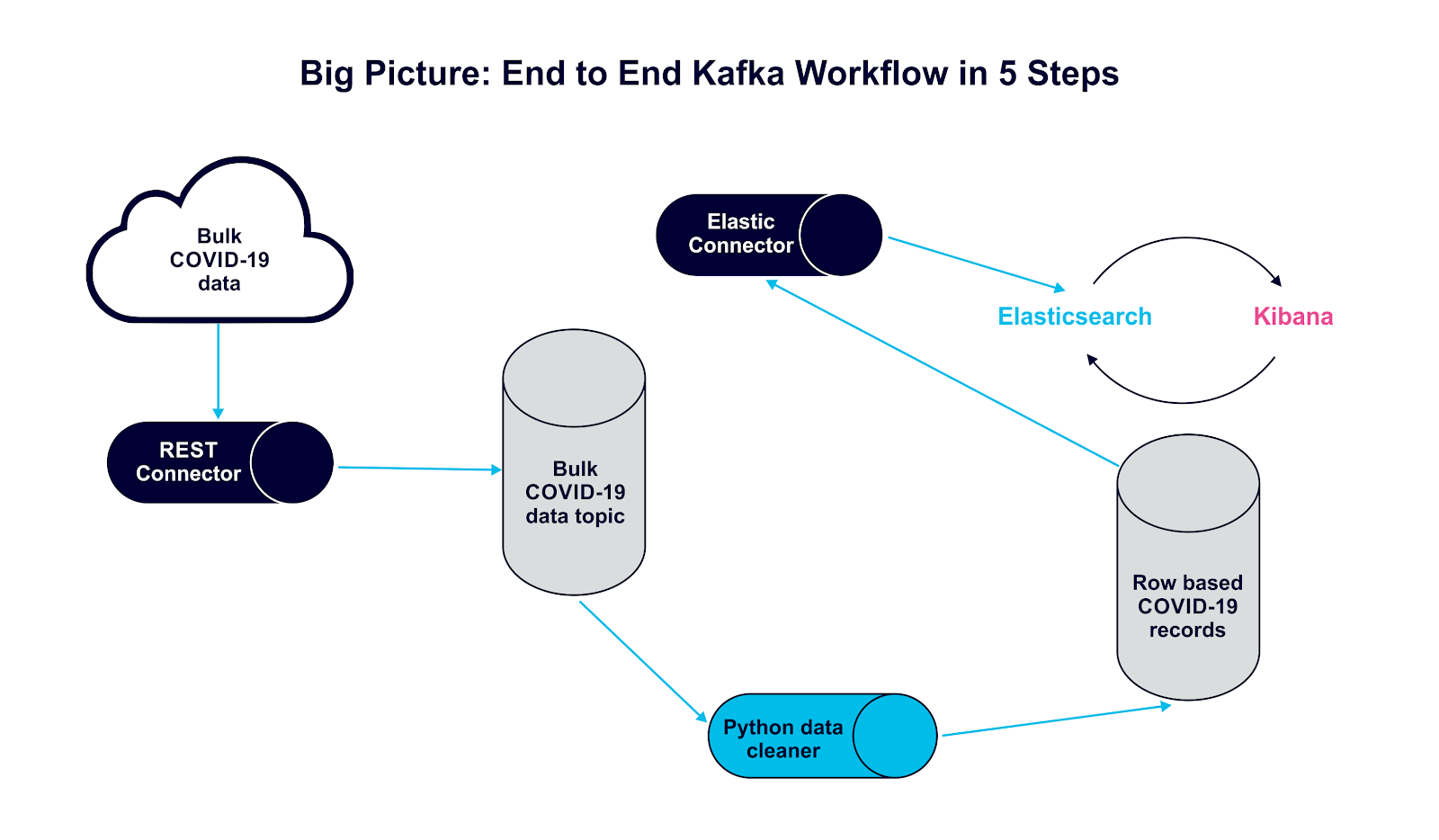 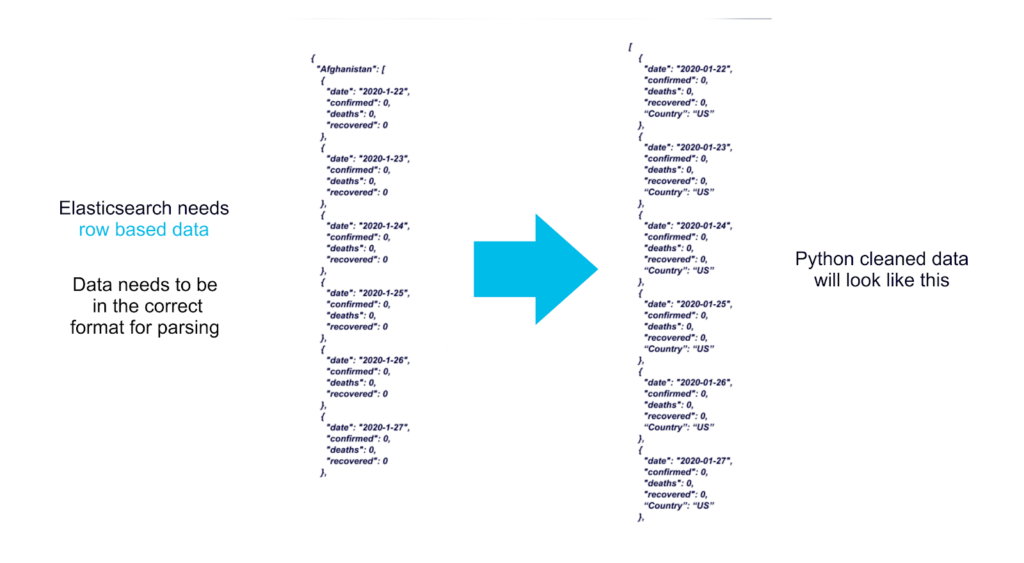Essentially, our Kafka connector will pull new COVID\_19 data every 24 hours and put it into a Kafka topic called *Covid19Global.* Our Python application will pull the latest record, go through all the data, and send each record one by one with a country key to another Kafka topic called *covid19*.
```
import json
import datetime
from kafka import KafkaConsumer
from kafka import KafkaProducer
#if you want to run outside of docker, simply change bootstrap_servers="localhost:29092"
# Here we connect to the kafka cluster and grab just one record, all covid data is a giant data dump, we are converting into a stream
consumer = KafkaConsumer('covid19Global',max_poll_records=1,bootstrap_servers="kafka:9092", group_id=None, auto_offset_reset="earliest")
# we will also be producing our records
producer = KafkaProducer(bootstrap_servers="kafka:9092", key_serializer=str.encode,value_serializer=lambda v: json.dumps(v).encode('utf-8'))
for message in consumer:
covid = json.loads(message.value)
for key in covid:
# print(key)
for i in covid[key]:
# we need to ensure our data format is correct to merge the data streams
# i.e. -> “date”:“2020-01-02" != “date”:“2020-1-2",
record_date = datetime.datetime.strptime(i['date'], '%Y-%m-%d')
record_date = record_date.strftime('%Y-%m-%d')
i['date'] = record_date
i['country'] = key
#we are sending our records to a new topic called covid19US
producer.send('covid19', key=record_date, value=i )
print(i)
```
You can run this code using docker instead of setting up a Python environment on your machine.
Running the Solution
--------------------
First you need to set up [Docker](https://www.docker.com/get-started) and [Git](https://git-scm.com/) on your machine
```
git clone https://github.com/meticulo3366/cassandra-kafka-elasticsearch-open-source.git
```
[Open the readme here and follow the instructions](https://github.com/meticulo3366/cassandra-kafka-elasticsearch-open-source/blob/master/COVID19.md)
Also you can read them directly below.
Turn on docker if you have not done so already
```
docker-compose up --force-recreate -V --remove-orphans --always-recreate-deps
```
Open another terminal and push in COVID19 Data.
```
curl -X POST -H 'Accept: application/json' -H 'Content-Type: application/json' https://localhost:8083/connectors -d @connector-configs/covid19restALL.json
```
Open another terminal and push in Stock Trading Volatility VIX Data.
```
curl -X POST -H 'Accept: application/json' -H 'Content-Type: application/json' https://localhost:8083/connectors -d @connector-configs/vixrest.json
```
Run the Python data cleaner.
To run the data cleaner, follow the instructions below
Open another terminal and Run the code to clean the data.
```
docker run --rm -ti --network cassandra-kafka-elasticsearch-open-source_default -v `pwd`:/usr/src/app jfloff/alpine-python:3.7-slim -A /usr/src/app/apk-requirements.txt -B /usr/src/app/build-requirements.txt -r /usr/src/app/requirements.txt -- python3 /usr/src/app/covid19_datacleaner.py
```
Open another terminal and validate that you have cleaned the data successfully.
```
docker exec -it cassandra-kafka-elasticsearch-open-source_connect_1 bash -c "kafka-console-consumer --bootstrap-server kafka:9092 --topic covid19 --from-beginning"
```
Open another terminal and send the data to Elasticsearch.
```
curl -X POST -H 'Accept: application/json' -H 'Content-Type: application/json' https://localhost:8083/connectors -d @connector-configs/covid19elk.json
```
Open another terminal and validate Elasticsearch has ingested the data.
```
curl https://127.0.0.1:9200/covid19/_search/?size=1000&pretty=1
```
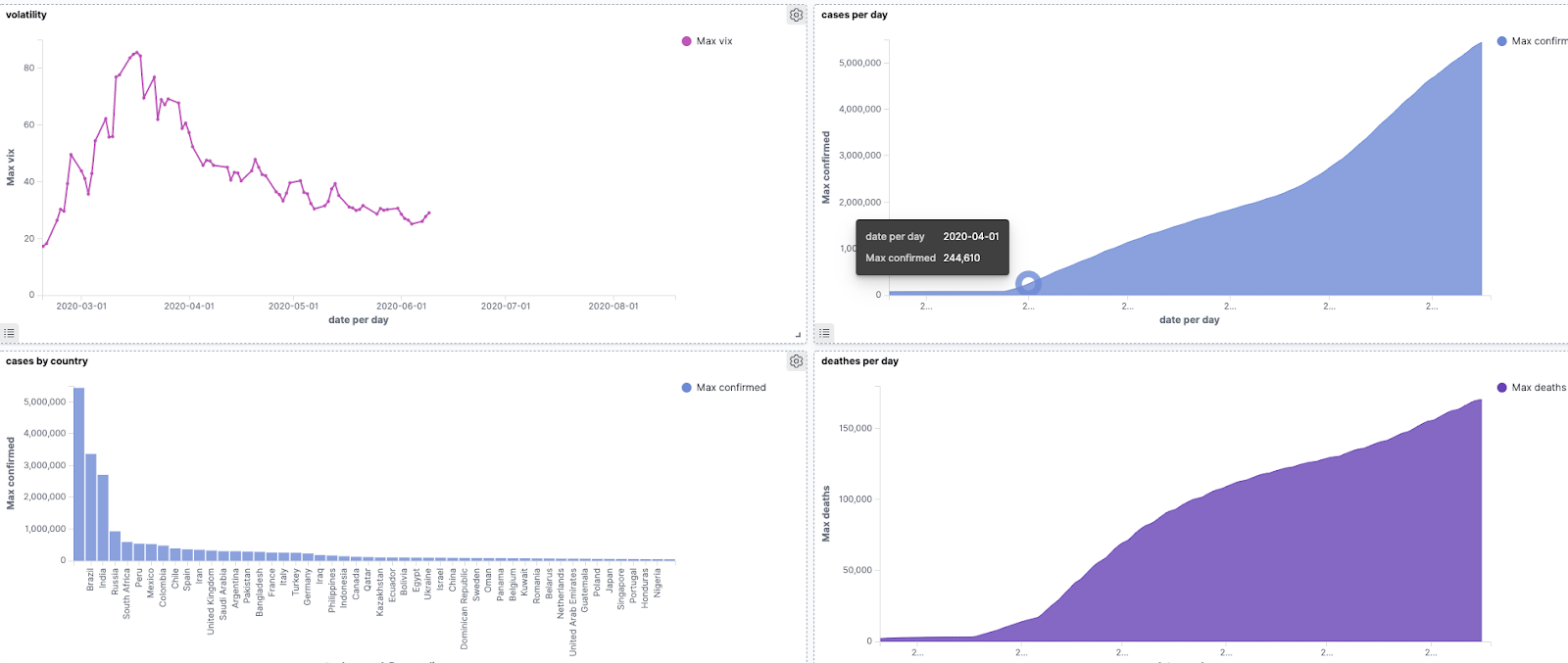
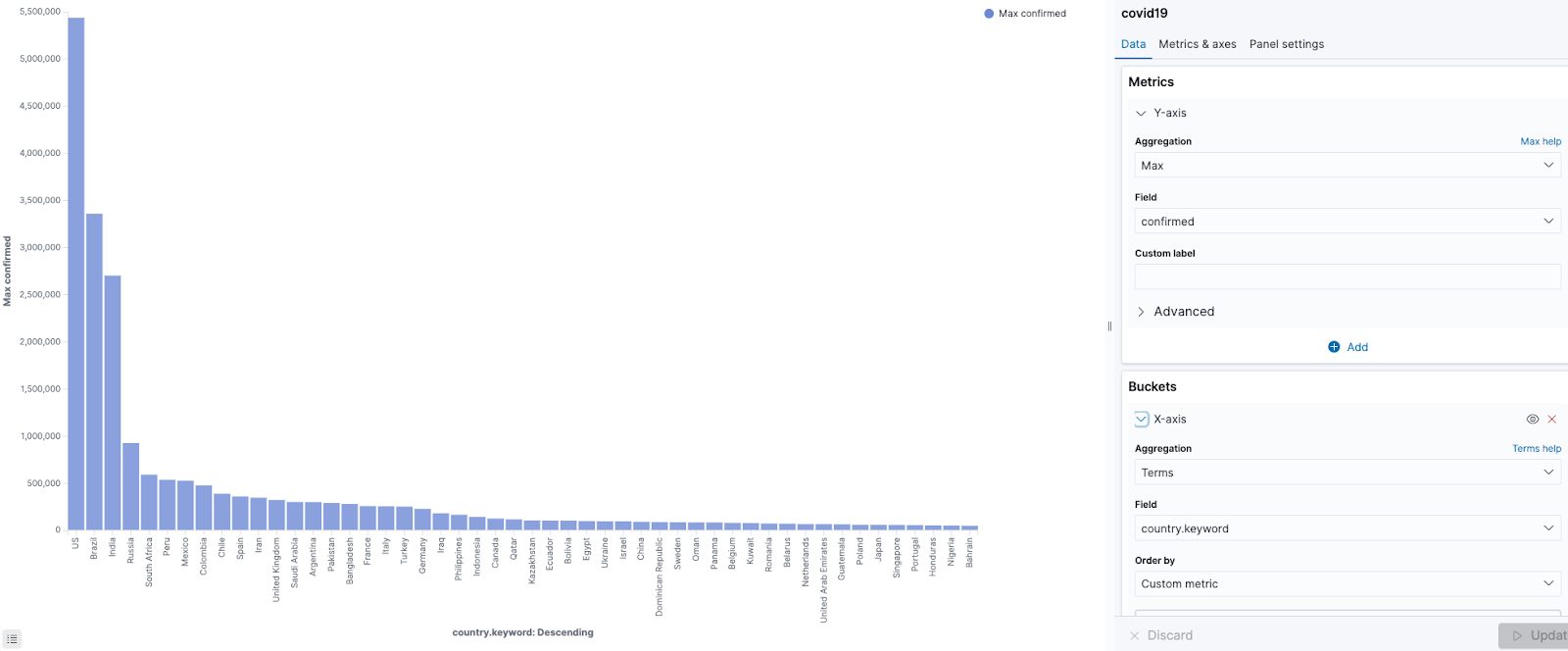
Finally you can navigate to Kibana to start visualizing and exploring the COVID-19. Here are some visualizations of the data below showing cases over time and by country.
 Experience the power of open source technologies by spinning up a cluster in just a few minutes.
[Free Trial](https://console2.instaclustr.com/signup?utm_cta=signup)
![mail icon]()#### Get the latest articles for open sourceIn your inbox
### Related content
[ A Comprehensive Guide to OpenSearch Architecture
Confused about your OpenSearch architecture? Get a complete understanding with our guide so you can better utilize the platform...
](https://www.instaclustr.com/blog/opensearch-and-elasticsearch-architecture/)
[ What Is the Instaclustr Terraform Provider?
Terraform is an open source platform that allows you to create, manage, and delete cloud resources in different cloud providers...
](https://www.instaclustr.com/blog/what-is-the-instaclustr-terraform-provider/)
[ 5 Essential considerations for an Elasticsearch to OpenSearch migration
Streamline your Elasticsearch to OpenSearch migration with these five essential tips. Learn how to handle plugins, limitations, ...
](https://www.instaclustr.com/blog/5-essential-considerations-for-an-elasticsearch-to-opensearch-migration/)
×Sign upto ourNewsletter
-----------------------