# Hello Cassandra! A Java Client Example
[Blog](/blog/)>[Technology](/blog/category/technical/)>Hello Cassandra! A Java Client Example
Hello Cassandra! A Java Client Example
======================================
September 07, 2017 | By [ Paul Brebner](https://www.instaclustr.com/blog/author/paul-brebner/)
[ ](https://x.com/intent/tweet?text=Hello%20Cassandra!%20A%20Java%20Client%20Example&url=https://www.instaclustr.com/blog/hello-cassandra-java-client-example/) [ ](https://www.linkedin.com/shareArticle?mini=true&url=https://www.instaclustr.com/blog/hello-cassandra-java-client-example/&title=&summary=Hello%20Cassandra!%20A%20Java%20Client%20Example&source=)
This is the third (and final) part of my blog-series on creating a demonstration [Cassandra](/platform/managed-apache-cassandra/) cluster, connecting, and communicating. We landed on the moon and made [Second Contact with the Monolith](/blog/consulting-cassandra-second-contact-monolith/) (CQL shell) in our last blog, but what can we do to understand the Monolith better? Let’s explore Cassandra Java client program.
**Java Client Driver**
----------------------
Apart from the CQL shell, another way of connecting to Cassandra is via a programming language driver. I’ll use Java. Instaclustr has a [good introduction to Cassandra and Drivers](https://www.slideshare.net/planetcassandra/client-drivers-and-cassandra-the-right-way), including best practices for configurations. We recommend the [DataStax driver](https://github.com/datastax/java-driver) for Java which is available under the Apache license as a binary tarball. Unpack it and include all the jar files in your Java libraries build path (I use Eclipse so I just had to import them). [The driver documentation is here](https://docs.datastax.com/en/developer/java-driver/3.3/), and [this is a good summary.](https://docs.datastax.com/en/developer/java-driver/3.3/manual/)
### **Connection**
From the Instaclustr console, under your trial cluster, Connection Info tab, at the bottom are code samples for connecting to the trial cluster with pre-populated data.
### **Cassandra Java Client example**
This is a simplistic code example of connecting to the trial Cassandra cluster, creating a time series data table, filling it with realistic looking data, querying it and saving the results into a csv file for graphing (Code below). To customise the code for your cluster, change the public IP addresses, and provide the data centre name and user/password details (it’s safest to use a non-super user). The [Cluster.builder()](https://docs.datastax.com/en/drivers/java/3.0/com/datastax/driver/core/Cluster.Builder.html) call uses a fluent API to configure the client with the IP addresses, load balancing policy, port number and user/password information. I’ve obviously been under a rock for a while as I havn’t come across fluent programming before. It’s all about the cascading of method invocations, and they are supported in [Java 8 by Lambda functions (and used in Java Streams)](https://books.google.com.au/books?id=0U8oDwAAQBAJ&pg=PA330&lpg=PA330&dq=java+8+fluents+lambda&source=bl&ots=QnhhmVBha1&sig=x_BLe8BzJLCbHUSFYx_Cp8NImjw&hl=en&sa=X&ved=0ahUKEwiP-ZXzgPnVAhXLS7wKHbYJBvs4ChDoAQhUMAk#v=onepage&q=java%208%20fluents%20lambda&f=false). This is a very simple configuration which I’ll revisit in the future with the Instaclustr recommended settings for production clusters.
The program then builds, gets meta data and prints out the host and cluster information, and then creates a session by connecting. You have the option of dropping the test table if it already exists or adding data to the existing table.
Next, we fill the table with some realistic time series sensor data. You can change how many host names (100 by default) are used, and how many timestamps are generated. For each time 3 metrics and values will be inserted. There are several types of statements in the Java clients including simple and prepared statements. In theory prepared statements are faster so there’s an option to use either in the code. In practice it seems that prepared statements may not improve response time significantly but may be designed to improve throughput. Realistic looking data is generated by a simple random walk.
The code illustrates some possible queries (SELECTs), including a simple aggregate function (max) and retrieving all the values for one host/metric combination, finding all host/metric permutations (to assist with subsequent queries as we made the primary key a compound key of host and metric so both are needed to select on), and finally retrieving the whole table and reporting the number of rows and total bytes returned.
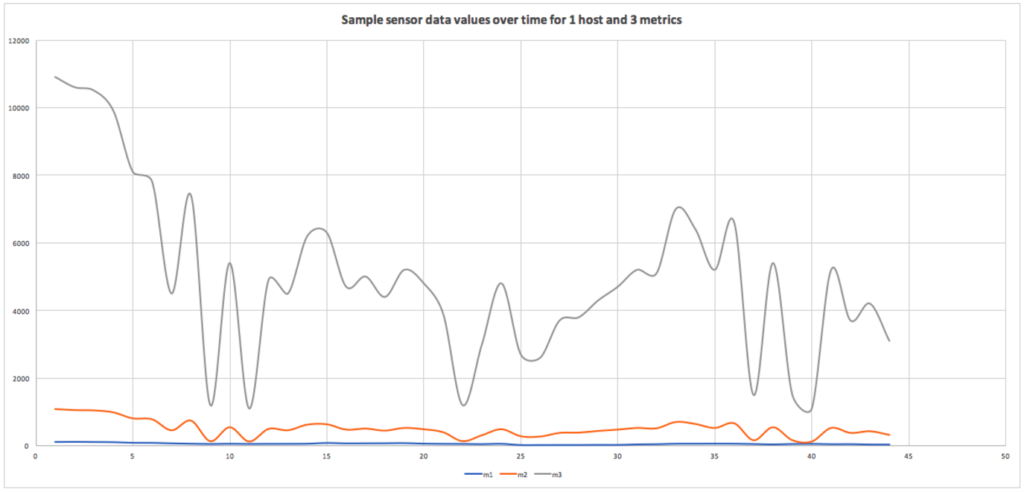
### **What does the data look like?**
The simplest possible way of taking a better look at the data was to use the cqlsh again and run this command to produce a CSV file:
COPY hals.sensordata TO ‘../test1.csv’ WITH header=true;
You can then read the csv file into excel (or similar) and graph (for example) all the metric values over time for a selected host:
[](https://www.instaclustr.com/wp-content/uploads/2021/10/sample-sensor-data-values-over-time-for-1-host-and-3-metrics-Instaclustr.png)
package test1; import java.util.Date; import com.datastax.driver.core.\*; import com.datastax.driver.core.policies.DCAwareRoundRobinPolicy; /\* \* Simple Java client test to connect to trial cluster, create a time series data table, fill it, query it, and save it as csv for graphing. \*/ public class CassTest1 { // the 3 node trial Cassandra test cluster Public IPs. These are dummy values. static String n1PubIP = "01.23.45.678"; static String n2PubIP = "01.234.56.78"; static String n3PubIP = "01.23.456.78"; static String dcName = "hal\_sydney"; // this is the DC name you used when created static String user = "user"; static String password = "password"; public static void main(String\[\] args) { long t1 = 0; // time each CQL operation, t1 is start time t2 is end time, time is t2-t1 long t2 = 0; long time = 0; Cluster.Builder clusterBuilder = Cluster.builder() .addContactPoints( n1PubIP, n2PubIP, n3PubIP // provide all 3 public IPs ) .withLoadBalancingPolicy(DCAwareRoundRobinPolicy.builder().withLocalDc(dcName).build()) // your local data centre .withPort(9042) .withAuthProvider(new PlainTextAuthProvider(user, password)); Cluster cluster = null; try { cluster = clusterBuilder.build(); Metadata metadata = cluster.getMetadata(); System.out.printf("Connected to cluster: %s\\n", metadata.getClusterName()); for (Host host: metadata.getAllHosts()) { System.out.printf("Datacenter: %s; Host: %s; Rack: %s\\n", host.getDatacenter(), host.getAddress(), host.getRack()); } Session session = cluster.connect(); ResultSet rs; boolean createTable = true; if (createTable) { rs = session.execute("CREATE KEYSPACE IF NOT EXISTS hals WITH replication = {'class': 'SimpleStrategy', 'replication\_factor' : 3}"); rs = session.execute("DROP TABLE IF EXISTS hals.sensordata"); rs = session.execute("CREATE TABLE hals.sensordata(host text, metric text, time timestamp, value double, PRIMARY KEY ((host, metric), time) ) WITH CLUSTERING ORDER BY (time ASC)"); System.out.println("Table hals.sensordata created!"); } // Fill the table with some realistic sensor data. if createTable=false we just ADD data to the table double startValue = 100; // start value for random walk double nextValue = startValue; // next value in random walk, initially startValue int numHosts = 100; // how many host names to generate int toCreate = 1000; // how many times to pick a host name and create all metrics for it boolean usePrepared = false; PreparedStatement prepared = null; // prepare a prepared statement if (usePrepared) { System.out.println("Using PREPARED statements for INSERT"); prepared = session.prepare("insert into hals.sensordata (host, metric, time, value) values (?, ?, ?, ?)"); } t1 = System.currentTimeMillis(); System.out.println("Creating data... iterations = " + toCreate); for (int r=1; r <= toCreate; r++) { long now = System.currentTimeMillis(); Date date = new Date(now); // generate a random host name String hostname = "host" + (long)Math.round((Math.random() \* numHosts)); // do a random walk to produce realistic data double rand = Math.random(); if (rand < 0.5) // 50% chance that value doesn't change ; else if (rand < 0.75) // 25% chance that value increases by 1 nextValue++; else // 25% chance that value decreases by 1 nextValue--; // never go negative if (nextValue < 0) nextValue = 0; // comparison of prepared vs. non-prepared statements if (usePrepared) { session.execute(prepared.bind("'" + hostname + "'", "'m1'", date, nextValue)); session.execute(prepared.bind("'" + hostname + "'", "'m2'", date, nextValue \* 10)); session.execute(prepared.bind("'" + hostname + "'", "'m3'", date, nextValue \* 100)); } else { // fake three metrics (m1, m2, m3) which are somehow related. rs = session.execute("insert into hals.sensordata (host, metric, time, value) values (" + "'" + hostname + "'" + ", " + "'m1'" + ", " + now + "," + (nextValue) + ");" ); rs = session.execute("insert into hals.sensordata (host, metric, time, value) values (" + "'" + hostname + "'" + ", " + "'m2'" + ", " + now + "," + (nextValue \* 10) + ");" ); rs = session.execute("insert into hals.sensordata (host, metric, time, value) values (" + "'" + hostname + "'" + ", " + "'m3'" + ", " + now + "," + (nextValue \* 100) + ");" ); } } t2 = System.currentTimeMillis(); System.out.println("Created rows = " + toCreate\*3 + " in time = " + (t2-t1)); // find the max value for a sample System.out.println("Getting max value for sample..."); t1 = System.currentTimeMillis(); rs = session.execute("select max(value) from hals.sensordata where host='host1' and metric='m1'"); t2 = System.currentTimeMillis(); time = t2-t1; Row row = rs.one(); System.out.println("Max value = " + row.toString() + " in time = " + time); // get all the values for a sample System.out.println("Getting all rows for sample..."); t1 = System.currentTimeMillis(); rs = session.execute("select \* from hals.sensordata where host='host1' and metric='m1'"); for (Row rowN : rs) { System.out.println(rowN.toString()); } t2 = System.currentTimeMillis(); time = t2-t1; System.out.println("time = " + time); // get all host/metric permutations System.out.println("Getting all host/metric permutations"); t1 = System.currentTimeMillis(); rs = session.execute("select distinct host, metric from hals.sensordata"); for (Row rowN : rs) { System.out.println(rowN.toString()); } t2 = System.currentTimeMillis(); time = t2-t1; System.out.println("time = " + time); // Note that SELECT \* will return all results without limit (even though the driver might use multiple queries in the background). // To handle large result sets, you use a LIMIT clause in your CQL query, or use one of the techniques described in the paging documentation. System.out.println("Select ALL..."); t1 = System.currentTimeMillis(); rs = session.execute("select \* from hals.sensordata"); System.out.println("Got rows (without fetching) = " + rs.getAvailableWithoutFetching()); int i = 0; long numBytes = 0; // example use of the data: count rows and total bytes returned. for (Row rowN : rs) { i++; numBytes += rowN.toString().length(); } t2 = System.currentTimeMillis(); time = t2-t1; System.out.println("Returned rows = " + i + ", total bytes = " + numBytes + ", in time = " + time); } finally { if (cluster != null) cluster.close(); } } }
1
2
3
4
5
6
7
8
9
10
11
12
13
14
15
16
17
18
19
20
21
22
23
24
25
26
27
28
29
30
31
32
33
34
35
36
37
38
39
40
41
42
43
44
45
46
47
48
49
50
51
52
53
54
55
56
57
58
59
60
61
62
63
64
65
66
67
68
69
70
71
72
73
74
75
76
77
78
79
80
81
82
83
84
85
86
87
88
89
90
91
92
93
94
95
96
97
98
99
100
101
102
103
104
105
106
107
108
109
110
111
112
113
114
115
116
117
118
119
120
121
122
123
124
125
126
127
128
129
130
131
132
133
134
135
136
137
138
139
140
141
142
143
144
145
146
147
148
149
150
151
152
153
154
155
156
157
158
159
160
161
162
163
164
165
166
package test1;
import java.util.Date;
import com.datastax.driver.core.\*;
import com.datastax.driver.core.policies.DCAwareRoundRobinPolicy;
/\*
\* Simple Java client test to connect to trial cluster, create a time series data table, fill it, query it, and save it as csv for graphing.
\*/
public class CassTest1 {
// the 3 node trial Cassandra test cluster Public IPs. These are dummy values.
static String n1PubIP = "01.23.45.678";
static String n2PubIP = "01.234.56.78";
static String n3PubIP = "01.23.456.78";
static String dcName = "hal\_sydney"; // this is the DC name you used when created
static String user = "user";
static String password = "password";
public static void main(String\[\] args) {
long t1 = 0; // time each CQL operation, t1 is start time t2 is end time, time is t2-t1
long t2 = 0;
long time = 0;
Cluster.Builder clusterBuilder = Cluster.builder()
.addContactPoints(
n1PubIP, n2PubIP, n3PubIP // provide all 3 public IPs
)
.withLoadBalancingPolicy(DCAwareRoundRobinPolicy.builder().withLocalDc(dcName).build()) // your local data centre
.withPort(9042)
.withAuthProvider(new PlainTextAuthProvider(user, password));
Cluster cluster = null;
try {
cluster = clusterBuilder.build();
Metadata metadata = cluster.getMetadata();
System.out.printf("Connected to cluster: %s\\n", metadata.getClusterName());
for (Host host: metadata.getAllHosts()) {
System.out.printf("Datacenter: %s; Host: %s; Rack: %s\\n", host.getDatacenter(), host.getAddress(), host.getRack());
}
Session session = cluster.connect();
ResultSet rs;
boolean createTable = true;
if (createTable) {
rs = session.execute("CREATE KEYSPACE IF NOT EXISTS hals WITH replication = {'class': 'SimpleStrategy', 'replication\_factor' : 3}");
rs = session.execute("DROP TABLE IF EXISTS hals.sensordata");
rs = session.execute("CREATE TABLE hals.sensordata(host text, metric text, time timestamp, value double, PRIMARY KEY ((host, metric), time) ) WITH CLUSTERING ORDER BY (time ASC)");
System.out.println("Table hals.sensordata created!");
}
// Fill the table with some realistic sensor data. if createTable=false we just ADD data to the table
double startValue = 100; // start value for random walk
double nextValue = startValue; // next value in random walk, initially startValue
int numHosts = 100; // how many host names to generate
int toCreate = 1000; // how many times to pick a host name and create all metrics for it
boolean usePrepared = false;
PreparedStatement prepared = null;
// prepare a prepared statement
if (usePrepared)
{
System.out.println("Using PREPARED statements for INSERT");
prepared = session.prepare("insert into hals.sensordata (host, metric, time, value) values (?, ?, ?, ?)");
}
t1 = System.currentTimeMillis();
System.out.println("Creating data... iterations = " + toCreate);
for (int r=1; r <= toCreate; r++) {
long now = System.currentTimeMillis();
Date date = new Date(now);
// generate a random host name
String hostname = "host" + (long)Math.round((Math.random() \* numHosts));
// do a random walk to produce realistic data
double rand = Math.random();
if (rand < 0.5)
// 50% chance that value doesn't change
;
else if (rand < 0.75)
// 25% chance that value increases by 1
nextValue++;
else
// 25% chance that value decreases by 1
nextValue--;
// never go negative
if (nextValue < 0)
nextValue = 0;
// comparison of prepared vs. non-prepared statements
if (usePrepared) {
session.execute(prepared.bind("'" + hostname + "'", "'m1'", date, nextValue));
session.execute(prepared.bind("'" + hostname + "'", "'m2'", date, nextValue \* 10));
session.execute(prepared.bind("'" + hostname + "'", "'m3'", date, nextValue \* 100));
}
else {
// fake three metrics (m1, m2, m3) which are somehow related.
rs = session.execute("insert into hals.sensordata (host, metric, time, value) values (" + "'" + hostname + "'" + ", " + "'m1'" + ", " + now + "," + (nextValue) + ");" );
rs = session.execute("insert into hals.sensordata (host, metric, time, value) values (" + "'" + hostname + "'" + ", " + "'m2'" + ", " + now + "," + (nextValue \* 10) + ");" );
rs = session.execute("insert into hals.sensordata (host, metric, time, value) values (" + "'" + hostname + "'" + ", " + "'m3'" + ", " + now + "," + (nextValue \* 100) + ");" );
}
}
t2 = System.currentTimeMillis();
System.out.println("Created rows = " + toCreate\*3 + " in time = " + (t2-t1));
// find the max value for a sample
System.out.println("Getting max value for sample...");
t1 = System.currentTimeMillis();
rs = session.execute("select max(value) from hals.sensordata where host='host1' and metric='m1'");
t2 = System.currentTimeMillis();
time = t2-t1;
Row row = rs.one();
System.out.println("Max value = " + row.toString() + " in time = " + time);
// get all the values for a sample
System.out.println("Getting all rows for sample...");
t1 = System.currentTimeMillis();
rs = session.execute("select \* from hals.sensordata where host='host1' and metric='m1'");
for (Row rowN : rs) {
System.out.println(rowN.toString());
}
t2 = System.currentTimeMillis();
time = t2-t1;
System.out.println("time = " + time);
// get all host/metric permutations
System.out.println("Getting all host/metric permutations");
t1 = System.currentTimeMillis();
rs = session.execute("select distinct host, metric from hals.sensordata");
for (Row rowN : rs) {
System.out.println(rowN.toString());
}
t2 = System.currentTimeMillis();
time = t2-t1;
System.out.println("time = " + time);
// Note that SELECT \* will return all results without limit (even though the driver might use multiple queries in the background).
// To handle large result sets, you use a LIMIT clause in your CQL query, or use one of the techniques described in the paging documentation.
System.out.println("Select ALL...");
t1 = System.currentTimeMillis();
rs = session.execute("select \* from hals.sensordata");
System.out.println("Got rows (without fetching) = " + rs.getAvailableWithoutFetching());
int i = 0;
long numBytes = 0;
// example use of the data: count rows and total bytes returned.
for (Row rowN : rs)
{
i++;
numBytes += rowN.toString().length();
}
t2 = System.currentTimeMillis();
time = t2-t1;
System.out.println("Returned rows = " + i + ", total bytes = " + numBytes + ", in time = " + time);
} finally {
if (cluster != null) cluster.close();
}
}
}
Next blog: A voyage to Jupiter: [Third Contact with a Monolith](/blog/third-contact-monolith-long-range-sensor-scan/)—exploring real Instametrics data.
Don’t have a trial cluster?
[Start for Free](https://console2.instaclustr.com/signup?utm_cta=signup)
### About the author
**[Paul Brebner](https://www.instaclustr.com/blog/author/paul-brebner/)** | Technology Evangelist at Instaclustr
Paul has extensive R&D and consulting experience in distributed systems, technology innovation, software architecture, and engineering, software performance and scalability, grid and cloud computing, and data analytics and machine learning.
[ Add Instaclustr as a preferred source on Google ](https://google.com/preferences/source?q=instaclustr.com)
![mail icon]()#### Get the latest articles for open sourceIn your inbox
### Related content
[ Cassandra’s Place in the NoSQL World
Use cases where Apache Cassandra offers better performance over NoSQL technologies Hadoop/HDFS and MongoDB...
](https://www.instaclustr.com/blog/cassandras-place-nosql-world/)
[ Common Apache Cassandra Data Modelling Traps
Understanding Cassandra's partition key, data deletion practices and secondary indexes to avoid common data modelling traps...
](https://www.instaclustr.com/blog/common-cassandra-data-modelling-traps/)
[ Reduce public attack surface across managed clusters with Zero Inbound Access
Learn how Zero Inbound Access for the NetApp Instaclustr Managed Platform reduces public attack surface by removing publicly ...
](https://www.instaclustr.com/blog/reduce-public-attack-surface-across-managed-clusters-with-zero-inbound-access/)
×Sign upto ourNewsletter
-----------------------