# OpenSearch® 101: Setting Up and Indexing/Searching Data with Node.js
[Blog](/blog/)>[Technology](/blog/category/technical/)>OpenSearch® 101: Setting Up and Indexing/Searching Data with Node.js
OpenSearch® 101: Setting Up and Indexing/Searching Data with Node.js
====================================================================
September 13, 2024 | By [ Kassian Wren](https://www.instaclustr.com/blog/author/kassian-wren/)
[ ](https://x.com/intent/tweet?text=OpenSearch%C2%AE%20101:%20Setting%20Up%20and%20Indexing/Searching%20Data%20with%20Node.js&url=https://www.instaclustr.com/blog/opensearch-101-setting-up-and-indexing-searching-data-with-node-js/) [ ](https://www.linkedin.com/shareArticle?mini=true&url=https://www.instaclustr.com/blog/opensearch-101-setting-up-and-indexing-searching-data-with-node-js/&title=&summary=OpenSearch%C2%AE%20101:%20Setting%20Up%20and%20Indexing/Searching%20Data%20with%20Node.js&source=)
You’re here because you want to learn more about OpenSearch, and I’m here to help!
In this post, I’ll cover:
- **Prerequisites and Installs:** Things you need to know and have ready so you can follow along as smoothly as possible.
- **Setting up OpenSearch on Instaclustr:** What it says on the label: I’ll walk you through setup in broad terms with resources for more details.
- **Connecting to your cluster with Node.js:** I’ll walk you through the code needed and the entire setup process.
- **Indexing data in your OpenSearch cluster:** I’ll cover a bit about what indexes are, then address how to add and modify them on your cluster
- **Searching data in your OpenSearch cluster:** Using Node.js, you’ll write a script to search for particular items.
With that said, it’s time to dive into getting you everything you need.
Getting started
----------------
This section is split into 2 parts: prerequisites, which are knowledge-based, and installs, which is software that needs to be installed.
### Prerequisites
In order to understand the technology used in this tutorial, you’ll need a good understanding of what OpenSearch is and does, and how it works. If you’re completely new to the subject, I recommend you watch [Learn Enough to Chat About OpenSearch.](https://www.youtube.com/watch?v=QVvDCNKYjBI)
A working knowledge of Javascript will also be helpful if you want to follow the Node.js code. However, there are OpenSearch client libraries for many languages, and if you’re willing to read the docs for them, you could follow along in [Java](https://github.com/opensearch-project/opensearch-java), [Python](https://github.com/opensearch-project/opensearch-py), [.NET](https://github.com/opensearch-project/opensearch-net), etc. Just look in your language’s package manager for the OpenSearch client.
### Installs
The only install for this tutorial is Node.js and npm, which you can install from one installer by following the steps for your operating system at [the Node.js website](https://encoded-592c9deb-987b-4562-aa3c-9fa3d37d83e9.uri/https%3a%2f%2fnodejs%2corg).
Setting up your cluster
------------------------
Now you’re ready to set up your cluster. If you need a detailed tutorial for this, check out [Getting Started with OpenSearch](https://www.youtube.com/watch?v=2RU-YqW5zsk) or read the [Instaclustr support documentation](https://www.instaclustr.com/support/documentation/opensearch/using-opensearch/connect-to-an-opensearch-cluster/).
Set up an OpenSearch cluster of any size you like (even [free trial](https://console2.instaclustr.com/signup) size), name it something you’ll remember, and provision it. Then take a break to maybe stretch or a breather – provisioning takes about 10 minutes. Then you’ll have a fully functional and ready-to-connect OpenSearch cluster.
### Connecting to your cluster
Before you write your code, you’re going to need to collect some information that will allow you to connect and authenticate with the OpenSearch cluster.
### Details, details
When you hit the ‘create cluster’ button, it will take you to the cluster detail page, where it keeps you updated on provisioning and eventually cluster status.
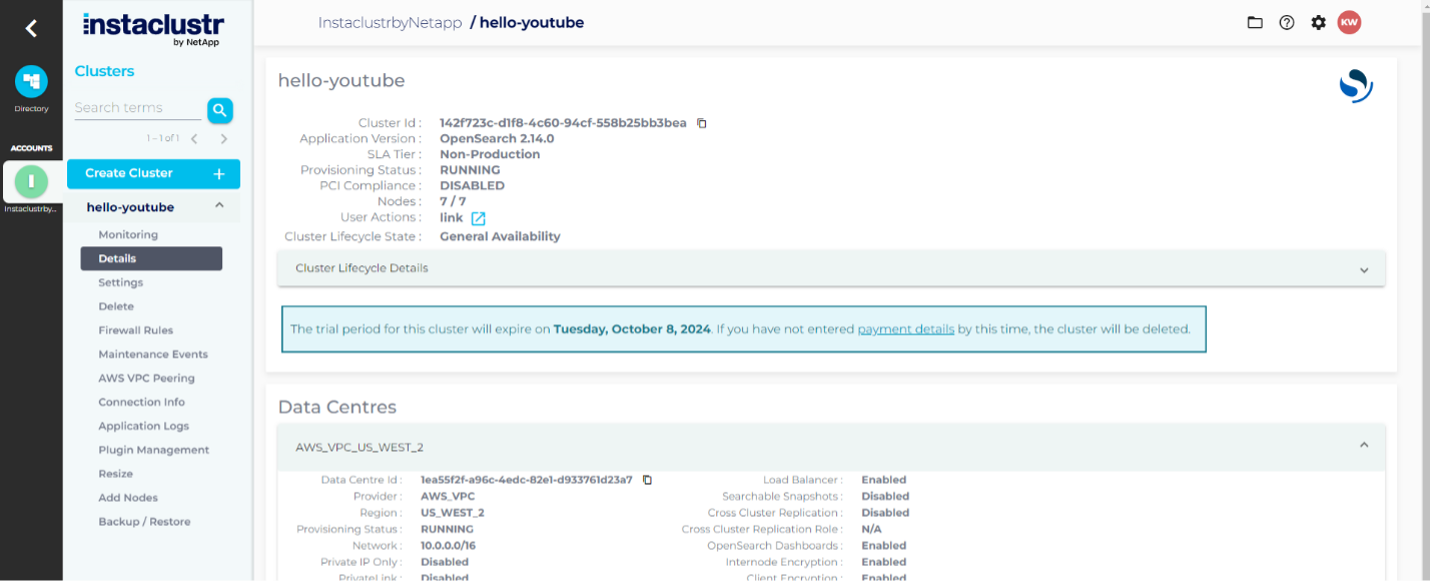
Once your cluster goes from `Provisioning Status: PROVISIONING (xx`%) to `Provisioning Status: RUNNING`, the menu on the left will have a few more links enabled than before, as seen in the above image on the left side under the name **hello-youtube**.
Once this is the case for your cluster, click the ‘Connection Info’ link in the left-side menu. The screen will load in the right-side pane where the details page was:

On this page there is a section starting with ‘Default Credentials…’ that has a username and password. Record these somewhere you can easily get to them for the code part of the tutorial. There is also a section titled ‘OpenSearch REST API’ and it contains a URL. Copy it to the same place you recorded the credentials for now.
### Building out the project
Create a folder for your project (I called mine OpenSearch-Nodejs). In that folder, in a terminal, run:
npm init -y
1
npm init -y
This will create a ``package.json file in your project that is used by npm, the node package manager, to describe your project, including its dependencies. We’ll use that to install 2 packages:
npm i @opensearch-project/opensearch dotenv
1
npm i @opensearch-project/opensearch dotenv
This command will install the Node.js library for OpenSearch and a library for storing usernames and passwords safely, respectively. Once this is done, create an `index.js` file, a `.env` file, and a `.`gitignore file if you’re planning on saving this code to Git.
Open the .gitignore file and add:
.env node\_modules
1
2
.env
node\_modules
Open the .env file and add the following, substituting in your username, password, and url you collected a few steps back.
OPENSEARCH\_HOST='' OPENSEARCH\_UNAME='icopensearch' OPENSEARCH\_PASS=''
1
2
3
OPENSEARCH\_HOST=''
OPENSEARCH\_UNAME='icopensearch'
OPENSEARCH\_PASS=''
Now that’s done, you’re ready to write some Javascript.
### Writing the Node.JS code
The next task is to create a client that will connect to your OpenSearch cluster, creating an index and adding/searching documents.
### Creating an OpenSearch client
In the documentation for the OpenSearch Node.js library, your client instantiation should look something like the following, added to your `index.js` file:
'use strict' require('dotenv').config() var host = process.env.OPENSEARCH\_HOST var protocol = 'https' var port = 9200 var auth = `${process.env.OPENSEARCH\_UNAME}:${process.env.OPENSEARCH\_PASS}` // Create a client with SSL/TLS enabled. var { Client } = require('@opensearch-project/opensearch') var fs = require('fs') var client = new Client({ node: protocol + '://' + auth + '@' + host + ':' + port, })
1
2
3
4
5
6
7
8
9
10
11
12
13
14
15
'use strict'
require('dotenv').config()
var host = process.env.OPENSEARCH\_HOST
var protocol = 'https'
var port = 9200
var auth = `${process.env.OPENSEARCH\_UNAME}:${process.env.OPENSEARCH\_PASS}`
// Create a client with SSL/TLS enabled.
var { Client } = require('@opensearch-project/opensearch')
var fs = require('fs')
var client = new Client({
node: protocol + '://' + auth + '@' + host + ':' + port,
})
This will get the values out of the `.env` file; use them to build a URL and use that URL to connect to your Instaclustr OpenSearch cluster.
Now that you’re connected, I’ll walk you through adding an index.
### Adding an index
To manage indexes, you’ll use the ``client.indicies object. In your `index.js` file, add the following code:
'use strict' require('dotenv').config() var host = process.env.OPENSEARCH\_HOST var protocol = 'https' var port = 9200 var auth = `${process.env.OPENSEARCH\_UNAME}:${process.env.OPENSEARCH\_PASS}` // Create a client with SSL/TLS enabled. var { Client } = require('@opensearch-project/opensearch') var fs = require('fs') var client = new Client({ node: protocol + '://' + auth + '@' + host + ':' + port, }) const printResponse = (title, response) => { console.log(`\\n${title}:`) console.log(response.body) } const handleErrorResponse = (error) => { if (error.meta && error.meta.body) { console.error('Error:', error.meta.body.error) } else { console.error('Error:', error.message) } } const start = async () => { try { // Check the cluster health const clusterHealthResponse = await client.cluster.health({}) printResponse('Get Cluster Health', clusterHealthResponse) // Check if the 'devrel\_team' index exists const indexExistsResponse = await client.indices.exists({ index: 'devrel\_team' }) if (indexExistsResponse.statusCode === 200) { // Delete the 'devrel\_team' index if it exists const deleteIndexResponse = await client.indices.delete({ index: 'devrel\_team' }) printResponse('Delete existing `devrel\_team` Index', deleteIndexResponse) } // Create the `devrel\_team` index const createIndexResponse = await client.indices.create({ index: 'devrel\_team', body: { mappings: { properties: { title: { type: 'text' }, name: { type: 'text' }, months\_with\_team: { type: 'integer' }, }, }, }, }) printResponse('Create `devrel\_team` Index', createIndexResponse) } catch (error) { handleErrorResponse(error) } } start()
1
2
3
4
5
6
7
8
9
10
11
12
13
14
15
16
17
18
19
20
21
22
23
24
25
26
27
28
29
30
31
32
33
34
35
36
37
38
39
40
41
42
43
44
45
46
47
48
49
50
51
52
53
54
55
56
57
58
59
60
61
62
63
64
65
'use strict'
require('dotenv').config()
var host = process.env.OPENSEARCH\_HOST
var protocol = 'https'
var port = 9200
var auth = `${process.env.OPENSEARCH\_UNAME}:${process.env.OPENSEARCH\_PASS}`
// Create a client with SSL/TLS enabled.
var { Client } = require('@opensearch-project/opensearch')
var fs = require('fs')
var client = new Client({
node: protocol + '://' + auth + '@' + host + ':' + port,
})
const printResponse = (title, response) => {
console.log(`\\n${title}:`)
console.log(response.body)
}
const handleErrorResponse = (error) => {
if (error.meta && error.meta.body) {
console.error('Error:', error.meta.body.error)
} else {
console.error('Error:', error.message)
}
}
const start = async () => {
try {
// Check the cluster health
const clusterHealthResponse = await client.cluster.health({})
printResponse('Get Cluster Health', clusterHealthResponse)
// Check if the 'devrel\_team' index exists
const indexExistsResponse = await client.indices.exists({ index: 'devrel\_team' })
if (indexExistsResponse.statusCode === 200) {
// Delete the 'devrel\_team' index if it exists
const deleteIndexResponse = await client.indices.delete({ index: 'devrel\_team' })
printResponse('Delete existing `devrel\_team` Index', deleteIndexResponse)
}
// Create the `devrel\_team` index
const createIndexResponse = await client.indices.create({
index: 'devrel\_team',
body: {
mappings: {
properties: {
title: { type: 'text' },
name: { type: 'text' },
months\_with\_team: { type: 'integer' },
},
},
},
})
printResponse('Create `devrel\_team` Index', createIndexResponse)
} catch (error) {
handleErrorResponse(error)
}
}
start()
This code will, after creating your client connection, check for an index `devrel_team`, and delete it if it exists. This will prevent issues with re-running this script multiple times. Then, it will create the `devrel_team` index using `client.indicies.create()`.
You have an index, now it needs documents.
### Adding documents to the index
To add documents to the new ``devrel\_team index, modify your `index.js` file to look like this:
'use strict' require('dotenv').config() var host = process.env.OPENSEARCH\_HOST var protocol = 'https' var port = 9200 var auth = `${process.env.OPENSEARCH\_UNAME}:${process.env.OPENSEARCH\_PASS}` // Create a client with SSL/TLS enabled. var { Client } = require('@opensearch-project/opensearch') var fs = require('fs') var client = new Client({ node: protocol + '://' + auth + '@' + host + ':' + port, }) const printResponse = (title, response) => { console.log(`\\n${title}:`) console.log(response.body) } const handleErrorResponse = (error) => { if (error.meta && error.meta.body) { console.error('Error:', error.meta.body.error) } else { console.error('Error:', error.message) } } const start = async () => { try { // Check the cluster health const clusterHealthResponse = await client.cluster.health({}) printResponse('Get Cluster Health', clusterHealthResponse) // Check if the 'devrel\_team' index exists const indexExistsResponse = await client.indices.exists({ index: 'devrel\_team' }) if (indexExistsResponse.statusCode === 200) { // Delete the 'devrel\_team' index if it exists const deleteIndexResponse = await client.indices.delete({ index: 'devrel\_team' }) printResponse('Delete existing `devrel\_team` Index', deleteIndexResponse) } // Create the `devrel\_team` index const createIndexResponse = await client.indices.create({ index: 'devrel\_team', body: { mappings: { properties: { title: { type: 'text' }, name: { type: 'text' }, months\_with\_team: { type: 'integer' }, }, }, }, }) printResponse('Create `devrel\_team` Index', createIndexResponse) const indexDevRelTeam = async () => { const titles = \[ 'dev advocate', 'dev advocate', 'dev advocate manager', 'senior dev advocate', 'dev advocate' \] const names = \[ 'Sam', 'Mark', 'Jane', 'Alex', 'John' \] for (let i = 0; i < 5; i++) { let response = await client.index({ index: 'devrel\_team', id: i, body: { title: `${titles\[i\]}` name: `${names\[i\]}`, months\_with\_team: Math.floor(Math.random() \* 24) }, }) printResponse(`Added index ID ${i}:`, response) } } await indexDevRelTeam() } catch (error) { handleErrorResponse(error) } } start() start()
1
2
3
4
5
6
7
8
9
10
11
12
13
14
15
16
17
18
19
20
21
22
23
24
25
26
27
28
29
30
31
32
33
34
35
36
37
38
39
40
41
42
43
44
45
46
47
48
49
50
51
52
53
54
55
56
57
58
59
60
61
62
63
64
65
66
67
68
69
70
71
72
73
74
75
76
77
78
79
80
81
82
83
84
85
86
87
88
89
90
91
92
93
94
95
96
97
98
99
'use strict'
require('dotenv').config()
var host = process.env.OPENSEARCH\_HOST
var protocol = 'https'
var port = 9200
var auth = `${process.env.OPENSEARCH\_UNAME}:${process.env.OPENSEARCH\_PASS}`
// Create a client with SSL/TLS enabled.
var { Client } = require('@opensearch-project/opensearch')
var fs = require('fs')
var client = new Client({
node: protocol + '://' + auth + '@' + host + ':' + port,
})
const printResponse = (title, response) => {
console.log(`\\n${title}:`)
console.log(response.body)
}
const handleErrorResponse = (error) => {
if (error.meta && error.meta.body) {
console.error('Error:', error.meta.body.error)
} else {
console.error('Error:', error.message)
}
}
const start = async () => {
try {
// Check the cluster health
const clusterHealthResponse = await client.cluster.health({})
printResponse('Get Cluster Health', clusterHealthResponse)
// Check if the 'devrel\_team' index exists
const indexExistsResponse = await client.indices.exists({ index: 'devrel\_team' })
if (indexExistsResponse.statusCode === 200) {
// Delete the 'devrel\_team' index if it exists
const deleteIndexResponse = await client.indices.delete({ index: 'devrel\_team' })
printResponse('Delete existing `devrel\_team` Index', deleteIndexResponse)
}
// Create the `devrel\_team` index
const createIndexResponse = await client.indices.create({
index: 'devrel\_team',
body: {
mappings: {
properties: {
title: { type: 'text' },
name: { type: 'text' },
months\_with\_team: { type: 'integer' },
},
},
},
})
printResponse('Create `devrel\_team` Index', createIndexResponse)
const indexDevRelTeam = async () => {
const titles = \[
'dev advocate',
'dev advocate',
'dev advocate manager',
'senior dev advocate',
'dev advocate'
\]
const names = \[
'Sam',
'Mark',
'Jane',
'Alex',
'John'
\]
for (let i = 0; i < 5; i++) {
let response = await client.index({
index: 'devrel\_team',
id: i,
body: {
title: `${titles\[i\]}`
name: `${names\[i\]}`,
months\_with\_team: Math.floor(Math.random() \* 24)
},
})
printResponse(`Added index ID ${i}:`, response)
}
}
await indexDevRelTeam()
} catch (error) {
handleErrorResponse(error)
}
}
start()
start()
This will add 5 team members to the index ``devrel\_team. Next, you’ll search your index.
### Searching the index
I’ll have you run 2 searches; one with no query that will return all documents, and one with a query to retrieve just one. In your `index.js` file, add the search functions below:
'use strict' require('dotenv').config() var host = process.env.OPENSEARCH\_HOST var protocol = 'https' var port = 9200 var auth = `${process.env.OPENSEARCH\_UNAME}:${process.env.OPENSEARCH\_PASS}` // Create a client with SSL/TLS enabled. var { Client } = require('@opensearch-project/opensearch') var fs = require('fs') var client = new Client({ node: protocol + '://' + auth + '@' + host + ':' + port, }) const printResponse = (title, response) => { console.log(`\\n${title}:`) console.log(response.body) } const handleErrorResponse = (error) => { if (error.meta && error.meta.body) { console.error('Error:', error.meta.body.error) } else { console.error('Error:', error.message) } } const start = async () => { try { // Check the cluster health const clusterHealthResponse = await client.cluster.health({}) printResponse('Get Cluster Health', clusterHealthResponse) // Check if the 'devrel\_team' index exists const indexExistsResponse = await client.indices.exists({ index: 'devrel\_team' }) if (indexExistsResponse.statusCode === 200) { // Delete the 'devrel\_team' index if it exists const deleteIndexResponse = await client.indices.delete({ index: 'devrel\_team' }) printResponse('Delete existing `devrel\_team` Index', deleteIndexResponse) } // Create the `devrel\_team` index const createIndexResponse = await client.indices.create({ index: 'devrel\_team', body: { mappings: { properties: { title: { type: 'text' }, name: { type: 'text' }, months\_with\_team: { type: 'integer' }, }, }, }, }) printResponse('Create `devrel\_team` Index', createIndexResponse) const indexDevRelTeam = async () => { const titles = \[ 'dev advocate', 'dev advocate', 'dev advocate manager', 'senior dev advocate', 'dev advocate' \] const names = \[ 'Sam', 'Mark', 'Jane', 'Alex', 'John' \] await (async () => { for (let i = 0; i < 5; i++) { let response = await client.index({ index: 'devrel\_team', id: i, body: { title: `${titles\[i\]}`, name: `${names\[i\]}`, months\_with\_team: Math.floor(Math.random() \* 24) }, }) printResponse(`Added index ID ${i}:`, response) } })() } await indexDevRelTeam() const searchDevrelTeam = async (query) => { const response = await client.search({ index: 'devrel\_team', body: query, }); console.log('\\nSearch Results:'); response.body.hits.hits.forEach((element) => { console.log(element.\_source); }); } setTimeout(async() => { await searchDevrelTeam({}) await searchDevrelTeam({ query: { term: { title: 'manager' } } }) // Delete the 'devrel\_team' index const deleteIndexResponse = await client.indices.delete({ index: 'devrel\_team' }) printResponse('Delete existing `devrel\_team` Index', deleteIndexResponse) }, 2000) } catch (error) { handleErrorResponse(error) } } start() Q
1
2
3
4
5
6
7
8
9
10
11
12
13
14
15
16
17
18
19
20
21
22
23
24
25
26
27
28
29
30
31
32
33
34
35
36
37
38
39
40
41
42
43
44
45
46
47
48
49
50
51
52
53
54
55
56
57
58
59
60
61
62
63
64
65
66
67
68
69
70
71
72
73
74
75
76
77
78
79
80
81
82
83
84
85
86
87
88
89
90
91
92
93
94
95
96
97
98
99
100
101
102
103
104
105
106
107
108
109
110
111
112
113
114
115
116
117
118
119
120
121
122
123
124
125
126
127
'use strict'
require('dotenv').config()
var host = process.env.OPENSEARCH\_HOST
var protocol = 'https'
var port = 9200
var auth = `${process.env.OPENSEARCH\_UNAME}:${process.env.OPENSEARCH\_PASS}`
// Create a client with SSL/TLS enabled.
var { Client } = require('@opensearch-project/opensearch')
var fs = require('fs')
var client = new Client({
node: protocol + '://' + auth + '@' + host + ':' + port,
})
const printResponse = (title, response) => {
console.log(`\\n${title}:`)
console.log(response.body)
}
const handleErrorResponse = (error) => {
if (error.meta && error.meta.body) {
console.error('Error:', error.meta.body.error)
} else {
console.error('Error:', error.message)
}
}
const start = async () => {
try {
// Check the cluster health
const clusterHealthResponse = await client.cluster.health({})
printResponse('Get Cluster Health', clusterHealthResponse)
// Check if the 'devrel\_team' index exists
const indexExistsResponse = await client.indices.exists({ index: 'devrel\_team' })
if (indexExistsResponse.statusCode === 200) {
// Delete the 'devrel\_team' index if it exists
const deleteIndexResponse = await client.indices.delete({ index: 'devrel\_team' })
printResponse('Delete existing `devrel\_team` Index', deleteIndexResponse)
}
// Create the `devrel\_team` index
const createIndexResponse = await client.indices.create({
index: 'devrel\_team',
body: {
mappings: {
properties: {
title: { type: 'text' },
name: { type: 'text' },
months\_with\_team: { type: 'integer' },
},
},
},
})
printResponse('Create `devrel\_team` Index', createIndexResponse)
const indexDevRelTeam = async () => {
const titles = \[
'dev advocate',
'dev advocate',
'dev advocate manager',
'senior dev advocate',
'dev advocate'
\]
const names = \[
'Sam',
'Mark',
'Jane',
'Alex',
'John'
\]
await (async () => {
for (let i = 0; i < 5; i++) {
let response = await client.index({
index: 'devrel\_team',
id: i,
body: {
title: `${titles\[i\]}`,
name: `${names\[i\]}`,
months\_with\_team: Math.floor(Math.random() \* 24)
},
})
printResponse(`Added index ID ${i}:`, response)
}
})()
}
await indexDevRelTeam()
const searchDevrelTeam = async (query) => {
const response = await client.search({
index: 'devrel\_team',
body: query,
});
console.log('\\nSearch Results:');
response.body.hits.hits.forEach((element) => {
console.log(element.\_source);
});
}
setTimeout(async() => {
await searchDevrelTeam({})
await searchDevrelTeam({
query: {
term: {
title: 'manager'
}
}
})
// Delete the 'devrel\_team' index
const deleteIndexResponse = await client.indices.delete({ index: 'devrel\_team' })
printResponse('Delete existing `devrel\_team` Index', deleteIndexResponse)
}, 2000)
} catch (error) {
handleErrorResponse(error)
}
}
start()
Q
And there you have it, a working OpenSearch Node.js application.
Conclusion
-----------
In this post, I walked you through setting up an OpenSearch client in Node.js, creating and managing indices, and creating and searching documents. In the next post, I’ll add a bit more data and walk you through more intermediate search queries.
Ready to experience the awesome power of OpenSearch? Spin up your first cluster for free on the [Instaclustr Managed Platform](https://console2.instaclustr.com/signup) and get started today.
### About the author
**[Kassian Wren](https://www.instaclustr.com/blog/author/kassian-wren/)** | Open Source Technology Advocate
Kassian specializes in open source technologies like OpenSearch and Cassandra. With over a decade of experience, they excel in creating impactful educational content across various formats and actively engage with the developer community through events, online platforms, and live presentations. Passionate about fostering knowledge-sharing, Kassian combines technical expertise with community-focused outreach to support and inspire developers worldwide.
[ Add Instaclustr as a preferred source on Google ](https://google.com/preferences/source?q=instaclustr.com)
![mail icon]()#### Get the latest articles for open sourceIn your inbox
### Related content
[ Zero Downtime Migration to Instaclustr
Yes, we can migrate existing Cassandra clusters to Instaclustr without any downtime. Here's what to expect from the process...
](https://www.instaclustr.com/blog/zero-downtime-migration-to-instaclustr/)
[ Workflow Comparison: Uber Cadence vs Netflix Conductor
When choosing what’s right for your company’s opensource workflow needs it is important to know the difference and similarities ...
](https://www.instaclustr.com/blog/workflow-comparison-uber-cadence-vs-netflix-conductor/)
[ Will Your Cassandra Database Project Succeed?: The New Stack
Open source Apache Cassandra® continues to stand out as an enterprise-proven solution for organizations seeking high availability...
](https://www.instaclustr.com/blog/will-your-cassandra-database-project-succeed-the-new-stack/)
×Sign upto ourNewsletter
-----------------------