# Will Your Cassandra Database Project Succeed?: The New Stack
[Blog](/blog/)>[Technology](/blog/category/technical/)>Using Cassandra Stress to model a time series workload
Using Cassandra Stress to model a time series workload
======================================================
May 09, 2018 | By [ Instaclustr ](https://www.instaclustr.com/blog/author/instaposting/)
[ ](https://x.com/intent/tweet?text=Using%20Cassandra%20Stress%20to%20model%20a%20time%20series%20workload&url=https://www.instaclustr.com/blog/using-cassandra-stress-to-model-a-time-series-workload/) [ ](https://www.linkedin.com/shareArticle?mini=true&url=https://www.instaclustr.com/blog/using-cassandra-stress-to-model-a-time-series-workload/&title=&summary=Using%20Cassandra%20Stress%20to%20model%20a%20time%20series%20workload&source=)
**Motivation**
When examining whether [Cassandra](https://www.instaclustr.com/platform/managed-apache-cassandra/) is a good fit for your needs, it is good practice to stress test Cassandra using a workload that looks similar to the expected workload in Production.
In the past we have examined the richness of features using YAML profiles in Cassandra’s stress tool – if you haven’t seen the previous post or are unfamiliar with YAML profiles in Cassandra stress, I’d recommend [checking it out now](https://www.instaclustr.com/blog/deep-diving-cassandra-stress-part-3-using-yaml-profiles/).
YAML profiles are all fine and dandy when it comes to mixed or general workloads using SizeTieredCompactionStrategy (STCS) or LeveledCompactionStrategy (LCS), but sometimes we may want to model a time series workload using TimeWindowCompactionStrategy (TWCS). How would we do that with the current options available to us in stress? Ideally, we would be able to do such a thing without having to schedule cassandra-stress instances every X minutes.
**Native functions**
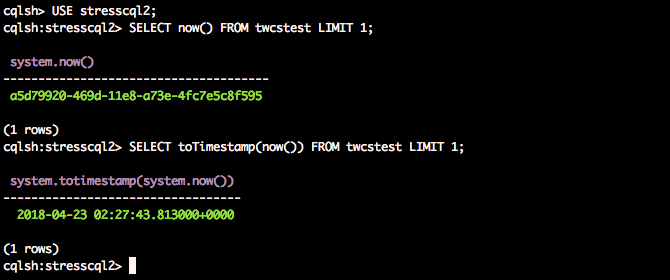
As it turns out, Cassandra has a native function **now()** that returns the current time as a **timeuuid**, which is a unique representation of time. Cassandra also ships with the function **toTimestamp()** that accepts a **timeuuid**. Putting the two together, we are able to obtain the following result:
[](https://www.instaclustr.com/wp-content/uploads/2021/10/Screen-Shot-2018-04-23-at-12.27.59-pm.png)
So we can use that to our advantage in a YAML profile:
table\_definition: | CREATE TABLE twcstest ( id text, time timestamp, metric int, value blob, PRIMARY KEY((id), time) ) WITH CLUSTERING ORDER BY (time DESC) AND compaction = { 'class':'TimeWindowCompactionStrategy', 'compaction\_window\_unit':'MINUTES', 'compaction\_window\_size':'20' } AND comment='A table to see what happens with TWCS & Stress' columnspec: - name: id size: fixed(64) population: uniform(1..1500M) - name: time cluster: fixed(288) - name: value size: fixed(50) queries: putindata: cql: insert into twcstest (id, time, metric, value) VALUES (?, toTimestamp(now()), ?, ?)
1
2
3
4
5
6
7
8
9
10
11
12
13
14
15
16
17
18
19
20
21
22
23
24
25
26
27
28
29
30
31
32
33
34
35
36
37
38
39
40
41
42
43
table\_definition: |
CREATE TABLE twcstest (
id text,
time timestamp,
metric int,
value blob,
PRIMARY KEY((id), time)
) WITH CLUSTERING ORDER BY (time DESC)
AND compaction = { 'class':'TimeWindowCompactionStrategy', 'compaction\_window\_unit':'MINUTES', 'compaction\_window\_size':'20' }
AND comment='A table to see what happens with TWCS & Stress'
columnspec:
- name: id
size: fixed(64)
population: uniform(1..1500M)
- name: time
cluster: fixed(288)
- name: value
size: fixed(50)
queries:
putindata:
cql: insert into twcstest (id, time, metric, value) VALUES (?, toTimestamp(now()), ?, ?)
Based on that YAML above, we can now insert time series data as part of our stress. Additionally, please be aware that the **compaction\_window\_unit** property has been deliberately kept much smaller than is typical of a normal production compaction strategy!
cassandra-stress user profile=stressspectwcs.yaml n=50000000 cl=QUORUM ops\\(putindata=1\\) -node file=nodelist.txt -rate threads=500 -log file=insert.log -pop seq=1..1500M
1
cassandra-stress user profile=stressspectwcs.yaml n=50000000 cl=QUORUM ops\\(putindata=1\\) -node file=nodelist.txt -rate threads=500 -log file=insert.log -pop seq=1..1500M
The only snag to be aware of is that stress will insert timestamps rapidly, so you may want to tweak the values a little to generate suitably sized partitions with respect to your production workload.
**That’s great, now how do I select data?**
Well, intuitively we would just make use of the same helpful native functions that got us out from the tight spot before. So we may try this:
queries: putindata: cql: insert into twcstest (id, time, metric, value) VALUES (?, toTimestamp(now()), ?, ?) simple1: cql: select \* from twcstest where id = ? and time <= toTimestamp(now()) and time >= hmmm….
1
2
3
4
5
6
7
8
9
queries:
putindata:
cql: insert into twcstest (id, time, metric, value) VALUES (?, toTimestamp(now()), ?, ?)
simple1:
cql: select \* from twcstest where id = ? and time <= toTimestamp(now()) and time >= hmmm….
We appear to be a little stuck because selects may not be as straightforward as we had expected.
1. We could try qualifying with just **<=**, but then that would be a whole lot of data we select (You aren’t going to do this in Production, are you?), unless **id** is bucketed…but it isn’t in our situation.
2. We could try qualifying with just **>=**, but then nothing will be returned (You aren’t testing a case like this either, surely).
Unfortunately for us, it doesn’t look like Cassandra has anything available to help us out here natively. But it certainly has something we can leverage.
**UDFs for the win**
User defined functions (UDFs) have been added to Cassandra since [2.2](https://issues.apache.org/jira/browse/CASSANDRA-7395). If you aren’t familiar with them, there are examples of them available in a [previous blog post](https://www.instaclustr.com/blog/user-defined-functions-and-aggregates/) and the [official cassandra documentation](https://cassandra.apache.org/doc/latest/cql/functions.html). Since Cassandra doesn’t have any other native functions to help us, we can just write our own UDF, as it should be.
Typically we may expect to want to select a slice up to a certain number of minutes ago. So we want to write a UDF to allow us to do that.
CREATE OR REPLACE FUNCTION stresscql2.minutesAgo ( arg int ) RETURNS NULL ON NULL INPUT RETURNS bigint LANGUAGE java AS $ return (System.currentTimeMillis() - arg \* 60 \* 1000); $;
1
2
3
4
5
6
7
8
9
10
11
CREATE OR REPLACE FUNCTION stresscql2.minutesAgo ( arg int )
RETURNS NULL ON NULL INPUT
RETURNS bigint
LANGUAGE java
AS $
return (System.currentTimeMillis() - arg \* 60 \* 1000); $;
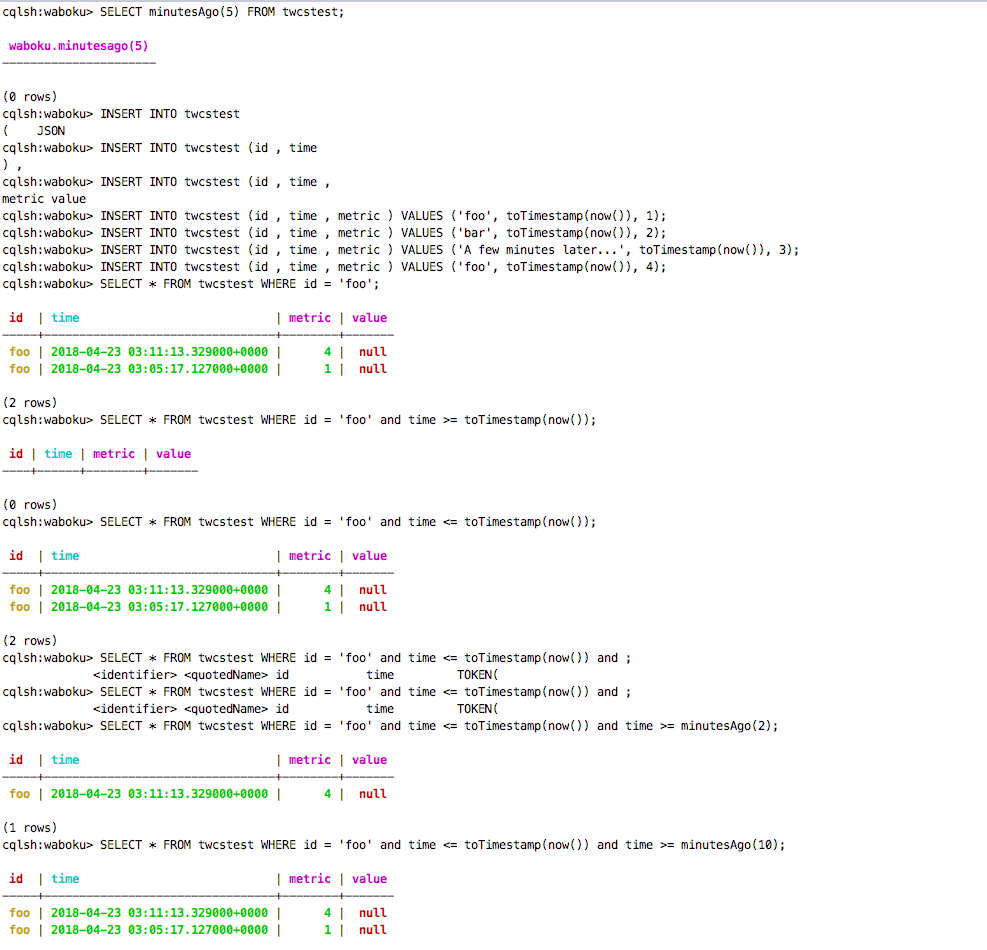
This UDF is quite self explanatory so I won’t go into too much detail. Needless to say, it returns a **bigint** of **arg** minutes ago.
Here is a test to illustrate just to be safe:
[](https://www.instaclustr.com/wp-content/uploads/2021/10/Screen-Shot-2018-04-23-at-1.12.56-pm.png)
Here is our new and improved YAML profile:
simple1: cql: select \* from twcstest where id = ? and time <= toTimestamp(now()) and time >= minutesAgo(5)
1
2
3
simple1:
cql: select \* from twcstest where id = ? and time <= toTimestamp(now()) and time >= minutesAgo(5)
Now, when we execute cassandra-stress with **simple1**, we can expect just data within a certain time frame instead of selecting the whole partition. We can also keep varying the query to select older data if we like, for example, **time >= minutesAgo(600) and time <= minutesAgo(590)** for data up to 10 hours ago.
**A variation with bucketing**
We can also create UDFs that model bucketing behaviour. For example, suppose now we have a schema that has data bucketed, like this:
CREATE TABLE twcstestbucket ( id text, bucket timestamp, time timestamp, metric int, value blob, PRIMARY KEY((id, bucket), time) ) WITH CLUSTERING ORDER BY (time DESC) AND compaction = { 'class':'TimeWindowCompactionStrategy', 'compaction\_window\_unit':'MINUTES', 'compaction\_window\_size':'20' } AND comment='A table to see what happens with TWCS & Stress'
1
2
3
4
5
6
7
8
9
10
11
12
13
14
15
16
17
18
19
CREATE TABLE twcstestbucket (
id text,
bucket timestamp,
time timestamp,
metric int,
value blob,
PRIMARY KEY((id, bucket), time)
) WITH CLUSTERING ORDER BY (time DESC)
AND compaction = { 'class':'TimeWindowCompactionStrategy', 'compaction\_window\_unit':'MINUTES', 'compaction\_window\_size':'20' }
AND comment='A table to see what happens with TWCS & Stress'
And we want to be able to insert data in 5 minute buckets. We can create UDFs like so:
CREATE OR REPLACE FUNCTION stresscql2.nowInMilliSec() RETURNS NULL ON NULL INPUT RETURNS bigint LANGUAGE java AS $ return (System.currentTimeMillis()); $; CREATE OR REPLACE FUNCTION stresscql2.bucket( arg bigint ) RETURNS NULL ON NULL INPUT RETURNS bigint LANGUAGE java AS $ java.time.ZonedDateTime time = java.time.ZonedDateTime.ofInstant(java.time.Instant.ofEpochMilli(arg), java.time.ZoneOffset.UTC); java.time.ZonedDateTime lastFiveMinutes = time.truncatedTo(java.time.temporal.ChronoUnit.HOURS) .plusMinutes(5 \* (time.getMinute()/5)); return (lastFiveMinutes.toEpochSecond() \* 1000); $; CREATE OR REPLACE FUNCTION stresscql2.randomBucket(lowerbound bigint, upperbound bigint) RETURNS NULL ON NULL INPUT RETURNS bigint LANGUAGE java AS $ java.time.ZonedDateTime lower = java.time.ZonedDateTime.ofInstant(java.time.Instant.ofEpochMilli(lowerbound), java.time.ZoneOffset.UTC); java.util.Random random = new java.util.Random(); int numberOfBuckets = (int) (upperbound - lowerbound) / (5 \* 60 \* 1000); int targetBucket = random.nextInt(numberOfBuckets); return (lower.truncatedTo(java.time.temporal.ChronoUnit.HOURS).plusMinutes(5 \* (lower.getMinute()/5)).plusMinutes(5 \* targetBucket).toEpochSecond() \* 1000); $;
1
2
3
4
5
6
7
8
9
10
11
12
13
14
15
16
17
18
19
20
21
22
23
24
25
26
27
28
29
30
31
32
33
34
35
36
37
38
39
40
41
42
43
44
45
46
47
48
49
50
51
52
53
CREATE OR REPLACE FUNCTION stresscql2.nowInMilliSec()
RETURNS NULL ON NULL INPUT
RETURNS bigint
LANGUAGE java
AS $
return (System.currentTimeMillis()); $;
CREATE OR REPLACE FUNCTION stresscql2.bucket( arg bigint )
RETURNS NULL ON NULL INPUT
RETURNS bigint
LANGUAGE java
AS $
java.time.ZonedDateTime time = java.time.ZonedDateTime.ofInstant(java.time.Instant.ofEpochMilli(arg), java.time.ZoneOffset.UTC);
java.time.ZonedDateTime lastFiveMinutes = time.truncatedTo(java.time.temporal.ChronoUnit.HOURS)
.plusMinutes(5 \* (time.getMinute()/5));
return (lastFiveMinutes.toEpochSecond() \* 1000);
$;
CREATE OR REPLACE FUNCTION stresscql2.randomBucket(lowerbound bigint, upperbound bigint)
RETURNS NULL ON NULL INPUT
RETURNS bigint
LANGUAGE java
AS $
java.time.ZonedDateTime lower = java.time.ZonedDateTime.ofInstant(java.time.Instant.ofEpochMilli(lowerbound), java.time.ZoneOffset.UTC);
java.util.Random random = new java.util.Random();
int numberOfBuckets = (int) (upperbound - lowerbound) / (5 \* 60 \* 1000);
int targetBucket = random.nextInt(numberOfBuckets);
return (lower.truncatedTo(java.time.temporal.ChronoUnit.HOURS).plusMinutes(5 \* (lower.getMinute()/5)).plusMinutes(5 \* targetBucket).toEpochSecond() \* 1000);
$;
The UDF **bucket** is quite self explanatory as well – it just returns the nearest 5 minute bucket smaller than **arg**. This assumes UTC time and 5 minute buckets, but the code can easily be tailored to be more general.
However, our UDF doesn’t understand **timeuuid**. Which is why we need another helper function, which is the function **nowInMilliSec**().
The final UDF generates a random bucket based on a lower and upper bound time. The expected input bounds should be in epoch milliseconds. This will help in selecting old/random data bucketed to within 5 minutes in a range.
And now here is our new and modified YAML profile to accommodate our desires of having stress follow a bucketed workload:
putindata: cql: insert into twcstestbucket (id, bucket, time, metric, value) VALUES (?, bucket(nowInMilliSec()), toTimestamp(now()), ?, ?) simple1: cql: select \* from twcstestbucket where id = ? and bucket = bucket(nowInMilliSec()) and time <= toTimestamp(now()) and time >= minutesAgo(5) fields: samerow selectold: cql: select \* from twcstestbucket where id = ? and bucket = randomBucket(1524115200000, 1524129600000)
1
2
3
4
5
6
7
8
9
10
11
12
13
putindata:
cql: insert into twcstestbucket (id, bucket, time, metric, value) VALUES (?, bucket(nowInMilliSec()), toTimestamp(now()), ?, ?)
simple1:
cql: select \* from twcstestbucket where id = ? and bucket = bucket(nowInMilliSec()) and time <= toTimestamp(now()) and time >= minutesAgo(5)
fields: samerow
selectold:
cql: select \* from twcstestbucket where id = ? and bucket = randomBucket(1524115200000, 1524129600000)
1524117600000 happens to be Thursday, April 19, 2018 5:20:00 AM in GMT time while 1524129600000 happens to be Thursday, April 19, 2018 9:20:00 AM. It can be tailored to suit needs. It’s kind of ugly, but it will do the job.
And there we go: Tap into UDFs to be able to model a TWCS workload with Cassandra stress.
cassandra-stress user profile=stressspectwcs.yaml n=50000000 cl=QUORUM ops\\(putindata=5,simple1=5,selectold=1\\) -node file=nodelist.txt -rate threads=500 -log file=mixed.log -pop seq=1..1500M
1
cassandra-stress user profile=stressspectwcs.yaml n=50000000 cl=QUORUM ops\\(putindata=5,simple1=5,selectold=1\\) -node file=nodelist.txt -rate threads=500 -log file=mixed.log -pop seq=1..1500M
There’s always an option of writing your own client and using that to perform stress instead, with the obvious benefit that there’s no need to write UDFs and you have control over everything. The downside is that you would have to write code that includes rate limiting and reporting of metrics whereas cassandra stress is the stressing tool that comes with Cassandra out of the box and has very rich statistics, down to latency for each query.
[ Add Instaclustr as a preferred source on Google ](https://google.com/preferences/source?q=instaclustr.com)
![mail icon]()#### Get the latest articles for open sourceIn your inbox
### Related content
[ Zero Downtime Migration to Instaclustr
Yes, we can migrate existing Cassandra clusters to Instaclustr without any downtime. Here's what to expect from the process...
](https://www.instaclustr.com/blog/zero-downtime-migration-to-instaclustr/)
[ Workflow Comparison: Uber Cadence vs Netflix Conductor
When choosing what’s right for your company’s opensource workflow needs it is important to know the difference and similarities ...
](https://www.instaclustr.com/blog/workflow-comparison-uber-cadence-vs-netflix-conductor/)
[ Will Your Cassandra Database Project Succeed?: The New Stack
Open source Apache Cassandra® continues to stand out as an enterprise-proven solution for organizations seeking high availability...
](https://www.instaclustr.com/blog/will-your-cassandra-database-project-succeed-the-new-stack/)
×Sign upto ourNewsletter
-----------------------