# How to perform a snapshot migration from Amazon OpenSearch Service
###### [Documentation](https://www.instaclustr.com/support/documentation/)
###### [Documentation](https://www.instaclustr.com/support/documentation/)
- [ Announcements+ ](#section-announcements)
- [ General ](#section-announcements-general)
- [ Announcement: RIYOA is now BYOC, and RICMI is now On-Premises ](https://www.instaclustr.com/support/documentation/announcements/general/announcement-riyoa-is-now-byoc-and-ricmi-is-now-on-premises/)
- [ Self-Service Tag Management feature is now available on the NetApp Instaclustr Managed Platform ](https://www.instaclustr.com/support/documentation/announcements/general/self-service-tag-management-feature-is-now-available-on-the-netapp-instaclustr-managed-platform/)
- [ NetApp releases Public Preview of Zero Inbound Access on the NetApp Instaclustr Managed Platform ](https://www.instaclustr.com/support/documentation/announcements/general/instaclustr-releases-zero-inbound-access-public-preview/)
- [ Instaclustr enables Default Encryption for new AWS EBS Volumes ](https://www.instaclustr.com/support/documentation/announcements/general/instaclustr-enables-default-encryption-for-new-aws-ebs-volumes/)
- [ Instaclustr API Rate Limits ](https://www.instaclustr.com/support/documentation/announcements/general/instaclustr-api-rate-limits/)
- [ Instaclustr disables GCP Soft-Delete on Cloud Storage Buckets ](https://www.instaclustr.com/support/documentation/announcements/general/instaclustr-disables-gcp-soft-delete-on-cloud-storage-buckets/)
- [ Apache Cassandra ](#section-announcements-apache-cassandra)
- [ Announcement: Addressing Assertion Errors and Quorum Failures in Cassandra 5.x Versions ](https://www.instaclustr.com/support/documentation/announcements/apache-cassandra/announcement-addressing-assertion-errors-and-quorum-failures-in-cassandra-5-x-versions/)
- [ Addressing Mutation Thread Stalls in Cassandra 4.1.8 ](https://www.instaclustr.com/support/documentation/announcements/apache-cassandra/addressing-mutation-thread-stalls-in-cassandra-4-1-8/)
- [ Important Announcement Regarding Cassandra 3.x End-of-Life Support ](https://www.instaclustr.com/support/documentation/announcements/apache-cassandra/cassandra-3-eol/)
- [ Updates to Cipher Suites for Cassandra version 4 and above Clusters ](https://www.instaclustr.com/support/documentation/announcements/apache-cassandra/updates-to-cipher-suites-for-cassandra-version-4-and-above-clusters/)
- [ Important Update: Apache Spark™ Add-On Will Reach End of Life on Instaclustr Platform on 10 Aug 2025 ](https://www.instaclustr.com/support/documentation/announcements/apache-cassandra/important-update-apache-spark-add-on-will-reach-end-of-life-on-instaclustr-platform-on-10-aug-2025/)
- [ Past Announcements ](https://www.instaclustr.com/support/documentation/announcements/apache-cassandra/past-announcements/)
- [ Apache Kafka and Kafka Connect ](#section-announcements-apache-kafka-and-kafka-connect)
- [ Instaclustr for Apache Kafka® and Kafka® Connect 4.3.1 are now generally available ](https://www.instaclustr.com/support/documentation/announcements/apache-kafka-and-kafka-connect/instaclustr-for-apache-kafka-and-kafka-connect-4-3-1-are-now-generally-available/)
- [ Instaclustr for Apache Kafka® and Kafka® Connect 4.2.1 are now generally available ](https://www.instaclustr.com/support/documentation/announcements/apache-kafka-and-kafka-connect/instaclustr-for-apache-kafka-and-kafka-connect-4-2-1-are-now-generally-available/)
- [ Instaclustr for Apache Kafka® and Apache Kafka® Connect 4.1.2 Are Generally Available ](https://www.instaclustr.com/support/documentation/announcements/apache-kafka-and-kafka-connect/instaclustr-for-apache-kafka-and-apache-kafka-connect-4-1-2-are-generally-available/)
- [ Instaclustr for Apache Kafka® and Apache Kafka® Connect 3.9.2 are Generally Available ](https://www.instaclustr.com/support/documentation/announcements/apache-kafka-and-kafka-connect/instaclustr-for-apache-kafka-and-apache-kafka-connect-3-9-2-are-generally-available/)
- [ Kafka “Diskless” – Proposals, Status & Insights ](https://www.instaclustr.com/support/documentation/announcements/apache-kafka-and-kafka-connect/kafka-diskless-proposals-status-insights/)
- [ Past Announcements ](#section-announcements-apache-kafka-and-kafka-connect-past-announcements)
- [ Instaclustr for Apache Kafka® and Kafka ® Connect 4.1.1 are generally available ](https://www.instaclustr.com/support/documentation/announcements/apache-kafka-and-kafka-connect/past-announcements/instaclustr-for-apache-kafka-and-kafka-connect-4-1-1-are-generally-available/)
- [ NetApp Instaclustr Security Advisory – Multiple Kafka CVEs (June 2025) ](https://www.instaclustr.com/support/documentation/announcements/apache-kafka-and-kafka-connect/past-announcements/netapp-instaclustr-security-advisory-multiple-kafka-cves-june-2025/)
- [ Instaclustr for Apache Kafka® and Kafka ® Connect 3.9.1 are generally available ](https://www.instaclustr.com/support/documentation/announcements/apache-kafka-and-kafka-connect/past-announcements/instaclustr-for-apache-kafka-and-kafka-connect-3-9-1-are-generally-available/)
- [ Instaclustr for Apache Kafka® and Apache Kafka® Connect 3.9.0 Are Generally Available ](https://www.instaclustr.com/support/documentation/announcements/apache-kafka-and-kafka-connect/past-announcements/instaclustr-for-apache-kafka-and-kafka-connect-3-9-0-are-generally-available/)
- [ Instaclustr for Apache Kafka® 3.8.1 and Kafka Tiered Storage Are Now Generally Available ](https://www.instaclustr.com/support/documentation/announcements/apache-kafka-and-kafka-connect/past-announcements/instaclustr-for-apache-kafka-3-8-1-and-kafka-tiered-storage-are-now-generally-available/)
- [ Instaclustr for Apache Kafka® and Apache Kafka® Connect 3.7.1 Are Now Generally Available ](https://www.instaclustr.com/support/documentation/announcements/apache-kafka-and-kafka-connect/past-announcements/instaclustr-for-apache-kafka-and-apache-kafka-connect-3-7-1-are-now-generally-available/)
- [ Cadence ](#section-announcements-cadence)
- [ Instaclustr NetApp Announces AWS Graviton Node Types for Managed Cadence® Workflow ](https://www.instaclustr.com/support/documentation/announcements/cadence/instaclustr-netapp-announces-aws-graviton-node-types-for-managed-cadence-workflow/)
- [ NetApp Announces General Availability of Cadence Web 4.0 and Cadence version 1.3.2 on the NetApp Instaclustr Managed Platform ](https://www.instaclustr.com/support/documentation/announcements/cadence/netapp-announces-general-availability-of-cadence-web-4-0-and-cadence-version-1-3-2-on-the-netapp-instaclustr-managed-platform/)
- [ Past Announcements ](https://www.instaclustr.com/support/documentation/announcements/cadence/past-announcements/)
- [ ClickHouse ](#section-announcements-clickhouse)
- [ Simpler, secure peering with AWS PrivateLink with NetApp Instaclustr for ClickHouse on the NetApp Instaclustr managed platform ](https://www.instaclustr.com/support/documentation/announcements/clickhouse/aws-privatelink-clickhouse/)
- [ OpenSearch ](#section-announcements-opensearch)
- [ OpenSearch 3.5 Is Now Generally Available on the NetApp Instaclustr Platform ](https://www.instaclustr.com/support/documentation/announcements/opensearch/opensearch-3-5-generally-available-netapp-instaclustr-platform/)
- [ Observability Plugin Is Now Available for OpenSearch on the NetApp Instaclustr Managed Platform ](https://www.instaclustr.com/support/documentation/announcements/opensearch/observability-plugin-available-for-opensearch-on-the-netapp-instaclustr-managed-platform/)
- [ Announcing OpenSearch 2.18 on the Instaclustr Managed Platform ](https://www.instaclustr.com/support/documentation/announcements/opensearch/announcing-opensearch-2-18-on-the-instaclustr-managed-platform/)
- [ OpenSearch® Sink Connector for Apache Kafka® is now Available on the Instaclustr Managed Platform ](https://www.instaclustr.com/support/documentation/announcements/opensearch/opensearch-sink-connector-for-apache-kafka-is-now-available-on-the-instaclustr-managed-platform/)
- [ Past Announcements ](https://www.instaclustr.com/support/documentation/announcements/opensearch/past-announcements/)
- [ PostgreSQL ](#section-announcements-postgresql-2)
- [ Past Announcements ](https://www.instaclustr.com/support/documentation/announcements/postgresql-2/past-announcements/)
- [ Release Log ](https://www.instaclustr.com/support/documentation/announcements/release-log/)
- [ Archive ](#section-announcements-archive)
- [ Apache ZooKeeper ](#section-announcements-archive-apache-zookeeper)
- [ Past Announcements ](https://www.instaclustr.com/support/documentation/announcements/archive/apache-zookeeper/past-announcements-2/)
- [ Redis ](#section-announcements-archive-redis)
- [ Past Announcements ](https://www.instaclustr.com/support/documentation/announcements/archive/redis/past-announcements/)
- [ Valkey ](#section-announcements-archive-valkey)
- [ Past Announcements ](https://www.instaclustr.com/support/documentation/announcements/archive/valkey/past-announcements/)
- [ Getting Started+ ](#section-getting-started)
- [ Signing Up ](https://www.instaclustr.com/support/documentation/getting-started/signing-up/)
- [ AWS Marketplace ](https://www.instaclustr.com/support/documentation/getting-started/aws-marketplace/)
- [ Azure Marketplace ](https://www.instaclustr.com/support/documentation/getting-started/azure-marketplace/)
- [ GCP Marketplace ](https://www.instaclustr.com/support/documentation/getting-started/gcp-marketplace/)
- [ Set Up BYOC - AWS ](https://www.instaclustr.com/support/documentation/getting-started/set-up-byoc-aws/)
- [ Setting Up a BYOC Provider Account Using Terraform ](https://www.instaclustr.com/support/documentation/getting-started/setting-up-a-byoc-provider-account-using-terraform/)
- [ Instaclustr Account and User Management+ ](#section-instaclustr-account-and-user-management)
- [ Updating User Details ](https://www.instaclustr.com/support/documentation/instaclustr-account-and-user-management/updating-user-details/)
- [ Migrating to Social SSO ](https://www.instaclustr.com/support/documentation/instaclustr-account-and-user-management/migrating-to-social-sso/)
- [ Change a User's Sign In Option ](https://www.instaclustr.com/support/documentation/instaclustr-account-and-user-management/change-a-users-sign-in-option/)
- [ User Security Settings ](https://www.instaclustr.com/support/documentation/instaclustr-account-and-user-management/user-security-settings/)
- [ Enable 2-Factor Authentication on Your User ](https://www.instaclustr.com/support/documentation/instaclustr-account-and-user-management/enable-2-factor-authentication/)
- [ Managing Account Details and Access ](https://www.instaclustr.com/support/documentation/instaclustr-account-and-user-management/managing-account-details-and-access/)
- [ Restructuring Accounts and Clusters via Instaclustr Organizations ](https://www.instaclustr.com/support/documentation/instaclustr-account-and-user-management/restructuring-accounts-and-clusters-via-instaclustr-organizations/)
- [ Types of Instaclustr Support Contacts ](https://www.instaclustr.com/support/documentation/instaclustr-account-and-user-management/types-of-support-contact/)
- [ Setting Account Preferences for Maintenance Event Notifications ](https://www.instaclustr.com/support/documentation/instaclustr-account-and-user-management/setting-account-preferences-for-maintenance-event-notifications/)
- [ Maintenance Event Webhook Notifications ](https://www.instaclustr.com/support/documentation/instaclustr-account-and-user-management/maintenance-event-webhook-notifications/)
- [ Account Security Options ](https://www.instaclustr.com/support/documentation/instaclustr-account-and-user-management/account-security-options/)
- [ Single Sign On (SSO) with SAML 2.0 Authentication ](https://www.instaclustr.com/support/documentation/instaclustr-account-and-user-management/single-sign-on/)
- [ Add New User to Your Account ](https://www.instaclustr.com/support/documentation/instaclustr-account-and-user-management/add-new-user-account/)
- [ User Roles ](https://www.instaclustr.com/support/documentation/instaclustr-account-and-user-management/user-roles/)
- [ Service Users ](https://www.instaclustr.com/support/documentation/instaclustr-account-and-user-management/service-users/)
- [ Organization Management ](#section-instaclustr-account-and-user-management-organization-management)
- [ Create a New Organization ](https://www.instaclustr.com/support/documentation/instaclustr-account-and-user-management/organization-management/create-a-new-organization/)
- [ Migrate Clusters to another Account within an Organization ](https://www.instaclustr.com/support/documentation/instaclustr-account-and-user-management/organization-management/migrate-clusters-to-another-account-within-an-organization/)
- [ Enrol and Remove Accounts from an Organization ](https://www.instaclustr.com/support/documentation/instaclustr-account-and-user-management/organization-management/enrol-and-remove-accounts-from-an-organization/)
- [ Manage Organization Owners ](https://www.instaclustr.com/support/documentation/instaclustr-account-and-user-management/organization-management/manage-organization-owners/)
- [ Manage Organization Details ](https://www.instaclustr.com/support/documentation/instaclustr-account-and-user-management/organization-management/manage-organization-details/)
- [ Manage Billing Through the Organization ](https://www.instaclustr.com/support/documentation/instaclustr-account-and-user-management/organization-management/manage-billing-through-the-organization/)
- [ Manage Multiple Account SSO through the Organization ](https://www.instaclustr.com/support/documentation/instaclustr-account-and-user-management/organization-management/manage-multiple-account-sso-through-the-organization/)
- [ Organization Account Controls ](https://www.instaclustr.com/support/documentation/instaclustr-account-and-user-management/organization-management/account-controls/)
- [ Sharing BYOC Provider Accounts ](https://www.instaclustr.com/support/documentation/instaclustr-account-and-user-management/organization-management/sharing-byoc-provider-accounts/)
- [ Console Features+ ](#section-console-features)
- [ Using Service Control Policies with Instaclustr BYOC (previously RIYOA) ](https://www.instaclustr.com/support/documentation/console-features/using-service-control-policies-with-instaclustr-byoc/)
- [ The Monitoring Page ](https://www.instaclustr.com/support/documentation/console-features/the-monitoring-page/)
- [ Search in Instaclustr Console ](https://www.instaclustr.com/support/documentation/console-features/search-clusters-and-accounts/)
- [ API Keys ](https://www.instaclustr.com/support/documentation/console-features/api-keys/)
- [ Adding Tags to Clusters ](https://www.instaclustr.com/support/documentation/console-features/adding-tags-to-clusters/)
- [ Deleting a Cluster ](https://www.instaclustr.com/support/documentation/console-features/deleting-a-cluster/)
- [ Two-Factor Delete ](https://www.instaclustr.com/support/documentation/console-features/two-factor-delete/)
- [ Maintenance Scheduling Features ](#section-console-features-maintenance-scheduling-features)
- [ Maintenance Events ](https://www.instaclustr.com/support/documentation/console-features/maintenance-scheduling-features/maintenance-events/)
- [ Exclusion Times ](https://www.instaclustr.com/support/documentation/console-features/maintenance-scheduling-features/exclusion-times/)
- [ Instaclustr Application Logs ](#section-console-features-application-logs)
- [ Viewing Application Logs ](https://www.instaclustr.com/support/documentation/console-features/application-logs/viewing-logs/)
- [ Storing Application Logs in S3 ](https://www.instaclustr.com/support/documentation/console-features/application-logs/storing-application-logs-in-s3/)
- [ Sending Application Logs to Apache Kafka® ](https://www.instaclustr.com/support/documentation/console-features/application-logs/sending-application-logs-to-apache-kafka/)
- [ Management Units Usage ](https://www.instaclustr.com/support/documentation/console-features/management-units-usage/)
- [ Useful Information+ ](#section-useful-information)
- [ Maximizing Availability During Maintenance on the NetApp Instaclustr Platform ](https://www.instaclustr.com/support/documentation/useful-information/maximizing-availability-during-maintenance-on-the-netapp-instaclustr-platform/)
- [ Self-Service Tag Management ](https://www.instaclustr.com/support/documentation/useful-information/self-service-tag-management/)
- [ Single CA ](https://www.instaclustr.com/support/documentation/useful-information/single-ca/)
- [ Zero Inbound Access ](https://www.instaclustr.com/support/documentation/useful-information/zero-inbound-access/)
- [ Cluster DNS ](https://www.instaclustr.com/support/documentation/useful-information/cluster-dns/)
- [ Lifecycle Policy ](https://www.instaclustr.com/support/documentation/useful-information/lifecycle-policy/)
- [ Lifecycle Status of Application Versions ](https://www.instaclustr.com/support/documentation/useful-information/lifecycle-status-of-application-versions/)
- [ Private Link ](#section-useful-information-private-link)
- [ Azure Private Link ](https://www.instaclustr.com/support/documentation/useful-information/private-link/azure-private-link/)
- [ GCP Private Service Connect ](https://www.instaclustr.com/support/documentation/useful-information/private-link/gcp-private-service-connect/)
- [ AWS PrivateLink ](https://www.instaclustr.com/support/documentation/useful-information/private-link/aws-privatelink/)
- [ Subject Alternative Names ](https://www.instaclustr.com/support/documentation/useful-information/subject-alternative-names/)
- [ PCI Compliance ](https://www.instaclustr.com/support/documentation/useful-information/pci-compliance/)
- [ Regions Not Included in the Cloud Provider Compliance Report ](https://www.instaclustr.com/support/documentation/useful-information/regions-not-in-cloud-provider-compliance-report/)
- [ Private Network Clusters ](https://www.instaclustr.com/support/documentation/useful-information/private-network-clusters/)
- [ Unsupported Firewall Rules ](https://www.instaclustr.com/support/documentation/useful-information/unsupported-firewall-rules/)
- [ What Are Virtual Racks? ](https://www.instaclustr.com/support/documentation/useful-information/what-are-virtual-racks/)
- [ AWS EBS Encryption and KMS Keys ](#section-useful-information-aws-ebs-encryption-and-kms-keys)
- [ Creating an AWS Data Centre with EBS Encryption ](https://www.instaclustr.com/support/documentation/useful-information/aws-ebs-encryption-and-kms-keys/creating-an-aws-data-centre-with-ebs-encryption/)
- [ Adding a KMS Key for Use on the Instaclustr Platform using Run in Instaclustr’s Account (RIIA) Provisioning ](https://www.instaclustr.com/support/documentation/useful-information/aws-ebs-encryption-and-kms-keys/adding-a-kms-key-riia/)
- [ Adding a KMS Key for use on the Instaclustr Platform using AWS Bring Your Own Cloud (BYOC - previously RIYOA) Provisioning ](https://www.instaclustr.com/support/documentation/useful-information/aws-ebs-encryption-and-kms-keys/adding-a-kms-key-byoc/)
- [ Network Address Allocation ](https://www.instaclustr.com/support/documentation/useful-information/network-address-allocation/)
- [ SLA Tier ](https://www.instaclustr.com/support/documentation/useful-information/sla-tier/)
- [ The Provisioning Life Cycle ](https://www.instaclustr.com/support/documentation/useful-information/provisioning-lifecycle/)
- [ Bundled Use Only Cluster Deployments ](https://www.instaclustr.com/support/documentation/useful-information/bundled-use-only-cluster-deployments/)
- [ Understanding Encryption on your ANF Cluster ](https://www.instaclustr.com/support/documentation/useful-information/understanding-encryption-on-your-anf-cluster/)
- [ BYOC Template Technical Reference ](https://www.instaclustr.com/support/documentation/useful-information/byoc-template-technical-reference/)
- [ Instaclustr Open Source Project Status ](https://www.instaclustr.com/support/documentation/useful-information/instaclustr-open-source-project-status/)
- [ Security+ ](#section-security)
- [ NetApp Instaclustr Security Overview ](https://www.instaclustr.com/support/documentation/security/instaclustr-security-overview/)
- [ Infrastructure & Network Security ](https://www.instaclustr.com/support/documentation/security/infrastructure-network-security/)
- [ Data Protection ](https://www.instaclustr.com/support/documentation/security/data-protection/)
- [ Application Security ](https://www.instaclustr.com/support/documentation/security/application-security/)
- [ Trust and Access ](https://www.instaclustr.com/support/documentation/security/trust-and-access/)
- [ Resilience ](https://www.instaclustr.com/support/documentation/security/resilience/)
- [ AI Cluster Health Security Overview ](https://www.instaclustr.com/support/documentation/security/ai-cluster-health-security-overview/)
- [ Security Advisories ](#section-security-security-advisories)
- [ Instaclustr Platform ](#section-security-security-advisories-instaclustr-platform)
- [ Security Advisory: Linux kernel vulnerabilities that allow a local user to gain root through page-cache changes ](https://www.instaclustr.com/support/documentation/security/security-advisories/instaclustr-platform/security-advisory-linux-kernel-vulnerabilities-that-allow-a-local-user-to-gain-root-through-page-cache-changes/)
- [ NetApp Instaclustr Security Advisory - CVE-2024-48990 ](https://www.instaclustr.com/support/documentation/security/security-advisories/instaclustr-platform/netapp-instaclustr-security-advisory-cve-2024-48990/)
- [ Apache Cassandra ](#section-security-security-advisories-apache-cassandra)
- [ Security Advisory – Cassandra Lucene Index – CVE-2025-26511 ](https://www.instaclustr.com/support/documentation/security/security-advisories/apache-cassandra/security-advisory-cassandra-lucene-index-cve-2025-26511/)
- [ Security Advisory for Apache Cassandra Vulnerabilities - CVE-2025-23015, CVE-2025-24860, and CVE-2024-27137 ](https://www.instaclustr.com/support/documentation/security/security-advisories/apache-cassandra/security-advisory-for-apache-cassandra-vulnerabilities-cve-2025-23015-cve-2025-24860-and-cve-2024-27137/)
- [ Apache Kafka and Kafka Connect ](#section-security-security-advisories-apache-kafka-and-kafka-connect)
- [ NetApp Instaclustr Security Advisory – Multiple Kafka CVEs (June 2025) ](https://www.instaclustr.com/support/documentation/security/security-advisories/apache-kafka-and-kafka-connect/netapp-instaclustr-security-advisory-multiple-kafka-cves-june-2025/)
- [ PostgreSQL ](#section-security-security-advisories-postgresql)
- [ Security Advisory for PostgreSQL Vulnerability CVE 2024-7348 ](https://www.instaclustr.com/support/documentation/security/security-advisories/postgresql/security-advisory-for-postgresql-vulnerability-cve-2024-7348/)
- [ Apache Cassandra+ ](#section-cassandra)
- [ Getting Started with Apache Cassandra ](#section-cassandra-getting-started-with-cassandra)
- [ Creating an Apache Cassandra Cluster ](https://www.instaclustr.com/support/documentation/cassandra/getting-started-with-cassandra/creating-a-cluster/)
- [ Creating a PCI Compliant Cassandra Cluster ](https://www.instaclustr.com/support/documentation/cassandra/getting-started-with-cassandra/documentation-cassandra-getting-started-with-cassandra-creating-a-pci-compliant-cluster/)
- [ Creating an AWS PrivateLink enabled Apache Cassandra Cluster on the Instaclustr Platform ](https://www.instaclustr.com/support/documentation/cassandra/getting-started-with-cassandra/creating-a-privatelink-cassandra-cluster/)
- [ Creating an Apache Cassandra Cluster in a Custom VPC ](https://www.instaclustr.com/support/documentation/cassandra/getting-started-with-cassandra/custom-vpc/)
- [ Using Apache Cassandra ](#section-cassandra-using-cassandra)
- [ Apache Cassandra Support Caveats ](https://www.instaclustr.com/support/documentation/cassandra/using-cassandra/apache-cassandra-support-caveats/)
- [ Changing the Apache Cassandra default user password ](https://www.instaclustr.com/support/documentation/cassandra/using-cassandra/changing-the-cassandra-default-user-password/)
- [ Connect to an Apache Cassandra Cluster ](https://www.instaclustr.com/support/documentation/cassandra/using-cassandra/connect-to-a-cluster/)
- [ Connect to Apache Cassandra with Cqlsh ](https://www.instaclustr.com/support/documentation/cassandra/using-cassandra/connect-to-cassandra-with-cqlsh/)
- [ Connect to Apache Cassandra with C# ](https://www.instaclustr.com/support/documentation/cassandra/using-cassandra/connect-to-cassandra-with-c-sharp/)
- [ Connect to Apache Cassandra with Golang ](https://www.instaclustr.com/support/documentation/cassandra/using-cassandra/connect-to-cassandra-with-golang/)
- [ Connect to Apache Cassandra with Node.js ](https://www.instaclustr.com/support/documentation/cassandra/using-cassandra/connect-to-cassandra-with-node-js/)
- [ Connect to an AWS PrivateLink enabled Apache Cassandra Cluster on the Instaclustr Platform ](https://www.instaclustr.com/support/documentation/cassandra/using-cassandra/connect-to-an-aws-privatelink-enabled-apache-cassandra-cluster-on-the-instaclustr-platform/)
- [ Avoiding range slice issues in Cassandra ](https://www.instaclustr.com/support/documentation/cassandra/using-cassandra/avoiding-range-slice-issues-in-cassandra/)
- [ Managing Tombstones in Apache Cassandra ](https://www.instaclustr.com/support/documentation/cassandra/using-cassandra/managing-tombstones-in-cassandra/)
- [ Use VPC Peering (AWS) to Connect to Apache Cassandra | Instaclustr ](https://www.instaclustr.com/support/documentation/cassandra/using-cassandra/connect-to-cassandra-cluster-vpc-peering-aws/)
- [ Use VPC Network Peering (GCP) to Connect to Apache Cassandra ](https://www.instaclustr.com/support/documentation/cassandra/using-cassandra/use-vpc-network-peering-gcp-to-connect-to-cassandra/)
- [ Use VNet Peering (Azure AZ) to Connect to Apache Cassandra ](https://www.instaclustr.com/support/documentation/cassandra/using-cassandra/use-vnet-peering-azure-az-to-connect-to-apache-cassandra/)
- [ Cluster data centre (CDC) & private addressing (GCP) connection ](https://www.instaclustr.com/support/documentation/cassandra/using-cassandra/connecting-to-a-cluster-data-center-cdc-with-private-addressing-gcp/)
- [ Data Modelling Recommended Practices ](https://www.instaclustr.com/support/documentation/cassandra/using-cassandra/data-modelling-recommended-practices/)
- [ ic-tools for Apache Cassandra SSTables ](https://www.instaclustr.com/support/documentation/cassandra/using-cassandra/ic-tools-for-cassandra-sstables/)
- [ Apache Cassandra Cluster Operations ](#section-cassandra-cassandra-cluster-operations)
- [ Expanding Your Cluster ](https://www.instaclustr.com/support/documentation/cassandra/cassandra-cluster-operations/expanding-your-cluster/)
- [ Setting Up a Multi-Datacentre Cluster with Instaclustr ](https://www.instaclustr.com/support/documentation/cassandra/cassandra-cluster-operations/setting-up-a-multi-datacentre-cluster-with-instaclustr/)
- [ Cluster Data Backups ](https://www.instaclustr.com/support/documentation/cassandra/cassandra-cluster-operations/cluster-data-backups/)
- [ Restoring a Cluster ](https://www.instaclustr.com/support/documentation/cassandra/cassandra-cluster-operations/restoring-a-cluster/)
- [ Apache Cassandra version upgrades ](https://www.instaclustr.com/support/documentation/cassandra/cassandra-cluster-operations/cassandra-version-upgrades/)
- [ In-place Data Centre Resizing ](https://www.instaclustr.com/support/documentation/cassandra/cassandra-cluster-operations/in-place-data-centre-resizing/)
- [ Apache Cassandra Monitoring Metrics Documentation ](#section-cassandra-cassandra-monitoring)
- [ Monitoring API Metrics Troubleshooting ](https://www.instaclustr.com/support/documentation/cassandra/cassandra-monitoring/monitoring-api-metrics-troubleshooting/)
- [ Accessing Monitoring Tools ](https://www.instaclustr.com/support/documentation/cassandra/cassandra-monitoring/accessing-monitoring-tools/)
- [ Tombstones Per Read ](https://www.instaclustr.com/support/documentation/cassandra/cassandra-monitoring/tombstones-per-read/)
- [ SSTables Per Read ](https://www.instaclustr.com/support/documentation/cassandra/cassandra-monitoring/sstables-per-read/)
- [ Client Reads and Writes Latency ](https://www.instaclustr.com/support/documentation/cassandra/cassandra-monitoring/read-and-write-latency/)
- [ Reads and Writes Per Second ](https://www.instaclustr.com/support/documentation/cassandra/cassandra-monitoring/reads-and-writes-per-second/)
- [ Thread Pool Metrics ](https://www.instaclustr.com/support/documentation/cassandra/cassandra-monitoring/thread-pool-metrics/)
- [ Pending Compactions ](https://www.instaclustr.com/support/documentation/cassandra/cassandra-monitoring/pending-compactions/)
- [ Range Slice ](https://www.instaclustr.com/support/documentation/cassandra/cassandra-monitoring/range-slice/)
- [ Synthetic Transactions ](https://www.instaclustr.com/support/documentation/cassandra/cassandra-monitoring/synthetic-transactions/)
- [ OS Load - Apache Cassandra ](https://www.instaclustr.com/support/documentation/cassandra/cassandra-monitoring/os-load/)
- [ Total Hint Metrics ](https://www.instaclustr.com/support/documentation/cassandra/cassandra-monitoring/total-hints/)
- [ Partition Size ](https://www.instaclustr.com/support/documentation/cassandra/cassandra-monitoring/partition-size/)
- [ Cluster Health Check ](https://www.instaclustr.com/support/documentation/cassandra/cassandra-monitoring/cluster-health-check/)
- [ Request Latency ](https://www.instaclustr.com/support/documentation/cassandra/cassandra-monitoring/request-latency/)
- [ Cassandra CPU Usage ](https://www.instaclustr.com/support/documentation/cassandra/cassandra-monitoring/cpu-usage/)
- [ Disk Usage ](https://www.instaclustr.com/support/documentation/cassandra/cassandra-monitoring/disk-usage/)
- [ Network ](https://www.instaclustr.com/support/documentation/cassandra/cassandra-monitoring/network/)
- [ Additional CPU ](https://www.instaclustr.com/support/documentation/cassandra/cassandra-monitoring/additional-cpu/)
- [ Memory ](https://www.instaclustr.com/support/documentation/cassandra/cassandra-monitoring/memory/)
- [ Memory (Heap) ](https://www.instaclustr.com/support/documentation/cassandra/cassandra-monitoring/heap-memory/)
- [ Memory (Off-Heap) ](https://www.instaclustr.com/support/documentation/cassandra/cassandra-monitoring/off-heap-memory/)
- [ Client Connections ](https://www.instaclustr.com/support/documentation/cassandra/cassandra-monitoring/client-connections/)
- [ Garbage Collection (ParNew) ](https://www.instaclustr.com/support/documentation/cassandra/cassandra-monitoring/garbage-collection-parnew/)
- [ Active Schema Versions ](https://www.instaclustr.com/support/documentation/cassandra/cassandra-monitoring/active-schema-versions/)
- [ CAS Reads and CAS Writes ](https://www.instaclustr.com/support/documentation/cassandra/cassandra-monitoring/cas-read-and-cas-write/)
- [ Apache Cassandra Add-Ons+ ](#section-cassandra-add-ons)
- [ Apache Spark Add-On for Apache Cassandra ](#section-cassandra-add-ons-apache-spark)
- [ Getting Started with the Apache Spark Add-On for Apache Cassandra ](https://www.instaclustr.com/support/documentation/cassandra-add-ons/apache-spark/getting-started-with-instaclustr-spark-cassandra/)
- [ Getting started with Spark Jobserver and Instaclustr ](https://www.instaclustr.com/support/documentation/cassandra-add-ons/apache-spark/getting-started-with-spark-jobserver-and-instaclustr/)
- [ Connecting to Spark via JDBC/ODBC Thrift Server ](https://www.instaclustr.com/support/documentation/cassandra-add-ons/apache-spark/connecting-spark-via-jdbc-odbc-thrift-server/)
- [ Instaclustr Spark with SSL configured Apache Cassandra Cluster ](https://www.instaclustr.com/support/documentation/cassandra-add-ons/apache-spark/instaclustr-spark-with-ssl-configured-cassandra-cluster/)
- [ Apache Spark Streaming, Apache Kafka and Apache Cassandra Tutorial ](https://www.instaclustr.com/support/documentation/cassandra-add-ons/apache-spark/spark-streaming-kafka-and-cassandra-tutorial/)
- [ Spark MLlib Linear Regression Example ](https://www.instaclustr.com/support/documentation/cassandra-add-ons/apache-spark/spark-mllib-linear-regression-example/)
- [ Enable Logging for Completed Applications ](https://www.instaclustr.com/support/documentation/cassandra-add-ons/apache-spark/enable-logging-completed-applications/)
- [ Useful Apache Spark References ](https://www.instaclustr.com/support/documentation/cassandra-add-ons/apache-spark/useful-apache-spark-references/)
- [ Apache Lucene ](https://www.instaclustr.com/support/documentation/cassandra-add-ons/lucene/)
- [ Continuous Backup ](https://www.instaclustr.com/support/documentation/cassandra-add-ons/continuous-backup/)
- [ Private Network Cluster ](https://www.instaclustr.com/support/documentation/cassandra-add-ons/private-network-cluster/)
- [ Apache Cassandra PCI ](https://www.instaclustr.com/support/documentation/cassandra-add-ons/pci/)
- [ Creating a Cassandra Cluster with Debezium Connector ](https://www.instaclustr.com/support/documentation/cassandra-add-ons/creating-a-cassandra-cluster-with-debezium-connector/)
- [ Apache Kafka+ ](#section-kafka)
- [ Useful Concepts ](#section-kafka-useful-concepts)
- [ Apache Kafka Client ⇄ Broker Encryption & Mutual Authentication (mTLS) ](https://www.instaclustr.com/support/documentation/kafka/useful-concepts/mtls/)
- [ Apache Kafka KRaft ](https://www.instaclustr.com/support/documentation/kafka/useful-concepts/apache-kafka-kraft-useful-information/)
- [ Apache Kafka Tiered Storage ](https://www.instaclustr.com/support/documentation/kafka/useful-concepts/kafka-tiered-storage/)
- [ Zookeeper to KRaft Migration Process ](https://www.instaclustr.com/support/documentation/kafka/useful-concepts/zookeeper-to-kraft-migration-process/)
- [ Getting Started with Apache Kafka ](#section-kafka-getting-started-with-kafka)
- [ Creating an Apache Kafka Cluster ](https://www.instaclustr.com/support/documentation/kafka/getting-started-with-kafka/creating-a-kafka-cluster/)
- [ Creating an Apache Kafka® Cluster With Client ⇄ Broker Encryption & Mutual Authentication (mTLS) Enabled ](https://www.instaclustr.com/support/documentation/kafka/getting-started-with-kafka/connecting-to-a-kafka-mtls-cluster/)
- [ Creating a PCI Compliant Apache Kafka Cluster ](https://www.instaclustr.com/support/documentation/kafka/getting-started-with-kafka/creating-a-pci-compliant-cluster/)
- [ Creating a PrivateLink Apache Kafka Cluster ](https://www.instaclustr.com/support/documentation/kafka/getting-started-with-kafka/creating-a-privatelink-kafka-cluster/)
- [ Creating a Private Service Connect Apache Kafka Cluster ](https://www.instaclustr.com/support/documentation/kafka/getting-started-with-kafka/creating-a-private-service-connect-apache-kafka-cluster/)
- [ Creating an Apache Kafka Cluster in a Custom VPC ](https://www.instaclustr.com/support/documentation/kafka/getting-started-with-kafka/custom-vpc/)
- [ Creating an Apache Kafka cluster with dedicated KRaft Controller nodes ](https://www.instaclustr.com/support/documentation/kafka/getting-started-with-kafka/creating-an-apache-kafka-cluster-with-dedicated-kraft-controller-nodes/)
- [ Creating a Apache Kafka cluster with dedicated Zookeeper nodes ](https://www.instaclustr.com/support/documentation/kafka/getting-started-with-kafka/creating-a-kafka-cluster-with-dedicated-zookeeper-nodes/)
- [ Using Apache Kafka ](#section-kafka-using-kafka)
- [ Configuring the Keystore to Use Client ⇄ Broker Encryption & Mutual Authentication (mTLS) For Apache Kafka Client ](https://www.instaclustr.com/support/documentation/kafka/using-kafka/configure-keystore-to-use-mtls-authentication-with-clients/)
- [ Converting Keystore (JKS) to PEM file ](https://www.instaclustr.com/support/documentation/kafka/using-kafka/converting-jks-to-pem-file/)
- [ Managing Certificates on a Client ⇄ Broker Encryption & Mutual Authentication (mTLS) Enabled Apache Kafka Cluster ](https://www.instaclustr.com/support/documentation/kafka/using-kafka/managing-certificates-with-mtls/)
- [ Using Apache Kafka Share Groups / Queues ](https://www.instaclustr.com/support/documentation/kafka/using-kafka/using-apache-kafka-share-groups-queues/)
- [ Using Kafka Client Telemetry ](https://www.instaclustr.com/support/documentation/kafka/using-kafka/using-kafka-client-telemetry/)
- [ Connect to an Apache Kafka Cluster ](https://www.instaclustr.com/support/documentation/kafka/using-kafka/connect-to-a-kafka-cluster/)
- [ Connect to a Private Service Connect Apache Kafka cluster ](https://www.instaclustr.com/support/documentation/kafka/using-kafka/connecting-to-a-private-service-connect-apache-kafka-cluster/)
- [ Connect to a PrivateLink Apache Kafka Cluster ](https://www.instaclustr.com/support/documentation/kafka/using-kafka/connect-to-a-privatelink-kafka-cluster/)
- [ Connect to a PrivateLink Apache Kafka cluster with AWS CloudFormation ](https://www.instaclustr.com/support/documentation/kafka/using-kafka/connect-to-a-privatelink-kafka-cluster-with-aws-cloudformation/)
- [ Managing Principal ARNs of an Apache Kafka Cluster with AWS PrivateLink ](https://www.instaclustr.com/support/documentation/kafka/using-kafka/managing-principal-arns-of-a-privatelink-kafka-cluster/)
- [ Use Apache Kafka with the Command Line ](https://www.instaclustr.com/support/documentation/kafka/using-kafka/use-kafka-with-the-command-line/)
- [ Use Apache Kafka with Java ](https://www.instaclustr.com/support/documentation/kafka/using-kafka/use-kafka-with-java/)
- [ Use Apache Kafka with Python ](https://www.instaclustr.com/support/documentation/kafka/using-kafka/use-kafka-with-python/)
- [ Use Apache Kafka with Ruby ](https://www.instaclustr.com/support/documentation/kafka/using-kafka/use-kafka-with-ruby/)
- [ Use Apache Kafka with C# ](https://www.instaclustr.com/support/documentation/kafka/using-kafka/use-kafka-with-c-sharp/)
- [ Working with Apache Kafka Streams API ](https://www.instaclustr.com/support/documentation/kafka/using-kafka/working-with-kafka-streams-api/)
- [ Connect to Apache Kafka and Kafka Connect Using VPC Peering (AWS) ](https://www.instaclustr.com/support/documentation/kafka/using-kafka/connect-to-kafka-cluster-vpc-peering-aws/)
- [ Using Certificates with Apache Kafka Clients ](https://www.instaclustr.com/support/documentation/kafka/using-kafka/how-to-use-certificates-with-kafka-clients/)
- [ Managing Apache Kafka Topics ](https://www.instaclustr.com/support/documentation/kafka/using-kafka/topic-management/)
- [ Managing Apache Kafka Users ](https://www.instaclustr.com/support/documentation/kafka/using-kafka/kafka-user-management-2/)
- [ Managing Apache Kafka ACLs ](https://www.instaclustr.com/support/documentation/kafka/using-kafka/kafka-acl-management/)
- [ Apache Kafka Cluster Operations ](#section-kafka-kafka-cluster-operations)
- [ Expanding Your Cluster ](https://www.instaclustr.com/support/documentation/kafka/kafka-cluster-operations/expanding-your-cluster/)
- [ Setting up Mirror Maker ](https://www.instaclustr.com/support/documentation/kafka/kafka-cluster-operations/setting-up-mirror-maker/)
- [ Cluster Config Backup ](https://www.instaclustr.com/support/documentation/kafka/kafka-cluster-operations/cluster-config-backup/)
- [ In-place Resizing for Apache Kafka ](https://www.instaclustr.com/support/documentation/kafka/kafka-cluster-operations/in-place-resizing-for-kafka/)
- [ Apache Kafka Monitoring Metrics Documentation ](#section-kafka-monitoring-information)
- [ Accessing Monitoring Information ](https://www.instaclustr.com/support/documentation/kafka/monitoring-information/accessing-monitoring-information/)
- [ Apache Kafka Schema Registry Metrics ](https://www.instaclustr.com/support/documentation/kafka/monitoring-information/kafka-schema-registry-metrics/)
- [ Consumer Group Metrics ](https://www.instaclustr.com/support/documentation/kafka/monitoring-information/kafka-consumer-group/)
- [ Consumer Group States ](https://www.instaclustr.com/support/documentation/kafka/monitoring-information/consumer-group-states/)
- [ Broker Topic Metrics ](https://www.instaclustr.com/support/documentation/kafka/monitoring-information/broker-topic-metrics/)
- [ Leader Election Rate and Time Ms ](https://www.instaclustr.com/support/documentation/kafka/monitoring-information/leader-election-rate-time-ms/)
- [ Message Conversions ](https://www.instaclustr.com/support/documentation/kafka/monitoring-information/message-conversions/)
- [ Network and Request Handler Capacity ](https://www.instaclustr.com/support/documentation/kafka/monitoring-information/network-and-request-handler-capacity/)
- [ Fetcher Lag Metrics ](https://www.instaclustr.com/support/documentation/kafka/monitoring-information/fetcher-lag-metrics/)
- [ Partition Metrics ](https://www.instaclustr.com/support/documentation/kafka/monitoring-information/partition-metrics/)
- [ Fetcher Manager Metrics ](https://www.instaclustr.com/support/documentation/kafka/monitoring-information/fetcher-manager-metrics/)
- [ Per-Topic Metrics ](https://www.instaclustr.com/support/documentation/kafka/monitoring-information/per-topic-metrics/)
- [ Replicas ](https://www.instaclustr.com/support/documentation/kafka/monitoring-information/replicas/)
- [ Request Metrics ](https://www.instaclustr.com/support/documentation/kafka/monitoring-information/request-metrics/)
- [ Synthetic Transactions | Kafka Documentation ](https://www.instaclustr.com/support/documentation/kafka/monitoring-information/synthetic-transactions/)
- [ Disk Usage | Kafka Documentation ](https://www.instaclustr.com/support/documentation/kafka/monitoring-information/disk-usage/)
- [ Delayed Operations ](https://www.instaclustr.com/support/documentation/kafka/monitoring-information/delayed-operations/)
- [ Garbage Collection ](https://www.instaclustr.com/support/documentation/kafka/monitoring-information/garbage-collection/)
- [ Network | Apache Kafka Documentation ](https://www.instaclustr.com/support/documentation/kafka/monitoring-information/network/)
- [ Memory | Kafka Documentation ](https://www.instaclustr.com/support/documentation/kafka/monitoring-information/memory/)
- [ CPU Usage | Kafka Documentation ](https://www.instaclustr.com/support/documentation/kafka/monitoring-information/cpu-usage/)
- [ Additional CPU - Kafka ](https://www.instaclustr.com/support/documentation/kafka/monitoring-information/additional-cpu/)
- [ Apache Kafka Add-Ons+ ](#section-kafka-add-ons)
- [ Apache Kafka REST Proxy ](https://www.instaclustr.com/support/documentation/kafka-add-ons/kafka-rest-proxy/)
- [ Using the Apache Kafka Schema Registry ](https://www.instaclustr.com/support/documentation/kafka-add-ons/using-the-kafka-schema-registry/)
- [ Enabling PCI ](https://www.instaclustr.com/support/documentation/kafka-add-ons/pci/)
- [ Using the Karapace Schema Registry ](https://www.instaclustr.com/support/documentation/kafka-add-ons/using-the-karapace-schema-registry/)
- [ Using the Karapace REST Proxy ](https://www.instaclustr.com/support/documentation/kafka-add-ons/using-the-karapace-rest-proxy/)
- [ Using Kafka Tiered Storage ](https://www.instaclustr.com/support/documentation/kafka-add-ons/using-kafka-tiered-storage/)
- [ Apache Kafka Connect+ ](#section-kafka-connect)
- [ Getting Started With Apache Kafka Connect ](#section-kafka-connect-getting-started-with-kafka-connect)
- [ Creating an Apache Kafka Connect Cluster ](https://www.instaclustr.com/support/documentation/kafka-connect/getting-started-with-kafka-connect/creating-a-kafka-connect-cluster/)
- [ Custom Kafka Connect Connectors ](https://www.instaclustr.com/support/documentation/kafka-connect/getting-started-with-kafka-connect/custom-kafka-connect-connectors/)
- [ Use IAM roles and policies to provide the Kafka Connect cluster with access to AWS S3 bucket ](https://www.instaclustr.com/support/documentation/kafka-connect/getting-started-with-kafka-connect/use-iam-roles-and-policies-to-provide-the-kafka-connect-cluster-with-access-to-aws-s3-bucket/)
- [ Using non-Instaclustr Kafka Clusters ](https://www.instaclustr.com/support/documentation/kafka-connect/getting-started-with-kafka-connect/using-non-instaclustr-kafka-clusters/)
- [ Using Apache Kafka Connect ](#section-kafka-connect-using-kafka-connect)
- [ Interacting with Apache Kafka Connect ](https://www.instaclustr.com/support/documentation/kafka-connect/using-kafka-connect/interacting-with-kafka-connect/)
- [ Connect to Instaclustr Managed Clusters ](https://www.instaclustr.com/support/documentation/kafka-connect/using-kafka-connect/connect-kafka-connect-to-other-clusters/)
- [ Updating custom connectors ](https://www.instaclustr.com/support/documentation/kafka-connect/using-kafka-connect/updating-custom-connectors/)
- [ Starting a connector ](https://www.instaclustr.com/support/documentation/kafka-connect/using-kafka-connect/starting-a-connector/)
- [ Troubleshooting your Kafka connectors ](https://www.instaclustr.com/support/documentation/kafka-connect/using-kafka-connect/troubleshooting-your-kafka-connectors/)
- [ Tutorial: Using Kafka with Amazon S3 ](https://www.instaclustr.com/support/documentation/kafka-connect/using-kafka-connect/store-kafka-data-amazon-s3/)
- [ Tutorial: Using Kafka with MQTT ](https://www.instaclustr.com/support/documentation/kafka-connect/using-kafka-connect/using-kafka-mqtt/)
- [ Bundled Connectors ](#section-kafka-connect-bundled-kafka-connect-plugins)
- [ Apache Cassandra Sink Connector ](https://www.instaclustr.com/support/documentation/kafka-connect/bundled-kafka-connect-plugins/cassandra-connector/)
- [ AWS S3 Source and Sink Connector ](https://www.instaclustr.com/support/documentation/kafka-connect/bundled-kafka-connect-plugins/instaclustr-aws-s3-kafka-connect-plugins/)
- [ ClickHouse Sink Connector ](https://www.instaclustr.com/support/documentation/kafka-connect/bundled-kafka-connect-plugins/clickhouse-kafka-connect-sink/)
- [ Elasticsearch Sink Connector ](https://www.instaclustr.com/support/documentation/kafka-connect/bundled-kafka-connect-plugins/elasticsearch-connector/)
- [ JDBC Source and Sink Connector ](https://www.instaclustr.com/support/documentation/kafka-connect/bundled-kafka-connect-plugins/jdbc-source-and-sink-connectors-for-apache-kafka/)
- [ OpenSearch Sink Connector ](https://www.instaclustr.com/support/documentation/kafka-connect/bundled-kafka-connect-plugins/opensearch-sink-connector/)
- [ SLA Sink Connector ](https://www.instaclustr.com/support/documentation/kafka-connect/bundled-kafka-connect-plugins/instaclustr-kafka-connect-sla-sink-plugin/)
- [ Kafka Mirroring with Kafka Connect ](https://www.instaclustr.com/support/documentation/kafka-connect/kafka-mirroring-with-kafka-connect/)
- [ Kafka Connect Monitoring Metrics Documentation ](#section-kafka-connect-monitoring-information)
- [ Worker Metrics ](https://www.instaclustr.com/support/documentation/kafka-connect/monitoring-information/worker-metrics/)
- [ Worker Rebalance Metrics ](https://www.instaclustr.com/support/documentation/kafka-connect/monitoring-information/worker-rebalance-metrics/)
- [ Availability Metrics ](https://www.instaclustr.com/support/documentation/kafka-connect/monitoring-information/availability-metrics/)
- [ Source Connector Metrics ](https://www.instaclustr.com/support/documentation/kafka-connect/monitoring-information/source-connector-metrics/)
- [ OpenSearch+ ](#section-opensearch)
- [ Getting started with OpenSearch ](#section-opensearch-getting-started-with-opensearch)
- [ Creating a PCI Compliant OpenSearch Cluster ](https://www.instaclustr.com/support/documentation/opensearch/getting-started-with-opensearch/creating-a-pci-compliant-opensearch-cluster/)
- [ Creating an OpenSearch Cluster ](https://www.instaclustr.com/support/documentation/opensearch/getting-started-with-opensearch/creating-an-opensearch-cluster/)
- [ Creating an OpenSearch Cluster using Terraform ](https://www.instaclustr.com/support/documentation/opensearch/getting-started-with-opensearch/creating-an-opensearch-cluster-using-terraform/)
- [ Creating an OpenSearch Cluster with Cross-cluster Replication ](https://www.instaclustr.com/support/documentation/opensearch/getting-started-with-opensearch/creating-an-opensearch-cluster-with-cross-cluster-replication/)
- [ Creating an OpenSearch Cluster with Dedicated Cluster Manager ](https://www.instaclustr.com/support/documentation/opensearch/getting-started-with-opensearch/creating-an-opensearch-cluster-with-dedicated-cluster-manager/)
- [ Creating an OpenSearch Cluster with Dedicated Ingest Nodes ](https://www.instaclustr.com/support/documentation/opensearch/getting-started-with-opensearch/creating-an-opensearch-cluster-with-dedicated-ingest-nodes/)
- [ Creating an OpenSearch Cluster with OpenSearch Dashboards ](https://www.instaclustr.com/support/documentation/opensearch/getting-started-with-opensearch/creating-an-opensearch-cluster-with-opensearch-dashboards/)
- [ Creating a PrivateLink OpenSearch Cluster ](https://www.instaclustr.com/support/documentation/opensearch/getting-started-with-opensearch/creating-a-privatelink-opensearch-cluster/)
- [ Using OpenSearch ](#section-opensearch-using-opensearch)
- [ Connect to an OpenSearch Cluster ](https://www.instaclustr.com/support/documentation/opensearch/using-opensearch/connect-to-an-opensearch-cluster/)
- [ Security Access Control ](https://www.instaclustr.com/support/documentation/opensearch/using-opensearch/security-access-control/)
- [ Connect to OpenSearch Using cURL ](https://www.instaclustr.com/support/documentation/opensearch/using-opensearch/connect-to-opensearch-using-curl/)
- [ Connect to OpenSearch with Java ](https://www.instaclustr.com/support/documentation/opensearch/using-opensearch/connect-to-opensearch-with-java/)
- [ Connect to OpenSearch with Python ](https://www.instaclustr.com/support/documentation/opensearch/using-opensearch/connect-to-opensearch-with-python/)
- [ Connect to OpenSearch with C# ](https://www.instaclustr.com/support/documentation/opensearch/using-opensearch/connect-to-opensearch-with-c-sharp/)
- [ Connect to a PrivateLink OpenSearch Cluster ](https://www.instaclustr.com/support/documentation/opensearch/using-opensearch/connect-to-a-privatelink-opensearch-cluster/)
- [ Use VPC Peering (AWS) to Connect to OpenSearch ](https://www.instaclustr.com/support/documentation/opensearch/using-opensearch/use-vpc-peering-aws-to-connect-to-opensearch/)
- [ Connect Logstash to OpenSearch ](https://www.instaclustr.com/support/documentation/opensearch/using-opensearch/connect-logstash-to-opensearch/)
- [ How to perform a snapshot migration from Amazon OpenSearch Service ](https://www.instaclustr.com/support/documentation/opensearch/using-opensearch/aws-opensearch-service-snapshot-migration-guide/)
- [ Using OpenSearch Dashboards ](#section-opensearch-using-opensearch-dashboards)
- [ Configuring OpenSearch Dashboards ](https://www.instaclustr.com/support/documentation/opensearch/using-opensearch-dashboards/configuring-opensearch-dashboards/)
- [ Connect to OpenSearch Dashboards ](https://www.instaclustr.com/support/documentation/opensearch/using-opensearch-dashboards/connect-to-opensearch-dashboards/)
- [ Connect an OpenID Connect (OIDC) Provider - OpenSearch ](https://www.instaclustr.com/support/documentation/opensearch/using-opensearch-dashboards/connect-an-openid-connect-oidc-provider/)
- [ Using OpenSearch Plugins ](#section-opensearch-using-opensearch-plugins)
- [ List of Available OpenSearch Plugins ](https://www.instaclustr.com/support/documentation/opensearch/using-opensearch-plugins/list-of-available-opensearch-plugins/)
- [ AI Search Plugin ](https://www.instaclustr.com/support/documentation/opensearch/using-opensearch-plugins/ai-search-plugin/)
- [ k-NN Plugin ](https://www.instaclustr.com/support/documentation/opensearch/using-opensearch-plugins/knn-plugin/)
- [ Alerting and Notifications Plugins ](https://www.instaclustr.com/support/documentation/opensearch/using-opensearch-plugins/alerting-and-notifications-plugins/)
- [ Anomaly Detection Plugin ](https://www.instaclustr.com/support/documentation/opensearch/using-opensearch-plugins/anomaly-detection-plugin/)
- [ Asynchronous Search Plugin ](https://www.instaclustr.com/support/documentation/opensearch/using-opensearch-plugins/asynchronous-search/)
- [ SQL Plugin ](https://www.instaclustr.com/support/documentation/opensearch/using-opensearch-plugins/sql/)
- [ Observability Plugin ](https://www.instaclustr.com/support/documentation/opensearch/using-opensearch-plugins/observability-plugin/)
- [ OpenSearch Cluster Operations ](#section-opensearch-opensearch-cluster-operations)
- [ Expanding Your Cluster ](https://www.instaclustr.com/support/documentation/opensearch/opensearch-cluster-operations/expanding-your-cluster/)
- [ OpenSearch Cluster Indices Backup ](https://www.instaclustr.com/support/documentation/opensearch/opensearch-cluster-operations/cluster-indices-backup/)
- [ Cluster Indices Restore - OpenSearch ](https://www.instaclustr.com/support/documentation/opensearch/opensearch-cluster-operations/cluster-indices-restore/)
- [ In-place Resizing for OpenSearch ](https://www.instaclustr.com/support/documentation/opensearch/opensearch-cluster-operations/in-place-resizing-for-opensearch/)
- [ Managing Principal ARNs of a PrivateLink OpenSearch Cluster ](https://www.instaclustr.com/support/documentation/opensearch/opensearch-cluster-operations/managing-principal-arns-of-a-privatelink-opensearch-cluster/)
- [ OpenSearch Monitoring Metrics Documentation ](#section-opensearch-opensearch-monitoring-metrics-documentation)
- [ Accessing OpenSearch Monitoring Tools ](https://www.instaclustr.com/support/documentation/opensearch/opensearch-monitoring-metrics-documentation/accessing-opensearch-monitoring-tools/)
- [ OpenSearch Document ](https://www.instaclustr.com/support/documentation/opensearch/opensearch-monitoring-metrics-documentation/document/)
- [ Index ](https://www.instaclustr.com/support/documentation/opensearch/opensearch-monitoring-metrics-documentation/index/)
- [ Query ](https://www.instaclustr.com/support/documentation/opensearch/opensearch-monitoring-metrics-documentation/query/)
- [ OpenSearch JVM ](https://www.instaclustr.com/support/documentation/opensearch/opensearch-monitoring-metrics-documentation/jvm/)
- [ Monitoring CPU Usage OpenSearch ](https://www.instaclustr.com/support/documentation/opensearch/opensearch-monitoring-metrics-documentation/monitoring-cpu-usage/)
- [ OS Load - OpenSearch ](https://www.instaclustr.com/support/documentation/opensearch/opensearch-monitoring-metrics-documentation/os-load/)
- [ OpenSearch Disk Usage ](https://www.instaclustr.com/support/documentation/opensearch/opensearch-monitoring-metrics-documentation/opensearch-disk-usage/)
- [ OpenSearch Network ](https://www.instaclustr.com/support/documentation/opensearch/opensearch-monitoring-metrics-documentation/opensearch-network/)
- [ OpenSearch Memory ](https://www.instaclustr.com/support/documentation/opensearch/opensearch-monitoring-metrics-documentation/opensearch-memory/)
- [ OpenSearch Add-Ons+ ](#section-opensearch-add-ons)
- [ OpenSearch Searchable Snapshots ](https://www.instaclustr.com/support/documentation/opensearch-add-ons/opensearch-searchable-snapshots/)
- [ OpenSearch Load Balancer ](https://www.instaclustr.com/support/documentation/opensearch-add-ons/opensearch-load-balancer/)
- [ PostgreSQL+ ](#section-postgresql)
- [ Getting Started with PostgreSQL ](#section-postgresql-getting-started-with-postgresql)
- [ Creating a PostgreSQL Cluster ](https://www.instaclustr.com/support/documentation/postgresql/getting-started-with-postgresql/getting-started-with-postgres-creating-a-postgres-cluster/)
- [ Creating a PostgreSQL Cluster with AWS PrivateLink ](https://www.instaclustr.com/support/documentation/postgresql/getting-started-with-postgresql/creating-a-postgresql-cluster-with-aws-privatelink/)
- [ Creating a PostgreSQL Cluster with Azure Private Link ](https://www.instaclustr.com/support/documentation/postgresql/getting-started-with-postgresql/creating-a-postgresql-cluster-with-azure-private-link/)
- [ Creating a PostgreSQL Cluster in a Custom VPC/VNet ](https://www.instaclustr.com/support/documentation/postgresql/getting-started-with-postgresql/creating-a-postgresql-cluster-in-a-custom-vpc-vnet/)
- [ Creating a PostgreSQL Cluster with Azure NetApp Files ](https://www.instaclustr.com/support/documentation/postgresql/getting-started-with-postgresql/creating-a-postgresql-cluster-with-azure-netapp-files/)
- [ Creating a PostgreSQL Multi-Region Replication (MRR) Cluster with Instaclustr ](https://www.instaclustr.com/support/documentation/postgresql/getting-started-with-postgresql/creating-a-postgresql-multi-region-replication-mrr-cluster-with-instaclustr/)
- [ Creating a PCI Compliant PostgreSQL Cluster ](https://www.instaclustr.com/support/documentation/postgresql/getting-started-with-postgresql/creating-a-pci-compliant-postgresql-cluster/)
- [ Using PostgreSQL ](#section-postgresql-using-postgresql)
- [ Available Extensions ](https://www.instaclustr.com/support/documentation/postgresql/using-postgresql/available-extensions/)
- [ Change PostgreSQL Default User Password ](https://www.instaclustr.com/support/documentation/postgresql/using-postgresql/change-postgresql-default-user-password/)
- [ Connect to a PostgreSQL Cluster ](https://www.instaclustr.com/support/documentation/postgresql/using-postgresql/connect-to-a-postgresql-cluster/)
- [ Connect to an AWS PrivateLink enabled PostgreSQL Cluster ](https://www.instaclustr.com/support/documentation/postgresql/using-postgresql/connect-to-an-aws-privatelink-enabled-postgresql-cluster/)
- [ Connect to an Azure Private Link enabled PostgreSQL Cluster ](https://www.instaclustr.com/support/documentation/postgresql/using-postgresql/connect-to-an-azure-private-link-enabled-postgresql-cluster/)
- [ Connect to PostgreSQL with C++ ](https://www.instaclustr.com/support/documentation/postgresql/using-postgresql/connect-to-postgresql-with-c-plus-plus/)
- [ Connect to PostgreSQL with Java ](https://www.instaclustr.com/support/documentation/postgresql/using-postgresql/connect-to-postgresql-with-java/)
- [ Connect to PostgreSQL with Python ](https://www.instaclustr.com/support/documentation/postgresql/using-postgresql/connect-to-postgresql-with-python/)
- [ Customer Administration Role ](https://www.instaclustr.com/support/documentation/postgresql/using-postgresql/customer-administration-role/)
- [ Enable or disable a PostgreSQL extension ](https://www.instaclustr.com/support/documentation/postgresql/using-postgresql/enable-or-disable-a-postgresql-extension/)
- [ Extensions that require additional Instantiation steps ](https://www.instaclustr.com/support/documentation/postgresql/using-postgresql/extensions-that-require-additional-instantiation-steps/)
- [ How Clients Connect to a PostgreSQL Cluster Using Azure Private Link connection ](https://www.instaclustr.com/support/documentation/postgresql/using-postgresql/how-clients-connect-to-a-postgresql-cluster-using-azure-private-link-connection/)
- [ Managing Principal ARNs of a PostgreSQL Cluster with AWS PrivateLink ](https://www.instaclustr.com/support/documentation/postgresql/using-postgresql/managing-principal-arns-of-a-postgresql-cluster-with-aws-privatelink/)
- [ PostgreSQL Cluster Operations ](#section-postgresql-postgresql-cluster-operations)
- [ Backup ](https://www.instaclustr.com/support/documentation/postgresql/postgresql-cluster-operations/backup/)
- [ Restore ](https://www.instaclustr.com/support/documentation/postgresql/postgresql-cluster-operations/restore/)
- [ Reloading a Node ](https://www.instaclustr.com/support/documentation/postgresql/postgresql-cluster-operations/reloading-a-node/)
- [ Modifying Configuration ](https://www.instaclustr.com/support/documentation/postgresql/postgresql-cluster-operations/modifying-configuration/)
- [ Replication and High Availability ](https://www.instaclustr.com/support/documentation/postgresql/postgresql-cluster-operations/replication-and-high-availability/)
- [ In-place Resizing for PostgreSQL ](https://www.instaclustr.com/support/documentation/postgresql/postgresql-cluster-operations/in-place-resizing-for-postgresql/)
- [ Azure NetApp Files Fast Forking ](https://www.instaclustr.com/support/documentation/postgresql/postgresql-cluster-operations/azure-netapp-files-fast-forking/)
- [ PostgreSQL Monitoring Documentation ](#section-postgresql-postgresql-monitoring-documentation)
- [ Miscellaneous Metrics ](https://www.instaclustr.com/support/documentation/postgresql/postgresql-monitoring-documentation/misc-metrics/)
- [ Transaction Metrics ](https://www.instaclustr.com/support/documentation/postgresql/postgresql-monitoring-documentation/transaction-metrics/)
- [ Replication and Replication Slot Metrics ](https://www.instaclustr.com/support/documentation/postgresql/postgresql-monitoring-documentation/replication-and-replication-slot-metrics/)
- [ Table Metrics ](https://www.instaclustr.com/support/documentation/postgresql/postgresql-monitoring-documentation/table-metrics/)
- [ Database Metrics ](https://www.instaclustr.com/support/documentation/postgresql/postgresql-monitoring-documentation/database-metrics/)
- [ Synthetic Transaction Metrics ](https://www.instaclustr.com/support/documentation/postgresql/postgresql-monitoring-documentation/synthetic-transactions/)
- [ CPU Metrics ](https://www.instaclustr.com/support/documentation/postgresql/postgresql-monitoring-documentation/cpu-metrics/)
- [ CPU Detailed Metrics ](https://www.instaclustr.com/support/documentation/postgresql/postgresql-monitoring-documentation/cpu-detailed-metrics/)
- [ Disk Metrics ](https://www.instaclustr.com/support/documentation/postgresql/postgresql-monitoring-documentation/disk-metrics/)
- [ Memory Metrics ](https://www.instaclustr.com/support/documentation/postgresql/postgresql-monitoring-documentation/memory-metrics/)
- [ Network Metrics ](https://www.instaclustr.com/support/documentation/postgresql/postgresql-monitoring-documentation/network-metrics/)
- [ Cluster Creation Options ](#section-postgresql-options)
- [ Replication Mode ](https://www.instaclustr.com/support/documentation/postgresql/options/replication-mode/)
- [ Synchronous Mode Strict ](https://www.instaclustr.com/support/documentation/postgresql/options/synchronous-mode-strict/)
- [ PostgreSQL with AWS FSx for NetApp ONTAP ](#section-postgresql-postgresql-with-aws-fsx-for-netapp-ontap)
- [ Creating a PostgreSQL Cluster with AWS FSx for NetApp ONTAP ](https://www.instaclustr.com/support/documentation/postgresql/postgresql-with-aws-fsx-for-netapp-ontap/creating-a-postgresql-cluster-with-aws-fsx-for-netapp-ontap/)
- [ AWS FSx for NetApp ONTAP Snapshotting ](https://www.instaclustr.com/support/documentation/postgresql/postgresql-with-aws-fsx-for-netapp-ontap/aws-fsx-for-netapp-ontap-snapshotting/)
- [ AWS FSx for NetApp ONTAP Fast Forking ](https://www.instaclustr.com/support/documentation/postgresql/postgresql-with-aws-fsx-for-netapp-ontap/aws-fsx-for-netapp-ontap-fast-forking/)
- [ PostgreSQL Add-Ons+ ](#section-postgresql-add-ons)
- [ Getting Started with PgBouncer ](https://www.instaclustr.com/support/documentation/postgresql-add-ons/getting-started-with-pgbouncer/)
- [ Using AWS Load Balancer ](https://www.instaclustr.com/support/documentation/postgresql-add-ons/using-aws-load-balancer/)
- [ Using PgBouncer ](https://www.instaclustr.com/support/documentation/postgresql-add-ons/using-pgbouncer/)
- [ PgBouncer Monitoring Metrics ](https://www.instaclustr.com/support/documentation/postgresql-add-ons/pgbouncer-monitoring-metrics/)
- [ Cadence+ ](#section-cadence)
- [ Getting Started with Cadence ](#section-cadence-getting-started-with-cadence)
- [ Creating a Cadence Cluster ](https://www.instaclustr.com/support/documentation/cadence/getting-started-with-cadence/creating-a-cadence-cluster/)
- [ Creating an Advanced Visibility Cadence Cluster ](https://www.instaclustr.com/support/documentation/cadence/getting-started-with-cadence/creating-an-advanced-visibility-cadence-cluster/)
- [ Load Balancer Support ](https://www.instaclustr.com/support/documentation/cadence/getting-started-with-cadence/load-balancer-support/)
- [ Create a Multi-Region Cadence Cluster ](https://www.instaclustr.com/support/documentation/cadence/getting-started-with-cadence/create-a-multi-region-cadence-cluster/)
- [ Creating a PCI Compliant Cadence Cluster ](https://www.instaclustr.com/support/documentation/cadence/getting-started-with-cadence/creating-a-pci-compliant-cadence-cluster/)
- [ Configuring the Cadence VPC ](https://www.instaclustr.com/support/documentation/cadence/getting-started-with-cadence/configuring-the-cadence-vpc/)
- [ Cadence Advanced Visibility ](https://www.instaclustr.com/support/documentation/cadence/getting-started-with-cadence/cadence-advanced-visibility/)
- [ Configuring your Cluster to Use Cadence Archival ](https://www.instaclustr.com/support/documentation/cadence/getting-started-with-cadence/configuring-your-cluster-to-use-cadence-archival/)
- [ Cadence HTTP API ](https://www.instaclustr.com/support/documentation/cadence/getting-started-with-cadence/cadence-http-api/)
- [ Creating a Cadence Cluster with HTTP API ](https://www.instaclustr.com/support/documentation/cadence/getting-started-with-cadence/creating-a-cadence-cluster-with-http-api/)
- [ Creating a PrivateLink Cadence Cluster ](https://www.instaclustr.com/support/documentation/cadence/getting-started-with-cadence/creating-a-privatelink-cadence-cluster/)
- [ Using Cadence ](#section-cadence-using-cadence)
- [ Securing Cadence Web Using NGINX ](https://www.instaclustr.com/support/documentation/cadence/using-cadence/securing-cadence-web-using-nginx/)
- [ Connect to a PrivateLink Cadence Cluster ](https://www.instaclustr.com/support/documentation/cadence/using-cadence/connect-to-a-privatelink-cadence-cluster/)
- [ Managing Principal ARNs of a PrivateLink Cadence Cluster ](https://www.instaclustr.com/support/documentation/cadence/using-cadence/managing-principal-arns-of-a-privatelink-cadence-cluster/)
- [ Cadence Cluster Operations ](#section-cadence-cadence-cluster-operations)
- [ In-place Scaling for Cadence ](https://www.instaclustr.com/support/documentation/cadence/cadence-cluster-operations/cadence-scaling/)
- [ Cadence Monitoring Metrics Documentation ](#section-cadence-monitoring-information)
- [ Accessing Monitoring Information ](https://www.instaclustr.com/support/documentation/cadence/monitoring-information/accessing-monitoring-information/)
- [ Cadence Node CPU Usage ](https://www.instaclustr.com/support/documentation/cadence/monitoring-information/node-cpu-usage/)
- [ Node Disk Usage ](https://www.instaclustr.com/support/documentation/cadence/monitoring-information/node-disk-usage/)
- [ Node Memory Usage ](https://www.instaclustr.com/support/documentation/cadence/monitoring-information/node-memory/)
- [ Node Network Usage ](https://www.instaclustr.com/support/documentation/cadence/monitoring-information/node-network-usage/)
- [ Cadence Synthetic Workflows ](https://www.instaclustr.com/support/documentation/cadence/monitoring-information/cadence-synthetic-workflows/)
- [ Cadence Global Metrics ](https://www.instaclustr.com/support/documentation/cadence/monitoring-information/cadence-frontend-metrics/)
- [ Cadence Persistence Metrics ](https://www.instaclustr.com/support/documentation/cadence/monitoring-information/cadence-persistence-metrics/)
- [ Cadence General Metrics ](https://www.instaclustr.com/support/documentation/cadence/monitoring-information/cadence-metrics/)
- [ Cadence Matching Metrics ](https://www.instaclustr.com/support/documentation/cadence/monitoring-information/cadence-matching-metrics/)
- [ Cadence History Metrics ](https://www.instaclustr.com/support/documentation/cadence/monitoring-information/cadence-history-metrics-2/)
- [ Cadence Workflow (tag-level) Metrics ](https://www.instaclustr.com/support/documentation/cadence/monitoring-information/cadence-workflow-tag-level-metrics/)
- [ Multi-Region Cadence Replication Metrics ](https://www.instaclustr.com/support/documentation/cadence/monitoring-information/multi-region-cadence-replication-metrics/)
- [ ClickHouse+ ](#section-clickhouse)
- [ Getting Started with ClickHouse ](#section-clickhouse-getting-started-with-clickhouse)
- [ Creating a ClickHouse Cluster ](https://www.instaclustr.com/support/documentation/clickhouse/getting-started-with-clickhouse/creating-a-clickhouse-cluster/)
- [ Creating a ClickHouse Cluster in the Same VPC as an Existing FSx ONTAP ](https://www.instaclustr.com/support/documentation/clickhouse/getting-started-with-clickhouse/creating-a-clickhouse-cluster-in-the-same-vpc-as-an-existing-fsx-ontap/)
- [ Configure a ClickHouse Cluster for Tiered Storage ](https://www.instaclustr.com/support/documentation/clickhouse/getting-started-with-clickhouse/configure-a-clickhouse-cluster-for-tiered-storage/)
- [ Creating an AWS PrivateLink ClickHouse Cluster ](https://www.instaclustr.com/support/documentation/clickhouse/getting-started-with-clickhouse/creating-an-aws-privatelink-clickhouse-cluster/)
- [ Using a ClickHouse Cluster ](#section-clickhouse-using-a-clickhouse-cluster)
- [ ClickHouse Cluster Macros ](https://www.instaclustr.com/support/documentation/clickhouse/using-a-clickhouse-cluster/documentation-clickhouse-using-a-clickhouse-cluster-clickhouse-cluster-macros/)
- [ Cluster Managing Principal ARNs of a PrivateLink ClickHouse Cluster ](https://www.instaclustr.com/support/documentation/clickhouse/using-a-clickhouse-cluster/cluster-managing-principal-arns-of-a-privatelink-clickhouse-cluster/)
- [ Connecting to a ClickHouse Cluster ](https://www.instaclustr.com/support/documentation/clickhouse/using-a-clickhouse-cluster/connecting-to-a-clickhouse-cluster/)
- [ Connecting to an AWS PrivateLink ClickHouse Cluster ](https://www.instaclustr.com/support/documentation/clickhouse/using-a-clickhouse-cluster/connecting-to-an-aws-privatelink-clickhouse-cluster/)
- [ Use VPC Peering (AWS) to Connect to NetApp Instaclustr-Managed ClickHouse ](https://www.instaclustr.com/support/documentation/clickhouse/using-a-clickhouse-cluster/use-aws-vpc-peering-to-connect-to-clickhouse/)
- [ Connecting to ClickHouse with ClickHouse Client ](https://www.instaclustr.com/support/documentation/clickhouse/using-a-clickhouse-cluster/connecting-to-clickhouse-with-clickhouse-client/)
- [ Connecting to ClickHouse with Java ](https://www.instaclustr.com/support/documentation/clickhouse/using-a-clickhouse-cluster/connecting-to-clickhouse-with-java/)
- [ Connecting to ClickHouse with Go ](https://www.instaclustr.com/support/documentation/clickhouse/using-a-clickhouse-cluster/connecting-to-clickhouse-with-go/)
- [ Connecting to ClickHouse with Python ](https://www.instaclustr.com/support/documentation/clickhouse/using-a-clickhouse-cluster/connecting-to-clickhouse-with-python/)
- [ Connecting to ClickHouse from Apache Superset™ ](https://www.instaclustr.com/support/documentation/clickhouse/using-a-clickhouse-cluster/connecting-to-clickhouse-from-apache-superset/)
- [ ClickHouse Cluster Backup and Restore ](https://www.instaclustr.com/support/documentation/clickhouse/using-a-clickhouse-cluster/clickhouse-cluster-backup-and-restore/)
- [ ClickHouse Cluster Resizing ](https://www.instaclustr.com/support/documentation/clickhouse/using-a-clickhouse-cluster/documentation-clickhouse-using-a-clickhouse-cluster-scaling-a-clickhouse-cluster/)
- [ Configuring ClickHouse Parameters ](https://www.instaclustr.com/support/documentation/clickhouse/using-a-clickhouse-cluster/configuration/)
- [ ClickHouse Integrations ](#section-clickhouse-integrations)
- [ AWS S3 Region Integration ](https://www.instaclustr.com/support/documentation/clickhouse/integrations/aws-s3-integration/)
- [ AWS Private S3 Bucket Integration ](https://www.instaclustr.com/support/documentation/clickhouse/integrations/private-s3/)
- [ AWS FSx for NetApp ONTAP Integration ](#section-clickhouse-integrations-s3-fsx-for-ontap)
- [ AWS FSx for NetApp ONTAP Integration: Instaclustr-Managed FSx ](https://www.instaclustr.com/support/documentation/clickhouse/integrations/s3-fsx-for-ontap/instaclustr-managed-fsx/)
- [ AWS FSx for NetApp ONTAP Integration: Self-Managed FSx ](https://www.instaclustr.com/support/documentation/clickhouse/integrations/s3-fsx-for-ontap/self-managed-fsx/)
- [ Domain Integration ](https://www.instaclustr.com/support/documentation/clickhouse/integrations/domain-integration/)
- [ Kafka Integration ](https://www.instaclustr.com/support/documentation/clickhouse/integrations/kafka/)
- [ Using Open Table Format for Integration ](https://www.instaclustr.com/support/documentation/clickhouse/integrations/open-table-format/)
- [ Useful Concepts ](#section-clickhouse-useful-concepts)
- [ Dedicated ClickHouse Keeper for ClickHouse Clusters ](https://www.instaclustr.com/support/documentation/clickhouse/useful-concepts/dedicated-clickhouse-keeper/)
- [ Load Balancer for ClickHouse Clusters ](https://www.instaclustr.com/support/documentation/clickhouse/useful-concepts/clickhouse-load-balancer/)
- [ Tiered Storage for ClickHouse Clusters ](https://www.instaclustr.com/support/documentation/clickhouse/useful-concepts/creating-a-clickhouse-cluster-with-tiered-storage/)
- [ Visualising ClickHouse Data ](#section-clickhouse-visualising-clickhouse-data)
- [ Connecting to ClickHouse from Grafana ](https://www.instaclustr.com/support/documentation/clickhouse/visualising-clickhouse-data/connecting-to-clickhouse-from-grafana/)
- [ ClickHouse Monitoring Metrics Documentation ](#section-clickhouse-monitoring-information)
- [ Accessing Monitoring Information ](https://www.instaclustr.com/support/documentation/clickhouse/monitoring-information/accessing-monitoring-information/)
- [ CPU Usage ](https://www.instaclustr.com/support/documentation/clickhouse/monitoring-information/cpu-usage/)
- [ Disk Usage ](https://www.instaclustr.com/support/documentation/clickhouse/monitoring-information/disk-usage/)
- [ Memory Usage ](https://www.instaclustr.com/support/documentation/clickhouse/monitoring-information/memory-usage/)
- [ Network Usage ](https://www.instaclustr.com/support/documentation/clickhouse/monitoring-information/network-usage/)
- [ Availability Metrics ](https://www.instaclustr.com/support/documentation/clickhouse/monitoring-information/availability-metrics/)
- [ Active Queries ](https://www.instaclustr.com/support/documentation/clickhouse/monitoring-information/active-queries/)
- [ Internal Replication Tasks ](https://www.instaclustr.com/support/documentation/clickhouse/monitoring-information/internal-replication-tasks/)
- [ Read and Write ](https://www.instaclustr.com/support/documentation/clickhouse/monitoring-information/read-and-write/)
- [ Mark Cache ](https://www.instaclustr.com/support/documentation/clickhouse/monitoring-information/mark-cache/)
- [ Query Cache ](https://www.instaclustr.com/support/documentation/clickhouse/monitoring-information/query-cache/)
- [ Uncompressed Cache ](https://www.instaclustr.com/support/documentation/clickhouse/monitoring-information/uncompressed-cache/)
- [ Remote Storage ](https://www.instaclustr.com/support/documentation/clickhouse/monitoring-information/remote-storage/)
- [ MCP Gateway+ ](#section-mcp-gateway)
- [ Getting Started with MCP Gateway ](#section-mcp-gateway-getting-started-with-mcp-gateway)
- [ Creating an MCP Gateway Cluster ](https://www.instaclustr.com/support/documentation/mcp-gateway/getting-started-with-mcp-gateway/creating-an-mcp-gateway-cluster/)
- [ Using MCP Gateway ](#section-mcp-gateway-using-mcp-gateway)
- [ MCP Gateway Concepts ](https://www.instaclustr.com/support/documentation/mcp-gateway/using-mcp-gateway/mcp-gateway-concepts/)
- [ Configure MCP Virtual Server ](https://www.instaclustr.com/support/documentation/mcp-gateway/using-mcp-gateway/configure-mcp-virtual-server/)
- [ Connecting to an MCP Gateway Virtual Server ](https://www.instaclustr.com/support/documentation/mcp-gateway/using-mcp-gateway/connecting-to-an-mcp-gateway-virtual-server/)
- [ Configure Kafka MCP Backend and Tools ](https://www.instaclustr.com/support/documentation/mcp-gateway/using-mcp-gateway/configure-kafka-mcp-backend-and-tools/)
- [ Configure HTTP Server MCP Backend and Tools ](https://www.instaclustr.com/support/documentation/mcp-gateway/using-mcp-gateway/configure-http-server-mcp-backend-and-tools/)
- [ Configure Cassandra MCP Backend and Tools ](https://www.instaclustr.com/support/documentation/mcp-gateway/using-mcp-gateway/configure-cassandra-mcp-backend-and-tools/)
- [ Configure MCP Tool Access ](https://www.instaclustr.com/support/documentation/mcp-gateway/using-mcp-gateway/configure-mcp-tool-access/)
- [ Identity Provider example configurations ](#section-mcp-gateway-mcp-gateway-identity-providers)
- [ Auth0 example configuration ](https://www.instaclustr.com/support/documentation/mcp-gateway/mcp-gateway-identity-providers/mcp-gateway-auth0-example-configuration/)
- [ Okta example configuration ](https://www.instaclustr.com/support/documentation/mcp-gateway/mcp-gateway-identity-providers/mcp-gateway-okta-example-configuration/)
- [ Entra ID example configuration ](https://www.instaclustr.com/support/documentation/mcp-gateway/mcp-gateway-identity-providers/entra-id-example-configuration/)
- [ Keycloak example configuration ](https://www.instaclustr.com/support/documentation/mcp-gateway/mcp-gateway-identity-providers/mcp-gateway-keycloak-example-configuration/)
###### [API & Integrations](https://www.instaclustr.com/support/api-integrations/)
###### [API & Integrations](https://www.instaclustr.com/support/api-integrations/)
- [ API Reference+ ](#section-api-reference)
- [ Cluster Management API ](https://www.instaclustr.com/support/api-integrations/api-reference/cluster-management-api/)
- [ Monitoring API ](https://www.instaclustr.com/support/api-integrations/api-reference/monitoring-api/)
- [ Rate Limits ](#section-api-reference-rate-limits)
- [ Instaclustr API Rate Limits ](https://www.instaclustr.com/support/api-integrations/api-reference/rate-limits/instaclustr-api-rate-limits/)
- [ Set Up a BYOC Provider Account Using the API ](https://www.instaclustr.com/support/api-integrations/api-reference/set-up-a-byoc-provider-account-using-the-api/)
- [ Integrations+ ](#section-integrations)
- [ Instaclustr Monitoring with Prometheus ](https://www.instaclustr.com/support/api-integrations/integrations/instaclustr-monitoring-with-prometheus/)
- [ Terraform Code Generation ](https://www.instaclustr.com/support/api-integrations/integrations/terraform-code-generation/)
- [ Using the Instaclustr Monitoring API with Datadog ](https://www.instaclustr.com/support/api-integrations/integrations/using-the-instaclustr-monitoring-api-with-datadog/)
- [ Using the Instaclustr Terraform Provider v2 ](https://www.instaclustr.com/support/api-integrations/integrations/using-the-instaclustr-terraform-provider/)
- [ Using Instaclustr with Kong ](https://www.instaclustr.com/support/api-integrations/integrations/using-instaclustr-with-kong/)
- [ Sending Instaclustr Metrics to New Relic via Prometheus ](https://www.instaclustr.com/support/api-integrations/integrations/sending-instaclustr-metrics-to-new-relic-via-prometheus/)
- [ Using Instaclustr from Heroku ](https://www.instaclustr.com/support/api-integrations/integrations/using-instaclustr-from-heroku/)
How to perform a snapshot migration from Amazon OpenSearch Service
==================================================================
Explore full documentation
How to perform a snapshot migration from Amazon OpenSearch Service
------------------------------------------------------------------
Overview
--------
This guide shows how to perform snapshot migration from an Elasticsearch cluster in the AWS OpenSearch Service, to a cluster in the Instaclustr managed service for Bring Your Own Cloud customers.
Snapshot migration is the fastest migration method in this scenario based on our observations from practice, providing a rate of at about 80 MB/s of primary store data for small clusters, and scales with size of the cluster with speeds of up to hundreds of MB/s on 30-node clusters. However, to ensure the destination cluster doesn’t miss writes, this method does require that writes are stopped on the source cluster during the migration. Nevertheless, the duration of write stoppages can be decreased by implementing an incremental backup approach and scheduling snapshots for periods that fall within acceptable downtime windows.
In this guide, the AWS account containing the AWS OpenSearch Service domain will be referred to as the ‘source AWS account’, and the AWS account containing the Instaclustr cluster will be referred to as the ‘destination AWS account’.
#### Assumptions
The steps in this guide can only be used when the destination cluster is in an AWS account that you control, which has been configured to permit Instaclustr to provision clusters. At Instaclustr, this configuration is referred to as Bring Your Own Cloud (BYOC – previously RIYOA).
To carry out the steps, you must also have permission to:
- Create roles, users, and policies in the source AWS account
- Edit a bucket policy in the destination AWS account
Throughout this guide, the AWS OpenSearch Domain will be identified as the ‘source account’ and the AWS account configured for Instaclustr BYOC provisioning will be known as the ‘destination account’.
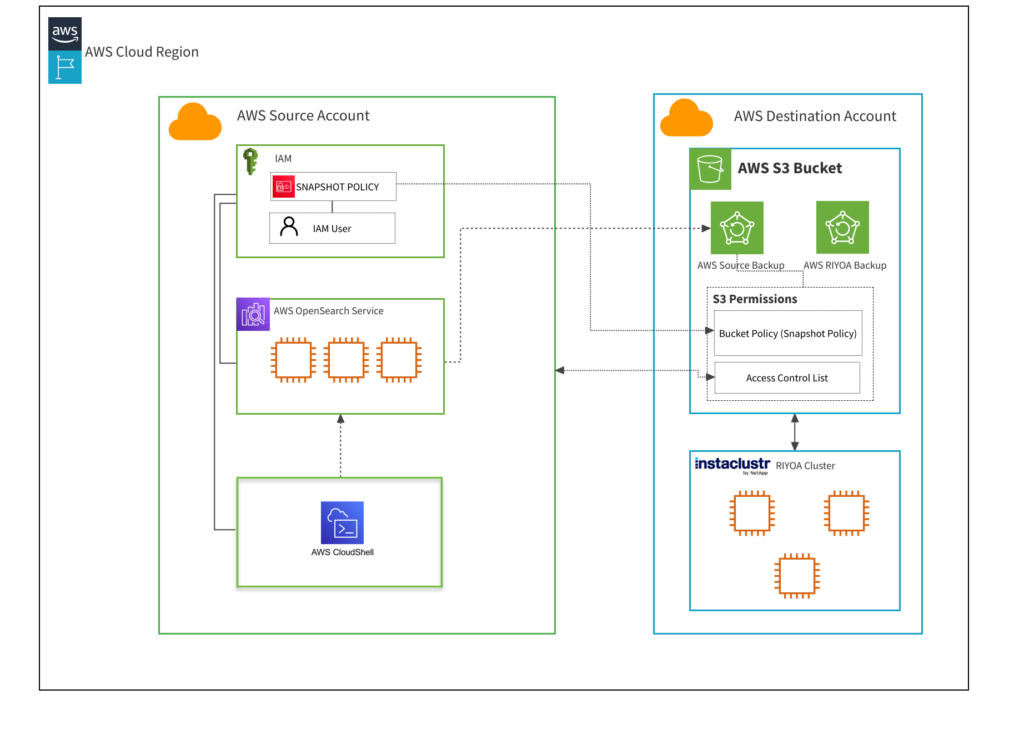
Table of Contents
-----------------
- [ Step 1: Create an IAM Policy ](#section-step-1-create-an-iam-policy)
- [ Step 2: Create an IAM Role](#section-step-2-create-an-iam-role)
- [ Step 3: Create an IAM user ](#section-step-3-create-an-iam-user)
- [ Step 4: Map Elasticsearch Roles to allow AWS OpenSearch Service to manage snapshots](#section-step-4-map-elasticsearch-roles-to-allow-aws-opensearch-service-to-manage-snapshots)
- [ Step 5: Update S3 Bucket permissions (temporary settings) ](#section-step-5-update-s3-bucket-permissions-temporary-settings)
- [ Step 6: Register the snapshot repository with AWS OpenSearch Service and initiate a backup ](#section-step-6-register-the-snapshot-repository-with-aws-opensearch-service-and-initiate-a-backup)
- [ Step 7: Unthrottle restore settings on destination cluster ](#section-step-7-unthrottle-restore-settings-on-destination-cluster)
- [ Step 8: Recreate users and other artefacts on destination cluster ](#section-step-8-recreate-users-and-other-artefacts-on-destination-cluster)
- [ Step 9: Prepare for the Final Incremental Snapshot ](#section-step-9-prepare-for-the-final-incremental-snapshot)
- [ Step 10: Rollback S3 bucket permissions](#section-step-10-rollback-s3-bucket-permissions)
- [ Step 11: Register snapshot repository in destination cluster ](#section-step-11-register-snapshot-repository-in-destination-cluster)
- [ Step 12: Initiate snapshot restore ](#section-step-12-initiate-snapshot-restore)
- [ Step 13: Monitor restore progress](#section-step-13-monitor-restore-progress)
- [ Step 14: Restart Client Applications ](#section-step-14-restart-client-applications)
- [ Step 15: Return restore speed to default ](#section-step-15-return-restore-speed-to-default)
- [ Known Errors and Solutions ](#section-known-errors-and-solutions)
Step 1: Create an IAM Policy
-----------------------------
In the source AWS account, set up a new AWS Identity and Access Management (IAM) policy.
This policy will grant permission to access the S3 bucket in the destination AWS account (also referred as the AWS account configured for Instaclustr BYOC).
Take the following steps:
1. In the AWS console, navigate to IAM.
2. Go to the ‘Policies’ page. Choose ‘Create policy’.
3. Use the ‘JSON’ tab in the policy editor and input the following policy.
(Please ensure the placeholder `s3-bucket-name` is replaced with the actual name of your bucket, while the wildcard suffix `/*` is kept intact).
Note: Ensure to use the accurate S3 bucket name designated for the destination AWS account.
{ "Version": "2012-10-17", "Statement": \[ { "Action": \[ "s3:ListBucket" \], "Effect": "Allow", "Resource": \[ "arn:aws:s3:::s3-bucket-name" \] }, { "Action": \[ "s3:GetObject", "s3:PutObject", "s3:DeleteObject" \], "Effect": "Allow", "Resource": \[ "arn:aws:s3:::s3-bucket-name/\*" \] } \] }
1
2
3
4
5
6
7
8
9
10
11
12
13
14
15
16
17
18
19
20
21
22
23
24
25
{
"Version": "2012-10-17",
"Statement": \[
{
"Action": \[
"s3:ListBucket"
\],
"Effect": "Allow",
"Resource": \[
"arn:aws:s3:::s3-bucket-name"
\]
},
{
"Action": \[
"s3:GetObject",
"s3:PutObject",
"s3:DeleteObject"
\],
"Effect": "Allow",
"Resource": \[
"arn:aws:s3:::s3-bucket-name/\*"
\]
}
\]
}
Step 2: Create an IAM Role
--------------------------
In the source AWS account, create an AWS IAM role.
This role will use the IAM policy created in the previous step.
Take the following steps in the AWS console:
1. In the AWS console, navigate to IAM
2. Go to the ‘Roles’ page. Choose ‘Create role’, then ‘AWS service’.
3. For use case, select ‘EC2’.
4. In ‘Add permission’, select the policy created earlier in Step 1.
5. Create the role with your desired name. For example: ‘SnapshotRole’
6. Once created, select the role again and go to ‘Trust relationships’ and ‘Edit trust policy’. Replace the service ec2.amazonaws.com with es.amazonaws.com as follows:
{ "Version": "2012-10-17", "Statement": \[ { "Sid": "", "Effect": "Allow", "Principal": { "Service": "es.amazonaws.com" }, "Action": "sts:AssumeRole" } \] }
1
2
3
4
5
6
7
8
9
10
11
12
13
{
"Version": "2012-10-17",
"Statement": \[
{
"Sid": "",
"Effect": "Allow",
"Principal": {
"Service": "es.amazonaws.com"
},
"Action": "sts:AssumeRole"
}
\]
}
Make a note of the ARN of this IAM role – it will be needed later.
Step 3: Create an IAM user
---------------------------
In the source AWS account, create a new IAM user.
This user will be used to register the destination cluster’s snapshot repository in the AWS OpenSearch Service cluster. If you have an existing user that you would like to use, you can skip the user creation step.
First, we will create a new IAM user with no permissions:
1. In the AWS console, navigate to IAM
2. Go to the ‘Users’ page. Choose ‘Create user’.
3. Ignore all the permissions options – choose ‘Next’ and ‘Create user’ for now. This will create a blank user with no permissions.
Navigate to the user you just created and set permissions:
1. Choose ‘Add permissions’, then ‘Create inline policy’.
2. Set the policy editor to JSON, and use the policy below.
The following placeholders need to be replaced in the template below:
- The ARN of the role you created in the previous step.
- The ARN of your AWS OpenSearch domain. Please ensure that the wildcard suffix is kept after the ARN (the resource should end with a forward slash followed by an asterisk, “/\*”).
{ "Version": "2012-10-17", "Statement": \[ { "Effect": "Allow", "Action": "iam:PassRole", "Resource": "arn:aws:iam::123456789012:role/SnapshotRole" }, { "Effect": "Allow", "Action": "es:ESHttpPut", "Resource": "arn:aws:es:region:123456789012:domain/AWSOpenSearchServiceDomain/\*" } \] }
1
2
3
4
5
6
7
8
9
10
11
12
13
14
15
{
"Version": "2012-10-17",
"Statement": \[
{
"Effect": "Allow",
"Action": "iam:PassRole",
"Resource": "arn:aws:iam::123456789012:role/SnapshotRole"
},
{
"Effect": "Allow",
"Action": "es:ESHttpPut",
"Resource": "arn:aws:es:region:123456789012:domain/AWSOpenSearchServiceDomain/\*"
}
\]
}
Now you have all the required IAM roles and policies.
Make a note of the ARN of this IAM user – it will be needed later.
Step 4: Map Elasticsearch Roles to allow AWS OpenSearch Service to manage snapshots
-----------------------------------------------------------------------------------
The source cluster requires Elasticsearch-specific permissions to register the destination cluster’s backup bucket.
There are two ways to accomplish this step:
- Using Kibana
- Using the REST API
Using Kibana is easier if it is enabled, but this option is only convenient if you have network access to your source cluster’s Kibana URL – for example, this may be difficult if the source cluster is in a private VPC. This guide will provide steps for both options.
### Managing Role Mappings using Kibana
Earlier, we created an IAM user, and an IAM role.
In this step, we will map the user and role together in the Elasticsearch security plugin, allowing the user to register a snapshot repository.
1. In the AWS console, go to ‘Amazon OpenSearch Service’, and go to ‘Domains’. Find the source cluster. In the general information for this cluster, there should be a ‘Kibana URL’.
2. Visit the Kibana URL in your browser.
(If you are unable to reach Kibana, skip to the next section: “Mapping roles via CURL”.)
3. In Kibana, go to ‘Security’ in the sidebar, then ‘Roles’.
4. Search for ‘manage\_snapshots’.
5. Click the ‘manage\_snapshots’ role and go to the ‘Mapped users’ tab. Choose ‘Manage mapping’.
6. In ‘Users’, provide the ARN of the IAM user you created earlier.
(Don’t use the ‘Create new internal user’ button – this is not necessary.)
7. In ‘Backend roles’, provide the ARN of the IAM role you created earlier.
8. Choose ‘Map’ to create the mapping. 
9. The ‘Mapped users’ tab should now show the IAM user mapped to the IAM role.
### Managing Role Mappings using the REST API
When working with role mappings during your migration process, it is important to note that the REST API request syntax may vary depending on whether your source cluster is running OpenSearch, or Open Distro for Elasticsearch. Below, we provide the relevant curl commands for each to help you create or replace the specified role mappings.
#### *Creating role mapping in Open Distro for Elasticsearch*
The following command will create a role mapping called ‘manage\_snapshots’.
Two placeholders need to be replaced:
- The ARN of the IAM user created earlier.
- The ARN of the IAM role created earlier.
JavaScript
curl -X PUT -u <username>:<password> "https://<host\_domain\_endpoint>:9200/\_opendistro/\_security/api/rolesmapping/manage\_snapshots" -H 'Content-Type: application/json' -d' { "hosts": \[\], "users": \[ "arn:aws:iam::1234567892716:user/user-test-migration" \], "backend\_roles": \[ "arn:aws:iam::1234567892716:role/user-test-migration-snapshot-role" \] }'
1
2
3
4
5
6
7
8
9
10
curl -X PUT -u <username>:<password> "https://<host\_domain\_endpoint>:9200/\_opendistro/\_security/api/rolesmapping/manage\_snapshots" -H 'Content-Type: application/json' -d'
{
"hosts": \[\],
"users": \[
"arn:aws:iam::1234567892716:user/user-test-migration"
\],
"backend\_roles": \[
"arn:aws:iam::1234567892716:role/user-test-migration-snapshot-role"
\]
}'
For detailed information on role mappings within Open Distro for Elasticsearch, refer to the [Open Distro for Elasticsearch documentation.](https://opendistro.github.io/for-elasticsearch-docs/docs/security/access-control/api/#role-mappings)
#### *Creating role mapping in OpenSearch*
The following command will create a role mapping called ‘manage\_snapshots’.
Two placeholders need to be replaced:
- The ARN of the IAM user created earlier.
- The ARN of the IAM role created earlier.
JavaScript
curl -X PUT -u <username>:<password> "https://<endpoint>:9200/\_plugins/\_security/api/rolesmapping/manage\_snapshots" -H 'Content-Type: application/json' -d' { "hosts": \[\], "users": \[ "arn:aws:iam::1234567892716:user/user-test-migration" \], "backend\_roles": \[ "arn:aws:iam::1234567892716:role/user-test-migration-snapshot-role" \], "and\_backend\_roles": \[\] }'
1
2
3
4
5
6
7
8
9
10
11
curl -X PUT -u <username>:<password> "https://<endpoint>:9200/\_plugins/\_security/api/rolesmapping/manage\_snapshots" -H 'Content-Type: application/json' -d'
{
"hosts": \[\],
"users": \[
"arn:aws:iam::1234567892716:user/user-test-migration"
\],
"backend\_roles": \[
"arn:aws:iam::1234567892716:role/user-test-migration-snapshot-role"
\],
"and\_backend\_roles": \[\]
}'
For detailed information on role mappings within OpenSearch, refer to the [OpenSearch documentation](https://opensearch.org/docs/2.13/security/access-control/api/#role-mappings).
Step 5: Update S3 Bucket permissions (temporary settings)
----------------------------------------------------------
Next, switch to the destination account – the AWS account set up for Instaclustr BYOC provisioning – to configure permissions that allow the source account to access the bucket. These changes are temporary and will be rolled back once the backup is completed successfully.
Go to the S3 bucket which has been configured as your destination cluster’s backup bucket and select the “Permissions” tab.
1. Edit bucket policy and provide the following:
- ARN of the IAM role created in Step 2.
- ARN of this S3 bucket ending with /\*
{ "Version": "2012-10-17", "Statement": \[ { "Effect": "Allow", "Principal": { "AWS": "arn:aws:iam::123456789012:role/SnapshotRole" }, "Action": \[ "s3:GetObject", "s3:PutObject", "s3:PutObjectAcl" \], "Resource": "arn:aws:s3:::s3-bucket-name/\*" } \] }
1
2
3
4
5
6
7
8
9
10
11
12
13
14
15
16
17
{
"Version": "2012-10-17",
"Statement": \[
{
"Effect": "Allow",
"Principal": {
"AWS": "arn:aws:iam::123456789012:role/SnapshotRole"
},
"Action": \[
"s3:GetObject",
"s3:PutObject",
"s3:PutObjectAcl"
\],
"Resource": "arn:aws:s3:::s3-bucket-name/\*"
}
\]
}
Once provided click Save changes.
2. Once the bucket’s policy changes are saved. Navigate to Edit “Object Ownership”, select “ACLs enabled”, keep the “Bucket owner preferred” setting and click Save Changes.
3. Edit “Access control list (ACL)”, click “Add grantee” and provide the canonical ID of the source AWS account.
(The canonical ID can be found by logging into the AWS console as the source account, choosing your user name drop down in the top right, and going to “Security credentials” – on this page, there is a ‘Canonical User ID’ field.)
4. Select the ‘List’ and ‘Write’ options under ‘Objects’. Click ‘Save changes’.

Step 6: Register the snapshot repository with AWS OpenSearch Service and initiate a backup
-------------------------------------------------------------------------------------------
To set up a manual repository on the AWS OpenSearch cluster and initiate a backup, we have adapted the Python script from the [AWS documentation](https://docs.aws.amazon.com/opensearch-service/latest/developerguide/managedomains-snapshots.html#managedomains-snapshot-registerdirectory), which can be executed within AWS CloudShell or from an EC2 instance that has connectivity to the source AWS OpenSearch cluster to register the repository and initiate the backup.
### 1. Create an Input file (json)
For the python script to execute correctly, the user must supply specific details regarding the source cluster and the destination backup bucket. This information should be entered into a JSON file, which the python script will then utilize to register the repository and start the backup process.
The following is an example of a dataset in JSON array format, which includes two entries representing two separate objects or source clusters. The information pertaining to the second object or source cluster is optional and can be omitted if not needed, but can be useful when migrating multiple clusters at a time. At least one set of source cluster information is needed for the Python script to perform the repository registration and initiate the backup process.
\[ { "host": "https://search-example-source-cluster-53ilhjrtdlrziirybjqpzdggmu.us-east-1.es.amazonaws.com", "region": "us-east-1", "repository\_api\_endpoint": "source-repository", "snapshot\_name": "source-snap-name", "s3\_bucket\_name": "s3-bucket-name", "s3\_base\_path": "4066e28c-c724-44b2-9754-a38f039860a1/folder-name", "s3\_role\_arn": "arn:aws:iam::123456789012:role/SnapshotRole" }, { "host": "second…host…in…the…same…region…if…required…otherwise…remove", "region": "us-east-1", "repository\_api\_endpoint": "another-repository", "snapshot\_name": "another-snap", "s3\_bucket\_name": "manual-repo-byo", "s3\_base\_path": "<AWS\_BYOC\_CLUSTER\_ID>/source-repository", "s3\_role\_arn": "xxx:aws:iam::123456789012:role/TheSnapshotRole" } \]
1
2
3
4
5
6
7
8
9
10
11
12
13
14
15
16
17
18
19
20
\[
{
"host": "https://search-example-source-cluster-53ilhjrtdlrziirybjqpzdggmu.us-east-1.es.amazonaws.com",
"region": "us-east-1",
"repository\_api\_endpoint": "source-repository",
"snapshot\_name": "source-snap-name",
"s3\_bucket\_name": "s3-bucket-name",
"s3\_base\_path": "4066e28c-c724-44b2-9754-a38f039860a1/folder-name",
"s3\_role\_arn": "arn:aws:iam::123456789012:role/SnapshotRole"
},
{
"host": "second…host…in…the…same…region…if…required…otherwise…remove",
"region": "us-east-1",
"repository\_api\_endpoint": "another-repository",
"snapshot\_name": "another-snap",
"s3\_bucket\_name": "manual-repo-byo",
"s3\_base\_path": "<AWS\_BYOC\_CLUSTER\_ID>/source-repository",
"s3\_role\_arn": "xxx:aws:iam::123456789012:role/TheSnapshotRole"
}
\]
Further explanation on input parameters:
- *host*
This value represents the Domain endpoint (IPv4) and can be obtained from the General Information page of the source cluster’s domain.

- *region*
The name of region in which the AWS OpenSearch cluster is currently present.
For example: us-east-1
- *repository\_api\_endpoint*
The name of the snapshot repository to register.
For example: source-repository
Note: Repository names cannot start with “cs-“. Additionally, you shouldn’t write to the same repository from multiple domains. Only one domain should have “write” access to the repository.
- *snapshot\_name*
Name of the snapshot. Must be unique within the snapshot repository.
- *s3\_bucket\_name*
Name of the s3 bucket that resides in the destination account.
- *s3\_base\_path*
Specifies the path within s3 bucket where backup data will be stored. We recommend using a base path that should comprise of “<BYOC\_CLUSTER\_ID>/<S3 Bucket Folder name of your choice>”.
For example: 4066e28c-c724-44b2-9754-a38f039860a1/source-repository
- *s3\_role\_arn*
The snapshot role ARN which was created in the source account as stated in step 2
for example: arn:aws:iam::123456789012:role/SnapshotRole
### 2. Saving the input file inside an AWS Cloud Shell session
AWS CloudShell is a browser-based shell that gives you command-line access to your AWS resources in the selected AWS Region. AWS CloudShell comes pre-installed with popular tools for resource management and creation. You have the same credentials as you use to log in to the console.
After preparing the input.json file for import into the Cloud Shell, initiate an AWS CloudShell session in the source account. To begin, look at the top right corner of the AWS Management Console; the CloudShell icon is typically the first one displayed, as illustrated in the image below:

run command:
cat > input.json << 'EOF'
1
cat > input.json << 'EOF'
Paste the json file contents and write ‘EOF’ to close and save the file with name input.json
### 3. Running python script
The Python script below is designed to use the input.json file created earlier. It will use these parameters to register the snapshot repository and take a snapshot.
To create the script file, run the command in AWS Cloud Shell
cat > snapshot.py << 'EOF'
1
cat > snapshot.py << 'EOF'
Press the “return” key to start a new line, then copy the entire Python script provided below and paste it into the AWS Cloud Shell. After pasting, press “return” once more to begin a new line and type ‘EOF’ to signify the end of the file input, which will save the script as ‘snapshot.py’. Finally, press enter to complete the process. (This method employs the ‘here document’ syntax for file creation.)
Python
import boto3 import json import requests from requests\_aws4auth import AWS4Auth import sys, traceback # To reduce the exception trace back and return only meaningful value def hook\_for\_exception(type, value, tb): trace = traceback.format\_tb(tb, limit=1) trace = trace\[0\].split("\\n")\[0\] exc = traceback.format\_exception\_only(type, value)\[0\] print("\\n" + trace + "\\n" + exc) sys.excepthook = hook\_for\_exception # Common method to print the result for the API requests (registering repository and snapshot) def print\_result(success\_message, failure\_message, status\_code, status\_text): if str(status\_code) == "200": print(success\_message) print(status\_text) else: print(failure\_message) print(str(status\_code) + " - " + status\_text) file\_name = input("Please enter the JSON file name: ") while not file\_name.endswith(".json"): file\_name = input("Enter file name with .json extension: ") file\_contents = open(file\_name) data = json.load(file\_contents) for i in data: host = i\["host"\] + "/" region = i\["region"\] service = 'es' credentials = boto3.Session().get\_credentials() awsauth = AWS4Auth(credentials.access\_key, credentials.secret\_key, region, service, session\_token=credentials.token) # Register repository api\_endpoint = i\["repository\_api\_endpoint"\] bucket = i\["s3\_bucket\_name"\] base\_path = i\["s3\_base\_path"\] role\_arn = i\["s3\_role\_arn"\] path = '\_snapshot/{}'.format(api\_endpoint) # the OpenSearch API endpoint url = host + path payload = { "type": "s3", "settings": { "bucket": "{}".format(bucket), "region": "{}".format(region), "base\_path": "{}".format(base\_path), "role\_arn": "{}".format(role\_arn) } } headers = {"Content-Type": "application/json"} response\_rego = requests.put(url, auth=awsauth, json=payload, headers=headers) print\_result("\\nRegistration of Snapshot repository is completed for {}".format(host), "\\nError while Registering Snapshot repository for {}".format(host), response\_rego.status\_code, response\_rego.text) if response\_rego.status\_code == 200: # Take snapshot snapshot = i\["snapshot\_name"\] backup\_path = '\_snapshot/{}/{}'.format(api\_endpoint, snapshot) backup\_url = host + backup\_path response\_snap = requests.put(backup\_url, auth=awsauth) print\_result("Snapshot: {} Triggered successfully for {}".format(snapshot, host), "\\nSnapshot: {} cannot be taken successfully for {}".format(snapshot, host), response\_snap.status\_code, response\_snap.text) else: print("\\nSkipping snapshot creation because Snapshot Repository was not registered successfully for " + host) # Closing file file\_contents.close()
1
2
3
4
5
6
7
8
9
10
11
12
13
14
15
16
17
18
19
20
21
22
23
24
25
26
27
28
29
30
31
32
33
34
35
36
37
38
39
40
41
42
43
44
45
46
47
48
49
50
51
52
53
54
55
56
57
58
59
60
61
62
63
64
65
66
67
68
69
70
71
72
73
74
75
76
77
78
79
80
import boto3
import json
import requests
from requests\_aws4auth import AWS4Auth
import sys, traceback
\# To reduce the exception trace back and return only meaningful value
def hook\_for\_exception(type, value, tb):
trace = traceback.format\_tb(tb, limit=1)
trace = trace\[0\].split("\\n")\[0\]
exc = traceback.format\_exception\_only(type, value)\[0\]
print("\\n" + trace + "\\n" + exc)
sys.excepthook = hook\_for\_exception
\# Common method to print the result for the API requests (registering repository and snapshot)
def print\_result(success\_message, failure\_message, status\_code, status\_text):
if str(status\_code) == "200":
print(success\_message)
print(status\_text)
else:
print(failure\_message)
print(str(status\_code) + " - " + status\_text)
file\_name = input("Please enter the JSON file name: ")
while not file\_name.endswith(".json"):
file\_name = input("Enter file name with .json extension: ")
file\_contents = open(file\_name)
data = json.load(file\_contents)
for i in data:
host = i\["host"\] + "/"
region = i\["region"\]
service = 'es'
credentials = boto3.Session().get\_credentials()
awsauth = AWS4Auth(credentials.access\_key, credentials.secret\_key, region, service, session\_token=credentials.token)
\# Register repository
api\_endpoint = i\["repository\_api\_endpoint"\]
bucket = i\["s3\_bucket\_name"\]
base\_path = i\["s3\_base\_path"\]
role\_arn = i\["s3\_role\_arn"\]
path = '\_snapshot/{}'.format(api\_endpoint) \# the OpenSearch API endpoint
url = host + path
payload = {
"type": "s3",
"settings": {
"bucket": "{}".format(bucket),
"region": "{}".format(region),
"base\_path": "{}".format(base\_path),
"role\_arn": "{}".format(role\_arn)
}
}
headers = {"Content-Type": "application/json"}
response\_rego = requests.put(url, auth=awsauth, json=payload, headers=headers)
print\_result("\\nRegistration of Snapshot repository is completed for {}".format(host),
"\\nError while Registering Snapshot repository for {}".format(host), response\_rego.status\_code,
response\_rego.text)
if response\_rego.status\_code == 200:
\# Take snapshot
snapshot = i\["snapshot\_name"\]
backup\_path = '\_snapshot/{}/{}'.format(api\_endpoint, snapshot)
backup\_url = host + backup\_path
response\_snap = requests.put(backup\_url, auth=awsauth)
print\_result("Snapshot: {} Triggered successfully for {}".format(snapshot, host),
"\\nSnapshot: {} cannot be taken successfully for {}".format(snapshot, host),
response\_snap.status\_code, response\_snap.text)
else:
print("\\nSkipping snapshot creation because Snapshot Repository was not registered successfully for " + host)
\# Closing file
file\_contents.close()
### 4. Install dependencies for the script
Prior to executing the script, dependencies must be installed.
Run the following commands in AWS CloudShell:
\# Create a virtual environment python3 -m venv venv # Enter the virtual environment # (This step will be needed every time the script is used) source venv/bin/activate # Install dependencies pip3 install boto requests-aws4auth
1
2
3
4
5
6
7
8
9
10
\# Create a virtual environment
python3 -m venv venv
\# Enter the virtual environment
\# (This step will be needed every time the script is used)
source venv/bin/activate
\# Install dependencies
pip3 install boto requests-aws4auth
### 5. Generate access and secret key
The script needs to act as the IAM user created in step 3. To do so, we can generate an access key and secret key.
Take the following steps (further details in [AWS User guide](https://docs.aws.amazon.com/IAM/latest/UserGuide/id_credentials_access-keys.html#Using_CreateAccessKey) if needed):
- In the AWS console, locate the IAM user that you created earlier.
- In this user, go to the ‘Security Credentials’ tab.
- Go to ‘Access keys’ and ‘Create access key’. (For use-case, choose ‘Command line interface’).
- Record the access key and secret key that are generated in a secure location.
### 6. **Use access key**
Now we need to make use of the access key and secret key generated in the previous step.
In CloudShell, run the following command:
aws configure
Follow prompts to enter the access key and secret key in this environment
### 7. Run the Python script
- Confirm that everything is ready:
– If you run `aws sts get-caller-identity`, this should have the ARN of the IAM user you created earlier, indicating that `aws configure` was used successfully.
– Your shell prompt should start with `(venv)`, indicating that you are still in the virtual environment that was created earlier. (If not, run `source venv/bin/activate` again.)
- Run the script with the following command:
python snapshot.py
- On the prompt to enter the file name, provide the name of the JSON file that you [created in an earlier step](#section-step-6-register-the-snapshot-repository-with-aws-opensearch-service-and-initiate-a-backup) – ‘input.json’.
- The script will attempt to register the repository; if this is successful, it will also attempt to trigger a backup. The output should be similar to this example:
### 
**NOTE:** By default, the create snapshot API only initiates the snapshot process, which runs in the background. Depending on its size, a snapshot can take some time to complete and does not represent perfect point-in-time view of the cluster.
Since snapshots are incremental, meaning that they only store data that has changed since the last successful snapshot, we recommend taking snapshots until the snapshot time falls into acceptable downtime range.
If you need to delete a snapshot, be sure to use the OpenSearch API rather than navigating to the storage location and purging files. Incremental snapshots from a cluster often share a lot of the same data; when you use the API, OpenSearch only removes data that no other snapshot is using.
After the backup has finished successfully, check to ensure that the objects are present within the directory or base path of the backup bucket specified in the JSON file. If you have the bucket page open, you might need to click on “Refresh Objects” to view the new objects.
Step 7: Unthrottle restore settings on destination cluster
-----------------------------------------------------------
Since the destination cluster will not be used until after the restore is complete, the performance impact of the restore process on the destination cluster does not matter. We can unthrottle restore-related settings to speed up the snapshot restore.
On the destination cluster, perform the following API call to speed up the restore process:
curl -X PUT -u <username>:<password> "https://<endpoint>:9200/\_cluster/settings -H 'Content-Type: application/json' -d ' { { "persistent" : { "indices.recovery.max\_bytes\_per\_sec" : "100gb", "indices.recovery.max\_concurrent\_file\_chunks" : "5", "indices.recovery.max\_concurrent\_operations" : "4" } }'
1
2
3
4
5
6
7
8
9
curl -X PUT -u <username>:<password> "https://<endpoint>:9200/\_cluster/settings -H 'Content-Type: application/json' -d '
{
{
"persistent" : {
"indices.recovery.max\_bytes\_per\_sec" : "100gb",
"indices.recovery.max\_concurrent\_file\_chunks" : "5",
"indices.recovery.max\_concurrent\_operations" : "4"
}
}'
Step 8: Recreate users and other artefacts on destination cluster
------------------------------------------------------------------
The steps in this document will migrate indices from the source cluster to the destination cluster. However, the steps will **not** bring the following objects:
- Users, roles, and role mappings, if role-based access control is in use on the source cluster.
- [Index templates](https://opensearch.org/docs/latest/im-plugin/index-templates/)
- [Ingest pipelines](https://opensearch.org/docs/latest/ingest-pipelines/get-ingest/)
- [Cluster settings](https://opensearch.org/docs/latest/api-reference/cluster-api/cluster-settings/)
If the source cluster has any of these objects in use, they will need to be recreated using the [OpenSearch REST API](https://opensearch.org/docs/latest/api-reference/) at this point.
Step 9: Prepare for the Final Incremental Snapshot
---------------------------------------------------
1. ### Client Shutdown:
Prior to initiating the final incremental snapshot, ensure all client applications that interact with your OpenSearch cluster are properly and safely shut down. This is a critical step to prevent any data changes during the snapshot process and ensure data consistency.
2. ### Update Client Configuration:
While your client applications are offline, update their configurations to point to the new destination OpenSearch cluster. This will typically involve:
- changing the endpoint URLs your application uses to connect to the cluster
- changing the username and password the application uses to authenticate (unless you recreated users and roles from the source cluster in the previous step)
Step 10: Rollback S3 bucket permissions
---------------------------------------
This step will ensure that the destination cluster is able to access the snapshot generated by the source cluster.
Proceed with this step only after confirming that the backup has been completed.
### 1. Rollback S3 bucket permissions (Destination Account)
As the source cluster’s account holds the ownership of the objects in the bucket currently, it is essential to transfer ownership of the snapshot objects to the destination AWS account for restore requests to succeed. To accomplish this, reverse the modifications implemented in Step 5 by disabling the ACL and removing the bucket policy.
Following, we have outlined two methods to revert the S3 Bucket permissions to their previous state. The first method involves utilizing a Python script crafted to specifically reverse those permissions. The second method entails performing the rollback manually via the AWS Management Console.
#### OPTION 1: Using Python Script
The Python script requires the name of the S3 Bucket as an input parameter to execute the rollback operations. For instance, here ‘fshami-manual-repo-byoc‘ as demonstrated in the screenshot provided below

Additionally, to make use of this method, the IAM user should have the appropriate permissions, such as s3:DeleteBucketPolicy, WRITE\_ACP, and s3:PutBucketOwnershipControls. You can run this script in the destination account’s AWS Cloud Shell, which avoids the need for installing additional dependencies. If you opt not to use AWS Cloud Shell, you’ll need to prepare your local environment according to the instructions in the Boto3 [Quick Start guide](https://boto3.amazonaws.com/v1/documentation/api/latest/guide/quickstart.html).
Using AWS Cloud Shell, run command:
Paste the file contents, hit ‘enter’ and write ‘EOF’ to close and save the file with
cat > rollback.py << 'EOF'
1
cat > rollback.py << 'EOF'
After saving the file, the user can execute it by typing `python rollback.py` into the command prompt, then entering the S3 bucket name when prompted, and the script will carry out the rollback operations.
Python
import boto3 bucket\_name = input("Please enter the bucket name to rollback the given S3 permissions: \\n") s3\_client = boto3.client('s3') def rollback\_bucket\_policy(bucket, client): bucket\_policy\_response = client.delete\_bucket\_policy( Bucket=bucket, ) get\_response(bucket\_policy\_response, "Bucket Policy Deleted", "Bucket policy cannot be deleted, please check user permissions") def rollback\_bucket\_acl(bucket, client): try: bucket\_acl\_response = client.put\_bucket\_acl( ACL='private', Bucket=bucket ) except: print("Access for other AWS accounts cannot be removed from Bucket, " "either it is already done manually or the user has not sufficient permissions, " "please login to AWS Console and verify S3 Bucket permissions tab") else: get\_response(bucket\_acl\_response, "Access for other AWS accounts has been removed from Bucket", bucket\_acl\_response) finally: rollback\_bucket\_ownership(bucket\_name, s3\_client) def rollback\_bucket\_ownership(bucket, client): bucket\_ownership\_response = client.put\_bucket\_ownership\_controls( Bucket=bucket, OwnershipControls={ 'Rules': \[ { 'ObjectOwnership': 'BucketOwnerEnforced' }, \] } ) get\_response(bucket\_ownership\_response, "Bucket Object Ownership has been reset to BucketOwnerEnforced", "Bucket Object Ownership cannot be reset, please check user permissions") def get\_response(response\_msg, pass\_message, fail\_message): response\_status\_code = response\_msg\["ResponseMetadata"\]\["HTTPStatusCode"\] if str(response\_status\_code) == "200" or str(response\_status\_code) == "204": print(pass\_message) else: print(fail\_message) try: # check for bucket existence response = s3\_client.head\_bucket( Bucket=bucket\_name, ) get\_response(response, "Bucket found, continuing rollback operation...", response) rollback\_bucket\_policy(bucket\_name, s3\_client) rollback\_bucket\_acl(bucket\_name, s3\_client) print("Destination or BYOC account Bucket Settings has been roll backed successfully.") except: print("Bucket not found, please check bucket name and try again!")
1
2
3
4
5
6
7
8
9
10
11
12
13
14
15
16
17
18
19
20
21
22
23
24
25
26
27
28
29
30
31
32
33
34
35
36
37
38
39
40
41
42
43
44
45
46
47
48
49
50
51
52
53
54
55
56
57
58
59
60
import boto3
bucket\_name = input("Please enter the bucket name to rollback the given S3 permissions: \\n")
s3\_client = boto3.client('s3')
def rollback\_bucket\_policy(bucket, client):
bucket\_policy\_response = client.delete\_bucket\_policy(
Bucket=bucket,
)
get\_response(bucket\_policy\_response, "Bucket Policy Deleted",
"Bucket policy cannot be deleted, please check user permissions")
def rollback\_bucket\_acl(bucket, client):
try:
bucket\_acl\_response = client.put\_bucket\_acl(
ACL='private',
Bucket=bucket
)
except:
print("Access for other AWS accounts cannot be removed from Bucket, "
"either it is already done manually or the user has not sufficient permissions, "
"please login to AWS Console and verify S3 Bucket permissions tab")
else:
get\_response(bucket\_acl\_response, "Access for other AWS accounts has been removed from Bucket",
bucket\_acl\_response)
finally:
rollback\_bucket\_ownership(bucket\_name, s3\_client)
def rollback\_bucket\_ownership(bucket, client):
bucket\_ownership\_response = client.put\_bucket\_ownership\_controls(
Bucket=bucket,
OwnershipControls={
'Rules': \[
{
'ObjectOwnership': 'BucketOwnerEnforced'
},
\]
}
)
get\_response(bucket\_ownership\_response, "Bucket Object Ownership has been reset to BucketOwnerEnforced",
"Bucket Object Ownership cannot be reset, please check user permissions")
def get\_response(response\_msg, pass\_message, fail\_message):
response\_status\_code = response\_msg\["ResponseMetadata"\]\["HTTPStatusCode"\]
if str(response\_status\_code) == "200" or str(response\_status\_code) == "204":
print(pass\_message)
else:
print(fail\_message)
try:
\# check for bucket existence
response = s3\_client.head\_bucket(
Bucket=bucket\_name,
)
get\_response(response, "Bucket found, continuing rollback operation...", response)
rollback\_bucket\_policy(bucket\_name, s3\_client)
rollback\_bucket\_acl(bucket\_name, s3\_client)
print("Destination or BYOC account Bucket Settings has been roll backed successfully.")
except:
print("Bucket not found, please check bucket name and try again!")
#### OPTION 2: Manual approach using AWS Console.
Go to the s3 bucket in the destination account and select “Permissions”
1. Delete the bucket policy that was to grant permissions for the snapshot role.
2. Edit access control list (ACL) and remove the access granted for the source account, Save changes.
3. Edit “Object Ownership” and select “ACLs disabled (recommended)”. Then Save changes.
### 2. Delete the IAM Role and IAM User in the source account (Optional)
1. The Snapshot role and IAM user that were set up in the source account for the backup process, as outlined in steps 1 and 2, can now be removed.
2. After deleting the Snapshot role and user, proceed to eliminate any redundant mappings from the AWS OpenSearch Service’s Kibana.
### 3. Remove credentials from AWS Cloud Shell session (Source Account)
Run the following commands in the AWS CloudShell session to remove the access and secret keys:
aws configure set aws\_access\_key\_id "" aws configure set aws\_secret\_access\_key ""
1
2
aws configure set aws\_access\_key\_id ""
aws configure set aws\_secret\_access\_key ""
Alternatively, you can delete the credential file along with other files
rm ~/.aws/credentials rm ~/path/to/input.json rm ~/path/to/script.py
1
2
3
rm ~/.aws/credentials
rm ~/path/to/input.json
rm ~/path/to/script.py
Step 11: Register snapshot repository in destination cluster
-------------------------------------------------------------
To restore data to the destination cluster, it is necessary to establish a custom repository for the destination cluster that shares the same base path used during the backup.
Use the API call provided below, ensuring to substitute the placeholders enclosed in angle brackets with the correct data.
curl -X PUT -u <username>:<password> "https://<endpoint>:9200/\_snapshot/<repository-name>" -H 'Content-Type: application/json' -d' { "type": "s3", "settings": { "bucket": "<S3-bucket-name>", "base\_path": "<cluster\_id>/<custom-snapshot-repository-base-path>", "readonly": true } }'
1
2
3
4
5
6
7
8
9
curl -X PUT -u <username>:<password> "https://<endpoint>:9200/\_snapshot/<repository-name>" -H 'Content-Type: application/json' -d'
{
"type": "s3",
"settings": {
"bucket": "<S3-bucket-name>",
"base\_path": "<cluster\_id>/<custom-snapshot-repository-base-path>",
"readonly": true
}
}'
NOTE: Please provide the correct base\_path, it should be the same base path used to create backup, created in step 6 and mentioned in the input json file as “s3\_base\_path”. For e.g: “4066e28c-c724-44b2-9754-a38f039860a1/folder-name“.
It is important to use the “readonly“: true setting, as shown above. If you forget to do so, the repository metadata may become corrupt, leading to errors when attempting to use the repository.
Step 12: Initiate snapshot restore
-----------------------------------
Once the snapshot repository registration is successful, you can confirm the snapshot and perform restore.
You can run GET /\_snapshot/<repository-name>/\_all to list snapshots in the repository – this can be used to get the name of the snapshot taken before, which is required for the next step.
curl -X POST -u <username>:<password> "https://<endpoint>:9200/\_snapshot/<repository-name>/<snapshot-name>/\_restore?wait\_for\_completion=true -d ' { "indices": "-.opendistro\_security" }'
1
2
3
4
curl -X POST -u <username>:<password> "https://<endpoint>:9200/\_snapshot/<repository-name>/<snapshot-name>/\_restore?wait\_for\_completion=true -d '
{
"indices": "-.opendistro\_security"
}'
The ‘indices’ argument uses multi-target syntax. We should avoid attempting to restore the ‘.opendistro\_security’ index, because it is not possible to restore over an existing index. The example above will restore all indices *except* ‘.opendistro\_security’. It is also possible to supply a list of indices to restore – eg, if there were two indices called ‘customers’ and ‘accounts’, we could run the call with `”indices”: “customers,accounts”`, and only those two indices would be restored
The snapshot restore is a blocking call (due to our use of the `wait_for_completion` parameter) – this call will hang until the snapshot is completed. Depending on the client you are using to make the snapshot call, you may need to increase a timeout setting to wait until this returns output. If the client times out, the restore will continue, but we would not know when it finishes, or receive confirmation that all shards were successfully restored.
Step 13: Monitor restore progress
---------------------------------
Snapshot restore speed varies – depending on the number of nodes and the presence or absence of resource bottlenecks, it can take from tens of MB/s to hundreds of MB/s.
If you need to know when the restore is expected to finish, the following steps can provide some information about progress:
- **Check the total number of shards.** When all shards involved in the restore are present and in GREEN status on the destination cluster, the restore will be finished. The results of a GET /\_cat/health?v call will show the number of shards in the cluster, as well as overall cluster health. If your shards are roughly similar in size, comparing the number of shards present on the source and destination clusters can provide a rough progress indicator (although the final count may not be identical, due to differences in the configuration of system indices.)
- **Check recovery tasks.** Snapshot restore works via the shard recovery mechanism. To view ongoing shard recovery tasks, you can run GET /\_cat/recovery?v&active\_only=true on the destination cluster. This doesn’t show overall progress (many recovery tasks will start and finish throughout the process), but it provides detailed information about what is currently being done – this can help to clarify what’s going on if large shards are taking a long time.
When the restore is complete, the restore API call should return output, showing which indices were restored, the snapshot name, and mostly importantly, the success or failure of the restore. Example output:
{ "snapshot": { "snapshot": "source-snap-name-2", "indices": \[ "baseline" \], "shards": { "total": 6, "failed": 0, "successful": 6 } } }
1
2
3
4
5
6
7
8
9
10
11
12
13
{
"snapshot": {
"snapshot": "source-snap-name-2",
"indices": \[
"baseline"
\],
"shards": {
"total": 6,
"failed": 0,
"successful": 6
}
}
}
Check the output and verify that there are zero failures.
Step 14: Restart Client Applications
-------------------------------------
After successfully completing the final restore and verifying that the target cluster is prepared to handle traffic, you can bring your client applications back online. Make certain that they are now connecting to the destination cluster by monitoring the connections and conducting tests on the functionality to ensure that the migration is seamless and does not disrupt the experience of the end-users.

Step 15: Return restore speed to default
-----------------------------------------
Earlier, we increased various settings to speed up snapshot restore.
We should return these settings to default – otherwise, we may see performance issues during non-urgent operations, such as the replacement of a failed node.
On the destination cluster, perform the following API call:
curl -X PUT -u <username>:<password> "https://<endpoint>:9200/\_cluster/settings -H 'Content-Type: application/json' -d ' { { "persistent" : { "indices.recovery.max\_bytes\_per\_sec" : null, "indices.recovery.max\_concurrent\_file\_chunks" : null, "indices.recovery.max\_concurrent\_operations" : null } }'
1
2
3
4
5
6
7
8
9
curl -X PUT -u <username>:<password> "https://<endpoint>:9200/\_cluster/settings -H 'Content-Type: application/json' -d '
{
{
"persistent" : {
"indices.recovery.max\_bytes\_per\_sec" : null,
"indices.recovery.max\_concurrent\_file\_chunks" : null,
"indices.recovery.max\_concurrent\_operations" : null
}
}'
Known Errors and Solutions
---------------------------
**Error: Bucket Does Not Allow ACLs**
When attempting to register your S3 bucket for use with AWS OpenSearch or during other operations, you may encounter the following error message:
{ "error": { "root\_cause": \[ { "type": "repository\_verification\_exception", "reason": "\[fshami-manual-repo-4\] path \[eb2488cc-df5e-440e-99be-ad1bc3aaab10\] is not accessible on master node" } \], "type": "repository\_verification\_exception", "reason": "\[fshami-manual-repo-4\] path \[eb2488cc-df5e-440e-99be-ad1bc3aaab10\] is not accessible on master node", "caused\_by": { "type": "i\_o\_exception", "reason": "Unable to upload object \[eb2488cc-df5e-440e-99be-ad1bc3aaab10/tests-UI0aUY5USOG\_XTIVfv8sEQ/master.dat\] using a single upload", "caused\_by": { "type": "amazon\_s3\_exception", "reason": "amazon\_s3\_exception: The bucket does not allow ACLs (Service: Amazon S3; Status Code: 400; Error Code: AccessControlListNotSupported; Request ID: ATEEWMP7AGNKXDWJ; S3 Extended Request ID: McXeAqDJhvth6oapi5HEnHYEmBAL71pVXEh6eqAyhA97/5YMkuMcOzwpd9q0+l7TNl8MZgWDcrk=)" } } }, "status": 500 }
1
2
3
4
5
6
7
8
9
10
11
12
13
14
15
16
17
18
19
20
21
{
"error": {
"root\_cause": \[
{
"type": "repository\_verification\_exception",
"reason": "\[fshami-manual-repo-4\] path \[eb2488cc-df5e-440e-99be-ad1bc3aaab10\] is not accessible on master node"
}
\],
"type": "repository\_verification\_exception",
"reason": "\[fshami-manual-repo-4\] path \[eb2488cc-df5e-440e-99be-ad1bc3aaab10\] is not accessible on master node",
"caused\_by": {
"type": "i\_o\_exception",
"reason": "Unable to upload object \[eb2488cc-df5e-440e-99be-ad1bc3aaab10/tests-UI0aUY5USOG\_XTIVfv8sEQ/master.dat\] using a single upload",
"caused\_by": {
"type": "amazon\_s3\_exception",
"reason": "amazon\_s3\_exception: The bucket does not allow ACLs (Service: Amazon S3; Status Code: 400; Error Code: AccessControlListNotSupported; Request ID: ATEEWMP7AGNKXDWJ; S3 Extended Request ID: McXeAqDJhvth6oapi5HEnHYEmBAL71pVXEh6eqAyhA97/5YMkuMcOzwpd9q0+l7TNl8MZgWDcrk=)"
}
}
},
"status": 500
}
**Solution:**
To resolve this issue, you will need to modify the bucket’s permissions to enable ACLs. Here’s how you can do this:
1. Navigate to the Amazon S3 console.
2. Find the bucket in question and click on its name to view its settings.
3. Go to the ‘Permissions’ tab for the bucket.
4. Edit “Object Ownership”, select “ACLs enabled”, keep the “Bucket owner preferred” setting.
5. Save the changes and retry the operation that previously caused the error.
**Error: Using same repository with same objects**
That error is typically when you register a repository as read / write on more than one cluster. Also, if you are using same base\_path and not a different folder for restoring the objects it will show this error.
{ "error": { "root\_cause": \[ { "type": "repository\_exception", "reason": "\[s3-repo\] Could not read repository data because the contents of the repository do not match its expected state. This is likely the result of either concurrently modifying the contents of the repository by a process other than this cluster or an issue with the repository's underlying storage. The repository has been disabled to prevent corrupting its contents. To re-enable it and continue using it please remove the repository from the cluster and add it again to make the cluster recover the known state of the repository from its physical contents." } \], "type": "repository\_exception", "reason": "\[s3-repo\] Could not read repository data because the contents of the repository do not match its expected state. This is likely the result of either concurrently modifying the contents of the repository by a process other than this cluster or an issue with the repository's underlying storage. The repository has been disabled to prevent corrupting its contents. To re-enable it and continue using it please remove the repository from the cluster and add it again to make the cluster recover the known state of the repository from its physical contents." }, "status": 500 }
1
2
3
4
5
6
7
8
9
10
11
12
13
{
"error": {
"root\_cause": \[
{
"type": "repository\_exception",
"reason": "\[s3-repo\] Could not read repository data because the contents of the repository do not match its expected state. This is likely the result of either concurrently modifying the contents of the repository by a process other than this cluster or an issue with the repository's underlying storage. The repository has been disabled to prevent corrupting its contents. To re-enable it and continue using it please remove the repository from the cluster and add it again to make the cluster recover the known state of the repository from its physical contents."
}
\],
"type": "repository\_exception",
"reason": "\[s3-repo\] Could not read repository data because the contents of the repository do not match its expected state. This is likely the result of either concurrently modifying the contents of the repository by a process other than this cluster or an issue with the repository's underlying storage. The repository has been disabled to prevent corrupting its contents. To re-enable it and continue using it please remove the repository from the cluster and add it again to make the cluster recover the known state of the repository from its physical contents."
},
"status": 500
}
**Solution:**
Delete the repository by DELETE \_snapshot/<REPOSITORY\_1>/ and recreate the repository with the correct base path. You can also use readonly option just add a comma after the base path and add a new attribute with value “readonly”: “true”
**How do I resolve the manual snapshot error in my OpenSearch Service cluster?**
Please refer to
**Credential retrieval error**
When running the python script to create the repository, if you experience the following error:
`botocore.exceptions.CredentialRetrievalError: Error when retrieving credentials from container-role: Error retrieving metadata: Received non 200 response 500 from container metadata`
This indicates that your access key and secret key have not been configured properly (via `aws configure`) – see the AWS documentation on [configuring the CLI](https://docs.aws.amazon.com/cli/latest/userguide/cli-chap-configure.html).
We hope this guide has provided you with a clear and comprehensive path for your snapshot migration from AWS OpenSearch Service to Instaclustr BYOC. Should you have any questions or require further clarification on any of the steps outlined in this guide, please do not hesitate to reach out the Instaclustr Support team at support@instaclustr.com. We’re here to ensure your migration process is as smooth and successful as possible.
### Contents
- [OpenSearch 3.5 Is Now Generally Available on the NetApp Instaclustr Platform](https://www.instaclustr.com/support/documentation/announcements/opensearch/opensearch-3-5-generally-available-netapp-instaclustr-platform/)
- [Accessing Monitoring Information](https://www.instaclustr.com/support/documentation/clickhouse/monitoring-information/accessing-monitoring-information/)
- [Announcements](https://www.instaclustr.com/support/documentation/announcements/)
- [Apache Cassandra Sink Connector](https://www.instaclustr.com/support/documentation/kafka-connect/bundled-kafka-connect-plugins/cassandra-connector/)
- [Apache Cassandra Support Caveats](https://www.instaclustr.com/support/documentation/cassandra/using-cassandra/apache-cassandra-support-caveats/)
- [Apache Kafka Client ⇄ Broker Encryption & Mutual Authentication (mTLS)](https://www.instaclustr.com/support/documentation/kafka/useful-concepts/mtls/)
- [Apache Kafka KRaft](https://www.instaclustr.com/support/documentation/kafka/useful-concepts/apache-kafka-kraft-useful-information/)
- [Apache Kafka Tiered Storage](https://www.instaclustr.com/support/documentation/kafka/useful-concepts/kafka-tiered-storage/)
- [API Reference](https://www.instaclustr.com/support/api-integrations/api-reference/)
- [Auth0 example configuration](https://www.instaclustr.com/support/documentation/mcp-gateway/mcp-gateway-identity-providers/mcp-gateway-auth0-example-configuration/)
- [Available Extensions](https://www.instaclustr.com/support/documentation/postgresql/using-postgresql/available-extensions/)
- [AWS FSx for NetApp ONTAP Integration: Instaclustr-Managed FSx](https://www.instaclustr.com/support/documentation/clickhouse/integrations/s3-fsx-for-ontap/instaclustr-managed-fsx/)
- [AWS FSx for NetApp ONTAP Integration: Self-Managed FSx](https://www.instaclustr.com/support/documentation/clickhouse/integrations/s3-fsx-for-ontap/self-managed-fsx/)
- [AWS S3 Region Integration](https://www.instaclustr.com/support/documentation/clickhouse/integrations/aws-s3-integration/)
- [AWS S3 Source and Sink Connector](https://www.instaclustr.com/support/documentation/kafka-connect/bundled-kafka-connect-plugins/instaclustr-aws-s3-kafka-connect-plugins/)
- [Azure Private Link](https://www.instaclustr.com/support/documentation/useful-information/private-link/azure-private-link/)
- [Backup](https://www.instaclustr.com/support/documentation/postgresql/postgresql-cluster-operations/backup/)
- [Change PostgreSQL Default User Password](https://www.instaclustr.com/support/documentation/postgresql/using-postgresql/change-postgresql-default-user-password/)
- [Changing the Apache Cassandra default user password](https://www.instaclustr.com/support/documentation/cassandra/using-cassandra/changing-the-cassandra-default-user-password/)
- [ClickHouse Cluster Macros](https://www.instaclustr.com/support/documentation/clickhouse/using-a-clickhouse-cluster/documentation-clickhouse-using-a-clickhouse-cluster-clickhouse-cluster-macros/)
- [ClickHouse Sink Connector](https://www.instaclustr.com/support/documentation/kafka-connect/bundled-kafka-connect-plugins/clickhouse-kafka-connect-sink/)
- [Cluster Management API](https://www.instaclustr.com/support/api-integrations/api-reference/cluster-management-api/)
- [Cluster Managing Principal ARNs of a PrivateLink ClickHouse Cluster](https://www.instaclustr.com/support/documentation/clickhouse/using-a-clickhouse-cluster/cluster-managing-principal-arns-of-a-privatelink-clickhouse-cluster/)
- [Configuring the Keystore to Use Client ⇄ Broker Encryption & Mutual Authentication (mTLS) For Apache Kafka Client](https://www.instaclustr.com/support/documentation/kafka/using-kafka/configure-keystore-to-use-mtls-authentication-with-clients/)
- [Connect to a PostgreSQL Cluster](https://www.instaclustr.com/support/documentation/postgresql/using-postgresql/connect-to-a-postgresql-cluster/)
- [Connect to an AWS PrivateLink enabled PostgreSQL Cluster](https://www.instaclustr.com/support/documentation/postgresql/using-postgresql/connect-to-an-aws-privatelink-enabled-postgresql-cluster/)
- [Connect to an Azure Private Link enabled PostgreSQL Cluster](https://www.instaclustr.com/support/documentation/postgresql/using-postgresql/connect-to-an-azure-private-link-enabled-postgresql-cluster/)
- [Connect to PostgreSQL with C++](https://www.instaclustr.com/support/documentation/postgresql/using-postgresql/connect-to-postgresql-with-c-plus-plus/)
- [Connect to PostgreSQL with Java](https://www.instaclustr.com/support/documentation/postgresql/using-postgresql/connect-to-postgresql-with-java/)
- [Connect to PostgreSQL with Python](https://www.instaclustr.com/support/documentation/postgresql/using-postgresql/connect-to-postgresql-with-python/)
- [Connecting to a ClickHouse Cluster](https://www.instaclustr.com/support/documentation/clickhouse/using-a-clickhouse-cluster/connecting-to-a-clickhouse-cluster/)
- [Connecting to an AWS PrivateLink ClickHouse Cluster](https://www.instaclustr.com/support/documentation/clickhouse/using-a-clickhouse-cluster/connecting-to-an-aws-privatelink-clickhouse-cluster/)
- [Converting Keystore (JKS) to PEM file](https://www.instaclustr.com/support/documentation/kafka/using-kafka/converting-jks-to-pem-file/)
- [Create a New Organization](https://www.instaclustr.com/support/documentation/instaclustr-account-and-user-management/organization-management/create-a-new-organization/)
- [Creating a Cadence Cluster](https://www.instaclustr.com/support/documentation/cadence/getting-started-with-cadence/creating-a-cadence-cluster/)
- [Creating a ClickHouse Cluster](https://www.instaclustr.com/support/documentation/clickhouse/getting-started-with-clickhouse/creating-a-clickhouse-cluster/)
- [Creating a ClickHouse Cluster in the Same VPC as an Existing FSx ONTAP](https://www.instaclustr.com/support/documentation/clickhouse/getting-started-with-clickhouse/creating-a-clickhouse-cluster-in-the-same-vpc-as-an-existing-fsx-ontap/)
- [Creating a PCI Compliant OpenSearch Cluster](https://www.instaclustr.com/support/documentation/opensearch/getting-started-with-opensearch/creating-a-pci-compliant-opensearch-cluster/)
- [Creating a PostgreSQL Cluster](https://www.instaclustr.com/support/documentation/postgresql/getting-started-with-postgresql/getting-started-with-postgres-creating-a-postgres-cluster/)
- [Creating a PostgreSQL Cluster with AWS FSx for NetApp ONTAP](https://www.instaclustr.com/support/documentation/postgresql/postgresql-with-aws-fsx-for-netapp-ontap/creating-a-postgresql-cluster-with-aws-fsx-for-netapp-ontap/)
- [Creating a PostgreSQL Cluster with AWS PrivateLink](https://www.instaclustr.com/support/documentation/postgresql/getting-started-with-postgresql/creating-a-postgresql-cluster-with-aws-privatelink/)
- [Creating a PostgreSQL Cluster with Azure Private Link](https://www.instaclustr.com/support/documentation/postgresql/getting-started-with-postgresql/creating-a-postgresql-cluster-with-azure-private-link/)
- [Creating an Apache Cassandra Cluster](https://www.instaclustr.com/support/documentation/cassandra/getting-started-with-cassandra/creating-a-cluster/)
- [Creating an Apache Kafka Cluster](https://www.instaclustr.com/support/documentation/kafka/getting-started-with-kafka/creating-a-kafka-cluster/)
- [Creating an Apache Kafka Connect Cluster](https://www.instaclustr.com/support/documentation/kafka-connect/getting-started-with-kafka-connect/creating-a-kafka-connect-cluster/)
- [Creating an Apache Kafka® Cluster With Client ⇄ Broker Encryption & Mutual Authentication (mTLS) Enabled](https://www.instaclustr.com/support/documentation/kafka/getting-started-with-kafka/connecting-to-a-kafka-mtls-cluster/)
- [Creating an MCP Gateway Cluster](https://www.instaclustr.com/support/documentation/mcp-gateway/getting-started-with-mcp-gateway/creating-an-mcp-gateway-cluster/)
- [Creating an OpenSearch Cluster](https://www.instaclustr.com/support/documentation/opensearch/getting-started-with-opensearch/creating-an-opensearch-cluster/)
- [Creating an OpenSearch Cluster using Terraform](https://www.instaclustr.com/support/documentation/opensearch/getting-started-with-opensearch/creating-an-opensearch-cluster-using-terraform/)
- [Customer Administration Role](https://www.instaclustr.com/support/documentation/postgresql/using-postgresql/customer-administration-role/)
- [Documentation](https://www.instaclustr.com/support/documentation/)
- [Elasticsearch Sink Connector](https://www.instaclustr.com/support/documentation/kafka-connect/bundled-kafka-connect-plugins/elasticsearch-connector/)
- [Enable or disable a PostgreSQL extension](https://www.instaclustr.com/support/documentation/postgresql/using-postgresql/enable-or-disable-a-postgresql-extension/)
- [Expanding Your Cluster](https://www.instaclustr.com/support/documentation/opensearch/opensearch-cluster-operations/expanding-your-cluster/)
- [Extensions that require additional Instantiation steps](https://www.instaclustr.com/support/documentation/postgresql/using-postgresql/extensions-that-require-additional-instantiation-steps/)
- [GCP Private Service Connect](https://www.instaclustr.com/support/documentation/useful-information/private-link/gcp-private-service-connect/)
- [General](https://www.instaclustr.com/support/documentation/announcements/general/)
- [Getting Started With Apache Kafka Connect](https://www.instaclustr.com/support/documentation/kafka-connect/getting-started-with-kafka-connect/)
- [Getting Started with Cadence](https://www.instaclustr.com/support/documentation/cadence/getting-started-with-cadence/)
- [Getting Started with ClickHouse](https://www.instaclustr.com/support/documentation/clickhouse/getting-started-with-clickhouse/)
- [Getting Started with MCP Gateway](https://www.instaclustr.com/support/documentation/mcp-gateway/getting-started-with-mcp-gateway/)
- [Getting Started with PgBouncer](https://www.instaclustr.com/support/documentation/postgresql-add-ons/getting-started-with-pgbouncer/)
- [Getting Started with PostgreSQL](https://www.instaclustr.com/support/documentation/postgresql/getting-started-with-postgresql/)
- [How Clients Connect to a PostgreSQL Cluster Using Azure Private Link connection](https://www.instaclustr.com/support/documentation/postgresql/using-postgresql/how-clients-connect-to-a-postgresql-cluster-using-azure-private-link-connection/)
- [Instaclustr API Rate Limits](https://www.instaclustr.com/support/api-integrations/api-reference/rate-limits/instaclustr-api-rate-limits/)
- [Instaclustr for Apache Kafka® and Kafka ® Connect 4.1.1 are generally available](https://www.instaclustr.com/support/documentation/announcements/apache-kafka-and-kafka-connect/past-announcements/instaclustr-for-apache-kafka-and-kafka-connect-4-1-1-are-generally-available/)
- [Instaclustr for Apache Kafka® and Kafka® Connect 4.3.1 are now generally available](https://www.instaclustr.com/support/documentation/announcements/apache-kafka-and-kafka-connect/instaclustr-for-apache-kafka-and-kafka-connect-4-3-1-are-now-generally-available/)
- [Instaclustr Monitoring with Prometheus](https://www.instaclustr.com/support/api-integrations/integrations/instaclustr-monitoring-with-prometheus/)
- [Instaclustr NetApp Announces AWS Graviton Node Types for Managed Cadence® Workflow](https://www.instaclustr.com/support/documentation/announcements/cadence/instaclustr-netapp-announces-aws-graviton-node-types-for-managed-cadence-workflow/)
- [Interacting with Apache Kafka Connect](https://www.instaclustr.com/support/documentation/kafka-connect/using-kafka-connect/interacting-with-kafka-connect/)
- [JDBC Source and Sink Connector](https://www.instaclustr.com/support/documentation/kafka-connect/bundled-kafka-connect-plugins/jdbc-source-and-sink-connectors-for-apache-kafka/)
- [List of Available OpenSearch Plugins](https://www.instaclustr.com/support/documentation/opensearch/using-opensearch-plugins/list-of-available-opensearch-plugins/)
- [Maintenance Events](https://www.instaclustr.com/support/documentation/console-features/maintenance-scheduling-features/maintenance-events/)
- [Managing Certificates on a Client ⇄ Broker Encryption & Mutual Authentication (mTLS) Enabled Apache Kafka Cluster](https://www.instaclustr.com/support/documentation/kafka/using-kafka/managing-certificates-with-mtls/)
- [Managing Principal ARNs of a PostgreSQL Cluster with AWS PrivateLink](https://www.instaclustr.com/support/documentation/postgresql/using-postgresql/managing-principal-arns-of-a-postgresql-cluster-with-aws-privatelink/)
- [Maximizing Availability During Maintenance on the NetApp Instaclustr Platform](https://www.instaclustr.com/support/documentation/useful-information/maximizing-availability-during-maintenance-on-the-netapp-instaclustr-platform/)
- [MCP Gateway Concepts](https://www.instaclustr.com/support/documentation/mcp-gateway/using-mcp-gateway/mcp-gateway-concepts/)
- [Migrate Clusters to another Account within an Organization](https://www.instaclustr.com/support/documentation/instaclustr-account-and-user-management/organization-management/migrate-clusters-to-another-account-within-an-organization/)
- [Miscellaneous Metrics](https://www.instaclustr.com/support/documentation/postgresql/postgresql-monitoring-documentation/misc-metrics/)
- [Monitoring API Metrics Troubleshooting](https://www.instaclustr.com/support/documentation/cassandra/cassandra-monitoring/monitoring-api-metrics-troubleshooting/)
- [NetApp Announces General Availability of Cadence Web 4.0 and Cadence version 1.3.2 on the NetApp Instaclustr Managed Platform](https://www.instaclustr.com/support/documentation/announcements/cadence/netapp-announces-general-availability-of-cadence-web-4-0-and-cadence-version-1-3-2-on-the-netapp-instaclustr-managed-platform/)
- [NetApp Instaclustr Security Advisory – Multiple Kafka CVEs (June 2025)](https://www.instaclustr.com/support/documentation/announcements/apache-kafka-and-kafka-connect/past-announcements/netapp-instaclustr-security-advisory-multiple-kafka-cves-june-2025/)
- [Observability Plugin Is Now Available for OpenSearch on the NetApp Instaclustr Managed Platform](https://www.instaclustr.com/support/documentation/announcements/opensearch/observability-plugin-available-for-opensearch-on-the-netapp-instaclustr-managed-platform/)
- [OpenSearch Searchable Snapshots](https://www.instaclustr.com/support/documentation/opensearch-add-ons/opensearch-searchable-snapshots/)
- [OpenSearch Sink Connector](https://www.instaclustr.com/support/documentation/kafka-connect/bundled-kafka-connect-plugins/opensearch-sink-connector/)
- [Past Announcements](https://www.instaclustr.com/support/documentation/kafka/announcements/past-announcements/)
- [Replication Mode](https://www.instaclustr.com/support/documentation/postgresql/options/replication-mode/)
- [Securing Cadence Web Using NGINX](https://www.instaclustr.com/support/documentation/cadence/using-cadence/securing-cadence-web-using-nginx/)
- [Self-Service Tag Management](https://www.instaclustr.com/support/documentation/useful-information/self-service-tag-management/)
- [Single CA](https://www.instaclustr.com/support/documentation/useful-information/single-ca/)
- [SLA Sink Connector](https://www.instaclustr.com/support/documentation/kafka-connect/bundled-kafka-connect-plugins/instaclustr-kafka-connect-sla-sink-plugin/)
- [Synchronous Mode Strict](https://www.instaclustr.com/support/documentation/postgresql/options/synchronous-mode-strict/)
- [Terraform Code Generation](https://www.instaclustr.com/support/api-integrations/integrations/terraform-code-generation/)
- [Transaction Metrics](https://www.instaclustr.com/support/documentation/postgresql/postgresql-monitoring-documentation/transaction-metrics/)
- [Updating User Details](https://www.instaclustr.com/support/documentation/instaclustr-account-and-user-management/updating-user-details/)
- [Use VPC Peering (AWS) to Connect to NetApp Instaclustr-Managed ClickHouse](https://www.instaclustr.com/support/documentation/clickhouse/using-a-clickhouse-cluster/use-aws-vpc-peering-to-connect-to-clickhouse/)
- [Useful Concepts](https://www.instaclustr.com/support/documentation/kafka/useful-concepts/)
- [Using Apache Kafka Share Groups / Queues](https://www.instaclustr.com/support/documentation/kafka/using-kafka/using-apache-kafka-share-groups-queues/)
- [Using AWS Load Balancer](https://www.instaclustr.com/support/documentation/postgresql-add-ons/using-aws-load-balancer/)
- [Using Kafka Client Telemetry](https://www.instaclustr.com/support/documentation/kafka/using-kafka/using-kafka-client-telemetry/)
- [Using Service Control Policies with Instaclustr BYOC (previously RIYOA)](https://www.instaclustr.com/support/documentation/console-features/using-service-control-policies-with-instaclustr-byoc/)
- [Using the Instaclustr Monitoring API with Datadog](https://www.instaclustr.com/support/api-integrations/integrations/using-the-instaclustr-monitoring-api-with-datadog/)
- [Worker Metrics](https://www.instaclustr.com/support/documentation/kafka-connect/monitoring-information/worker-metrics/)
- [Zero Inbound Access](https://www.instaclustr.com/support/documentation/useful-information/zero-inbound-access/)
- [Zookeeper to KRaft Migration Process](https://www.instaclustr.com/support/documentation/kafka/useful-concepts/zookeeper-to-kraft-migration-process/)
- [Accessing OpenSearch Monitoring Tools](https://www.instaclustr.com/support/documentation/opensearch/opensearch-monitoring-metrics-documentation/accessing-opensearch-monitoring-tools/)
- [Announcing OpenSearch 2.18 on the Instaclustr Managed Platform](https://www.instaclustr.com/support/documentation/announcements/opensearch/announcing-opensearch-2-18-on-the-instaclustr-managed-platform/)
- [Apache Kafka REST Proxy](https://www.instaclustr.com/support/documentation/kafka-add-ons/kafka-rest-proxy/)
- [AWS FSx for NetApp ONTAP Snapshotting](https://www.instaclustr.com/support/documentation/postgresql/postgresql-with-aws-fsx-for-netapp-ontap/aws-fsx-for-netapp-ontap-snapshotting/)
- [Cluster DNS](https://www.instaclustr.com/support/documentation/useful-information/cluster-dns/)
- [Configure a ClickHouse Cluster for Tiered Storage](https://www.instaclustr.com/support/documentation/clickhouse/getting-started-with-clickhouse/configure-a-clickhouse-cluster-for-tiered-storage/)
- [Configure MCP Virtual Server](https://www.instaclustr.com/support/documentation/mcp-gateway/using-mcp-gateway/configure-mcp-virtual-server/)
- [Configuring OpenSearch Dashboards](https://www.instaclustr.com/support/documentation/opensearch/using-opensearch-dashboards/configuring-opensearch-dashboards/)
- [Connect to an OpenSearch Cluster](https://www.instaclustr.com/support/documentation/opensearch/using-opensearch/connect-to-an-opensearch-cluster/)
- [Connecting to ClickHouse with ClickHouse Client](https://www.instaclustr.com/support/documentation/clickhouse/using-a-clickhouse-cluster/connecting-to-clickhouse-with-clickhouse-client/)
- [CPU Usage](https://www.instaclustr.com/support/documentation/clickhouse/monitoring-information/cpu-usage/)
- [Creating an Advanced Visibility Cadence Cluster](https://www.instaclustr.com/support/documentation/cadence/getting-started-with-cadence/creating-an-advanced-visibility-cadence-cluster/)
- [Dedicated ClickHouse Keeper for ClickHouse Clusters](https://www.instaclustr.com/support/documentation/clickhouse/useful-concepts/dedicated-clickhouse-keeper/)
- [Enrol and Remove Accounts from an Organization](https://www.instaclustr.com/support/documentation/instaclustr-account-and-user-management/organization-management/enrol-and-remove-accounts-from-an-organization/)
- [Exclusion Times](https://www.instaclustr.com/support/documentation/console-features/maintenance-scheduling-features/exclusion-times/)
- [Getting started with OpenSearch](https://www.instaclustr.com/support/documentation/opensearch/getting-started-with-opensearch/)
- [Instaclustr for Apache Kafka® and Kafka® Connect 4.2.1 are now generally available](https://www.instaclustr.com/support/documentation/announcements/apache-kafka-and-kafka-connect/instaclustr-for-apache-kafka-and-kafka-connect-4-2-1-are-now-generally-available/)
- [Load Balancer Support](https://www.instaclustr.com/support/documentation/cadence/getting-started-with-cadence/load-balancer-support/)
- [Okta example configuration](https://www.instaclustr.com/support/documentation/mcp-gateway/mcp-gateway-identity-providers/mcp-gateway-okta-example-configuration/)
- [OpenSearch Cluster Indices Backup](https://www.instaclustr.com/support/documentation/opensearch/opensearch-cluster-operations/cluster-indices-backup/)
- [OpenSearch Load Balancer](https://www.instaclustr.com/support/documentation/opensearch-add-ons/opensearch-load-balancer/)
- [Restore](https://www.instaclustr.com/support/documentation/postgresql/postgresql-cluster-operations/restore/)
- [Signing Up](https://www.instaclustr.com/support/documentation/getting-started/signing-up/)
- [Using a ClickHouse Cluster](https://www.instaclustr.com/support/documentation/clickhouse/using-a-clickhouse-cluster/)
- [Using PgBouncer](https://www.instaclustr.com/support/documentation/postgresql-add-ons/using-pgbouncer/)
- [AWS FSx for NetApp ONTAP Fast Forking](https://www.instaclustr.com/support/documentation/postgresql/postgresql-with-aws-fsx-for-netapp-ontap/aws-fsx-for-netapp-ontap-fast-forking/)
- [AWS Marketplace](https://www.instaclustr.com/support/documentation/getting-started/aws-marketplace/)
- [AWS PrivateLink](https://www.instaclustr.com/support/documentation/useful-information/private-link/aws-privatelink/)
- [ClickHouse Integrations](https://www.instaclustr.com/support/documentation/clickhouse/integrations/)
- [Cluster Indices Restore - OpenSearch](https://www.instaclustr.com/support/documentation/opensearch/opensearch-cluster-operations/cluster-indices-restore/)
- [Connecting to an MCP Gateway Virtual Server](https://www.instaclustr.com/support/documentation/mcp-gateway/using-mcp-gateway/connecting-to-an-mcp-gateway-virtual-server/)
- [Connecting to ClickHouse with Java](https://www.instaclustr.com/support/documentation/clickhouse/using-a-clickhouse-cluster/connecting-to-clickhouse-with-java/)
- [Create a Multi-Region Cadence Cluster](https://www.instaclustr.com/support/documentation/cadence/getting-started-with-cadence/create-a-multi-region-cadence-cluster/)
- [Creating a PCI Compliant Cadence Cluster](https://www.instaclustr.com/support/documentation/cadence/getting-started-with-cadence/creating-a-pci-compliant-cadence-cluster/)
- [Creating a PostgreSQL Cluster in a Custom VPC/VNet](https://www.instaclustr.com/support/documentation/postgresql/getting-started-with-postgresql/creating-a-postgresql-cluster-in-a-custom-vpc-vnet/)
- [Creating an AWS PrivateLink ClickHouse Cluster](https://www.instaclustr.com/support/documentation/clickhouse/getting-started-with-clickhouse/creating-an-aws-privatelink-clickhouse-cluster/)
- [Creating an OpenSearch Cluster with Cross-cluster Replication](https://www.instaclustr.com/support/documentation/opensearch/getting-started-with-opensearch/creating-an-opensearch-cluster-with-cross-cluster-replication/)
- [Creating an OpenSearch Cluster with Dedicated Cluster Manager](https://www.instaclustr.com/support/documentation/opensearch/getting-started-with-opensearch/creating-an-opensearch-cluster-with-dedicated-cluster-manager/)
- [Disk Usage](https://www.instaclustr.com/support/documentation/clickhouse/monitoring-information/disk-usage/)
- [Entra ID example configuration](https://www.instaclustr.com/support/documentation/mcp-gateway/mcp-gateway-identity-providers/entra-id-example-configuration/)
- [Instaclustr for Apache Kafka® and Apache Kafka® Connect 4.1.2 Are Generally Available](https://www.instaclustr.com/support/documentation/announcements/apache-kafka-and-kafka-connect/instaclustr-for-apache-kafka-and-apache-kafka-connect-4-1-2-are-generally-available/)
- [Load Balancer for ClickHouse Clusters](https://www.instaclustr.com/support/documentation/clickhouse/useful-concepts/clickhouse-load-balancer/)
- [OpenSearch Document](https://www.instaclustr.com/support/documentation/opensearch/opensearch-monitoring-metrics-documentation/document/)
- [OpenSearch® Sink Connector for Apache Kafka® is now Available on the Instaclustr Managed Platform](https://www.instaclustr.com/support/documentation/announcements/opensearch/opensearch-sink-connector-for-apache-kafka-is-now-available-on-the-instaclustr-managed-platform/)
- [PgBouncer Monitoring Metrics](https://www.instaclustr.com/support/documentation/postgresql-add-ons/pgbouncer-monitoring-metrics/)
- [Replication and Replication Slot Metrics](https://www.instaclustr.com/support/documentation/postgresql/postgresql-monitoring-documentation/replication-and-replication-slot-metrics/)
- [Security Access Control](https://www.instaclustr.com/support/documentation/opensearch/using-opensearch/security-access-control/)
- [Using the Apache Kafka Schema Registry](https://www.instaclustr.com/support/documentation/kafka-add-ons/using-the-kafka-schema-registry/)
- [Azure Marketplace](https://www.instaclustr.com/support/documentation/getting-started/azure-marketplace/)
- [Configure Kafka MCP Backend and Tools](https://www.instaclustr.com/support/documentation/mcp-gateway/using-mcp-gateway/configure-kafka-mcp-backend-and-tools/)
- [Connecting to ClickHouse with Go](https://www.instaclustr.com/support/documentation/clickhouse/using-a-clickhouse-cluster/connecting-to-clickhouse-with-go/)
- [Connecting to ClickHouse with Python](https://www.instaclustr.com/support/documentation/clickhouse/using-a-clickhouse-cluster/connecting-to-clickhouse-with-python/)
- [Creating an OpenSearch Cluster with Dedicated Ingest Nodes](https://www.instaclustr.com/support/documentation/opensearch/getting-started-with-opensearch/creating-an-opensearch-cluster-with-dedicated-ingest-nodes/)
- [Creating an OpenSearch Cluster with OpenSearch Dashboards](https://www.instaclustr.com/support/documentation/opensearch/getting-started-with-opensearch/creating-an-opensearch-cluster-with-opensearch-dashboards/)
- [Enabling PCI](https://www.instaclustr.com/support/documentation/kafka-add-ons/pci/)
- [In-place Resizing for OpenSearch](https://www.instaclustr.com/support/documentation/opensearch/opensearch-cluster-operations/in-place-resizing-for-opensearch/)
- [Index](https://www.instaclustr.com/support/documentation/opensearch/opensearch-monitoring-metrics-documentation/index/)
- [Instaclustr for Apache Kafka® and Apache Kafka® Connect 3.9.2 are Generally Available](https://www.instaclustr.com/support/documentation/announcements/apache-kafka-and-kafka-connect/instaclustr-for-apache-kafka-and-apache-kafka-connect-3-9-2-are-generally-available/)
- [Instaclustr for Apache Kafka® and Kafka ® Connect 3.9.1 are generally available](https://www.instaclustr.com/support/documentation/announcements/apache-kafka-and-kafka-connect/past-announcements/instaclustr-for-apache-kafka-and-kafka-connect-3-9-1-are-generally-available/)
- [Manage Organization Owners](https://www.instaclustr.com/support/documentation/instaclustr-account-and-user-management/organization-management/manage-organization-owners/)
- [Memory Usage](https://www.instaclustr.com/support/documentation/clickhouse/monitoring-information/memory-usage/)
- [Reloading a Node](https://www.instaclustr.com/support/documentation/postgresql/postgresql-cluster-operations/reloading-a-node/)
- [Table Metrics](https://www.instaclustr.com/support/documentation/postgresql/postgresql-monitoring-documentation/table-metrics/)
- [Tiered Storage for ClickHouse Clusters](https://www.instaclustr.com/support/documentation/clickhouse/useful-concepts/creating-a-clickhouse-cluster-with-tiered-storage/)
- [Useful Concepts](https://www.instaclustr.com/support/documentation/clickhouse/useful-concepts/)
- [Visualising ClickHouse Data](https://www.instaclustr.com/support/documentation/clickhouse/visualising-clickhouse-data/)
- [ClickHouse Monitoring Metrics Documentation](https://www.instaclustr.com/support/documentation/clickhouse/monitoring-information/)
- [Configure HTTP Server MCP Backend and Tools](https://www.instaclustr.com/support/documentation/mcp-gateway/using-mcp-gateway/configure-http-server-mcp-backend-and-tools/)
- [Configuring the Cadence VPC](https://www.instaclustr.com/support/documentation/cadence/getting-started-with-cadence/configuring-the-cadence-vpc/)
- [Connect to an Apache Kafka Cluster](https://www.instaclustr.com/support/documentation/kafka/using-kafka/connect-to-a-kafka-cluster/)
- [Connect to OpenSearch Using cURL](https://www.instaclustr.com/support/documentation/opensearch/using-opensearch/connect-to-opensearch-using-curl/)
- [Connecting to ClickHouse from Grafana](https://www.instaclustr.com/support/documentation/clickhouse/visualising-clickhouse-data/connecting-to-clickhouse-from-grafana/)
- [Creating a PrivateLink OpenSearch Cluster](https://www.instaclustr.com/support/documentation/opensearch/getting-started-with-opensearch/creating-a-privatelink-opensearch-cluster/)
- [Database Metrics](https://www.instaclustr.com/support/documentation/postgresql/postgresql-monitoring-documentation/database-metrics/)
- [GCP Marketplace](https://www.instaclustr.com/support/documentation/getting-started/gcp-marketplace/)
- [Kafka “Diskless” – Proposals, Status & Insights](https://www.instaclustr.com/support/documentation/announcements/apache-kafka-and-kafka-connect/kafka-diskless-proposals-status-insights/)
- [Manage Organization Details](https://www.instaclustr.com/support/documentation/instaclustr-account-and-user-management/organization-management/manage-organization-details/)
- [Managing Principal ARNs of a PrivateLink OpenSearch Cluster](https://www.instaclustr.com/support/documentation/opensearch/opensearch-cluster-operations/managing-principal-arns-of-a-privatelink-opensearch-cluster/)
- [Modifying Configuration](https://www.instaclustr.com/support/documentation/postgresql/postgresql-cluster-operations/modifying-configuration/)
- [Network Usage](https://www.instaclustr.com/support/documentation/clickhouse/monitoring-information/network-usage/)
- [Query](https://www.instaclustr.com/support/documentation/opensearch/opensearch-monitoring-metrics-documentation/query/)
- [Using the Karapace Schema Registry](https://www.instaclustr.com/support/documentation/kafka-add-ons/using-the-karapace-schema-registry/)
- [Accessing Monitoring Information](https://www.instaclustr.com/support/documentation/cadence/monitoring-information/accessing-monitoring-information/)
- [Accessing Monitoring Information](https://www.instaclustr.com/support/documentation/kafka/monitoring-information/accessing-monitoring-information/)
- [Accessing Monitoring Tools](https://www.instaclustr.com/support/documentation/cassandra/cassandra-monitoring/accessing-monitoring-tools/)
- [Apache Kafka Schema Registry Metrics](https://www.instaclustr.com/support/documentation/kafka/monitoring-information/kafka-schema-registry-metrics/)
- [Availability Metrics](https://www.instaclustr.com/support/documentation/clickhouse/monitoring-information/availability-metrics/)
- [AWS Private S3 Bucket Integration](https://www.instaclustr.com/support/documentation/clickhouse/integrations/private-s3/)
- [Cadence Advanced Visibility](https://www.instaclustr.com/support/documentation/cadence/getting-started-with-cadence/cadence-advanced-visibility/)
- [Configure Cassandra MCP Backend and Tools](https://www.instaclustr.com/support/documentation/mcp-gateway/using-mcp-gateway/configure-cassandra-mcp-backend-and-tools/)
- [Connect to a Private Service Connect Apache Kafka cluster](https://www.instaclustr.com/support/documentation/kafka/using-kafka/connecting-to-a-private-service-connect-apache-kafka-cluster/)
- [Connect to a PrivateLink Apache Kafka Cluster](https://www.instaclustr.com/support/documentation/kafka/using-kafka/connect-to-a-privatelink-kafka-cluster/)
- [Connect to a PrivateLink Apache Kafka cluster with AWS CloudFormation](https://www.instaclustr.com/support/documentation/kafka/using-kafka/connect-to-a-privatelink-kafka-cluster-with-aws-cloudformation/)
- [Connect to an Apache Cassandra Cluster](https://www.instaclustr.com/support/documentation/cassandra/using-cassandra/connect-to-a-cluster/)
- [Connect to OpenSearch with Java](https://www.instaclustr.com/support/documentation/opensearch/using-opensearch/connect-to-opensearch-with-java/)
- [Connecting to ClickHouse from Apache Superset™](https://www.instaclustr.com/support/documentation/clickhouse/using-a-clickhouse-cluster/connecting-to-clickhouse-from-apache-superset/)
- [Creating a PCI Compliant Apache Kafka Cluster](https://www.instaclustr.com/support/documentation/kafka/getting-started-with-kafka/creating-a-pci-compliant-cluster/)
- [Expanding Your Cluster](https://www.instaclustr.com/support/documentation/cassandra/cassandra-cluster-operations/expanding-your-cluster/)
- [Expanding Your Cluster](https://www.instaclustr.com/support/documentation/kafka/kafka-cluster-operations/expanding-your-cluster/)
- [Getting Started](https://www.instaclustr.com/support/documentation/getting-started/)
- [Getting Started with Apache Cassandra](https://www.instaclustr.com/support/documentation/cassandra/getting-started-with-cassandra/)
- [Getting Started with Apache Kafka](https://www.instaclustr.com/support/documentation/kafka/getting-started-with-kafka/)
- [Getting Started with the Apache Spark Add-On for Apache Cassandra](https://www.instaclustr.com/support/documentation/cassandra-add-ons/apache-spark/getting-started-with-instaclustr-spark-cassandra/)
- [OpenSearch JVM](https://www.instaclustr.com/support/documentation/opensearch/opensearch-monitoring-metrics-documentation/jvm/)
- [Set Up BYOC - AWS](https://www.instaclustr.com/support/documentation/getting-started/set-up-byoc-aws/)
- [Setting Up a BYOC Provider Account Using Terraform ](https://www.instaclustr.com/support/documentation/getting-started/setting-up-a-byoc-provider-account-using-terraform/)
- [Synthetic Transaction Metrics](https://www.instaclustr.com/support/documentation/postgresql/postgresql-monitoring-documentation/synthetic-transactions/)
- [The Monitoring Page](https://www.instaclustr.com/support/documentation/console-features/the-monitoring-page/)
- [Using the Karapace REST Proxy](https://www.instaclustr.com/support/documentation/kafka-add-ons/using-the-karapace-rest-proxy/)
- [Viewing Application Logs](https://www.instaclustr.com/support/documentation/console-features/application-logs/viewing-logs/)
- [Active Queries](https://www.instaclustr.com/support/documentation/clickhouse/monitoring-information/active-queries/)
- [ClickHouse Cluster Backup and Restore](https://www.instaclustr.com/support/documentation/clickhouse/using-a-clickhouse-cluster/clickhouse-cluster-backup-and-restore/)
- [Connect to OpenSearch with Python](https://www.instaclustr.com/support/documentation/opensearch/using-opensearch/connect-to-opensearch-with-python/)
- [Consumer Group Metrics](https://www.instaclustr.com/support/documentation/kafka/monitoring-information/kafka-consumer-group/)
- [CPU Metrics](https://www.instaclustr.com/support/documentation/postgresql/postgresql-monitoring-documentation/cpu-metrics/)
- [Creating a PrivateLink Apache Kafka Cluster](https://www.instaclustr.com/support/documentation/kafka/getting-started-with-kafka/creating-a-privatelink-kafka-cluster/)
- [Manage Billing Through the Organization](https://www.instaclustr.com/support/documentation/instaclustr-account-and-user-management/organization-management/manage-billing-through-the-organization/)
- [Manage Multiple Account SSO through the Organization](https://www.instaclustr.com/support/documentation/instaclustr-account-and-user-management/organization-management/manage-multiple-account-sso-through-the-organization/)
- [Managing Principal ARNs of an Apache Kafka Cluster with AWS PrivateLink](https://www.instaclustr.com/support/documentation/kafka/using-kafka/managing-principal-arns-of-a-privatelink-kafka-cluster/)
- [Monitoring CPU Usage OpenSearch](https://www.instaclustr.com/support/documentation/opensearch/opensearch-monitoring-metrics-documentation/monitoring-cpu-usage/)
- [Organization Account Controls](https://www.instaclustr.com/support/documentation/instaclustr-account-and-user-management/organization-management/account-controls/)
- [Using Kafka Tiered Storage](https://www.instaclustr.com/support/documentation/kafka-add-ons/using-kafka-tiered-storage/)
- [Using the Instaclustr Terraform Provider v2](https://www.instaclustr.com/support/api-integrations/integrations/using-the-instaclustr-terraform-provider/)
- [Connect to Instaclustr Managed Clusters](https://www.instaclustr.com/support/documentation/kafka-connect/using-kafka-connect/connect-kafka-connect-to-other-clusters/)
- [Connect to OpenSearch with C#](https://www.instaclustr.com/support/documentation/opensearch/using-opensearch/connect-to-opensearch-with-c-sharp/)
- [Consumer Group States](https://www.instaclustr.com/support/documentation/kafka/monitoring-information/consumer-group-states/)
- [CPU Detailed Metrics](https://www.instaclustr.com/support/documentation/postgresql/postgresql-monitoring-documentation/cpu-detailed-metrics/)
- [Creating a Private Service Connect Apache Kafka Cluster](https://www.instaclustr.com/support/documentation/kafka/getting-started-with-kafka/creating-a-private-service-connect-apache-kafka-cluster/)
- [Internal Replication Tasks](https://www.instaclustr.com/support/documentation/clickhouse/monitoring-information/internal-replication-tasks/)
- [OS Load - OpenSearch](https://www.instaclustr.com/support/documentation/opensearch/opensearch-monitoring-metrics-documentation/os-load/)
- [Sharing BYOC Provider Accounts](https://www.instaclustr.com/support/documentation/instaclustr-account-and-user-management/organization-management/sharing-byoc-provider-accounts/)
- [Use Apache Kafka with the Command Line](https://www.instaclustr.com/support/documentation/kafka/using-kafka/use-kafka-with-the-command-line/)
- [Apache Cassandra](https://www.instaclustr.com/support/documentation/announcements/apache-cassandra/)
- [ClickHouse Cluster Resizing](https://www.instaclustr.com/support/documentation/clickhouse/using-a-clickhouse-cluster/documentation-clickhouse-using-a-clickhouse-cluster-scaling-a-clickhouse-cluster/)
- [Configuring ClickHouse Parameters](https://www.instaclustr.com/support/documentation/clickhouse/using-a-clickhouse-cluster/configuration/)
- [Connect to a PrivateLink OpenSearch Cluster](https://www.instaclustr.com/support/documentation/opensearch/using-opensearch/connect-to-a-privatelink-opensearch-cluster/)
- [Disk Metrics](https://www.instaclustr.com/support/documentation/postgresql/postgresql-monitoring-documentation/disk-metrics/)
- [Memory Metrics](https://www.instaclustr.com/support/documentation/postgresql/postgresql-monitoring-documentation/memory-metrics/)
- [OpenSearch Disk Usage](https://www.instaclustr.com/support/documentation/opensearch/opensearch-monitoring-metrics-documentation/opensearch-disk-usage/)
- [Read and Write](https://www.instaclustr.com/support/documentation/clickhouse/monitoring-information/read-and-write/)
- [Use VPC Peering (AWS) to Connect to OpenSearch](https://www.instaclustr.com/support/documentation/opensearch/using-opensearch/use-vpc-peering-aws-to-connect-to-opensearch/)
- [Connect Logstash to OpenSearch](https://www.instaclustr.com/support/documentation/opensearch/using-opensearch/connect-logstash-to-opensearch/)
- [Mark Cache](https://www.instaclustr.com/support/documentation/clickhouse/monitoring-information/mark-cache/)
- [Network Metrics](https://www.instaclustr.com/support/documentation/postgresql/postgresql-monitoring-documentation/network-metrics/)
- [OpenSearch Network](https://www.instaclustr.com/support/documentation/opensearch/opensearch-monitoring-metrics-documentation/opensearch-network/)
- [AI Search Plugin](https://www.instaclustr.com/support/documentation/opensearch/using-opensearch-plugins/ai-search-plugin/)
- [Apache Spark Add-On for Apache Cassandra](https://www.instaclustr.com/support/documentation/cassandra-add-ons/apache-spark/)
- [AWS FSx for NetApp ONTAP Integration](https://www.instaclustr.com/support/documentation/clickhouse/integrations/s3-fsx-for-ontap/)
- [Broker Topic Metrics](https://www.instaclustr.com/support/documentation/kafka/monitoring-information/broker-topic-metrics/)
- [Cadence Node CPU Usage](https://www.instaclustr.com/support/documentation/cadence/monitoring-information/node-cpu-usage/)
- [Configure MCP Tool Access](https://www.instaclustr.com/support/documentation/mcp-gateway/using-mcp-gateway/configure-mcp-tool-access/)
- [Connect to OpenSearch Dashboards](https://www.instaclustr.com/support/documentation/opensearch/using-opensearch-dashboards/connect-to-opensearch-dashboards/)
- [Creating a PCI Compliant Cassandra Cluster](https://www.instaclustr.com/support/documentation/cassandra/getting-started-with-cassandra/documentation-cassandra-getting-started-with-cassandra-creating-a-pci-compliant-cluster/)
- [Creating an Apache Kafka Cluster in a Custom VPC](https://www.instaclustr.com/support/documentation/kafka/getting-started-with-kafka/custom-vpc/)
- [Creating an AWS Data Centre with EBS Encryption](https://www.instaclustr.com/support/documentation/useful-information/aws-ebs-encryption-and-kms-keys/creating-an-aws-data-centre-with-ebs-encryption/)
- [Getting started with Spark Jobserver and Instaclustr](https://www.instaclustr.com/support/documentation/cassandra-add-ons/apache-spark/getting-started-with-spark-jobserver-and-instaclustr/)
- [How to perform a snapshot migration from Amazon OpenSearch Service](https://www.instaclustr.com/support/documentation/opensearch/using-opensearch/aws-opensearch-service-snapshot-migration-guide/)
- [In-place Scaling for Cadence](https://www.instaclustr.com/support/documentation/cadence/cadence-cluster-operations/cadence-scaling/)
- [Instaclustr Account and User Management](https://www.instaclustr.com/support/documentation/instaclustr-account-and-user-management/)
- [Instaclustr Platform](https://www.instaclustr.com/support/documentation/security/security-advisories/instaclustr-platform/)
- [Integrations](https://www.instaclustr.com/support/api-integrations/integrations/)
- [k-NN Plugin](https://www.instaclustr.com/support/documentation/opensearch/using-opensearch-plugins/knn-plugin/)
- [Keycloak example configuration](https://www.instaclustr.com/support/documentation/mcp-gateway/mcp-gateway-identity-providers/mcp-gateway-keycloak-example-configuration/)
- [Lifecycle Policy](https://www.instaclustr.com/support/documentation/useful-information/lifecycle-policy/)
- [Migrating to Social SSO](https://www.instaclustr.com/support/documentation/instaclustr-account-and-user-management/migrating-to-social-sso/)
- [Monitoring API](https://www.instaclustr.com/support/api-integrations/api-reference/monitoring-api/)
- [NetApp Instaclustr Security Overview](https://www.instaclustr.com/support/documentation/security/instaclustr-security-overview/)
- [OpenSearch Memory](https://www.instaclustr.com/support/documentation/opensearch/opensearch-monitoring-metrics-documentation/opensearch-memory/)
- [Query Cache](https://www.instaclustr.com/support/documentation/clickhouse/monitoring-information/query-cache/)
- [Rate Limits](https://www.instaclustr.com/support/api-integrations/api-reference/rate-limits/)
- [Replication and High Availability](https://www.instaclustr.com/support/documentation/postgresql/postgresql-cluster-operations/replication-and-high-availability/)
- [Search in Instaclustr Console](https://www.instaclustr.com/support/documentation/console-features/search-clusters-and-accounts/)
- [Set Up a BYOC Provider Account Using the API](https://www.instaclustr.com/support/api-integrations/api-reference/set-up-a-byoc-provider-account-using-the-api/)
- [Setting Up a Multi-Datacentre Cluster with Instaclustr](https://www.instaclustr.com/support/documentation/cassandra/cassandra-cluster-operations/setting-up-a-multi-datacentre-cluster-with-instaclustr/)
- [Setting up Mirror Maker](https://www.instaclustr.com/support/documentation/kafka/kafka-cluster-operations/setting-up-mirror-maker/)
- [Storing Application Logs in S3](https://www.instaclustr.com/support/documentation/console-features/application-logs/storing-application-logs-in-s3/)
- [Tombstones Per Read](https://www.instaclustr.com/support/documentation/cassandra/cassandra-monitoring/tombstones-per-read/)
- [Use Apache Kafka with Java](https://www.instaclustr.com/support/documentation/kafka/using-kafka/use-kafka-with-java/)
- [Using Apache Cassandra](https://www.instaclustr.com/support/documentation/cassandra/using-cassandra/)
- [Using Apache Kafka](https://www.instaclustr.com/support/documentation/kafka/using-kafka/)
- [Using Cadence](https://www.instaclustr.com/support/documentation/cadence/using-cadence/)
- [Using Instaclustr with Kong](https://www.instaclustr.com/support/api-integrations/integrations/using-instaclustr-with-kong/)
- [Using MCP Gateway](https://www.instaclustr.com/support/documentation/mcp-gateway/using-mcp-gateway/)
- [Using OpenSearch](https://www.instaclustr.com/support/documentation/opensearch/using-opensearch/)
- [Using PostgreSQL](https://www.instaclustr.com/support/documentation/postgresql/using-postgresql/)
- [Configuring your Cluster to Use Cadence Archival](https://www.instaclustr.com/support/documentation/cadence/getting-started-with-cadence/configuring-your-cluster-to-use-cadence-archival/)
- [In-place Resizing for PostgreSQL](https://www.instaclustr.com/support/documentation/postgresql/postgresql-cluster-operations/in-place-resizing-for-postgresql/)
- [Uncompressed Cache](https://www.instaclustr.com/support/documentation/clickhouse/monitoring-information/uncompressed-cache/)
- [Azure NetApp Files Fast Forking](https://www.instaclustr.com/support/documentation/postgresql/postgresql-cluster-operations/azure-netapp-files-fast-forking/)
- [Cadence HTTP API](https://www.instaclustr.com/support/documentation/cadence/getting-started-with-cadence/cadence-http-api/)
- [Console Features](https://www.instaclustr.com/support/documentation/console-features/)
- [Remote Storage](https://www.instaclustr.com/support/documentation/clickhouse/monitoring-information/remote-storage/)
- [Creating a Cadence Cluster with HTTP API](https://www.instaclustr.com/support/documentation/cadence/getting-started-with-cadence/creating-a-cadence-cluster-with-http-api/)
- [Apache Cassandra Cluster Operations](https://www.instaclustr.com/support/documentation/cassandra/cassandra-cluster-operations/)
- [Apache Kafka Cluster Operations](https://www.instaclustr.com/support/documentation/kafka/kafka-cluster-operations/)
- [Apache Lucene](https://www.instaclustr.com/support/documentation/cassandra-add-ons/lucene/)
- [API Keys](https://www.instaclustr.com/support/documentation/console-features/api-keys/)
- [Cluster Data Backups](https://www.instaclustr.com/support/documentation/cassandra/cassandra-cluster-operations/cluster-data-backups/)
- [Connect to a PrivateLink Cadence Cluster](https://www.instaclustr.com/support/documentation/cadence/using-cadence/connect-to-a-privatelink-cadence-cluster/)
- [Connect to Apache Cassandra with Cqlsh](https://www.instaclustr.com/support/documentation/cassandra/using-cassandra/connect-to-cassandra-with-cqlsh/)
- [Connecting to Spark via JDBC/ODBC Thrift Server](https://www.instaclustr.com/support/documentation/cassandra-add-ons/apache-spark/connecting-spark-via-jdbc-odbc-thrift-server/)
- [Creating a PrivateLink Cadence Cluster](https://www.instaclustr.com/support/documentation/cadence/getting-started-with-cadence/creating-a-privatelink-cadence-cluster/)
- [Domain Integration](https://www.instaclustr.com/support/documentation/clickhouse/integrations/domain-integration/)
- [Leader Election Rate and Time Ms](https://www.instaclustr.com/support/documentation/kafka/monitoring-information/leader-election-rate-time-ms/)
- [Node Disk Usage](https://www.instaclustr.com/support/documentation/cadence/monitoring-information/node-disk-usage/)
- [Sending Application Logs to Apache Kafka®](https://www.instaclustr.com/support/documentation/console-features/application-logs/sending-application-logs-to-apache-kafka/)
- [SSTables Per Read](https://www.instaclustr.com/support/documentation/cassandra/cassandra-monitoring/sstables-per-read/)
- [Use Apache Kafka with Python](https://www.instaclustr.com/support/documentation/kafka/using-kafka/use-kafka-with-python/)
- [Useful Information](https://www.instaclustr.com/support/documentation/useful-information/)
- [Apache Kafka and Kafka Connect](https://www.instaclustr.com/support/documentation/announcements/apache-kafka-and-kafka-connect/)
- [Security](https://www.instaclustr.com/support/documentation/security/)
- [Creating an Apache Kafka cluster with dedicated KRaft Controller nodes](https://www.instaclustr.com/support/documentation/kafka/getting-started-with-kafka/creating-an-apache-kafka-cluster-with-dedicated-kraft-controller-nodes/)
- [Adding a KMS Key for Use on the Instaclustr Platform using Run in Instaclustr’s Account (RIIA) Provisioning](https://www.instaclustr.com/support/documentation/useful-information/aws-ebs-encryption-and-kms-keys/adding-a-kms-key-riia/)
- [Adding Tags to Clusters](https://www.instaclustr.com/support/documentation/console-features/adding-tags-to-clusters/)
- [Alerting and Notifications Plugins](https://www.instaclustr.com/support/documentation/opensearch/using-opensearch-plugins/alerting-and-notifications-plugins/)
- [Apache Cassandra](https://www.instaclustr.com/support/documentation/cassandra/)
- [Apache Cassandra](https://www.instaclustr.com/support/documentation/security/security-advisories/apache-cassandra/)
- [Apache Cassandra Monitoring Metrics Documentation](https://www.instaclustr.com/support/documentation/cassandra/cassandra-monitoring/)
- [Apache Kafka Monitoring Metrics Documentation](https://www.instaclustr.com/support/documentation/kafka/monitoring-information/)
- [API & Integrations](https://www.instaclustr.com/support/api-integrations/)
- [Cadence Cluster Operations](https://www.instaclustr.com/support/documentation/cadence/cadence-cluster-operations/)
- [Change a User's Sign In Option](https://www.instaclustr.com/support/documentation/instaclustr-account-and-user-management/change-a-users-sign-in-option/)
- [Client Reads and Writes Latency](https://www.instaclustr.com/support/documentation/cassandra/cassandra-monitoring/read-and-write-latency/)
- [Cluster Config Backup](https://www.instaclustr.com/support/documentation/kafka/kafka-cluster-operations/cluster-config-backup/)
- [Connect an OpenID Connect (OIDC) Provider - OpenSearch](https://www.instaclustr.com/support/documentation/opensearch/using-opensearch-dashboards/connect-an-openid-connect-oidc-provider/)
- [Connect to Apache Cassandra with C#](https://www.instaclustr.com/support/documentation/cassandra/using-cassandra/connect-to-cassandra-with-c-sharp/)
- [Continuous Backup](https://www.instaclustr.com/support/documentation/cassandra-add-ons/continuous-backup/)
- [Creating a Apache Kafka cluster with dedicated Zookeeper nodes](https://www.instaclustr.com/support/documentation/kafka/getting-started-with-kafka/creating-a-kafka-cluster-with-dedicated-zookeeper-nodes/)
- [Creating an AWS PrivateLink enabled Apache Cassandra Cluster on the Instaclustr Platform](https://www.instaclustr.com/support/documentation/cassandra/getting-started-with-cassandra/creating-a-privatelink-cassandra-cluster/)
- [Identity Provider example configurations](https://www.instaclustr.com/support/documentation/mcp-gateway/mcp-gateway-identity-providers/)
- [Infrastructure & Network Security](https://www.instaclustr.com/support/documentation/security/infrastructure-network-security/)
- [Kafka Integration](https://www.instaclustr.com/support/documentation/clickhouse/integrations/kafka/)
- [Lifecycle Status of Application Versions](https://www.instaclustr.com/support/documentation/useful-information/lifecycle-status-of-application-versions/)
- [Managing Principal ARNs of a PrivateLink Cadence Cluster](https://www.instaclustr.com/support/documentation/cadence/using-cadence/managing-principal-arns-of-a-privatelink-cadence-cluster/)
- [Message Conversions](https://www.instaclustr.com/support/documentation/kafka/monitoring-information/message-conversions/)
- [Node Memory Usage](https://www.instaclustr.com/support/documentation/cadence/monitoring-information/node-memory/)
- [PostgreSQL Cluster Operations](https://www.instaclustr.com/support/documentation/postgresql/postgresql-cluster-operations/)
- [Restoring a Cluster](https://www.instaclustr.com/support/documentation/cassandra/cassandra-cluster-operations/restoring-a-cluster/)
- [Sending Instaclustr Metrics to New Relic via Prometheus](https://www.instaclustr.com/support/api-integrations/integrations/sending-instaclustr-metrics-to-new-relic-via-prometheus/)
- [Use Apache Kafka with Ruby](https://www.instaclustr.com/support/documentation/kafka/using-kafka/use-kafka-with-ruby/)
- [Using Instaclustr from Heroku](https://www.instaclustr.com/support/api-integrations/integrations/using-instaclustr-from-heroku/)
- [Using OpenSearch Dashboards](https://www.instaclustr.com/support/documentation/opensearch/using-opensearch-dashboards/)
- [In-place Resizing for Apache Kafka](https://www.instaclustr.com/support/documentation/kafka/kafka-cluster-operations/in-place-resizing-for-kafka/)
- [Apache Cassandra Add-Ons](https://www.instaclustr.com/support/documentation/cassandra-add-ons/)
- [Apache Cassandra version upgrades](https://www.instaclustr.com/support/documentation/cassandra/cassandra-cluster-operations/cassandra-version-upgrades/)
- [Connect to Apache Cassandra with Golang](https://www.instaclustr.com/support/documentation/cassandra/using-cassandra/connect-to-cassandra-with-golang/)
- [Deleting a Cluster](https://www.instaclustr.com/support/documentation/console-features/deleting-a-cluster/)
- [Instaclustr Spark with SSL configured Apache Cassandra Cluster](https://www.instaclustr.com/support/documentation/cassandra-add-ons/apache-spark/instaclustr-spark-with-ssl-configured-cassandra-cluster/)
- [Network and Request Handler Capacity](https://www.instaclustr.com/support/documentation/kafka/monitoring-information/network-and-request-handler-capacity/)
- [Node Network Usage](https://www.instaclustr.com/support/documentation/cadence/monitoring-information/node-network-usage/)
- [Private Network Cluster](https://www.instaclustr.com/support/documentation/cassandra-add-ons/private-network-cluster/)
- [Reads and Writes Per Second](https://www.instaclustr.com/support/documentation/cassandra/cassandra-monitoring/reads-and-writes-per-second/)
- [Use Apache Kafka with C#](https://www.instaclustr.com/support/documentation/kafka/using-kafka/use-kafka-with-c-sharp/)
- [Using Open Table Format for Integration](https://www.instaclustr.com/support/documentation/clickhouse/integrations/open-table-format/)
- [Apache Cassandra PCI](https://www.instaclustr.com/support/documentation/cassandra-add-ons/pci/)
- [Adding a KMS Key for use on the Instaclustr Platform using AWS Bring Your Own Cloud (BYOC - previously RIYOA) Provisioning](https://www.instaclustr.com/support/documentation/useful-information/aws-ebs-encryption-and-kms-keys/adding-a-kms-key-byoc/)
- [Anomaly Detection Plugin](https://www.instaclustr.com/support/documentation/opensearch/using-opensearch-plugins/anomaly-detection-plugin/)
- [Apache Kafka](https://www.instaclustr.com/support/documentation/kafka/)
- [Apache Kafka and Kafka Connect](https://www.instaclustr.com/support/documentation/security/security-advisories/apache-kafka-and-kafka-connect/)
- [Apache Spark Streaming, Apache Kafka and Apache Cassandra Tutorial](https://www.instaclustr.com/support/documentation/cassandra-add-ons/apache-spark/spark-streaming-kafka-and-cassandra-tutorial/)
- [Cadence Monitoring Metrics Documentation](https://www.instaclustr.com/support/documentation/cadence/monitoring-information/)
- [Cadence Synthetic Workflows](https://www.instaclustr.com/support/documentation/cadence/monitoring-information/cadence-synthetic-workflows/)
- [Connect to Apache Cassandra with Node.js](https://www.instaclustr.com/support/documentation/cassandra/using-cassandra/connect-to-cassandra-with-node-js/)
- [Creating a PostgreSQL Cluster with Azure NetApp Files](https://www.instaclustr.com/support/documentation/postgresql/getting-started-with-postgresql/creating-a-postgresql-cluster-with-azure-netapp-files/)
- [Creating an Apache Cassandra Cluster in a Custom VPC](https://www.instaclustr.com/support/documentation/cassandra/getting-started-with-cassandra/custom-vpc/)
- [Data Protection](https://www.instaclustr.com/support/documentation/security/data-protection/)
- [Fetcher Lag Metrics](https://www.instaclustr.com/support/documentation/kafka/monitoring-information/fetcher-lag-metrics/)
- [In-place Data Centre Resizing](https://www.instaclustr.com/support/documentation/cassandra/cassandra-cluster-operations/in-place-data-centre-resizing/)
- [Partition Metrics](https://www.instaclustr.com/support/documentation/kafka/monitoring-information/partition-metrics/)
- [PostgreSQL Monitoring Documentation](https://www.instaclustr.com/support/documentation/postgresql/postgresql-monitoring-documentation/)
- [Private Link](https://www.instaclustr.com/support/documentation/useful-information/private-link/)
- [Thread Pool Metrics](https://www.instaclustr.com/support/documentation/cassandra/cassandra-monitoring/thread-pool-metrics/)
- [Two-Factor Delete](https://www.instaclustr.com/support/documentation/console-features/two-factor-delete/)
- [User Security Settings](https://www.instaclustr.com/support/documentation/instaclustr-account-and-user-management/user-security-settings/)
- [Using OpenSearch Plugins](https://www.instaclustr.com/support/documentation/opensearch/using-opensearch-plugins/)
- [Apache ZooKeeper](https://www.instaclustr.com/support/documentation/announcements/archive/apache-zookeeper/)
- [Fetcher Manager Metrics](https://www.instaclustr.com/support/documentation/kafka/monitoring-information/fetcher-manager-metrics/)
- [Connect to an AWS PrivateLink enabled Apache Cassandra Cluster on the Instaclustr Platform](https://www.instaclustr.com/support/documentation/cassandra/using-cassandra/connect-to-an-aws-privatelink-enabled-apache-cassandra-cluster-on-the-instaclustr-platform/)
- [Apache Kafka Add-Ons](https://www.instaclustr.com/support/documentation/kafka-add-ons/)
- [Avoiding range slice issues in Cassandra](https://www.instaclustr.com/support/documentation/cassandra/using-cassandra/avoiding-range-slice-issues-in-cassandra/)
- [Cadence Global Metrics](https://www.instaclustr.com/support/documentation/cadence/monitoring-information/cadence-frontend-metrics/)
- [Maintenance Scheduling Features](https://www.instaclustr.com/support/documentation/console-features/maintenance-scheduling-features/)
- [Managing Tombstones in Apache Cassandra](https://www.instaclustr.com/support/documentation/cassandra/using-cassandra/managing-tombstones-in-cassandra/)
- [Per-Topic Metrics](https://www.instaclustr.com/support/documentation/kafka/monitoring-information/per-topic-metrics/)
- [Spark MLlib Linear Regression Example](https://www.instaclustr.com/support/documentation/cassandra-add-ons/apache-spark/spark-mllib-linear-regression-example/)
- [Working with Apache Kafka Streams API](https://www.instaclustr.com/support/documentation/kafka/using-kafka/working-with-kafka-streams-api/)
- [Cadence Persistence Metrics](https://www.instaclustr.com/support/documentation/cadence/monitoring-information/cadence-persistence-metrics/)
- [Apache Kafka Connect](https://www.instaclustr.com/support/documentation/kafka-connect/)
- [Cadence General Metrics](https://www.instaclustr.com/support/documentation/cadence/monitoring-information/cadence-metrics/)
- [Application Security](https://www.instaclustr.com/support/documentation/security/application-security/)
- [Asynchronous Search Plugin](https://www.instaclustr.com/support/documentation/opensearch/using-opensearch-plugins/asynchronous-search/)
- [Cadence](https://www.instaclustr.com/support/documentation/announcements/cadence/)
- [Cadence Matching Metrics](https://www.instaclustr.com/support/documentation/cadence/monitoring-information/cadence-matching-metrics/)
- [Cluster Creation Options](https://www.instaclustr.com/support/documentation/postgresql/options/)
- [Connect to Apache Kafka and Kafka Connect Using VPC Peering (AWS)](https://www.instaclustr.com/support/documentation/kafka/using-kafka/connect-to-kafka-cluster-vpc-peering-aws/)
- [Creating a PostgreSQL Multi-Region Replication (MRR) Cluster with Instaclustr](https://www.instaclustr.com/support/documentation/postgresql/getting-started-with-postgresql/creating-a-postgresql-multi-region-replication-mrr-cluster-with-instaclustr/)
- [Enable 2-Factor Authentication on Your User](https://www.instaclustr.com/support/documentation/instaclustr-account-and-user-management/enable-2-factor-authentication/)
- [Enable Logging for Completed Applications](https://www.instaclustr.com/support/documentation/cassandra-add-ons/apache-spark/enable-logging-completed-applications/)
- [Instaclustr Application Logs](https://www.instaclustr.com/support/documentation/console-features/application-logs/)
- [OpenSearch Cluster Operations](https://www.instaclustr.com/support/documentation/opensearch/opensearch-cluster-operations/)
- [Replicas](https://www.instaclustr.com/support/documentation/kafka/monitoring-information/replicas/)
- [Subject Alternative Names](https://www.instaclustr.com/support/documentation/useful-information/subject-alternative-names/)
- [Use VPC Peering (AWS) to Connect to Apache Cassandra | Instaclustr](https://www.instaclustr.com/support/documentation/cassandra/using-cassandra/connect-to-cassandra-cluster-vpc-peering-aws/)
- [Cadence History Metrics](https://www.instaclustr.com/support/documentation/cadence/monitoring-information/cadence-history-metrics-2/)
- [Creating a PCI Compliant PostgreSQL Cluster](https://www.instaclustr.com/support/documentation/postgresql/getting-started-with-postgresql/creating-a-pci-compliant-postgresql-cluster/)
- [OpenSearch](https://www.instaclustr.com/support/documentation/opensearch/)
- [Use VPC Network Peering (GCP) to Connect to Apache Cassandra](https://www.instaclustr.com/support/documentation/cassandra/using-cassandra/use-vpc-network-peering-gcp-to-connect-to-cassandra/)
- [Cadence Workflow (tag-level) Metrics](https://www.instaclustr.com/support/documentation/cadence/monitoring-information/cadence-workflow-tag-level-metrics/)
- [Multi-Region Cadence Replication Metrics](https://www.instaclustr.com/support/documentation/cadence/monitoring-information/multi-region-cadence-replication-metrics/)
- [OpenSearch Add-Ons](https://www.instaclustr.com/support/documentation/opensearch-add-ons/)
- [Use VNet Peering (Azure AZ) to Connect to Apache Cassandra](https://www.instaclustr.com/support/documentation/cassandra/using-cassandra/use-vnet-peering-azure-az-to-connect-to-apache-cassandra/)
- [Cluster data centre (CDC) & private addressing (GCP) connection](https://www.instaclustr.com/support/documentation/cassandra/using-cassandra/connecting-to-a-cluster-data-center-cdc-with-private-addressing-gcp/)
- [Management Units Usage](https://www.instaclustr.com/support/documentation/console-features/management-units-usage/)
- [Pending Compactions](https://www.instaclustr.com/support/documentation/cassandra/cassandra-monitoring/pending-compactions/)
- [Request Metrics](https://www.instaclustr.com/support/documentation/kafka/monitoring-information/request-metrics/)
- [Useful Apache Spark References](https://www.instaclustr.com/support/documentation/cassandra-add-ons/apache-spark/useful-apache-spark-references/)
- [Using Certificates with Apache Kafka Clients](https://www.instaclustr.com/support/documentation/kafka/using-kafka/how-to-use-certificates-with-kafka-clients/)
- [ClickHouse](https://www.instaclustr.com/support/documentation/announcements/clickhouse/)
- [Creating a Cassandra Cluster with Debezium Connector](https://www.instaclustr.com/support/documentation/cassandra-add-ons/creating-a-cassandra-cluster-with-debezium-connector/)
- [Data Modelling Recommended Practices](https://www.instaclustr.com/support/documentation/cassandra/using-cassandra/data-modelling-recommended-practices/)
- [Managing Account Details and Access](https://www.instaclustr.com/support/documentation/instaclustr-account-and-user-management/managing-account-details-and-access/)
- [Managing Apache Kafka Topics](https://www.instaclustr.com/support/documentation/kafka/using-kafka/topic-management/)
- [OpenSearch Monitoring Metrics Documentation](https://www.instaclustr.com/support/documentation/opensearch/opensearch-monitoring-metrics-documentation/)
- [PCI Compliance](https://www.instaclustr.com/support/documentation/useful-information/pci-compliance/)
- [PostgreSQL with AWS FSx for NetApp ONTAP](https://www.instaclustr.com/support/documentation/postgresql/postgresql-with-aws-fsx-for-netapp-ontap/)
- [Range Slice](https://www.instaclustr.com/support/documentation/cassandra/cassandra-monitoring/range-slice/)
- [SQL Plugin](https://www.instaclustr.com/support/documentation/opensearch/using-opensearch-plugins/sql/)
- [Synthetic Transactions | Kafka Documentation](https://www.instaclustr.com/support/documentation/kafka/monitoring-information/synthetic-transactions/)
- [Trust and Access](https://www.instaclustr.com/support/documentation/security/trust-and-access/)
- [Using Apache Kafka Connect](https://www.instaclustr.com/support/documentation/kafka-connect/using-kafka-connect/)
- [Regions Not Included in the Cloud Provider Compliance Report](https://www.instaclustr.com/support/documentation/useful-information/regions-not-in-cloud-provider-compliance-report/)
- [ic-tools for Apache Cassandra SSTables](https://www.instaclustr.com/support/documentation/cassandra/using-cassandra/ic-tools-for-cassandra-sstables/)
- [Synthetic Transactions](https://www.instaclustr.com/support/documentation/cassandra/cassandra-monitoring/synthetic-transactions/)
- [OpenSearch](https://www.instaclustr.com/support/documentation/announcements/opensearch/)
- [Disk Usage | Kafka Documentation](https://www.instaclustr.com/support/documentation/kafka/monitoring-information/disk-usage/)
- [Instaclustr for Apache Kafka® and Apache Kafka® Connect 3.9.0 Are Generally Available](https://www.instaclustr.com/support/documentation/announcements/apache-kafka-and-kafka-connect/past-announcements/instaclustr-for-apache-kafka-and-kafka-connect-3-9-0-are-generally-available/)
- [OS Load - Apache Cassandra](https://www.instaclustr.com/support/documentation/cassandra/cassandra-monitoring/os-load/)
- [PostgreSQL](https://www.instaclustr.com/support/documentation/postgresql/)
- [PostgreSQL](https://www.instaclustr.com/support/documentation/security/security-advisories/postgresql/)
- [Private Network Clusters](https://www.instaclustr.com/support/documentation/useful-information/private-network-clusters/)
- [Resilience](https://www.instaclustr.com/support/documentation/security/resilience/)
- [Restructuring Accounts and Clusters via Instaclustr Organizations](https://www.instaclustr.com/support/documentation/instaclustr-account-and-user-management/restructuring-accounts-and-clusters-via-instaclustr-organizations/)
- [Total Hint Metrics](https://www.instaclustr.com/support/documentation/cassandra/cassandra-monitoring/total-hints/)
- [PostgreSQL Add-Ons](https://www.instaclustr.com/support/documentation/postgresql-add-ons/)
- [PostgreSQL](https://www.instaclustr.com/support/documentation/announcements/postgresql-2/)
- [Delayed Operations](https://www.instaclustr.com/support/documentation/kafka/monitoring-information/delayed-operations/)
- [Partition Size](https://www.instaclustr.com/support/documentation/cassandra/cassandra-monitoring/partition-size/)
- [Redis](https://www.instaclustr.com/support/documentation/announcements/archive/redis/)
- [AI Cluster Health Security Overview](https://www.instaclustr.com/support/documentation/security/ai-cluster-health-security-overview/)
- [Cluster Health Check](https://www.instaclustr.com/support/documentation/cassandra/cassandra-monitoring/cluster-health-check/)
- [Instaclustr for Apache Kafka® 3.8.1 and Kafka Tiered Storage Are Now Generally Available](https://www.instaclustr.com/support/documentation/announcements/apache-kafka-and-kafka-connect/past-announcements/instaclustr-for-apache-kafka-3-8-1-and-kafka-tiered-storage-are-now-generally-available/)
- [Types of Instaclustr Support Contacts](https://www.instaclustr.com/support/documentation/instaclustr-account-and-user-management/types-of-support-contact/)
- [Unsupported Firewall Rules](https://www.instaclustr.com/support/documentation/useful-information/unsupported-firewall-rules/)
- [Setting Account Preferences for Maintenance Event Notifications](https://www.instaclustr.com/support/documentation/instaclustr-account-and-user-management/setting-account-preferences-for-maintenance-event-notifications/)
- [Maintenance Event Webhook Notifications](https://www.instaclustr.com/support/documentation/instaclustr-account-and-user-management/maintenance-event-webhook-notifications/)
- [Valkey](https://www.instaclustr.com/support/documentation/announcements/archive/valkey/)
- [Managing Apache Kafka Users](https://www.instaclustr.com/support/documentation/kafka/using-kafka/kafka-user-management-2/)
- [Request Latency](https://www.instaclustr.com/support/documentation/cassandra/cassandra-monitoring/request-latency/)
- [Account Security Options](https://www.instaclustr.com/support/documentation/instaclustr-account-and-user-management/account-security-options/)
- [Cadence](https://www.instaclustr.com/support/documentation/cadence/)
- [Cassandra CPU Usage](https://www.instaclustr.com/support/documentation/cassandra/cassandra-monitoring/cpu-usage/)
- [Garbage Collection](https://www.instaclustr.com/support/documentation/kafka/monitoring-information/garbage-collection/)
- [Instaclustr for Apache Kafka® and Apache Kafka® Connect 3.7.1 Are Now Generally Available](https://www.instaclustr.com/support/documentation/announcements/apache-kafka-and-kafka-connect/past-announcements/instaclustr-for-apache-kafka-and-apache-kafka-connect-3-7-1-are-now-generally-available/)
- [Security Advisories](https://www.instaclustr.com/support/documentation/security/security-advisories/)
- [What Are Virtual Racks?](https://www.instaclustr.com/support/documentation/useful-information/what-are-virtual-racks/)
- [ClickHouse](https://www.instaclustr.com/support/documentation/clickhouse/)
- [Network | Apache Kafka Documentation](https://www.instaclustr.com/support/documentation/kafka/monitoring-information/network/)
- [Disk Usage](https://www.instaclustr.com/support/documentation/cassandra/cassandra-monitoring/disk-usage/)
- [Managing Apache Kafka ACLs](https://www.instaclustr.com/support/documentation/kafka/using-kafka/kafka-acl-management/)
- [Network](https://www.instaclustr.com/support/documentation/cassandra/cassandra-monitoring/network/)
- [Additional CPU](https://www.instaclustr.com/support/documentation/cassandra/cassandra-monitoring/additional-cpu/)
- [Memory](https://www.instaclustr.com/support/documentation/cassandra/cassandra-monitoring/memory/)
- [Memory | Kafka Documentation](https://www.instaclustr.com/support/documentation/kafka/monitoring-information/memory/)
- [AWS EBS Encryption and KMS Keys](https://www.instaclustr.com/support/documentation/useful-information/aws-ebs-encryption-and-kms-keys/)
- [MCP Gateway](https://www.instaclustr.com/support/documentation/mcp-gateway/)
- [Memory (Heap)](https://www.instaclustr.com/support/documentation/cassandra/cassandra-monitoring/heap-memory/)
- [Network Address Allocation](https://www.instaclustr.com/support/documentation/useful-information/network-address-allocation/)
- [OpenSearch® Sink Connector for Apache Kafka® is now Available on the Instaclustr Managed Platform](https://www.instaclustr.com/support/documentation/announcements/apache-kafka-connect/past-announcements/opensearch-sink-connector-for-apache-kafka-is-now-available-on-the-instaclustr-managed-platform/)
- [Single Sign On (SSO) with SAML 2.0 Authentication](https://www.instaclustr.com/support/documentation/instaclustr-account-and-user-management/single-sign-on/)
- [Memory (Off-Heap)](https://www.instaclustr.com/support/documentation/cassandra/cassandra-monitoring/off-heap-memory/)
- [Announcement: Addressing Assertion Errors and Quorum Failures in Cassandra 5.x Versions](https://www.instaclustr.com/support/documentation/announcements/apache-cassandra/announcement-addressing-assertion-errors-and-quorum-failures-in-cassandra-5-x-versions/)
- [Client Connections](https://www.instaclustr.com/support/documentation/cassandra/cassandra-monitoring/client-connections/)
- [Addressing Mutation Thread Stalls in Cassandra 4.1.8](https://www.instaclustr.com/support/documentation/announcements/apache-cassandra/addressing-mutation-thread-stalls-in-cassandra-4-1-8/)
- [Announcement: RIYOA is now BYOC, and RICMI is now On-Premises](https://www.instaclustr.com/support/documentation/announcements/general/announcement-riyoa-is-now-byoc-and-ricmi-is-now-on-premises/)
- [Garbage Collection (ParNew)](https://www.instaclustr.com/support/documentation/cassandra/cassandra-monitoring/garbage-collection-parnew/)
- [Active Schema Versions](https://www.instaclustr.com/support/documentation/cassandra/cassandra-monitoring/active-schema-versions/)
- [Important Announcement Regarding Cassandra 3.x End-of-Life Support](https://www.instaclustr.com/support/documentation/announcements/apache-cassandra/cassandra-3-eol/)
- [Self-Service Tag Management feature is now available on the NetApp Instaclustr Managed Platform](https://www.instaclustr.com/support/documentation/announcements/general/self-service-tag-management-feature-is-now-available-on-the-netapp-instaclustr-managed-platform/)
- [NetApp releases Public Preview of Zero Inbound Access on the NetApp Instaclustr Managed Platform](https://www.instaclustr.com/support/documentation/announcements/general/instaclustr-releases-zero-inbound-access-public-preview/)
- [Updates to Cipher Suites for Cassandra version 4 and above Clusters](https://www.instaclustr.com/support/documentation/announcements/apache-cassandra/updates-to-cipher-suites-for-cassandra-version-4-and-above-clusters/)
- [Instaclustr enables Default Encryption for new AWS EBS Volumes](https://www.instaclustr.com/support/documentation/announcements/general/instaclustr-enables-default-encryption-for-new-aws-ebs-volumes/)
- [Important Update: Apache Spark™ Add-On Will Reach End of Life on Instaclustr Platform on 10 Aug 2025](https://www.instaclustr.com/support/documentation/announcements/apache-cassandra/important-update-apache-spark-add-on-will-reach-end-of-life-on-instaclustr-platform-on-10-aug-2025/)
- [Instaclustr API Rate Limits](https://www.instaclustr.com/support/documentation/announcements/general/instaclustr-api-rate-limits/)
- [Security Advisory – Cassandra Lucene Index – CVE-2025-26511](https://www.instaclustr.com/support/documentation/security/security-advisories/apache-cassandra/security-advisory-cassandra-lucene-index-cve-2025-26511/)
- [Security Advisory: Linux kernel vulnerabilities that allow a local user to gain root through page-cache changes](https://www.instaclustr.com/support/documentation/security/security-advisories/instaclustr-platform/security-advisory-linux-kernel-vulnerabilities-that-allow-a-local-user-to-gain-root-through-page-cache-changes/)
- [Instaclustr disables GCP Soft-Delete on Cloud Storage Buckets](https://www.instaclustr.com/support/documentation/announcements/general/instaclustr-disables-gcp-soft-delete-on-cloud-storage-buckets/)
- [NetApp Instaclustr Security Advisory - CVE-2024-48990](https://www.instaclustr.com/support/documentation/security/security-advisories/instaclustr-platform/netapp-instaclustr-security-advisory-cve-2024-48990/)
- [NetApp Instaclustr Security Advisory – Multiple Kafka CVEs (June 2025)](https://www.instaclustr.com/support/documentation/security/security-advisories/apache-kafka-and-kafka-connect/netapp-instaclustr-security-advisory-multiple-kafka-cves-june-2025/)
- [Observability Plugin](https://www.instaclustr.com/support/documentation/opensearch/using-opensearch-plugins/observability-plugin/)
- [Past Announcements](https://www.instaclustr.com/support/documentation/announcements/archive/apache-zookeeper/past-announcements-2/)
- [Past Announcements](https://www.instaclustr.com/support/documentation/announcements/apache-cassandra/past-announcements/)
- [Past Announcements](https://www.instaclustr.com/support/documentation/announcements/apache-kafka-and-kafka-connect/past-announcements/)
- [Past Announcements](https://www.instaclustr.com/support/documentation/announcements/apache-kafka-connect/past-announcements/)
- [Past Announcements](https://www.instaclustr.com/support/documentation/announcements/cadence/past-announcements/)
- [Past Announcements](https://www.instaclustr.com/support/documentation/announcements/opensearch/past-announcements/)
- [Past Announcements](https://www.instaclustr.com/support/documentation/announcements/archive/redis/past-announcements/)
- [Past Announcements](https://www.instaclustr.com/support/documentation/announcements/archive/valkey/past-announcements/)
- [Past Announcements](https://www.instaclustr.com/support/documentation/announcements/postgresql-2/past-announcements/)
- [Security Advisory for Apache Cassandra Vulnerabilities - CVE-2025-23015, CVE-2025-24860, and CVE-2024-27137](https://www.instaclustr.com/support/documentation/security/security-advisories/apache-cassandra/security-advisory-for-apache-cassandra-vulnerabilities-cve-2025-23015-cve-2025-24860-and-cve-2024-27137/)
- [Security Advisory for PostgreSQL Vulnerability CVE 2024-7348](https://www.instaclustr.com/support/documentation/security/security-advisories/postgresql/security-advisory-for-postgresql-vulnerability-cve-2024-7348/)
- [Simpler, secure peering with AWS PrivateLink with NetApp Instaclustr for ClickHouse on the NetApp Instaclustr managed platform](https://www.instaclustr.com/support/documentation/announcements/clickhouse/aws-privatelink-clickhouse/)
- [Add New User to Your Account](https://www.instaclustr.com/support/documentation/instaclustr-account-and-user-management/add-new-user-account/)
- [Bundled Connectors](https://www.instaclustr.com/support/documentation/kafka-connect/bundled-kafka-connect-plugins/)
- [Custom Kafka Connect Connectors](https://www.instaclustr.com/support/documentation/kafka-connect/getting-started-with-kafka-connect/custom-kafka-connect-connectors/)
- [Release Log](https://www.instaclustr.com/support/documentation/announcements/release-log/)
- [SLA Tier](https://www.instaclustr.com/support/documentation/useful-information/sla-tier/)
- [Updating custom connectors](https://www.instaclustr.com/support/documentation/kafka-connect/using-kafka-connect/updating-custom-connectors/)
- [Use IAM roles and policies to provide the Kafka Connect cluster with access to AWS S3 bucket](https://www.instaclustr.com/support/documentation/kafka-connect/getting-started-with-kafka-connect/use-iam-roles-and-policies-to-provide-the-kafka-connect-cluster-with-access-to-aws-s3-bucket/)
- [Worker Rebalance Metrics](https://www.instaclustr.com/support/documentation/kafka-connect/monitoring-information/worker-rebalance-metrics/)
- [CPU Usage | Kafka Documentation](https://www.instaclustr.com/support/documentation/kafka/monitoring-information/cpu-usage/)
- [Additional CPU - Kafka](https://www.instaclustr.com/support/documentation/kafka/monitoring-information/additional-cpu/)
- [Archive](https://www.instaclustr.com/support/documentation/announcements/archive/)
- [The Provisioning Life Cycle](https://www.instaclustr.com/support/documentation/useful-information/provisioning-lifecycle/)
- [User Roles](https://www.instaclustr.com/support/documentation/instaclustr-account-and-user-management/user-roles/)
- [Bundled Use Only Cluster Deployments](https://www.instaclustr.com/support/documentation/useful-information/bundled-use-only-cluster-deployments/)
- [Service Users](https://www.instaclustr.com/support/documentation/instaclustr-account-and-user-management/service-users/)
- [Organization Management](https://www.instaclustr.com/support/documentation/instaclustr-account-and-user-management/organization-management/)
- [Understanding Encryption on your ANF Cluster](https://www.instaclustr.com/support/documentation/useful-information/understanding-encryption-on-your-anf-cluster/)
- [BYOC Template Technical Reference](https://www.instaclustr.com/support/documentation/useful-information/byoc-template-technical-reference/)
- [CAS Reads and CAS Writes](https://www.instaclustr.com/support/documentation/cassandra/cassandra-monitoring/cas-read-and-cas-write/)
- [Instaclustr Open Source Project Status](https://www.instaclustr.com/support/documentation/useful-information/instaclustr-open-source-project-status/)
- [Kafka Mirroring with Kafka Connect](https://www.instaclustr.com/support/documentation/kafka-connect/kafka-mirroring-with-kafka-connect/)
- [Kafka Connect Monitoring Metrics Documentation](https://www.instaclustr.com/support/documentation/kafka-connect/monitoring-information/)
- [Starting a connector](https://www.instaclustr.com/support/documentation/kafka-connect/using-kafka-connect/starting-a-connector/)
- [Using non-Instaclustr Kafka Clusters](https://www.instaclustr.com/support/documentation/kafka-connect/getting-started-with-kafka-connect/using-non-instaclustr-kafka-clusters/)
- [Availability Metrics](https://www.instaclustr.com/support/documentation/kafka-connect/monitoring-information/availability-metrics/)
- [Troubleshooting your Kafka connectors](https://www.instaclustr.com/support/documentation/kafka-connect/using-kafka-connect/troubleshooting-your-kafka-connectors/)
- [Source Connector Metrics](https://www.instaclustr.com/support/documentation/kafka-connect/monitoring-information/source-connector-metrics/)
- [Tutorial: Using Kafka with Amazon S3](https://www.instaclustr.com/support/documentation/kafka-connect/using-kafka-connect/store-kafka-data-amazon-s3/)
- [Tutorial: Using Kafka with MQTT](https://www.instaclustr.com/support/documentation/kafka-connect/using-kafka-connect/using-kafka-mqtt/)
[ Previous ](https://www.instaclustr.com/support/documentation/opensearch/using-opensearch/connect-logstash-to-opensearch/)Connect Logstash to OpenSearch
[ Next ](https://www.instaclustr.com/support/documentation/opensearch/using-opensearch-dashboards/)Using OpenSearch Dashboards
Need support?
[Learn more](https://support.instaclustr.com/hc/en-us/requests/new)
Experiencing difficulties on the website or console?
[See the status page](https://status.instaclustr.com/?_gl=1*qj87gm*_gcl_au*MTYxNTg3NTY5Ny4xNzM1NTI0ODMzLjE4OTQyMjAxNTYuMTc0MTAxMTI5My4xNzQxMDExMjkz*_ga*MTgxNTY5OTk0NS4xNzEwOTYxMzE1*_ga_4NBQSJMP6D*MTc0MjIyMjAyOC4yNDUuMS4xNzQyMjIzMDUyLjIwLjAuMA..&_ga=2.12354995.628574599.1742218211-1815699945.1710961315)
Already have an account?
[Log in to the Console](https://console2.instaclustr.com/?_gl=1*qj87gm*_gcl_au*MTYxNTg3NTY5Ny4xNzM1NTI0ODMzLjE4OTQyMjAxNTYuMTc0MTAxMTI5My4xNzQxMDExMjkz*_ga*MTgxNTY5OTk0NS4xNzEwOTYxMzE1*_ga_4NBQSJMP6D*MTc0MjIyMjAyOC4yNDUuMS4xNzQyMjIzMDUyLjIwLjAuMA..&_ga=2.12354995.628574599.1742218211-1815699945.1710961315)
### Need help withyour Cluster?
[Contact support](https://support.instaclustr.com/hc/en-us/requests/new)
Learn about our
Managed platform
----------------------------------
Schedule your 1:1 session with one of our open source experts
[ Schedule a demo ](/schedule-a-demo/)