


Your analytics data doesn’t have to live in Amazon S3 for ClickHouse to query it like it does.
That’s the short version of this post. The longer version is that Amazon FSx for NetApp ONTAP (FSx for ONTAP) can expose an S3-compatible object store through ONTAP S3, and ClickHouse’s s3() table function works against any S3-compatible endpoint. It just wants a URL, credentials, and a format. Point it at FSx for ONTAP and you get SQL analytics running directly on top of your enterprise storage. No pipeline. No copy. No second source of truth.
And on the NetApp Instaclustr managed platform, connecting the two is a form and a button. You fill in your FSx for ONTAP details in the Console, click Add and Apply, and the platform stands up the VPC peering, security groups, and named-collection credentials for you.
Quick answer: ClickHouse can query Parquet files on Amazon FSx for NetApp ONTAP when FSx for ONTAP is configured with ONTAP S3. The NetApp Instaclustr integration creates the networking and named collection details that ClickHouse needs, so you can run s3() queries against FSx for ONTAP without copying the data into ClickHouse first.
If you already know why that matters, skip to the “Five steps” section. If not, stick around for two minutes.
Why query Amazon FSx for NetApp ONTAP with ClickHouse?
Most analytics stacks look like this. Operational data lives somewhere sensible (a file share, an application database, a data lake), and then someone builds a pipeline to move a copy of it into somewhere fast for analytics. That copy costs money, drifts out of sync, and adds a job to your on-call rotation.
The data is already on your NetApp storage. Why copy it somewhere else just to query it?
Amazon FSx for ONTAP gives you a fully managed ONTAP file system on AWS, the same ONTAP your storage team has been running for years. What many teams miss is that FSx for ONTAP file systems can also expose an S3-compatible object store through ONTAP S3, running on the same storage virtual machine (SVM) as your NFS and SMB shares.
ClickHouse, meanwhile, is a columnar OLAP engine that can query Parquet, CSV, JSON, and ORC files sitting in any S3-compatible bucket via its built-in s3() table function. It doesn’t need to ingest them first. It reads what the query actually needs, then gets out of the way while you alt-tab back to your dashboard.
Stitch the two together and you have:
- One copy of the data. The same Parquet files your data engineers land on Amazon FSx for ONTAP are the files ClickHouse queries.
- Storage capabilities from ONTAP. Storage efficiency and capacity management continue to work underneath.
- Compute flexibility from ClickHouse. Scale compute independently of the data stored on Amazon FSx for ONTAP.
That’s the pitch. Now the setup.
NOTE: Before you start: ONTAP S3, not Amazon S3 Access Points. AWS also provides S3 access points for Amazon FSx for ONTAP volumes, a different integration pattern for exposing Amazon FSx for ONTAP data over the S3 API. This walkthrough uses ONTAP S3, the S3 server built into the ONTAP SVM, connected through Instaclustr’s built-in Amazon FSx for ONTAP integration. The S3 access points route is worth its own dedicated post; assume ONTAP S3 for everything below.
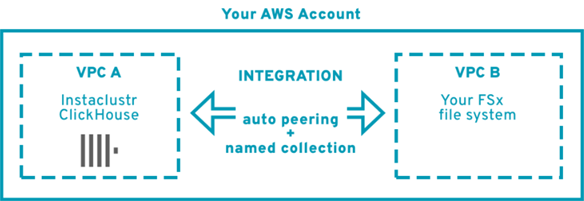
ClickHouse and Amazon FSx for ONTAP tutorial requirements
This ClickHouse tutorial covers the common scenario of connecting an Instaclustr-managed ClickHouse cluster to an FSx for ONTAP file system you already run yourself, in the same AWS account but a different VPC. Other topologies (Instaclustr-managed FSx for ONTAP, cross-account FSx for ONTAP, same-VPC setups) use the same integration flow and are covered in the documentation here.
- A NetApp Instaclustr-managed ClickHouse cluster provisioned in an AWS BYOC (Bring Your Own Cloud Account) provider account, with BYOC setup complete. A free trial works fine for this walkthrough.
- The AWS account hosting FSx for ONTAP must include IAM permissions for FSx for ONTAP operations (covered by the BYOC Setup Guide)
- A customer-managed FSx for ONTAP file system in the same AWS account, in a different VPC. The FSx for ONTAP-hosting account also needs to have gone through the Run in Your Own Account (RIYOA)/Bring Your Own Cloud (BYOC) setup process so the integration can automate the cross-VPC peering.
- The S3 details for that file system: FSx for ONTAP ID, VPC ID, SVM endpoint IP and DNS, S3 access key and secret, and (for HTTPS) the PEM-encoded root CA certificate for the S3 endpoint.
- Non-overlapping CIDR ranges between the ClickHouse cluster and the FSx for ONTAP file system. Overlapping CIDRs will prevent the integration from applying.
A sample Parquet file to query is nice to have. The classic NYC taxi trips dataset works well, but anything with a few columns will do.
Five steps to query Parquet on FSx for ONTAP with ClickHouse
Step 1 – Gather your ONTAP S3 setup details
Everything the integration form asks for lives on the FSx for ONTAP side, so pull it together before you open the console:
- FSx for ONTAP ID (e.g.,
fs-062dd71b4966d6000) and VPC ID where the file system lives - This is the documentation I used for
FSx ID:
![Getting started: Query Parquet on Amazon FSx for NetApp® ONTAP with ClickHouse® supporting diagram]()
- AWS region of the file system, and the provider account name as it appears in your Instaclustr account
- SVM endpoint IP address and fully qualified DNS name. The integration needs both, because the FSx for ONTAP S3 DNS name doesn’t resolve across VPCs on its own.
- S3 access key and secret for a user with access to the buckets you want to query
- PEM-encoded root CA certificate for the S3 endpoint (required when using HTTPS, which is the strongly recommended default)
Write these down or paste them into a secure note. You’ll enter them into the console in the next step.
Step 2 – Configure the integration in the console
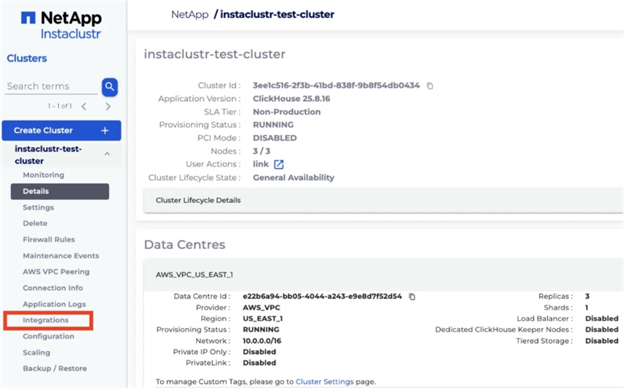
In the NetApp Instaclustr Console, open your ClickHouse cluster and click Integrations in the sidebar.
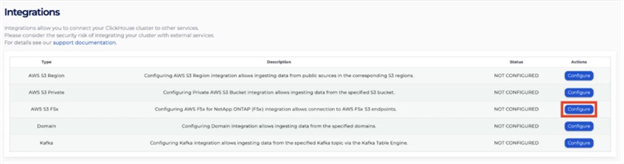
Find the AWS S3 FSx for ONTAP row and click Configure.
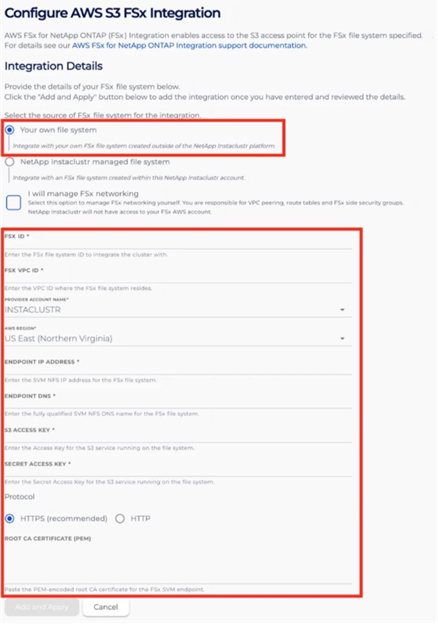
On the configuration page, select Your own file system (since this walkthrough uses an FSx for ONTAP file system you already run). Paste in the FSx for ONTAP details you gathered in Step 1. Leave Protocol on the default HTTPS (recommended) and paste your root CA certificate into the Root CA Certificate (PEM) field.
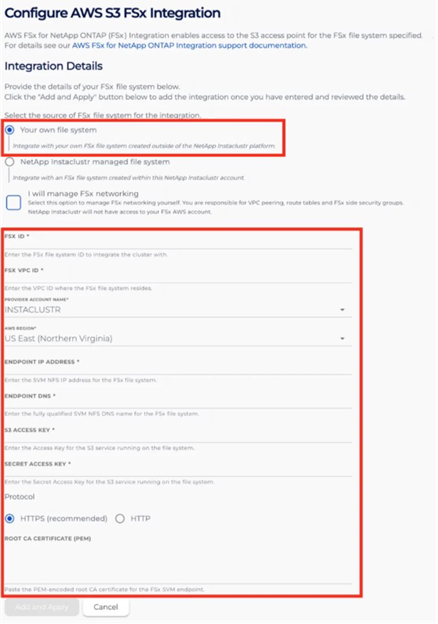
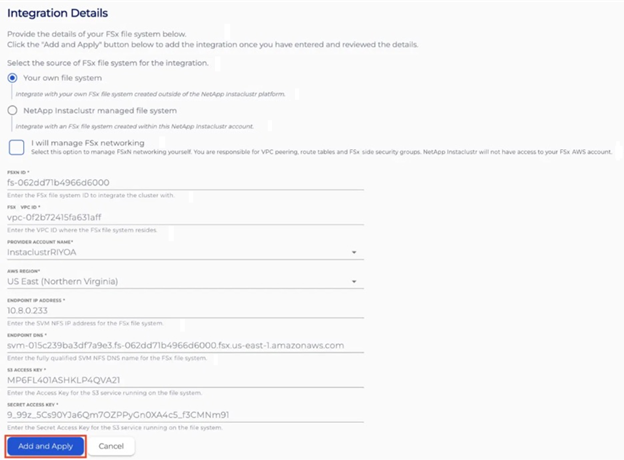
A couple of things to know before you click Add and Apply:
- The Protocol setting (HTTP vs. HTTPS) can’t be changed after the integration is created. To switch, you’ll need to delete and recreate the integration, or contact NetApp Instaclustr Support.
- The root CA certificate is supplied here, once, at integration time. It isn’t self-serviceable later. If the underlying certificate changes, plan to delete and recreate the integration.
Step 3 – Choose your networking mode
Leave it unchecked (the default) and the platform sets up the VPC peering and cluster-side security group for you when you submit the form. Your FSx for ONTAP account needs to have gone through the RIYOA/BYOC setup process, but from there the plumbing is handled behind the scenes. This is the easy path.
Check it and you take responsibility for the network side yourself: an active VPC peering connection between your FSx for ONTAP VPC and the cluster VPC, correct routing, and a security group attached to the FSx for ONTAP interfaces allowing inbound TCP 443 (or 80 for HTTP) from the ClickHouse cluster’s CIDR. NetApp Instaclustr won’t have access to your FSx for ONTAP AWS account in this mode. This is the path to take if you have organizational reasons to keep networking self-managed.
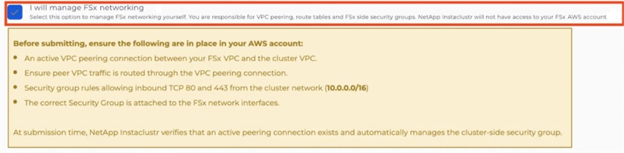
Either way, once the form is filled out, click Add and Apply. The Integrations page will show the AWS S3 FSx for ONTAP row as APPLYING while the platform provisions everything.

When it’s done, the row shows APPLIED, and a Named Collection appears with a name like fsx_fs_062dd71b4966d6000, the string you’ll reference from ClickHouse queries. Copy it.

Step 4 – Query Parquet from ONTAP S3 with ClickHouse
This is the payoff. Upload a Parquet file to a bucket on your FSx for ONTAP S3 server (any S3 client with an --endpoint-url override works, including the AWS CLI). Then open a clickhouse-client session against your Instaclustr cluster and run:
|
1 2 3 4 5 6 7 8 9 10 11 |
SELECT passenger_count, avg(trip_distance) AS avg_miles, count() AS trips FROM s3( <NAMED COLLECTION>, filename = '<S3 BUCKET NAME>/<FILE NAME>', format = 'Parquet' ) GROUP BY passenger_count ORDER BY passenger_count; |
NOTE: Replace with the collection name from Step 3, and / with the path to the Parquet file you uploaded.
That’s it. No table was created. No data was loaded. No credentials in the query. ClickHouse resolves the endpoint and credentials from the named collection the integration created for you, reads the Parquet metadata to understand the file, and can read only the columns required by the query. Parquet metadata can also help ClickHouse avoid reading data that doesn’t match the query.
Step 5 – Give the dataset a persistent ClickHouse table definition
Ad-hoc s3() calls are great for exploration. When you know you’ll hit the same dataset over and over, create a persistent table definition using the S3 engine. Again, referencing the named collection instead of hard-coding credentials:
|
1 2 3 4 5 |
CREATE TABLE trips_fsx ( passenger_count Nullable(Int64), trip_distance Float64 ) ENGINE = s3(<NAMED COLLECTION>, filename = '<S3 BUCKET NAME>/<FILE NAME>', format = 'Parquet'); |
NOTE: this example uses the NYC taxi dataset. Adjust the table name, columns, and types to match your Parquet file.
Now trips_fsx behaves like any other ClickHouse table for SELECT purposes: dashboards, BI tools, Grafana panels, whatever you point at it. The data still isn’t copied into ClickHouse. You’ve created a persistent table definition that points at the external Parquet file; every query still reads from FSx for ONTAP on demand.
What to watch out for
A few things that will save you a support ticket:
- Protocol and certificate are set once. HTTPS vs. HTTP, and the root CA you supply, are fixed at integration creation. If either needs to change, delete and recreate the integration.
- Non-overlapping CIDRs. The ClickHouse cluster VPC and the FSx VPC must use different CIDR ranges. Overlaps will cause the integration to fail on apply.
- If the integration shows FAILED. Delete it, double-check the FSx details (IDs, endpoint IP/DNS, keys, certificate), and try again. If it still fails, contact NetApp Instaclustr Support.
- Don’t touch AWS resources Instaclustr provisioned. If the platform created a VPC peering connection, security group, or other AWS resource on your behalf during integration, don’t modify it directly in the AWS Console. Changes made outside the Instaclustr platform can cause unexpected cluster issues.
- File layout matters. Avoid thousands of tiny files. For analytical workloads, reasonably large Parquet files generally give ClickHouse more useful work to parallelize than a pile of tiny objects. As a starting point, files in the roughly 128 MB to 1 GB range can be reasonable for many analytical workloads. The right size depends on your schema, compression, network, and query patterns.
- Partition your object paths. Organizing data into paths such as
year=2026/month=08/…can let ClickHouse select only the relevant objects when your query includes matching partition conditions.
Where this fits in the bigger picture
This post is the entry point. Once your ClickHouse cluster has an FSx for ONTAP integration wired up, there’s a natural progression from here:
- Start here (this post): Query Parquet directly from FSx for ONTAP with ClickHouse.
- Next: What changes when your data is managed as Apache Iceberg? You get ACID transactions, schema evolution, and time travel from the Iceberg table format, with the underlying data stored on ONTAP and queryable through ClickHouse’s
iceberg()function. - Then: How do you continuously land streaming data from Kafka onto FSx for ONTAP so ClickHouse can query it fresh, without a batch job in between?
- Finally: How do you protect and replicate the resulting analytics data using the same ONTAP tooling your storage team already runs?
Each of those is its own post. Links coming as we publish them.
Wrapping up
The old assumption was that “S3 analytics” meant “data in AWS S3.” It doesn’t. ClickHouse will happily query any S3-compatible endpoint, and FSx for ONTAP gives you one that sits on top of ONTAP storage your organization is likely already invested in.
Five steps. One copy of the data. Your existing NAS becomes your analytics lake.
Ready to try it? Spin up a free NetApp Instaclustr for managed ClickHouse trial, configure the FSx for ONTAP integration through the Integrations page, and query your own Parquet data directly from Amazon FSx for NetApp ONTAP.

