ClickHouse is designed for high-performance analytical workloads, routinely scanning large volumes of data and performing massive aggregations with exceptionally low latency. However, in real-world production environments, especially dashboards, reporting tools, and Business Intelligence (BI) workloads, the exact same queries are often executed repeatedly.
For instance, a dashboard might auto-refresh every 30 seconds, multiple concurrent users might open the identical report, or an application might repeatedly request the same aggregated metrics. In these scenarios, repeatedly re-computing the same result set can lead to unnecessary strain on CPU, memory, and I/O resources.
This is exactly where the ClickHouse query cache comes into play. It allows ClickHouse to compute a SELECT query once and serve subsequent executions directly from memory. By bypassing the most expensive execution stages for repeated identical requests, it drastically reduces query latency and frees up server resources for other queries and workloads.
What is query cache?
The query cache was introduced in ClickHouse version 23.1 as an experimental feature. Subsequent releases improved its stability and functionality, making it suitable for production analytical workloads from version 23.5 onwards. It stores the result of SELECT queries in memory. When the same query is executed again with Query Cache enabled, ClickHouse returns the cached result directly from memory, bypassing storage reads and expensive query execution stages.
Query workflow without and with query cache:
1. Query execution without query cache
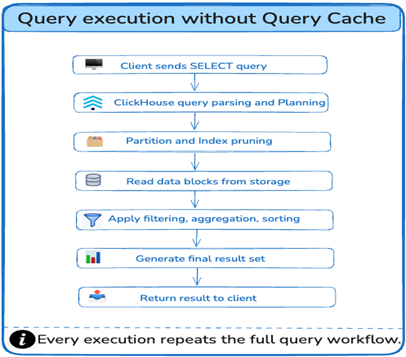
Without Query Cache, ClickHouse executes the full query workflow for every request, including query planning, data access, and result processing. Repeated execution of identical queries can therefore consume additional CPU, memory, and I/O resources.
2.Query execution with query cache
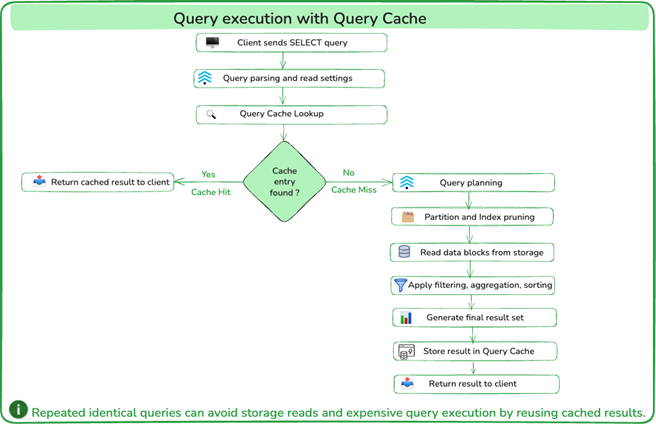
When Query Cache is enabled, ClickHouse first parses the incoming SELECT query and builds an Abstract Syntax Tree (AST), which is an internal representation of the query structure. ClickHouse then performs a Query Cache lookup to determine whether a valid cached result exists for that query.
If a valid cache entry is found, this is a cache hit. In this case, ClickHouse returns the cached result to the client and avoids expensive execution steps such as query planning, partition pruning, storage reads, filtering, aggregation, sorting, and final result generation.
If no matching cache entry exists, this is a cache miss. ClickHouse then continues with the normal query execution process, including query planning, partition and index pruning, data access, filtering, aggregation, and sorting. Once the result set is generated, it is stored in the Query Cache and returned to the client. Subsequent executions of the same query can then reuse the cached result until the cache entry expires.
How to enable Query Cache:
The query cache is not enabled by default. To use it, the use_query_cache setting must be enabled. This can be done at the query level, session level, or through a user/profile-level setting.
The recommended approach is to enable Query Cache selectively at the query level for workloads where repeated executions of identical queries are expected. Session-level or profile-level enablement can be useful for reporting and dashboard workloads but should be evaluated carefully to avoid unnecessary cache utilization.
- Enable at query level: To enable query cache for a specific
SELECTquery, add theSETTINGSclause at the end of the query:
1234SELECT count(), sum(salary)FROM employeesWHERE start_date >= '2026-01-01' AND department = 'HR'SETTINGS use_query_cache = 1;
This is the safest and most controlled approach because only this query is allowed to use the query cache. - Enable at session level: To enable query cache for all eligible
SELECTqueries in the current session, setuse_query_cachebefore running the queries:
1234SET use_query_cache = 1;-- All queries in this session will now use the cacheSELECT * FROM employees WHERE status = 'active';
This setting applies only to the current session. It is useful for testing or for specific workloads, but it should be used carefully because all eligible queries in that session may start using cached results. - Configure globally via User/Profile: Query Cache can also be enabled through a user profile in
users.xml. This makes it active by default for users assigned to that profile. Any eligibleSELECTquery executed by users assigned to this profile can utilise Query Cache without requiringSETTINGS use_query_cache=1in individual queries
12345678<clickhouse><profiles><default><use_query_cache>1</use_query_cache><query_cache_ttl>300</query_cache_ttl></default></profiles></clickhouse>This approach should be used carefully because it may cause many queries from that user/profile to use query cache.
Configure Query Cache Capacity
You should also size the cache at the server level in config.xml. Unlike the previous options, these settings do not enable query cache usage. They define the amount of memory available to the query cache and the limits for cached entries.
|
1 2 3 4 5 6 7 8 |
<clickhouse> <query_cache> <max_size_in_bytes>1073741824</max_size_in_bytes> <max_entries>1024</max_entries> <max_entry_size_in_bytes>1048576</max_entry_size_in_bytes> <max_entry_size_in_rows>30000000</max_entry_size_in_rows> </query_cache> </clickhouse> |
Important: Query Cache is local to each ClickHouse server process. In a distributed cluster, cache entries are not synchronized or shared between nodes. As a result, the same query executed on different servers may result in different cache hit rates. Ensure cache sizing and profile settings are applied consistently across all nodes where Query Cache is expected to be used.
Key Query Cache Settings and Server-Level Capacity Parameters
| Name | Default Value | Description |
|---|---|---|
use_query_cache |
0 | Enables or disables Query Cache for a query, session, or profile. Query Cache is only used when this setting is enabled. |
query_cache_ttl |
60 seconds | Defines how long a cached query result remains valid. After the TTL expires, the cached result cannot be reused and the query must be executed again. |
query_cache_share_between_users |
0 | Allows cached query results to be shared between different users when enabled. Use with caution, as cached entries are not shared by default for security considerations. |
query_cache_min_query_duration |
0 | Cache only query results for queries that run longer than the configured duration. Useful for preventing short-running or inexpensive queries from occupying cache space. |
query_cache_min_query_runs |
0 | Cache query results only after the same query has been executed a specified number of times. Useful for preventing one-off or rarely executed queries from occupying cache space. |
enable_reads_from_query_cache |
1 | It controls whether ClickHouse is allowed to read existing cached results from the Query Cache. When it is set to 0, ClickHouse will not read from the Query Cache, even if a valid cached result already exists. The query will be executed normally. |
enable_writes_to_query_cache |
1 | Controls whether query results are stored in the Query Cache. Setting it to 0 allows cache reads but prevents new results from being cached. |
max_size_in_bytes (query_cache) |
1073741824 | Maximum amount of memory that the Query Cache can consume at the server level. |
max_entries (query_cache) |
1024 | Maximum number of cached SELECT query results that can be stored in the Query Cache. |
max_entry_size_in_bytes (query_cache) |
1048576 | Maximum size of an individual SELECT query result. Larger result sets will not be cached. |
max_entry_size_in_rows (query_cache) |
30,000,000 | Maximum number of rows allowed in a single cached query result. Results exceeding this limit will not be cached. |
Important: Not all query cache settings are configured at the same level. Query Cache behaviour settings (such as use_query_cache and query_cache_ttl) can be configured at the query, session, or profile level. In contrast, query cache capacity parameters (such as max_size_in_bytes and max_entries) are server-level settings configured in config.xml.
Monitoring Query Cache
Effective monitoring helps ensure that query cache delivers the expected performance benefits while making efficient use of available resources.
- Check current query cache entries:
12SELECT query, result_size, stale, shared, compressed, expires_at,key_hash FROM system.query_cache ORDER BY expires_at DESC;This helps identify which queries are stored in the cache and how much space they consumed.
Outcome review: Review the
result_sizecolumn to understand how much cache space each cached query consumes. A large number of entries with very small result sizes may indicate that cache space is being used by queries that provide limited caching benefit. Conversely, a small number of very large entries may consume a disproportionate amount of cache memory, reducing cache effectiveness for other queries.The
expires_atand stale columns should also be reviewed to understand cache freshness and utilisation. If entries expire before they are reused, the TTL may be too short, or the workload may not be a good fit for query cache. On the other hand, if entries remain valid for an extended period, organisations should confirm that the associated data freshness trade-off is acceptable. - Check Query Cache Size:
12345SELECTmetric,valueFROM system.metricsWHERE metric IN ('QueryCacheEntries', 'QueryCacheBytes');QueryCacheEntries: Displays the number of current cache entries.QueryCacheBytes: Displays the current amount of memory used by the query cache.
Note: ClickHouse exposes these metrics in system.metrics.
Outcome review: These metrics help determine whether the allocated cache size is being utilised effectively. Consistently low values may indicate that Query Cache is underutilized, while consistently high memory usage combined with low cache hit rates may suggest that cache entries are being evicted before they can provide value. Monitoring these metrics over time helps identify appropriate cache sizing for your workload.
- Check Cache Hits and Misses:
12345SELECTevent,valueFROM system.eventsWHERE event IN ('QueryCacheHits', 'QueryCacheMisses');This gives a high-level view of whether queries are being served from cache or missing the cache.
Outcome review: A growing number of query cache hits generally indicates that workloads are benefiting from cached results. If cache misses significantly outnumber hits over time, consider reviewing query patterns, cache TTL settings, and whether the workload contains enough repeated queries to benefit from query cache.
- Check per-query cache behavior using
system.query_log:
12345678910111213SELECTevent_time,query,result_rows,query_cache_usage,ProfileEvents['QueryCacheHits'] AS cache_hits,ProfileEvents['QueryCacheMisses'] AS cache_missesFROM system.query_logWHERE type = 'QueryFinish'AND event_time >= now() - INTERVAL 1 HOURAND query_cache_usage IN ('Read', 'Write')ORDER BY event_time DESCLIMIT 10;This query shows recent queries that interacted with the Query Cache.
query_cache_usage: Indicates whether the result was read from the cache (Read) or written into the cache (Write).ProfileEvents: Provides additional cache hit/miss counters for each completed query.
Outcome review: Using
query_cache_usage IN ('Read', 'Write')limits the output to queries that interacted with the query cache, making it easier to identify which queries are benefiting from cached results and which queries are generating new cache entries. This information can help validate cache effectiveness and identify workloads that benefit most from query cache. Thecache_hitsandcache_missesvalues provide additional insight into cache effectiveness for each completed query. Users can use this information to identify which dashboards, reports, or analytical workloads benefit most from query cache and where cache settings, TTL, or query patterns may need adjustment.
Conclusion
ClickHouse query cache is a valuable feature for improving the performance of repeated SELECT queries by reusing previously computed results. When configured appropriately, it can significantly reduce query execution overhead, lower resource consumption, and improve response times for repetitive queries.
However, query cache should be used intentionally. It is best suited for dashboards, BI reports, recurring analytical queries, and workloads where the same queries are executed repeatedly. It is not a substitute for good schema design, efficient queries, appropriate partitioning, or effective primary-key filtering.
Key Takeaways
- Query Cache usage must be enabled through
use_query_cacheat the query, session, or profile level. - Cache capacity and limits are configured separately using the
<query_cache>section in the server configuration (config.xml). - Settings such as
query_cache_min_query_durationandquery_cache_min_query_runscan help prevent short-running or one-off queries from occupying cache space. - Monitoring cache hits, misses, memory consumption, and per-query cache behaviour is essential to confirm that Query Cache is delivering measurable benefits for your workload.
Combined with the operational expertise and managed platform capabilities of NetApp Instaclustr for ClickHouse, organisations can confidently optimise performance, improve scalability, and focus on deriving greater value from their data.
For more information, contact the NetApp Instaclustr for ClickHouse experts or start a free Instaclustr trial.
Frequently Asked Questions
-
Is query cache enabled by default? +
No, query cache is not enabled by default. It is only used when
use_query_cacheis enabled at the query, session, or profile level. Please note that configuring the<query_cache>section only defines cache capacity and limits; it does not automatically enable query cache usage. -
Can query cache improve all queries? +
No, query cache provides the greatest benefit for expensive queries that are executed repeatedly. One-off queries or highly dynamic workloads may see little or no benefit.
-
What happens when the underlying data changes? +
Cached results remain valid until their configured TTL expires. This is an important point: Query Cache is transactionally inconsistent. It does not automatically invalidate cached results when data is inserted, updated, or deleted. Instead, cached entries remain available until their TTL expires. If the same query is executed before the TTL expires, ClickHouse may return the cached result instead of recomputing it.
-
Is query cache shared across ClickHouse cluster nodes? +
No, query cache is local to each ClickHouse server process. In a multi-node cluster, each server maintains its own independent query cache.
-
Should I enable query cache globally? +
Not necessarily. The safest approach is usually to enable query cache selectively for queries or workloads that are known to execute repeatedly. Global enablement should be evaluated carefully to avoid caching low-value or infrequently executed queries.
-
Does query cache replace good schema design and query optimization? +
No, query cache should be viewed as a performance optimisation layer, not a substitute for proper schema design, efficient queries, appropriate partitioning, or effective primary-key filtering. The best results are achieved when Query Cache is combined with well-designed tables and queries.
-
Are queries containing now(), today(), or other non-deterministic functions cached? +
Not by default. Query Cache does not cache the results of queries containing non-deterministic functions such as
now(),today(),yesterday(). If required, this behaviour can be overridden using thequery_cache_nondeterministic_function_handlingsetting, which allows the results of such queries to be cached.