Efficient data ingestion is a pivotal component in modern data management, particularly when working with tools like OpenSearch and Kafka. The new OpenSearch pull-based ingestion feature, introduced in version 3.0, promises to simplify data workflows while offering greater flexibility and control. Unlike the traditional push-based approach, this experimental feature allows OpenSearch to connect directly to external data sources, such as Apache Kafka, and pull records into indices seamlessly.
Experimental features in OpenSearch 3.0 are still in development and not yet stable enough for production use. Although we plan to release this feature on the NetApp Instaclustr platform once it’s production-ready, we were eager to explore it during its experimental phase.
Historically OpenSearch architecture requires use of a separate ‘connector’ application to take data from external sources and push the data into OpenSearch. Common tools for this include DataPrepper, fluentd/fluentbit, and Logstash. The anticipated experimental pull-based ingestion feature is designed to allow OpenSearch to connect directly to external data sources (currently Apache Kafka and Amazon Kinesis) and pull records from them, automatically ingesting them as documents in an index. Ingesting documents into OpenSearch from other data sources is a common OpenSearch use case, and we believe this feature has the potential to simplify data ingestion greatly, designed to offer benefits like:
- Reducing architectural complexity by removing the need to run middleware (e.g. DataPrepper) just to take data from one location and push it into OpenSearch.
- Reducing infrastructure spend by consolidating the ingesting work onto the OpenSearch cluster, so you no longer need to do this on dedicated infrastructure (though you may need to adjust the sizing of your cluster to accommodate the ingest workload).
- Exactly-once semantics ensures each document is only ingested once, preventing documents being missed or duplicated.
- Automatic backpressure handling, OpenSearch controls how fast documents are ingested and will throttle ingestion to ensure it does not overload itself.
While this experimental feature is not yet available on the NetApp Instaclustr Managed Platform, we will be keeping a close eye on its development. If you are interested in trying out this new feature, please reach out to our Support team.
In this blog post, we get a hands-on look at the new experimental feature by configuring OpenSearch to ingest from a NetApp Instaclustr for Apache Kafka cluster. We run an example use case where we demonstrate pull-based ingestion to ingest timeseries data stored in a Kafka cluster into an OpenSearch cluster, where OpenSearch can easily analyze the data. Our trial is setup as an example of IT operational monitoring to visualize CPU and memory usage of the Kafka cluster. But keep in mind, this solution is available for other uses of OpenSearch Discovery Dashboard for illustrative purposes, in banking and finance to monitor financial transactions, shipping and transport to monitor log/logistics metrics, meteorology for monitoring and analyzing weather data and more.
Infrastructure configuration
- A running OpenSearch 3.0 cluster (for our trial we used OpenSearch version 3.0.0) with:
- The
ingestion-kafkaplugin installed - Remote-backed storage and segment replication enabled
- The
- A running Kafka cluster (for this blog we used Kafka version 3.9.0) with a plaintext (unauthenticated) listener for OpenSearch to use and a topic for OpenSearch to ingest from.
- Unfortunately, at the time of writing there was a known issue in the
ingestion-kafkaplugin that meant the plugin only worked with plaintext listeners instead of the standard SASL authentication we normally require for Kafka. In general, SASL authentication should be used where possible, and if you are using plaintext listeners, you should limit connectivity to the private network (e.g. using VPC Peering) to avoid unwanted connections to your cluster.
- Unfortunately, at the time of writing there was a known issue in the
- Network connectivity from the OpenSearch cluster to the Kafka cluster.
Configuring the OpenSearch cluster
To get the OpenSearch cluster ready to use pull-based ingestion, we performed the following additional configuration:
- Installed the
ingestion-kafkaplugin using theopensearch-plugintool, e.g.:
1bin/opensearch-plugin install ingestion-kafka - Enabled remote-backed storage and segment replication by adding the following settings to the
opensearch.ymlconfiguration file:
12345678node.attr.remote_store.repository.remote-repository.type: "s3"node.attr.remote_store.repository.remote-repository.settings.bucket: "<s3 bucket name>"node.attr.remote_store.repository.remote-repository.settings.base_path: "<s3 bucket base path>"node.attr.remote_store.repository.remote-repository.settings.region: "<s3 bucket region>"node.attr.remote_store.segment.repository: "remote-repository"node.attr.remote_store.translog.repository: "remote-repository"node.attr.remote_store.state.enabled: truenode.attr.remote_store.state.repository: "remote-repository"
Setting up the Kafka cluster
To easily create a running Kafka cluster, we used the NetApp Instaclustr Console to create a private network Kafka cluster on AWS in just a few clicks. Once the cluster was running, we used the console to create a VPC Peering connection to the VPC where the OpenSearch 3 cluster was running and update the cluster’s firewall to allow the OpenSearch cluster’s IP addresses to connect.
Next, we used the kafka-topics.sh tool to create a “metrics” topic with three partitions that the OpenSearch cluster will ingest from:
|
1 |
./kafka-topics.sh --bootstrap-server <kafka node IP>:9092 --create --topic metrics --partitions 3 |
Note: in the current experimental version of pull-based ingestion, the topic’s partition count must match the number of shards of the destination OpenSearch index.
Because the plugin can only connect to a plaintext Kafka listener, we must update the cluster’s ACLs to allow an anonymous user to use the newly created topic:
|
1 |
./kafka-acls.sh --bootstrap-server <kafka node IP>:9092 --add --allow-principal User:ANONYMOUS --topic “metrics” --operation ALL |
This ACL configuration was only required because at the time of writing the plugin did not support SASL authentication. It is not recommended to use plaintext listeners and anonymous users like this in a production environment.
Creating source data from a Kafka producer
For this blog we chose to demonstrate a use case involving timeseries metrics data stored in a Kafka cluster. For simplicity’s sake we used a basic Java application as a Kafka producer that generated dummy data every minute and pushed it into the Kafka cluster’s “metrics” topic.
The data format used by the ingestion-kafka plugin expects the Kafka records to be a string representing a JSON object with the desired OpenSearch document under a _source key (the message format is described in full here). The dummy data we generated had the following properties:
@timestamp: a timestamp representing when the metric value was recorded, formatted according to the OpenSearchstrict_date_time_no_millisformat (e.g. “2025-06-25T09:10:00+10:00”)cluster_id: a UUID representing the cluster where the metric value came from (e.g. “89084ed8-d422-4a3f-8e90-42c524dbeefd”)node_id: a UUID representing the specific node in the cluster where the metric value came from (e.g. “940ec9c9-3c16-414e-a083-93f36df1ecaa”)metric_name: a String representing which metric the record relates to, in this case we used eithermem_usage(percentage of available memory used) orcpu_usage(percentage of CPU used)metric_value: a double (double-precision floating-point number) representing the value of the metric (e.g. 14.5)
An example of a record stored in the Kafka topic is:
|
1 |
{"_source":{"@timestamp":"2025-06-25T09:10:00+10:00","cluster_id":"89084ed8-d422-4a3f-8e90-42c524dbeefd","node_id":"940ec9c9-3c16-414e-a083-93f36df1ecaa","metric_name":"mem_usage","metric_value":12.5}} |
Creating the pull-based ingestion index in OpenSearch
With all the pre-requisite setup out of the way, all that remained was to create the pull-based ingestion index. Thankfully, creating pull-based ingestion indexes is the same as creating any other index, just with some additional configuration. We created a kafka-metrics index, configured to pull data from the Kafka cluster’s metrics topic with the following request:
|
1 2 3 4 5 6 7 8 9 10 11 12 13 14 15 16 17 18 19 20 21 22 23 24 25 26 27 28 29 30 31 32 33 34 35 36 37 |
PUT /kafka-metrics { "settings": { "ingestion_source": { "type": "kafka", "pointer.init.reset": "earliest", "param": { "topic": "metrics", "bootstrap_servers": "<kafka node IP 1>:9092,<kafka node IP 2>:9092,<kafka node IP 3>:9092" } }, "index.number_of_shards": 3, "index.number_of_replicas": 2, "index": { "replication.type": "SEGMENT" } }, "mappings": { "properties": { "@timestamp": { "type": "date" }, "cluster_id": { "type": "keyword" }, "node_id": { "type": "keyword" }, "metric_name": { "type": "keyword" }, "metric_value": { "type": "double" } } } } |
To ensure OpenSearch ingested all existing records in the topic as well as future ones, we set pointer.init.reset to “earliest”. For information on all possible configuration options, see the OpenSearch pull-based ingestion documentation.
And just like that, we had a new index that was automatically populated with records from the Kafka topic, without needing to provision extra infrastructure and install and configure another piece of software!
To verify that the Kafka records were being ingested by OpenSearch we issued a simple search request for the index, GET /kafka-metrics/_search?size=3, which showed documents were being ingested as expected:
|
1 2 3 4 5 6 7 8 9 10 11 12 13 14 15 16 17 18 19 20 21 22 23 24 25 26 27 28 29 30 31 32 33 34 35 36 37 38 39 40 41 42 43 44 45 46 47 48 49 50 51 52 53 54 55 |
{ "took": 47, "timed_out": false, "_shards": { "total": 3, "successful": 3, "skipped": 0, "failed": 0 }, "hits": { "total": { "value": 10000, "relation": "gte" }, "max_score": 1, "hits": [ { "_index": "kafka-metrics", "_id": "ijKQvpcBhUiAeO3JQuXu", "_score": 1, "_source": { "cluster_id": "89084ed8-d422-4a3f-8e90-42c524dbeefd", "@timestamp": "2025-06-26T17:45:09+10:00", "metric_name": "mem_usage", "metric_value": 31.37, "node_id": "71ee9607-ff66-4b60-b157-92f7c16134d0" } }, { "_index": "kafka-metrics", "_id": "izKQvpcBhUiAeO3JQuXu", "_score": 1, "_source": { "cluster_id": "89084ed8-d422-4a3f-8e90-42c524dbeefd", "@timestamp": "2025-06-26T18:17:15+10:00", "metric_name": "cpu_usage", "metric_value": 35.76, "node_id": "940ec9c9-3c16-414e-a083-93f36df1ecaa" } }, { "_index": "kafka-metrics", "_id": "jDKQvpcBhUiAeO3JQuXu", "_score": 1, "_source": { "cluster_id": "89084ed8-d422-4a3f-8e90-42c524dbeefd", "@timestamp": "2025-06-26T18:17:15+10:00", "metric_name": "mem_usage", "metric_value": 13.34, "node_id": "940ec9c9-3c16-414e-a083-93f36df1ecaa" } } ] } } |
After leaving our Kafka producer that was generating dummy data running for a while, we could also observe the data regularly being ingested using the OpenSearch Dashboards Discover function:
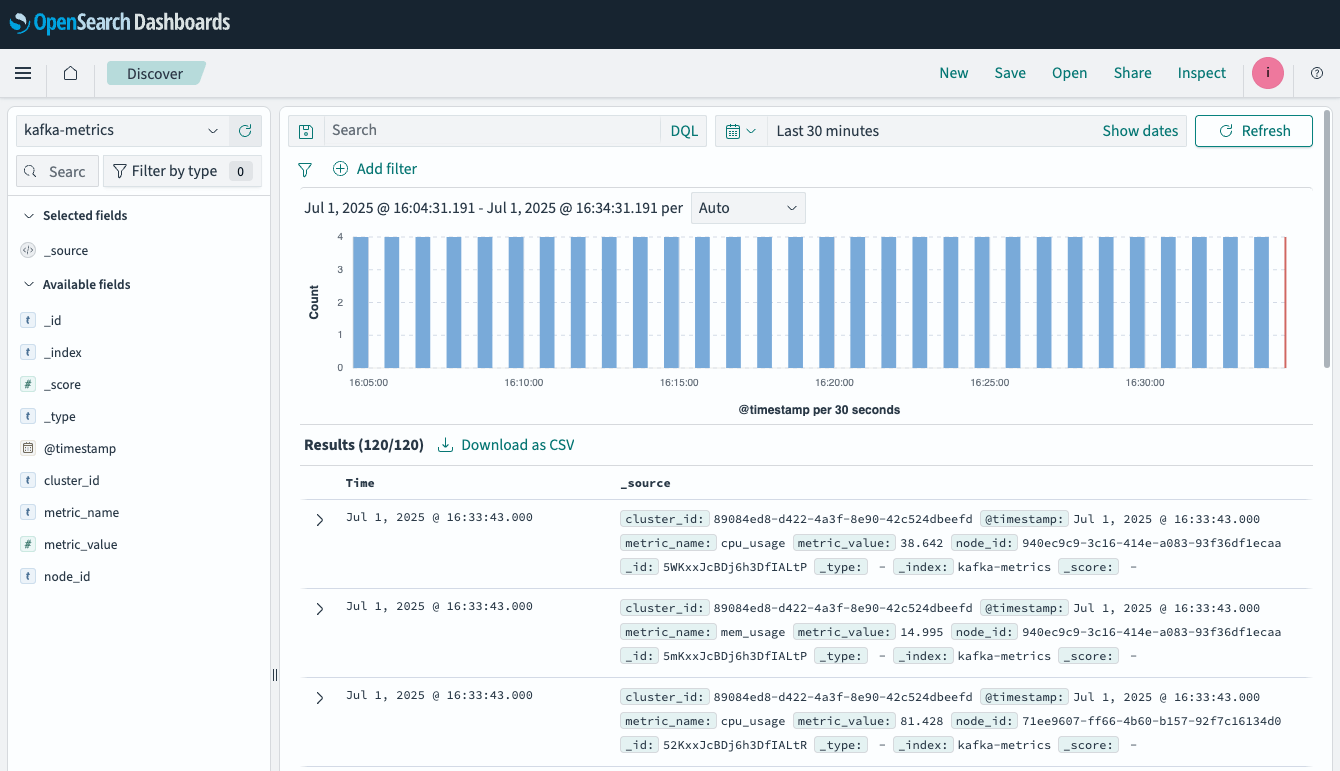
Using the ingested data in OpenSearch Dashboards
With the metrics data now available in OpenSearch, we were free to use its powerful features to gain more insight into the data by easily searching, analyzing, and visualizing it. As an example, we created this simple visualization to show the minimum, maximum, and average metric values for each metric from a specific Kafka node, averaged every five minutes:
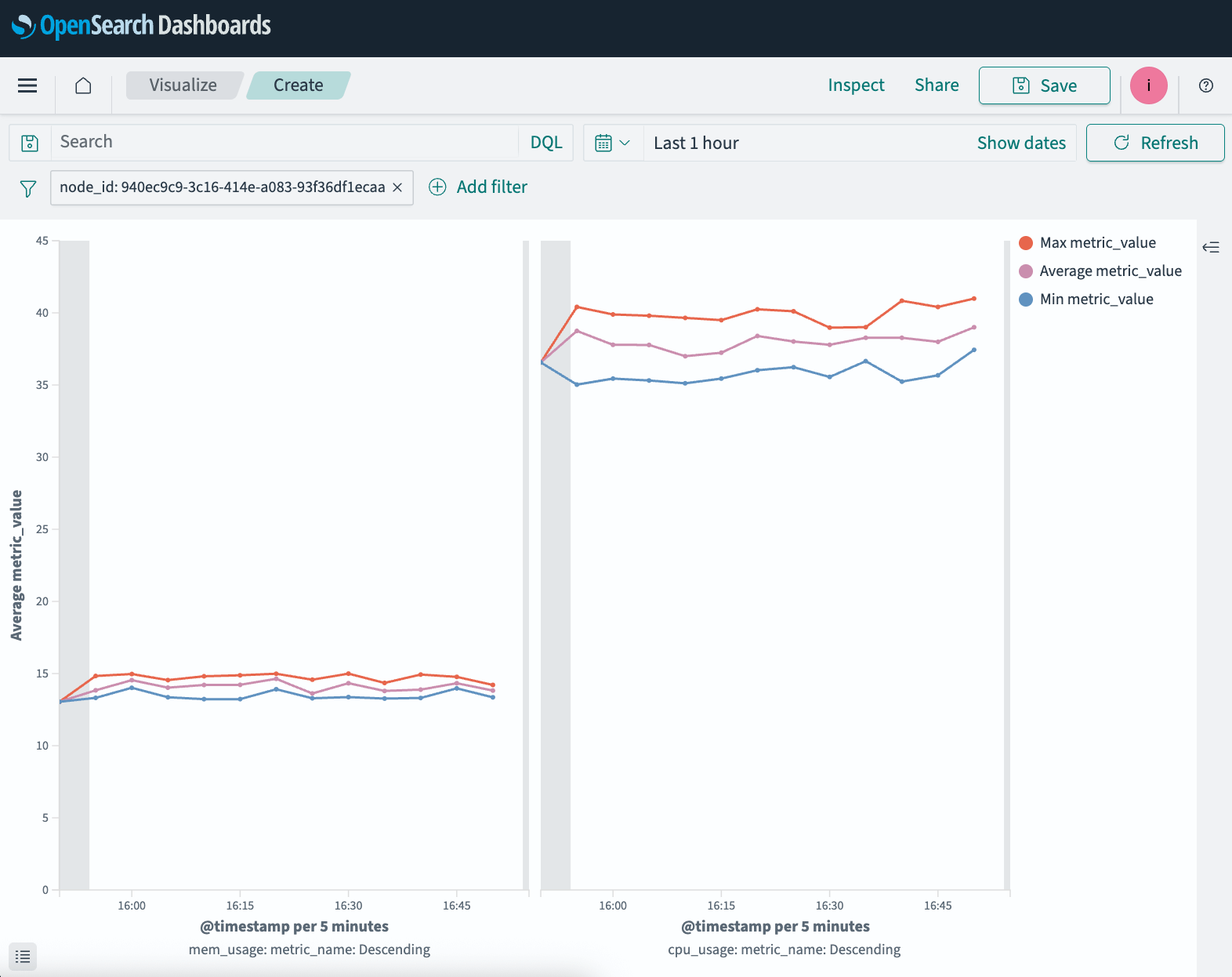
In this visualization, the left side shows the aggregations calculated for memory usage metrics, while the right side shows CPU usage.
To avoid having to manually generate these aggregations every time we wanted to view them, we created a scheduled Index Transform job to automatically perform the aggregations and store the results in a new kafka-metrics-aggregated index. The transform job runs continuously and populates the kafka-metrics-aggregated index with documents containing aggregated metric values for each node and metric type, e.g.:
|
1 2 3 4 5 6 7 8 9 10 11 12 13 14 15 16 17 18 19 20 21 22 23 24 25 26 27 28 29 30 31 32 33 34 35 36 37 38 39 40 41 42 43 44 45 46 47 48 49 50 51 52 53 54 55 56 57 58 59 60 61 62 63 64 65 66 67 |
{ "took": 3, "timed_out": false, "_shards": { "total": 1, "successful": 1, "skipped": 0, "failed": 0 }, "hits": { "total": { "value": 12, "relation": "eq" }, "max_score": 1, "hits": [ { "_index": "kafka-metrics-aggregated", "_id": "ijvCoGZdxlrCCILA-YR6yw", "_score": 1, "_source": { "transform._id": "kafka-metrics-aggregated", "_doc_count": 5, "transform._doc_count": 5, "node_id_terms": "71ee9607-ff66-4b60-b157-92f7c16134d0", "metric_name_terms": "cpu_usage", "@timestamp _date_histogram_5_m_fixed": 1750806000000, "avg_metric_value": 69.66, "max_metric_value": 93.1, "min_metric_value": 34.1 } }, { "_index": "kafka-metrics-aggregated", "_id": "8Z8Bzh92TlycVixKa8SRhQ", "_score": 1, "_source": { "transform._id": "kafka-metrics-aggregated", "_doc_count": 5, "transform._doc_count": 5, "node_id_terms": "71ee9607-ff66-4b60-b157-92f7c16134d0", "metric_name_terms": "cpu_usage", "@timestamp _date_histogram_5_m_fixed": 1750806300000, "avg_metric_value": 83.42, "max_metric_value": 92.4, "min_metric_value": 74.4 } }, { "_index": "kafka-metrics-aggregated", "_id": "Ee0DoUQtstcJJpfsTXCYFw", "_score": 1, "_source": { "transform._id": "kafka-metrics-aggregated", "_doc_count": 1, "transform._doc_count": 1, "node_id_terms": "71ee9607-ff66-4b60-b157-92f7c16134d0", "metric_name_terms": "cpu_usage", "@timestamp _date_histogram_5_m_fixed": 1750806600000, "avg_metric_value": 76.7, "max_metric_value": 76.7, "min_metric_value": 76.7 } } ] } } |
Conclusion
Based on our experience getting hands-on with OpenSearch’s experimental pull-based ingestion feature, we were very impressed. Even in its current state, it was easy to get up and running and worked as we expected, making connecting OpenSearch and Kafka as simple as a single POST request. We are already thinking about potential for using this feature for internal applications to simplify data flows between our OpenSearch and Kafka clusters, which would allow us to remove infrastructure and reduce maintenance overheads. We will be closely following the feature’s development and look forward to announcing full Instaclustr Platform support as it moves to become a stable feature.
If you are interested in trying out the OpenSearch pull-based ingestion feature in its current experimental state, reach out to our Support team to discuss your requirements further.
SAFE HARBOR STATEMENT: Any unreleased services or features referenced in this blog are not currently available and may not be made generally available on time or at all, as may be determined in NetApp’s sole discretion. Any such referenced services or features do not represent promises to deliver, commitments, or obligations of NetApp and may not be incorporated into any contract. Customers should make their purchase decisions based upon services and features that are currently generally available.

