Introduction
In today’s cloud-native landscape, organizations routinely manage dozens or even hundreds of clusters distributed across multiple cloud providers. This scale brings unprecedented flexibility and resilience, but it also introduces significant operational complexity. Without proper organization and metadata management, such as consistently applying tags and labels, even straightforward tasks—such as identifying cluster ownership, isolating environments, or understanding cost exposure—can become time-consuming and error prone.
In the past, managing tags and labels across cloud resources has been a manual and fragmented process. When running clusters across different cloud providers, teams often had to navigate multiple cloud provider consoles (AWS, Azure, GCP) to apply tags individually to each resource or rely on support tickets to request changes. This approach not only slowed down operations but also introduced inconsistencies, such as missing tags on some resources, or outdated metadata due to manual oversight or delayed updates. As infrastructure scales, these inefficiencies compound exponentially.
What is needed is immediate, self-service control over metadata management; A way to organize, categorize, and maintain consistency of metadata across all clusters, without dependencies on manual processes or support interventions. NetApp Instaclustr’s Self-Service Tag Management addresses these challenges by enabling users to centrally manage tags for all clusters, streamlining resource identification, automation, and compliance.
In this blog, we’ll explore what tags are and why they matter, how tagging works on the Instaclustr Platform, and what you can do with tags across the Console, API, and Terraform. We’ll then walk through a practical example showing how a multi-tenant SaaS platform can use tags to organize and manage its infrastructure at scale, before looking at advanced governance options for customers running in their own cloud accounts.
What tags are—and why they matter
At their core, tags are key-value pairs that enable you to categorize and label your clusters in meaningful ways. Think of them as flexible metadata that travels with your resources, providing context that goes far beyond a simple cluster name. Tags play a crucial role across three fundamental operational areas:
- Organizing cloud resources
- Automation
- Reporting
Benefits
Self-Service Tag Management gives you immediate, centralized control over how clusters are organized and categorized through tags. By enabling direct management of tags across all your Instaclustr clusters, you can streamline resource identification, automate operational workflows, and maintain consistent metadata—without manual overhead or support tickets.
- Reduce support dependencies: Minimize waiting for tickets
- Multi-interface flexibility: Console, API, or Terraform—your choice
- Cloud-native integration: Tags propagate to AWS, Azure, and GCP resources
- Enhanced automation: Integrate tagging into CI/CD pipelines
- Improved visibility: Filter and search clusters through tags instantly
- Supports reporting: Maintain consistent metadata for audits and reporting
Native cloud integration
One of the most powerful aspects of Instaclustr’s tag management feature is its seamless integration with native cloud provider tagging and labeling systems. When you apply tags to an Instaclustr cluster, those tags are automatically propagated to the corresponding tagging or labelling system in your chosen cloud provider (when using Bring Your Own Cloud deployment model)—whether AWS, Azure, or GCP. This means your tags are visible and manageable directly within your cloud provider’s console and APIs, ensuring unified resource management across your entire cloud estate.
This native integration helps ensure strong consistency between what you see in the Instaclustr Console and what exists in your cloud provider’s environment, reducing the need for manual reconciliation required, and minimizing risk of metadata drift.
How tagging works on Instaclustr
It is important to understand that tag behavior differs depending on your chosen deployment model on the NetApp Instaclustr Platform.
Tagging behavior—RIIA vs. BYOC
Clusters deployed using the Bring Your Own Cloud (BYOC) model
This model offers complete flexibility. Clusters are created within the customer’s own cloud account, and tags can be created, updated, or deleted at any point in the cluster’s lifecycle. This enables organizations to adapt tagging to changing business needs, evolving compliance requirements, or shifting operational priorities. Because tags propagate to native cloud resources in your own account, BYOC deployments unlock the full value of tag management—including cost allocation, cloud-native filtering, and policy enforcement.
Clusters deployed using the Run in Instaclustr Account (RIIA) model
In this model, clusters are provisioned directly within Instaclustr’s managed cloud accounts. Tags are applied during the initial cluster creation phase and remain immutable throughout the cluster’s lifecycle.
Account-level tags
Account-level tags let you define a standard set of tags at the account level that act as defaults for every new cluster provisioned under that account. Think of them as a tagging template— rather than manually specifying the same tags every time you create a cluster, you define them once at the account level and they are automatically applied to new clusters at creation time.
This is particularly valuable for teams managing many clusters, where consistency matters. If your organization requires every cluster to carry a CostCenter, Environment, or Compliance tag, for example, defining these at the account level ensures they’re present from the start—without relying on individual users to remember to add them.
By establishing account-level tag defaults, you create a baseline of consistent metadata across your infrastructure while still allowing per-cluster customization when needed.
Default platform tags vs. customer-defined tags
The Instaclustr Platform automatically applies a set of platform tags to every cloud resource it provisions. These include identifiers such as the account, cluster name, data center, region, and node—providing Instaclustr with the metadata it needs to manage your infrastructure. In BYOC deployments, these tags are visible in your cloud provider’s console alongside your own tags.
Customer-defined tags are the tags you create and manage yourself—either at the account level (as defaults) or per data center when creating or updating a cluster. These coexist alongside platform tags on your cloud resources, but the two are kept separate: platform tag key names are reserved and cannot be used for customer-defined tags, ensuring there are no conflicts.
| Provider | Max customer tags | Key length | Value length |
| AWS | 35 | 128 chars | 256 chars |
| Azure | 35 | 128 chars | 256 chars |
| GCP | 49 | 64 chars | 63 chars |
For full details see the Self-Service Tag Management documentation.
What you can do with tags on the Instaclustr Platform
Searching and filtering by tags in the Instaclustr Console
As your cluster estate grows, being able to quickly locate the right cluster becomes essential. The Instaclustr Console includes tag-aware search and filtering, accessible directly from the cluster navigation bar or through the Advanced Search dialog.
You can search for clusters using tags in three ways:
- By key and value: Find clusters where a specific tag has a specific value. For example, searching for Environment:Production returns only clusters tagged with that exact combination.
- By key only: Find all clusters that carry a particular tag key, regardless of its value. Useful for verifying that a tag like CostCenter has been applied consistently across your estate.
- By value only: Find all clusters where any tag matches a particular value. For example, searching for Acme_Technologies would surface clusters whether that value appears under Customer, Owner, or any other tag key.
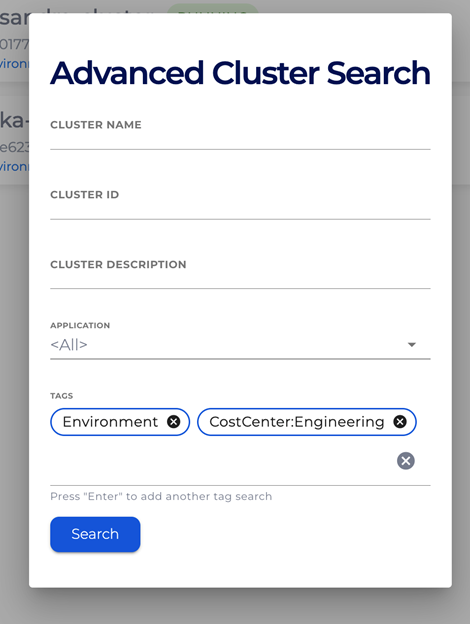
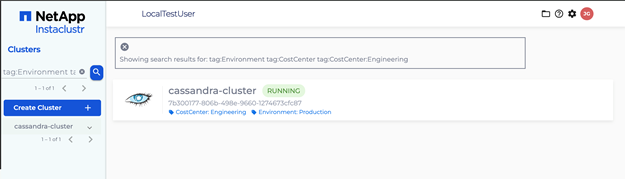
Tag search can be combined with other filters such as cluster name, cluster ID, description, and application type, allowing you to narrow results precisely. The Advanced Search dialog provides tag autocompletion based on keys already in use across your account, while the free-text search bar accepts tag queries directly for quick lookups. When results are displayed, matching tags are highlighted on each cluster card, giving you immediate visual confirmation of why a cluster appeared in your results.
Searching for clusters using tags:
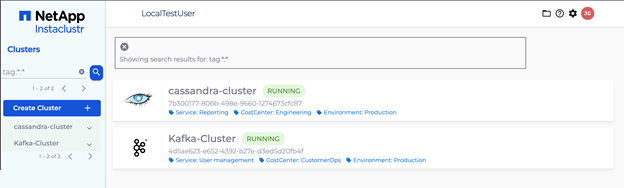
Example: Searching by tags where the tags are Environment and CostCenter
Managing tags on running clusters
For BYOC clusters, you can add, update, and delete tags on running clusters at any time—no need to recreate or reprovision. This means your tagging can evolve alongside your business: as customers onboard, compliance requirements change, or teams restructure, your metadata stays current.
Tag changes are applied asynchronously—the platform processes them as operations against your cloud provider, and the Console reflects an updating state until complete.
Note for existing clusters: All new clusters have tag management enabled by default. Clusters provisioned before the release of Self-Service Tag Management (Dec. 2025) have tag management disabled and must enable it explicitly—a one-time, irreversible action available per data center in the Console, via Terraform or the API. This safeguard ensures that pre-existing tags set at cluster creation are not accidentally modified or deleted.
Multi–data center tag operations
For clusters spanning multiple data centers, tags are scoped per data center but can be managed in bulk. The Console lets you select specific data centers or apply changes across all of them in a single action, and the API supports updating tags across every data center in a cluster in one call. This keeps tag management practical even as your cluster topology grows.
Audit trail
Every tag operation—create, update, and delete—is recorded in the platform’s action log, providing a clear audit trail. This supports compliance and governance requirements by ensuring that all metadata changes are traceable to a user and timestamp.
Advanced governance and enforcement in BYOC deployments
For organizations running Instaclustr clusters in their own AWS accounts using the BYOC model, tag management extends beyond organization—it becomes part of your governance and control plane. Many enterprises enforce mandatory tagging at resource creation using AWS Service Control Policies (SCPs), where any API call that doesn’t include the required tags is denied outright. Because Instaclustr’s Self-Service Tag Management applies your custom tags at resource creation time, Instaclustr-managed resources are designed to align with these policies just like resources created by your internal teams, when configured according to documented requirements.
This means cost visibility from day one through AWS Cost Explorer, compliance continuity without retroactive tagging, and consistent governance across your entire cloud estate—no exceptions required for third-party managed resources. If your organization uses SCPs, AWS Config rules, or other organization-level controls, Instaclustr is designed to work within your existing policies, not around them.
For a detailed walkthrough of how this works—including SCP examples, IAM configuration requirements, and setup guidance, read more here.
Using tags in practice: A SaaS platform example
Let’s explore how tags solve real operational challenges for a company that many of us can relate to. Imagine you are managing infrastructure for a growing SaaS platform that serves multiple enterprise customers. Your platform is built on a dedicated architecture per customer, where data isolation and security are paramount.
Each of your customers gets their own dedicated infrastructure isolated from other customer tenants. To deliver a comprehensive solution, you have deployed dedicated OpenSearch clusters for search, analytics, and log aggregation, alongside dedicated Kafka clusters for real-time event streaming and data pipelines, ensuring complete resource isolation and security for each customer environment.
Each of your customers requires multiple service deployments:
- User management: Relies on Apache Kafka for event driven authentication flows and activity tracking
- Payroll: Uses OpenSearch for secure audit logging and compliance reporting, and Analytics combines both Kafka streams to feed real-time data into OpenSearch for dashboards and insights.
Each of these services requires its own cluster infrastructure, and to maintain proper development workflows and production stability, you need separate environments for Development and Production. You have made use of Instaclustr Terraform provider to provision these clusters on the NetApp Instaclustr’s managed service platform.
To effectively manage clusters serving different customers, services, and environments, the operations team requires the following capabilities:
- Cluster organization and discovery: Quickly identifying which clusters belong to which customer, service, or environment.
- Search and filtering capabilities: Locating clusters based on business or technical attributes.
- Infrastructure visibility: Maintaining a clear overview of resources for monitoring, troubleshooting, and reporting.
- Metadata consistency: Ensuring information about clusters is accurate and up to date for compliance and audit needs.
Tags are a practical tool that helps address these challenges. By applying meaningful metadata to each cluster, teams can categorize, search, and report on resources efficiently.
The first step in using Tags to organize infrastructure is to produce a Tag Taxonomy. For our multi-tenant SaaS platform let us consider the following Tag Taxonomy
| Tag key | Tag values | Purpose |
| Customer | Acme_Technologies, ABC_Bank | Customer Identification |
| Service | Payroll, User management, Reporting | Service categorization |
| Environment | Development, Production | Lifecycle stage |
| CostCenter | Engineering, CustomerOps | For chargeback / reporting |
| Compliance | HIPAA, SOC2 | Regulatory requirements |
| ClusterType | OpenSearch, Kafka | Technology Identification |
| Owner | Platform-team, [email protected] | Responsible team or individual |
| Managed By | Terraform, Console, API | How cluster is provisioned |
Once OpenSearch and Kafka clusters are provisioned, the tags can be applied to the cluster’s resources.
Cloud resources can be efficiently located by utilizing tags. The following example demonstrates how AWS EC2 instances with the tag key “Service” and the tag value “UserManagement” are displayed in the AWS console when a search is performed using these tag parameters.
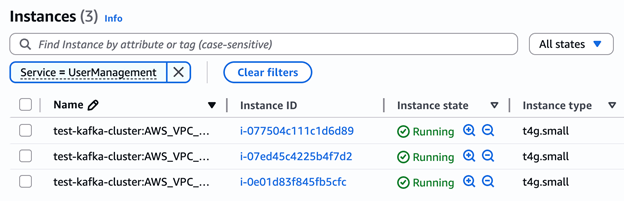
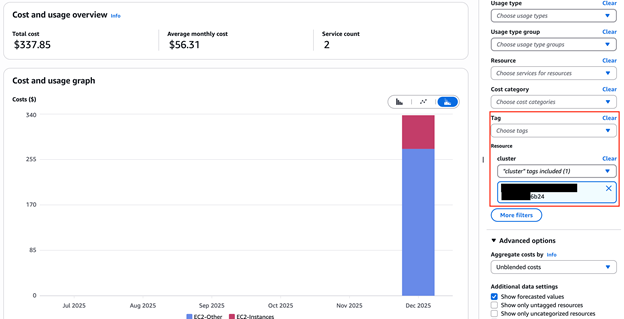
You can filter resources using tags to examine both cost and usage, as illustrated below.
Conclusion
Self-Service Tag Management provides a straightforward way to organize and manage your cloud infrastructure as your clusters expand across AWS, Azure, and GCP. Available through the Instaclustr Console, the Cluster Management API, and the Instaclustr Terraform Provider, it fits naturally into your existing workflows—whether you prefer a visual interface, programmatic automation, or infrastructure-as-code. By applying consistent tags, you can easily group related resources, support monitoring and cost tracking, maintain compliance, and enable automation workflows. This feature reflects our commitment to delivering practical self-service tools that simplify day-to-day operations.
Getting started
Now that you understand the benefits of Self-Service Tag Management, you’re probably wondering: “How do I get started?”. Instaclustr’s support documentation offers step-by-step guidance to help you get started.
Ready to get started?
- Read more in our Release Blog here.
- Support documentation: Self Service Tag Management
- Automate programmatically: Review Cluster Management API documentation
Discover the new self-service tag management feature on the NetApp Instaclustr Managed Platform. Log in to your account to get started. Don’t have an account? Sign up for a free trial on the Instaclustr Platform and explore all the products and features we offer.

