Asynchronous data inserts in ClickHouse are a server-side batching mechanism that buffers incoming data in memory before writing it to disk. This approach allows ClickHouse to handle high-throughput ingestion smoothly and predictably under heavy load.
Everyone talks about ClickHouse’s speed in large analytical workloads, usually focusing on the blazing-fast queries. But speed doesn’t just come from how quickly you can read data; it’s also about how quickly you can write it. As data volumes and concurrency increase, traditional insert patterns can struggle to keep up, turning ingestion into a bottleneck. Asynchronous Inserts address this challenge by enabling serverside batching, allowing ClickHouse to handle highthroughput ingestion more smoothly and predictably under load.
Instead of relying on client-side batching, ClickHouse performs batching internally, improving both efficiency and resilience for modern streaming workloads. We unpack how this mechanism works under the hood and walk through the key configuration parameters that can be set for peak performance. Actual performance and stability gains depend on workload characteristics, configuration, and resource constraints.
How do insert modes in ClickHouse?
ClickHouse supports two main insert modes—Synchronous & Asynchronous. Let’s understand these modes in detail. Understanding the difference helps you choose the right balance between durability and ingestion speed.
What are synchronous inserts?
For a given client connection, each INSERT waits until the data is written to disk and acknowledged before the client proceeds with the next insert. This provides stronger durability guarantees but can slow down ingestion under highvolume workloads. The following diagram demonstrates this behaviour:
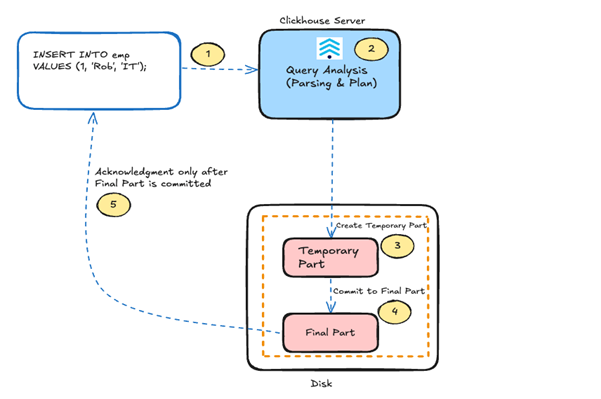
As shown in the diagram, when ClickHouse receives a synchronous insert request, it processes it in the following steps:
- First, the
INSERTis passed to the ClickHouse server. - Next, it parses the query and prepares the execution plan.
- The server then writes the data into a temporary part on disk, which serves as an intermediate stage before durability is guaranteed.
- Once the temporary part is successfully written, ClickHouse commits it to a final part.
- Only after this commit does the server send an acknowledgment back to the client.
Trade-off reminder: Synchronous inserts provide the highest level of immediate durability and consistency. However, because every insert creates a new part on disk, sending many small synchronous inserts can quickly overwhelm the server with “Too many parts” errors. For high-frequency data, batching should be managed by the application or switched to Asynchronous mode.
What are asynchronous inserts?
In asynchronous insert mode, ClickHouse buffers incoming data in memory instead of writing it immediately to a data part on disk. This mode is enabled by setting async_insert = 1, which shifts batching responsibility from the client to the server. This behaviour aims to improve throughput and reduces latency, but the timing of the acknowledgment depends on the wait_for_async_insert setting. Buffering is based on the query shape and insert settings. ClickHouse maintains a separate asynchronous buffer for each unique insert query shape and settings combination.
Scenario 1: wait_for_async_insert = 0
- After parsing and validation, ClickHouse places the data into an in-memory buffer.
- Acknowledgment is sent immediately after buffering, without waiting for the data to be flushed to disk.
- Multiple inserts from one or more clients accumulate in this buffer and are flushed to disk later by background threads, based on
async_insertconfiguration parameters (see the next section for details).
The following diagram illustrates the asynchronous insert process (with early acknowledgment when wait_for_async_insert = 0):
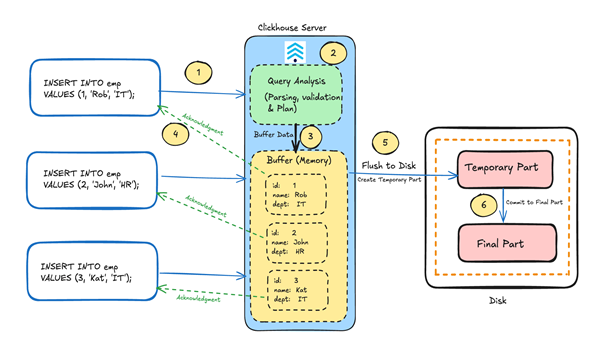
As shown in the diagram:
- ClickHouse receives an asynchronous insert request.
- It parses the query and prepares the execution plan.
- Instead of writing the data immediately to disk, the server places it into an in-memory buffer.
- At this point, ClickHouse sends an acknowledgment back to the client, significantly reducing latency.
- Multiple inserts from one or more clients accumulate in this buffer and are flushed to disk later based on
async_insertconfiguration parameters (see the next section for details). - During the flush process, the data is first written as a temporary part and then committed to a final part in the MergeTree structure.
Note: ClickHouse consciously adopted Asynchronous inserts as the default mode with the ClickHouse version 26.3 release in April 2026.
Trade‑off reminder: With wait_for_async_insert = 0, the client receives an acknowledgment before data is persisted to disk. This dramatically reduces latency but creates a small window where acknowledged data may be lost if the server crashes before the buffered data is flushed to disk. This mode is best suited for high‑volume, append‑only workloads where occasional data loss is acceptable, and is generally not recommended for production critical databases that cannot tolerate the data loss.
Important: Buffering is based on the query shape and insert settings. ClickHouse maintains a separate asynchronous buffer for each unique insert query shape and settings combination. Therefore, different query shapes or settings result in separate buffers.
Scenario 2: wait_for_async_insert = 1
- After buffering, ClickHouse waits until the data is flushed to disk and committed to a final part before sending acknowledgment to the client.
- This makes asynchronous inserts behave closer to synchronous mode but still allows batching and reduced part count.
The following diagram illustrates the asynchronous insert process when wait_for_async_insert = 1:
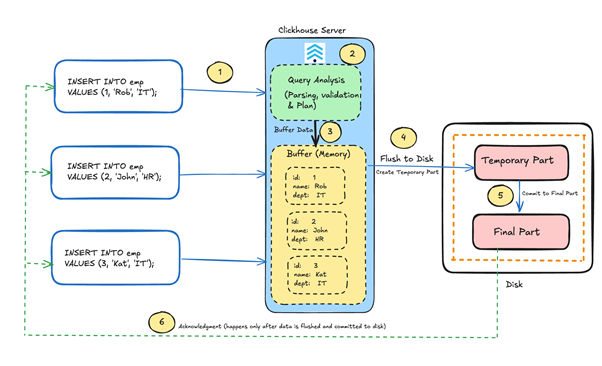
As shown in the diagram, when ClickHouse receives an asynchronous insert request with wait_for_async_insert = 1 (Step 1), it parses the query and prepares the execution plan (Step 2). Based on the query shape and setting combination, the data is then placed into a specific in-memory buffer (Step 3), where multiple inserts from one or more clients can accumulate.
Unlike the default asynchronous behaviour, ClickHouse does not send an acknowledgment immediately after buffering. Instead, it waits until the buffered data is flushed to disk (Step 4), written as a temporary part, and committed as a final part in the MergeTree structure (Step 5). Only after this commit does the server send an acknowledgment back to the client (Step 6). This approach ensures high durability while still providing the performance benefits of automated batching and a reduced part count.
How do you configure asynchronous data inserts in ClickHouse?
Tuning asynchronous inserts is primarily about balancing ingestion latency, batching efficiency, and durability guarantees. This is achieved by carefully configuring buffer sizes, batch flush triggers, and background flush parallelism. In this section, we describe the key settings required to effectively tune asynchronous inserts in ClickHouse. These settings can be configured globally at the server or user level and selectively overridden at the session or query level to suit specific ingestion workloads.
Parameter: async_insert
Default value: 0, or 1 from v26.3 onwards
Description:
- This setting enables the asynchronous inserts (use 1 to enable, 0 to disable).
- Can be set globally in the server configuration.
- Can also be applied at query / session level using the SET command.
Parameter: wait_for_async_insert
Default value: 0, or 1 from v26.3 onwards
Description:
- Most important setting of asynchronous inserts.
- Controls the acknowledgment timing.
- If set to
1(default), the client will wait until the buffered data is flushed to disk and committed before receiving acknowledgment. - If set to
0, The client receives acknowledgment immediately after data is written to the in-memory buffer, before it is flushed to disk.
- If set to
Parameter: async_insert_busy_timeout_ms
Default value: 200
Description:
- This setting controls how long ClickHouse will wait (in ms) before forcing a batch flush from buffer to disk.
- Without this limit, inserts could wait indefinitely for more data.
- Impact of high value:
- Larger parts
- Fewer merges
- Increased memory usage
- Impact of low value:
- Faster and more frequent flushes
- Smaller parts
- Less benefit of data batching
- This setting works alongside
async_insert_max_data_sizeandasync_insert_max_query_number. A flush occurs when any one of these conditions is met.
Parameter: async_insert_max_data_size
Default value: 10485760
Description:
- This setting defines the maximum amount of data (in bytes) buffered in memory for an asynchronous insert batch.
- Flush is triggered once this threshold is exceeded.
- Larger size means:
- Fewer parts
- Fewer merges
- Improved query performance
- But also implies:
- More memory usage
- Larger write operations
- This setting works alongside
async_insert_max_query_numberandasync_insert_busy_timeout_ms. A flush occurs when any one of these conditions is met.
Parameter: async_insert_max_query_number
Default value: 450
Description:
- This setting limits the number of individual insert queries that can accumulate in an asynchronous insert buffer. When this limit is reached, ClickHouse flushes the buffered data to disk and continues accepting new insert queries into a new buffer.
- By capping the number of queued insert queries, this setting helps:
- Prevent excessive memory accumulation.
- Avoid starvation when many small inserts arrive concurrently.
- This setting works alongside
async_insert_max_data_sizeandasync_insert_busy_timeout_ms. A flush occurs when any one of these conditions is met.
Parameter: async_insert_threads
Default value: 16
Description:
- This setting controls how many background threads are used to flush asynchronous insert batches to disk.
- If the value is too low:
- Async buffers accumulate in memory (high memory usage)
- Higher insert latency
- Growing async insert backlog
- If the value is too high:
- Higher disk I/O contention
- Excessive part creation, leading to merge pressure
- High CPU usage due to concurrent flush operations
- Best practice is to configure this globally at the server or user level, rather than overriding it per session or query.
Why do asynchronous data inserts in ClickHouse matter?
Asynchronous data inserts matter because they allow ClickHouse to automatically batch small inserts server-side, accommodating modern continuous data generation without requiring complex changes to client applications.
Modern day data platforms don’t behave like traditional batch systems; many real-world data sources generate data continuously. In such scenarios, client‑side batching is often complex or impractical. Here is why asynchronous inserts are a game-changer:
- Modern ingestion patterns don’t batch naturally: While client‑side batching looks simple on paper, it breaks down in real‑world ingestion pipelines. Today’s systems are distributed, event‑driven, and highly parallel, making batching at the client both complex and error‑prone. Asynchronous inserts move the batching responsibility to ClickHouse itself. This allows ClickHouse to automatically accumulate and batch many small inserts on the server side, without requiring changes to the client application layer.
- Controlling part creation and merge activity: With synchronous inserts, every insert operation immediately creates a new data part. When inserts are small and frequent, parts accumulate faster than background merge processes can consolidate them. This leads to:
- Increased CPU utilization and disk I/O
- Too many parts errors
- Higher metadata overhead
- Degraded query performanceAsynchronous inserts significantly reduce this overhead by batching multiple inserts in memory and writing them as fewer, larger parts. As a result, designed for:
- Lower merge pressure
- Disk operations become more efficient
- Improved query performance
- Stabilised ingestion under loadBy producing well-sized parts instead of numerous small ones, asynchronous inserts help maintain long-term cluster stability and efficiency.
- Better resource utilization under concurrency: By buffering inserts in memory and flushing them based on size, time, or query-count thresholds, ClickHouse can regulate how and when disk writes occur. Instead of every insert immediately triggering part creation and disk activity, writes are consolidated and executed in controlled batches. This approach allows ClickHouse to:
- Smooth ingestion spikes by absorbing bursts in memory
- Optimise disk writes through larger, more sequential operations
- Reduce CPU overhead caused by excessive small part creation
- Lower background merge contention
Conclusion
Asynchronous inserts are more than a performance tweak; they fundamentally shift batching responsibility from the client to the server. This allows ClickHouse to absorb ingestion spikes, prevent part explosion, and maintain stability under heavy concurrency. When tuned correctly, this feature provides a vital balance between low latency, resource efficiency, and cluster health.
However, success in production requires more than flipping a switch. Optimizing wait_for_async_insert, buffer sizes, and flush thresholds demands a deep understanding of your specific workload and durability needs. Without careful configuration, you risk memory pressure or disk contention that can undermine the very performance benefits you seek to gain.
Running ClickHouse efficiently in production requires more than feature knowledge, it requires operational expertise. NetApp Instaclustr for ClickHouse simplifies the deployment and management of ClickHouse clusters, reducing infrastructure complexity and operational overhead. Get started with NetApp Instaclustr today and run ClickHouse at scale in your environment with production‑ready practices and operational support.
Frequently Asked Questions
-
When did asynchronous data inserts become the default in ClickHouse? +
ClickHouse consciously adopted asynchronous inserts as the default mode starting with the version 26.3 release in April 2026.
-
What happens if wait_for_async_insert is set to 0? +
When
wait_for_async_insertis set to0, the client receives an acknowledgment immediately after data is written to the in-memory buffer, before it is flushed to disk. This dramatically reduces latency but carries a small risk of data loss if the server crashes. -
How do synchronous inserts impact ClickHouse performance? +
Synchronous inserts provide maximum durability, but because every insert creates a new part on disk, sending many small inserts can overwhelm the server and cause “Too many parts” errors, degrading query performance.
-
What triggers a data flush when using asynchronous inserts? +
ClickHouse triggers a flush to disk when any one of three conditions is met: the timeout limit (
async_insert_busy_timeout_ms), the maximum data size (async_insert_max_data_size), or the maximum query number (async_insert_max_query_number).

