


Introduction
In this two-part Kafka Streams tutorial, we build a Kafka Streams application that processes streaming news data in real time.
The twist? Not all input data is well-formed. Some messages arrive as free-form text instead of JSON, while others are valid JSON but missing important fields. In this Kafka Streams application, we detect these issues, route problematic records to Dead Letter Queues (using KIP-1034), repair them with LLM assisted workflows, and then reinject them back into the stream to help ensure processing can continue uninterrupted.
The example we’ll use throughout is a simple news aggregation service. It collects articles from multiple sources and groups them by category over a time window. Most records are valid—but a few are not—and that’s where things get interesting.
In part 1, we introduce the application and Streams topology. First up, we’ll introduce the different types of news records, using this blog as the topic of the news (a “self-referential” example)!
What’s the latest news?
Let’s start with a simple, self-referential example—news about this very blog.
Invalid record type 1 (freeform text)
Here’s a news item as it might arrive from a producer:
“Let’s build an Apache Kafka Streams News Processing Application – with KIP-1034 and LLMs/GenAI! With some help of AI I’ve come up with a demo Kafka Streams news processing application with examples of two sorts of error handling including using KIP-1034, and repairs done with LLMs”
This is just freeform text—not valid JSON. Our application can’t process this directly. Our news application expects news in a specific JSON format!
Invalid record type 2 (incomplete JSON)
With AI, we can turn the freeform string into the correct JSON:
|
1 2 3 4 5 6 |
{ "articleId": "news-123", "heading": "KIP-1034 DLQ meets LLM news repair in Kafka Streams", "article": "Let’s build an Apache Kafka Streams News Processing Application – with KIP-1034 and LLMs/GenAI! With some help of AI I’ve come up with a demo Kafka Streams news processing application with examples of two sorts of error handling including using KIP-1034, and repairs done with LLMs", "categories": [] } |
This record is now in the correct JSON format, with an id, heading, article and (empty) categories.
Valid and complete JSON records
Oh no! We forgot the categories, so let’s add categories automatically with AI:
|
1 2 3 4 5 6 7 8 9 10 11 12 13 |
{ "articleId": "news-123", "heading": " KIP-1034 DLQ meets LLM news repair in Kafka Streams ", "article": "Let’s build an Apache Kafka Streams News Processing Application – with KIP-1034 and LLMs/GenAI! With some help of AI I’ve come up with a demo Kafka Streams news processing application with examples of two sorts of error handling including using KIP-1034, and repairs done with LLMs", "categories": [ "kafka-streams", "kip-1034", "error-handling", "dead-letter-queue", "llm", "demo" ] } |
This is an example of a valid record that the Streams application can process correctly. Most input records arrive in this format, and all LLM-repaired records will also end up looking like this.
Kafka Streams error handling: Two types of “bad” data
This example illustrates the two kinds of issues we handle in this Kafka Streams application:
- Invalid format: Freeform text (non-JSON) that cannot be deserialized
- Incomplete data: Valid JSON, but missing required fields (like categories)
In both cases, the goal is the same: detect the issue, repair the record using an LLM, and reintroduce it into the stream. Once repaired, these records are indistinguishable from valid input and flow through the application as normal.
How do we detect invalid records in Kafka Streams? That’s where KIP-1034 comes in.
Kafka Streams Dead Letter Queues with KIP-1034
KIP-1034 is all about detecting bad messages. This blog builds directly on another blog “How to handle bad messages safely in Kafka Streams with KIP-1034 Dead Letter Queues”, where you can learn all about how KIP-1034 works and why it’s better than the previously available alternatives.
That blog ended on a cliff-hanger: sure, we can catch and put bad messages and useful metadata into a DLQ—but then what? How do we process them automatically? This blog picks up on this problem with a novel solution – using GenAI/LLM for auto repair.
Note that KIP-1034 requires Kafka 4.2.0 or later.
Streaming Data + LLMs
An earlier article, “Can LLMs work with Streaming Data”, was also an inspiration here. It explored how easy it is to use LLMs to process streaming data and do something “useful” with it—in this case, I generated random fake news stories, and automatically categorized them, with the idea being that it would form a Kafka pipeline to send news items to different topics depending on their categories—i.e. AI powered Content Based Delivery (CBD) over streaming Kafka data.
The goal in this blog is to use LLMs/GenAI together with Kafka Streams and KIP-1034 (Kafka Streams DLQs) to handle and fix streaming data errors. The challenge is that LLMs are slower and don’t scale as rapidly as Kafka, so use cases need to focus on paths outside the main “happy” path—for example, error detection and repair and classification.
The Apache Kafka Streams example: Application overview
The complete Java Kafka Streams processing code, including documentation, LLM setup instructions and sample output, etc., is available in this GitHub. The rest of the blog is a commentary on that code, and it will make the most sense alongside the repository.
We’ll look at two ways records can be invalid (formatting and completeness), two approaches to detecting them, and how a local LLM fixes both (as well as generating the data in the first place).
The example is a streaming news processing service. News is expected to be generated as JSON with an id, headline, article, and categories. When categories are missing (perhaps depending on who generates the news) one part of the pipeline handles it (the Streams application itself), with an LLM adding categories based on the headline and body.
When the record arrives as a raw string, not formatted as JSON, it’s detected differently using KIP-1034 and also processed by an LLM, which formats it as the expected JSON and adds categories and a headline.
In both approaches, the streaming application will receive the fixed records back and continues processing them correctly.
The current application is very simple and purely designed to aggregate all the articles in the same category over a time window—perhaps to republish them under distinct categories (or analyze them for similarity – e.g. to detect breaking news stories, etc) for downstream subscribers.
The Kafka Streams topology
To understand the application better, let’s look at the Kafka Streams application topology.
The topic demo-news-ff-raw is written by any of the producers (for valid and invalidly formatted news). The diagram below shows consumption inside Streams once bytes reach the JsonNewsItemSerde edge. Kafka Streams topologies are made of Directed Acyclic Graphs (DAGs) consisting of Nodes (the processors that do the work) and Edges (the streams of data connecting the nodes, e.g. see my earlier Kafka Streams introduction blog).
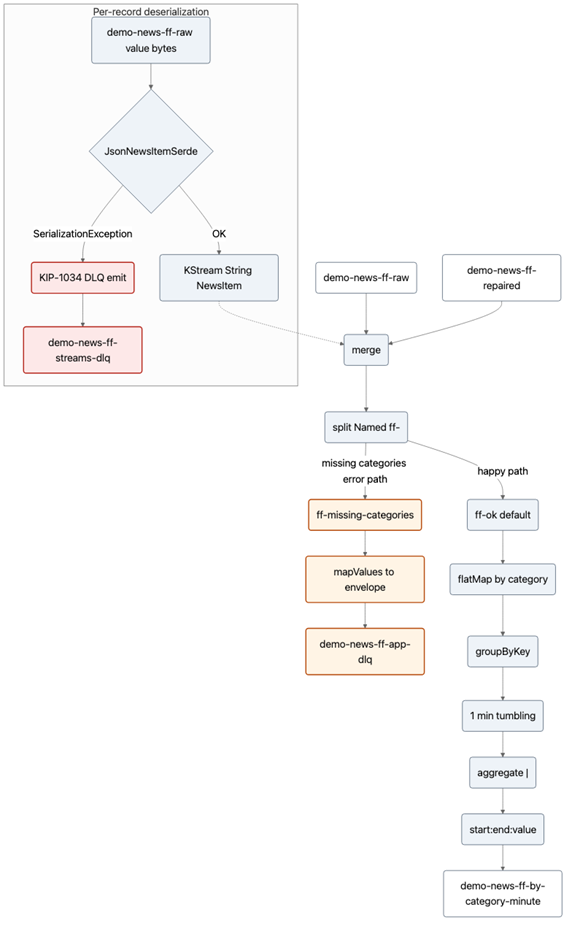
Failed deserialization does not appear as a KStream record. Instead, the framework emits to demo-news-ff-streams-dlq (the KIP-1034 DLQ that handles Serde failures) before the merge processor.
The first diagram focuses on the “happy path”. The second shows the complete error paths, including the multiple Producers responsible for generating:
- Valid records:
- Randomly LLM generated complete and validly formatted JSON news (the majority of records).
- Invalid records:
- “String” news – the invalid format.
- JSON news with missing categories – incomplete JSON.
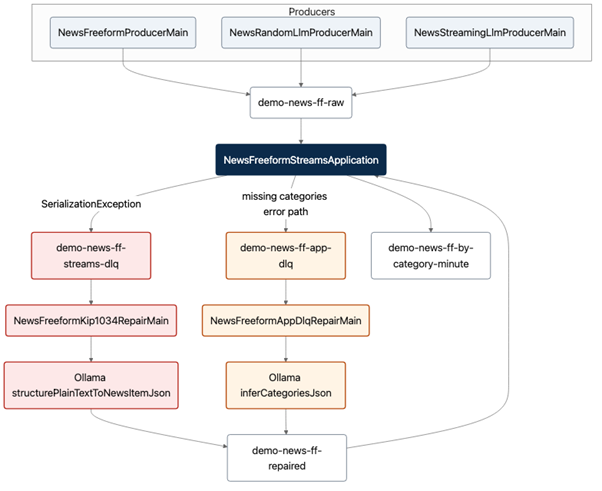
All the producers write to the same raw topic that the Streams application consumes from. It also shows the two repair loops, with repaired records injected back to the application.
Topics and their roles
| Topic | Role |
|---|---|
demo-news-ff-raw |
Prose or NewsItem JSON (bytes) |
demo-news-ff-repaired |
Valid JSON; merge source |
demo-news-ff-streams-dlq |
KIP-1034 DLQ (serde failures) |
demo-news-ff-app-dlq |
Application envelopes (MISSING_CATEGORIES) |
demo-news-ff-by-category-minute |
Windowed sink |
How to Build a Kafka Streams Application: The Detailed Flow
In more detail, here’s the Streams application flow. Feel free to skip ahead if you are not interested in this level of detail.
At a high level, the application does three things:
- Ingest news (raw + repaired)
- Split valid vs invalid records
- Aggregate valid records by category
Invalid records are sent to DLQs, repaired outside the topology, and reintroduced into the pipeline.
NewsFreeformStreamsApplication builds NewsFreeformTopology on top of two input topics—demo-news-ff-raw and demo-news-ff-repaired—both topics are consumed as KStream<String, NewsItem> using the same JsonNewsItemSerde. Everything below assumes a record survived deserialization on that edge.
Deserialization (filter out invalid JSON early)
For each byte value, the serde either produces a NewsItem or throws. On throw, LogAndContinueExceptionHandler (configured on the app) writes a row to demo-news-ff-streams-dlq (KIP-1034: raw key/value bytes plus __streams.errors.* headers) and skips that offset—so prose never enters a KStream operator as a value.
Merge (combine raw and repaired streams)
Valid items from raw and repaired are merged into one stream. Repaired records are how out-of-band repair jobs close the loop after handling DLQs.
Split (separate valid vs incomplete records)
The merged stream is split with named branches: if categories is missing or all blank, the record is mapped to a JSON envelope (reason, articleId, rawJson, detail) and written to demo-news-ff-app-dlq. Otherwise, it is the “ok” branch.
Happy path (aggregate valid data)
Ok records are flatMapped to one key-value per non-blank category (key = category), groupByKey, one-minute tumbling window, aggregate (join payloads with |), then mapped to windowStart:windowEnd:payload... strings on demo-news-ff-by-category-minute.
Repair loops (LLM fixes outside the topology)
NewsFreeformKip1034RepairMain reads demo-news-ff-streams-dlq as bytes, turns prose into NewsItem JSON (Ollama when available, else deterministic tags), and produces to demo-news-ff-repaired. NewsFreeformAppDlqRepairMain reads demo-news-ff-app-dlq, fills categories for MISSING_CATEGORIES envelopes, and produces to demo-news-ff-repaired. The Streams application consumes repaired records with the same strict serde, so those rows re-enter the flow at step 2.
A Note on LLM Performance in Kafka Streams
Using a potentially slow LLM with fast streaming data may seem like a peculiar combination in general, but for this demo/use case we believe it is a good fit. If we assume the faulty messages are infrequent compared to correctly formatted messages, then the repair loop isn’t called very often. That gives the LLM enough time to process and return repaired messages back to the Stream application, as long as they arrive within the time window (one minute, plus 10 seconds grace period for the demo) and meet application-specific validation criteria.
Part 1 covers the problem space, the news processing example, and the Kafka Streams topology that makes it all work. Part 2 dives into how failures are detected and repaired using KIP-1034 and LLMs.

