


Hybrid search in OpenSearch is a retrieval method that combines multiple search techniques, such as keyword matching and semantic vector search, into a single, unified result set.
When you search strictly with keyword matching or solely with semantic, you’re losing some of the query’s intent. This strategy can also make things difficult when dealing with a diverse set of queries and documents: for example, a knowledge corpus for a business that contains thousands of pages of technical documentation and the backend for a stack overflow-like site where employees can ask and answer questions.
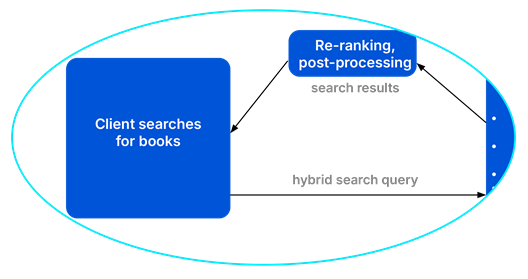
The solution? Hybrid search: where multiple retrieval methods are used and their result sets combine into one. A common example is using BM25 keyword search with neural sparse vector search, combining the results of a keyword-match and semantic search into one set.
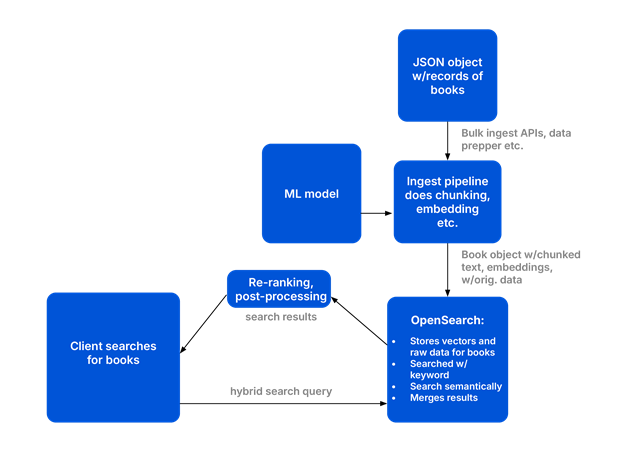
In this blog post, we’ll cover the three major pieces of this OpenSearch hybrid pipeline and how they work together to create full-context results: the ingest, the index, and the post-processor. We’ll also walk through a Python implementation of this type of search, using book data as an example.
What is the architecture of an OpenSearch hybrid search?
An OpenSearch hybrid search architecture relies on three core components:
- an ingest pipeline to create vector embeddings,
- an index to store the data, and
- a post-processing pipeline to merge and rank the results.
Turning documents made up of text into searchable entities within OpenSearch takes a bit of work. First, you need to prepare the data. They you need to store the information in a way that makes it easy and efficient to search. Finally, you want to search the data and get back one result set. These three problems are solved by ingest pipelines working together with indexes and post-processing pipelines.
What is an ingest pipeline in OpenSearch?
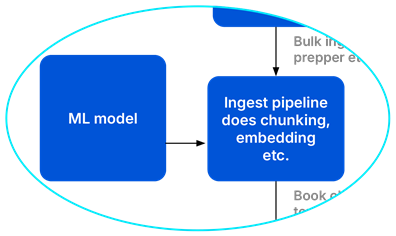
An ingest pipeline in OpenSearch is a set of pre-processing steps, such as tokenization, chunking, and creating vector embeddings, that transform raw JSON text into a searchable record.
Turning a JSON object full of text into a searchable record in OpenSearch takes some preparation. This is done by OpenSearch using an ingest pipeline. This is a piece of code you can attach to your index that does things like tokenization, chunking, and creating vector embeddings. Ingest pipelines result in documents ready to be stored in OpenSearch and searched. In this demo, I create an ingest pipeline that creates vector embeddings for the summaries of the books for semantic search.
How do you design an index for hybrid search?
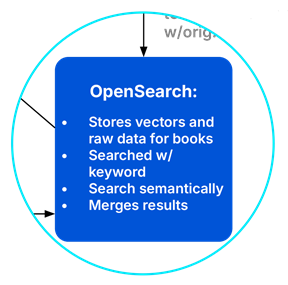
To design an index for hybrid search in OpenSearch, you must configure mappings that support both lexical fields (for exact keyword matching) and vector fields (for semantic search).
Good index design can make or break any OpenSearch query, and vector search is no exception. The index sets a document standard that makes search easier and faster. It also houses vector data we can use for semantic search. In this demo, I’ll design an index that allows for easy and efficient keyword and semantic search for our book records.
What is a post-processing pipeline in OpenSearch?
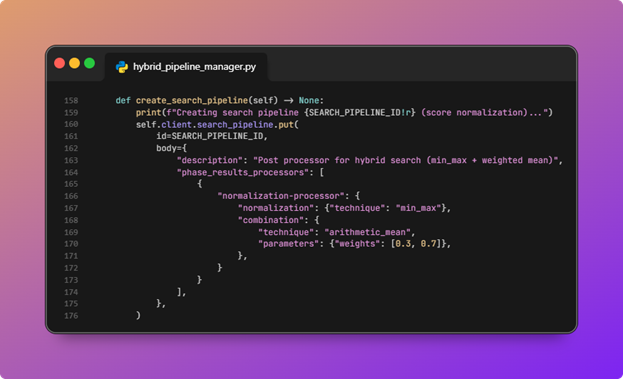
A hybrid query runs multiple sub-queries, and the raw scores returned from these are often not directly comparable (different scales), requiring some kind of normalization and combination to create one ranked set. This is where the post-processing pipeline comes in; it calculates a single fused score for ranking. In this pipeline, I’ll use min-max for normalization, and weighted means for combination.
How does the OpenSearch hybrid search demo work?
This demo uses an OpenSearch cluster running the ML Commons plugin (part of the AI search plugin in NetApp Instaclustr), and connects with a Python client. The data used is from the Gutenberg Project; it’s records of public-domain books. A neural sparse ML model is used to create the vector embeddings that store and search semantic values. store and search semantic values.
If you follow along with the code, you’ll end up with:
- A named index that stores keyword+semantic data about books
- An ingest pipeline for that index used to create neural sparse vector embeddings
- A search pipeline for hybrid keyword + neural sparse semantic search
The demo also has a cleanup script that will take down what the script creates in your cluster. All ML model registration, deployment, and inference in this demo run within the OpenSearch cluster; Instaclustr manages the platform, while model choice, configuration, and query behavior remain under user control.
A demo: How does OpenSearch hybrid search work?
The code takes several steps to complete a hybrid search:
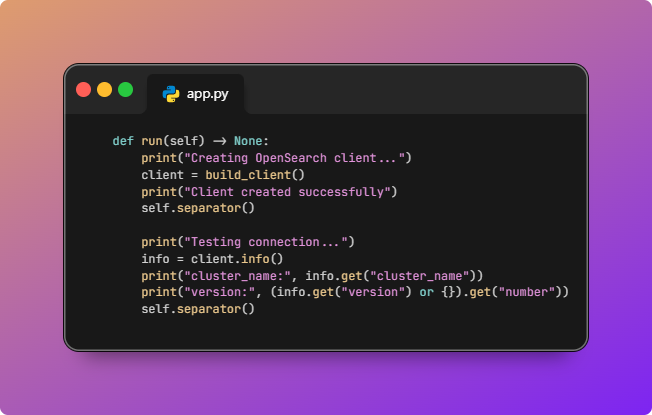
- Code starts an OpenSearch client and tests connection.
HybridSearchPipelineApp.runcallsbuild_client()fromclient.py, which loads.envviapython-dotenv, readsOPENSEARCH_HOST,OPENSEARCH_PORT, optionalTLSandOPENSEARCH_USER/OPENSEARCH_PASSWORD, and returns an OpenSearch client. The “connection test” is a real cluster round trip:client.info()prints thecluster_nameand the OpenSearch version string.
![OpenSearch hybrid search pipeline diagram 2]()
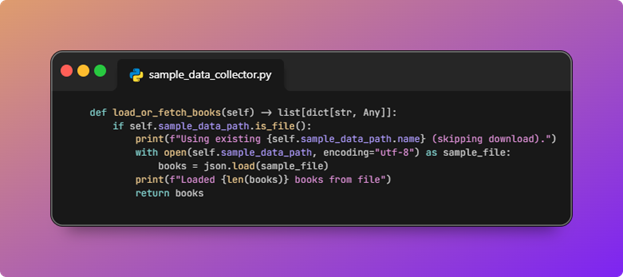
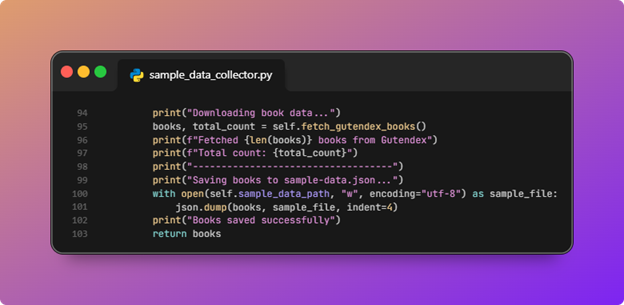
- Next, it checks if the sample data file exists; if not, it downloads and saves book data JSON.
In this step, we are either loading or creating the JSON object with our books information in it as shown in the chart earlier:
![OpenSearch hybrid search pipeline diagram 3]()
SampleDataCollector.load_or_fetch_booksusesSAMPLE_DATA_PATHfromconfig.py(by defaulthybrid_search_pipeline/sample-data.jsonnext to the package).
![OpenSearch hybrid search pipeline diagram 4]()
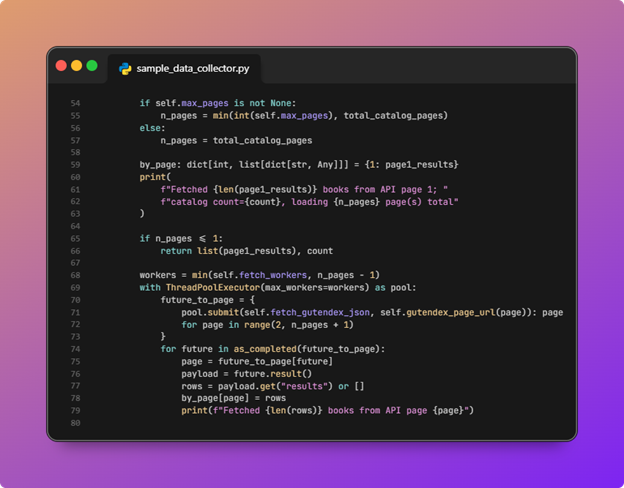
If that file exists, the script loads it and skips the network. If not, it callsfetch_gutendex_books: page 1 is fetched first to learn total count and page size, then additional Gutendex pages are requested in parallel (bounded bymax_pagesandfetch_workers).
![OpenSearch hybrid search pipeline diagram 5]()
The merged list is written back tosample-data.jsonso the next run is fast and reproducible offline.
![OpenSearch hybrid search pipeline diagram 6]()
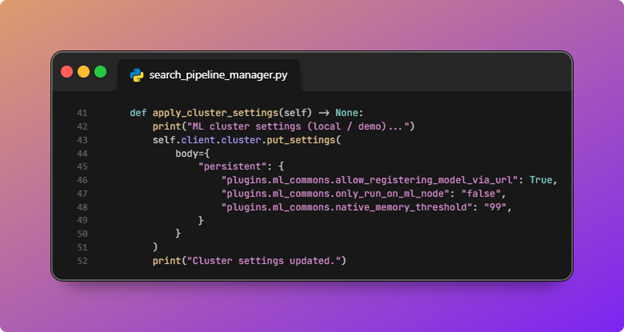
- Cluster settings need to be configured for ML Commons (including URL-based model registration) and for smaller demo clusters.
HybridSearchPipelineManager.apply_cluster_settingsissuescluster.put_settingswith persistent ML Commons flags.
![OpenSearch hybrid search pipeline diagram 7]()
In this repo,plugins.ml_commons.allow_registering_model_via_urlis set totrue, which is the knob that allows models to be registered from a URL when your workflow uses that path (common when pulling model artifacts from the network rather than only from pre-bundled artifacts).The script also setsonly_run_on_ml_nodeto false and raisesnative_memory_thresholdso single-node or small clusters are less likely to trip ML memory circuit breakers during register, deploy, and ingest.These are demo-oriented relaxations; production clusters should follow your platform’s ML sizing and security guidance instead of copying thresholds blindly.
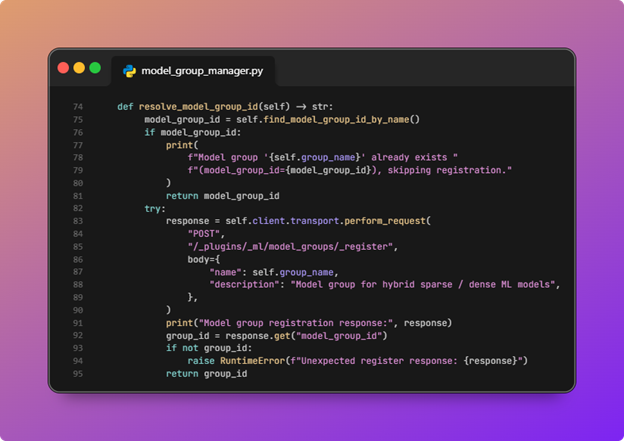
- ML models in ML Commons need to be in a group, so a model group is created.
ModelGroupManager.resolve_model_group_idfirst searches ML Commons for an existing group namedMODEL_GROUP_NAME(hybrid-search-modelsinconfig.py). If none exists, it registers a new model group. That group id is what this step passes into model registration and deployment.
![OpenSearch hybrid search pipeline diagram 8]()
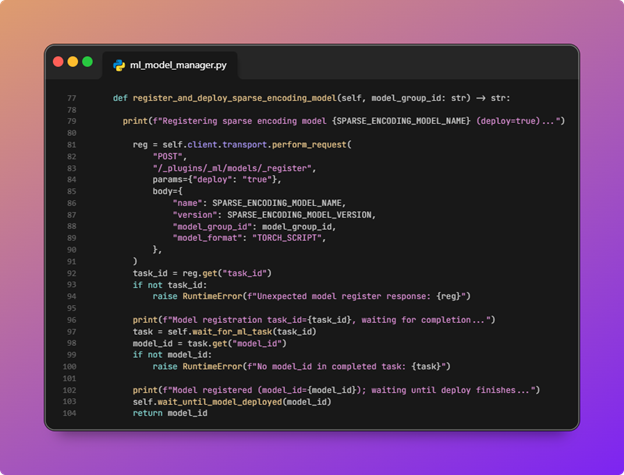
- The neural sparse encoding model is registered to that group and deployed.
This step loads and deploys the ML model so it can be used by the ingest pipeline, as shown in the diagram earlier:
![OpenSearch hybrid search pipeline diagram 9]()
MLModelManager.register_and_deploy_sparse_encoding_modelposts to/_plugins/_ml/models/_registerwithdeploy=true, the model name and version fromconfig.py,model_group_id, andTORCH_SCRIPTformat. It polls the returned ML task untilCOMPLETED, readsmodel_id, then polls the deploy task untilmodel_stateisDEPLOYED.
![OpenSearch hybrid search pipeline diagram 10]()
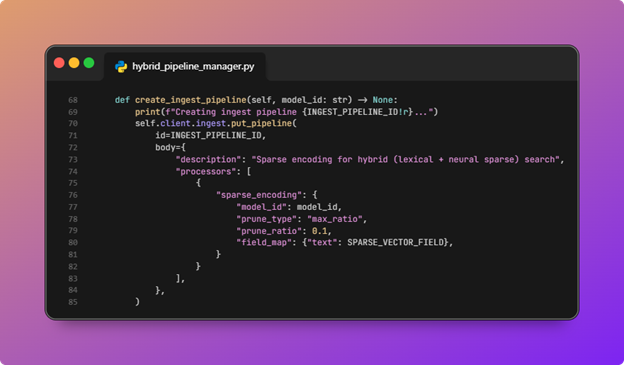
- The ingest pipeline is created so documents get neural sparse features on insert.
This step creates the ingest pipeline and hooks it up to the ML model we deployed:
![OpenSearch hybrid search pipeline diagram 11]()
HybridSearchPipelineManager.create_ingest_pipelinedefines a pipeline with a singlesparse_encodingprocessor: it maps the document’s text field intopassage_embedding(arank_featuresfield in the index mapping) using the deployed modelid, withprune_type / prune_ratioto cap sparsity.
![OpenSearch hybrid search pipeline diagram 12]()
This is document-side neural sparse encoding: each indexed document is enriched with sparse features suitable forneural_sparseretrieval, not a separate “call an embedding API from Python” step. - The book index is created with fields for keyword and semantic search.
![OpenSearch hybrid search pipeline diagram 13]()
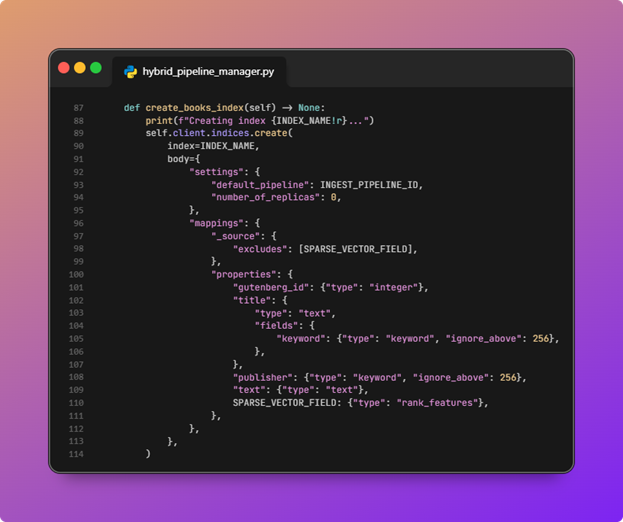
create_books_indexcreatesINDEX_NAMEwithdefault_pipelineset to the ingest pipeline id so bulk indexing automatically runs sparse encoding.Mappings include lexical text and title (withtitle.keywordfor exact/filter use), a publisher keyword field, andpassage_embeddingasrank_features._sourceexcludes the sparse field to keep stored payloads smaller while still allowing it to participate in scoring.number_of_replicasis set to0for a simple single-node style demo.
![OpenSearch hybrid search pipeline diagram 14]()
- The bulk index API inserts book documents from the sample data.
![OpenSearch hybrid search pipeline diagram 15]()
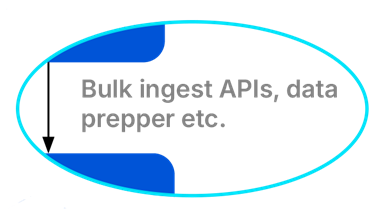
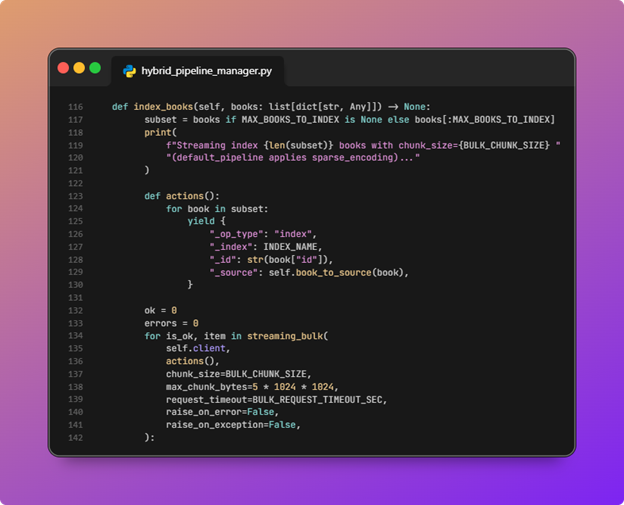
index_booksoptionally truncates toMAX_BOOKS_TO_INDEXfor speed, maps each Gutendex record throughbook_to_source(Gutenberg id, title, publisher default, combined title plus first summary into text), then streams bulk actions viastreaming_bulkwith a smallchunk_size, request timeout, and a short pause between chunks to reduce pressure on ML and indexing.
![OpenSearch hybrid search pipeline diagram 16]()
After bulk completes, it refreshes the index so the demo search sees fresh segments. - The search post-processor pipeline is created (normalization + combination).
![OpenSearch hybrid search pipeline diagram 17]()
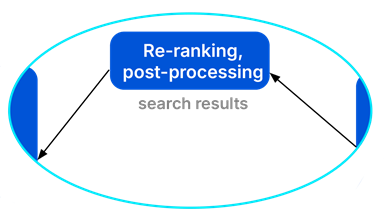
create_search_pipelineregisters a search pipeline with anormalization-processor:min_maxnormalization per sub-query score, thenarithmetic_meancombination with weights[0.3, 0.7], matching the order of the two sub-queries in the hybrid query (lexical first, neural sparse second).
![OpenSearch hybrid search pipeline diagram 18]()
That is what makes incomparable raw scores usable for a single fused ranking. - A hybrid search runs and results are printed.
![OpenSearch hybrid search pipeline diagram 19]()
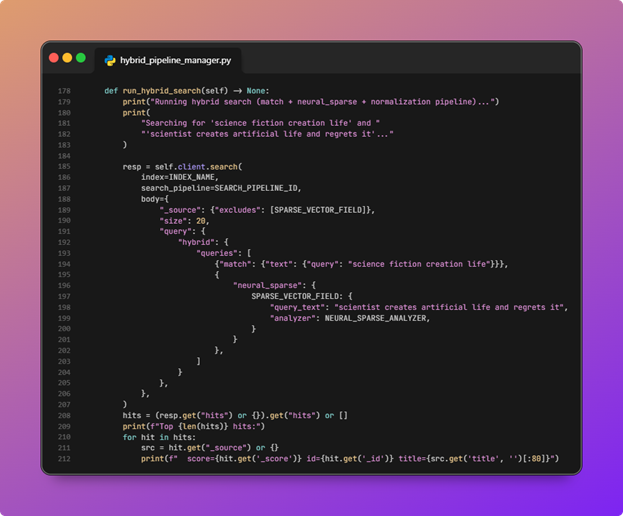
run_hybrid_searchsends a search request withsearch_pipelineset to the pipeline id from step 9. The query is a hybrid wrapper around a match on text and aneural_sparsequery againstpassage_embeddingwithquery_textand the configured analyzer.
![OpenSearch hybrid search pipeline diagram 20]()
Returned hits exclude the sparse field from_source; the script prints score, document id, and a truncated title for the top results. - The script cleans up indexes, pipelines, and ML artifacts.
cleanupdeletes the demo index, the search pipeline, and the ingest pipeline. It then undeploys and deletes the registered model by id and deletes the model group by id. Errors like missing index are handled so teardown is best effort. In a real deployment you would typically omit this step or guard it with flags, so you do not delete production indices or shared model groups.

Mapping architecture to functions
| Layer | Role in hybrid sparse | In this script |
| Ingest | Encode/embed text → sparse features at index time | sparse_encoding in create_ingest_pipeline |
| Index | Lexical + semanticrank_features; auto-run ingest |
create_books_index + default_pipeline |
| Query | Two retrieval signals | hybrid → match + neural_sparse in run_hybrid_search |
| Post-processor | Comparable scores + weighted blend | normalization-processor in create_search_pipeline |
Running the scripts
First, you’ll need to configure the scripts via the .env.example file. Copy it to .env and fill it out with your cluster information (host, username, password, etc).
Then, to run the scripts, in the project root, run:
|
1 |
$ python .\hybrid_search_pipeline\__main__.py\ |
Conclusion
There’s a key takeaway here: Hybrid search is not only a hybrid query; it is ingest-time enrichment, index/schema wiring, and query-time normalization all working together.
You can build pipelines like this quickly on NetApp Instaclustr, and you can try out hybrid search and see explore OpenSearch on Instaclustr usinghow it runs on our free trial.
Frequently Asked Questions
-
Can you run hybrid search in OpenSearch without a post-processing pipeline? +
While you can technically run multiple queries, you need a post-processing pipeline to normalize and combine the disparate scoring scales (e.g., BM25 and neural sparse scores) into a single, accurately ranked result list.
-
Why use BM25 with neural sparse vector search? +
BM25 excels at exact keyword matching for specific terminology, while neural sparse vector search captures the semantic meaning of a query. Combining them ensures you capture both exact matches and broader conceptual intent.
-
What machine learning plugins are required for OpenSearch hybrid search? +
To natively generate vector embeddings and handle neural queries, OpenSearch requires the ML Commons plugin. This plugin allows you to register and deploy the machine learning models needed for semantic search.
-
What plugins do you need to run a hybrid search on NetApp Instaclustr? +
You’ll need the AI Search plugin enabled in order to run any semantic or hybrid searches. This plugin includes ML Commons and some useful ML tools for OpenSearch.

