


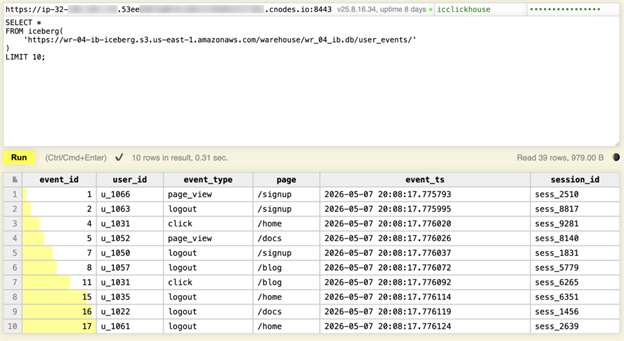
That’s ClickHouse below querying an Iceberg table on S3 within 0.31 seconds to read metadata and return the first rows. No Spark job, no data movement, and no separate warehouse layer to manage.
By the end of this article, you’ll have the full pipeline running and understand why each component exists—not just how to configure it.
This article describes an example architecture for educational purposes. Actual configurations, performance, and availability depend on customer environment, selected services, and applicable NetApp Instaclustr service terms.
The Problem: Where does streaming data live?
Kafka is not a database. It’s a log (fast, durable, and distributed) but it only retains data for a configured window (typically seven days). When someone asks, “How many signups did we get last Tuesday?”, you either no longer have the data or you’re about to reprocess logs from cold storage—neither is a good answer.
The instinct is to dump events to S3. S3 is cheap and durable, but raw files there are a mess: no schema tracking, no efficient querying, and no way to roll back if bad data gets written. That is where Apache Iceberg fits.
What is Apache Iceberg used for?
Apache Iceberg is a table format that sits on top of S3 and adds a metadata layer—a catalog of which files exist, what schema they use, and how they’re partitioned. Think of it like a library index: instead of scanning every shelf, you go straight to the correct aisle. Queries are fast because ClickHouse reads Iceberg metadata first, then only scans the files that match the query.
The deeper idea here is the separation of storage and compute without vendor lock-in. In practical terms, Iceberg turns a folder of files into a table that query engines can understand.
In this setup, Iceberg gives you:
- Schema evolution
- Time travel
- ACID transactions
- Open table metadata on top of files in S3
That means your data stays in open formats such as Parquet, ORC, or Avro, and engines that support Iceberg can query it directly.
All three managed services (Kafka, Kafka Connect, and ClickHouse) are available on Instaclustr with production SLAs and 24×7 expert support, so you can focus on building the pipeline rather than managing the infrastructure.
What is a queryable data lake?
A queryable data lake is stored data that remains in object storage but can still be queried like a table. You do not have to move it into a separate warehouse first.
In this guide, S3 is the storage layer, Iceberg is the table layer, and ClickHouse is the query engine.
Why use Kafka Connect instead of a script?
Writing a Python consumer to bridge Kafka and S3 works in development. In production it falls apart: if it crashes mid-batch, you don’t know what was written. You’d need to build retry logic, offset tracking, and health monitoring yourself. Kafka Connect handles those operational concerns for you. It’s a distributed runtime—if a worker goes down, its tasks are automatically reassigned. It tracks offsets durably inside Kafka itself, so restarts pick up exactly where they left off. The Apache Iceberg Sink Connector layers exactly-once semantics on top, coordinating commits so events aren’t duplicated across successful writes. You describe what to move with a JSON config; Connect handles the rest.
What the Kafka Connect Iceberg sink does
The Kafka Connect Iceberg sink moves records from Kafka into Iceberg tables. In this walkthrough, it writes events from a Kafka topic into an Iceberg table stored in S3 and tracked in AWS Glue.
Kafka Connect provides:
- A distributed runtime
- Durable offset tracking inside Kafka
- Automatic task reassignment if a worker fails
The Apache Iceberg Sink Connector adds exactly-once semantics on top of that by coordinating commits so successful writes are not duplicated.
Architecture overview
Here is the full data flow:
Kafka → Kafka Connect (Iceberg Sink) → Iceberg on S3 → ClickHouse
Each layer has a distinct role:
- Kafka handles event ingestion
- Kafka Connect bridges Kafka and Iceberg reliably
- Iceberg organizes S3 files into a queryable table
- ClickHouse queries Iceberg data directly from S3
The key architectural idea is simple: data is written once to Iceberg and never moved again.
Prerequisites
Before starting, install Java 17 and the Kafka CLI tools—both are needed later. The commands below use Homebrew on macOS; Linux users should use their package manager and adjust paths accordingly:
|
1 2 3 |
brew install openjdk@17 kafka export PATH="/opt/homebrew/opt/openjdk@17/bin:$PATH" export PATH="/opt/homebrew/Cellar/kafka/4.2.0/libexec/bin:$PATH" |
Step 1: Create the Iceberg Table on S3
We’ll use PyIceberg to define the schema and insert a small batch of seed data, so the table exists before Kafka Connect begins appending records. Kafka Connect owns all writes in the live pipeline – this is a one-time bootstrap step.
|
1 |
python3 -m venv iceberg-env && source iceberg-env/bin/activate pip install "pyiceberg[glue,pyiceberg-core]" pyarrow boto3 |
Both glue and pyiceberg-core extras are required (glue for the catalog client and pyiceberg-core for partition transforms)
We’re using AWS Glue as the Iceberg catalog. If you prefer a vendor-neutral option, Apache Polaris and Project Nessie are open source alternatives that work with the same Iceberg Sink Connector configuration.
Glue is AWS-native and accessible from both your laptop and the Kafka Connect workers—a local SQLite catalog would only exist on your machine and Connect workers on separate nodes would never find it. Make sure your local AWS credentials have permission to write to S3 and create Glue databases and tables.
|
1 2 3 4 5 6 7 8 9 10 11 12 13 14 15 16 17 18 19 20 21 22 23 24 25 |
create_iceberg_table.py from pyiceberg.catalog.glue import GlueCatalog from pyiceberg.schema import Schema from pyiceberg.types import NestedField, StringType, TimestampType, LongType from pyiceberg.partitioning import PartitionSpec, PartitionField from pyiceberg.transforms import DayTransform import pyarrow as pa from datetime import datetime, timedelta import random S3_BUCKET = "" AWS_REGION = "us-east-1" WAREHOUSE_PATH = f"s3://{S3_BUCKET}/warehouse" catalog = GlueCatalog("glue", **{"region_name": AWS_REGION, "warehouse": WAREHOUSE_PATH}) catalog.create_namespace_if_not_exists("analytics") schema = Schema( NestedField(1, "event_id", LongType(), required=False), NestedField(2, "user_id", StringType(), required=False), NestedField(3, "event_type", StringType(), required=False), NestedField(4, "page", StringType(), required=False), NestedField(5, "event_ts", TimestampType(), required=False), ) partition_spec = PartitionSpec( PartitionField(source_id=5, field_id=1000, transform=DayTransform(), name="event_day") ) table = catalog.create_table_if_not_exists( identifier="analytics.user_events", schema=schema, partition_spec=partition_spec ) event_types = ["page_view", "click", "signup", "purchase", "logout"] pages = ["/home", "/pricing", "/docs", "/blog/", "/signup", "/checkout"] base_time = datetime(2025, 2, 10, 8, 0, 0) records = [{"event_id": i+1, "user_id": f"u_{random.randint(1000,1099)}", "event_type": random.choice(event_types), "page": random.choice(pages), "event_ts": base_time + timedelta(minutes=random.randint(0, 2880))} for i in range(500)] table.append(pa.Table.from_pylist(records)) print(f"Wrote {len(records)} records to {WAREHOUSE_PATH}") |
Important: Use required=False on all fields – PyArrow creates nullable columns by default and a required=True mismatch causes a schema error on write.
|
1 |
python3 create_iceberg_table.py aws s3 ls s3:///warehouse/ --recursive |
Glue appends .db to the namespace name, so your data lands at warehouse/analytics.db/user_events/ —use this path in later steps.
Step 2: Provision Kafka, Kafka Connect, and ClickHouse on Instaclustr
Provision Kafka first. The Kafka Connect setup requires selecting a running Kafka cluster from a dropdown – only clusters in RUNNING state appear.
Kafka (event ingestion)
Apache Kafka, AWS US East 1, KRaft mode, auto-create topics enabled, network 10.0.0.0/16, 3 dev nodes.
Kafka Connect (pipeline runtime)
3 nodes, Kafka VPC option, network 10.5.0.0/16. Tick Use Custom Connectors and choose “Add permission policy to instance role later” for S3 access—SSO temporary credentials won’t work here as the form has no session token field.
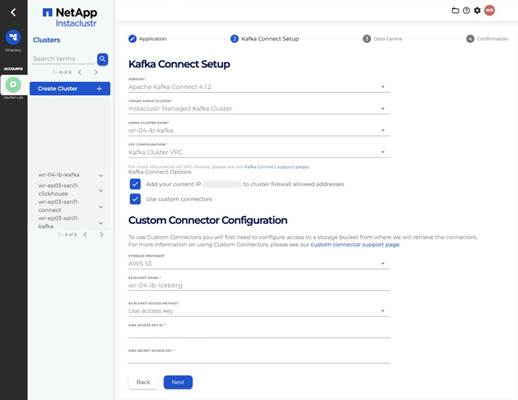
NOTE: Enabling Custom Connectors for new accounts:
Custom Connectors must be manually activated by the Instaclustr support team—there is no self-service option in the console. Email Instaclustr Support with your account name and request activation before provisioning your Kafka Connect cluster. Allow 1 business day for the team to enable it. Once activated, the ‘Use Custom Connectors’ checkbox will appear during Kafka Connect cluster creation. Kafka Connect cluster provisioning itself can take up to 2 hours. You can read more here.
Since ClickHouse is a columnar database built for analytical queries on large datasets, unlike a traditional database that loads data into its own storage, ClickHouse can query Iceberg tables directly from S3. It will read only the files that it needs in milliseconds. So, deploy 1 shard, 3 replicas in the same AWS region as your Kafka cluster and choose a network CIDR that doesn’t overlap with your other clusters (notice how I used 10.6.0.0/16).
Save your ClickHouse password immediately. The icclickhouse credentials are shown once on the Connection Info page after provisioning and automatically removed after 5 days.
Step 3: Upload the Iceberg Sink Connector and set IAM permissions
The Apache Iceberg Sink connector currently must be built from source—no official pre-built JAR is available. Start by cloning the Apache Iceberg repository. This creates a local folder called iceberg on your machine. Navigate into it and run the build using Gradle (a build tool used by Apache Iceberg project. The ./gradlew command is a self-contained Gradle wrapper included in the repo—you don’t need to install Gradle separately).
The -x test -x integrationTest flags skip the test suite to speed up the build, which takes a few minutes.
|
1 2 3 |
git clone https://github.com/apache/iceberg.git cd iceberg ./gradlew -x test -x integrationTest clean build |
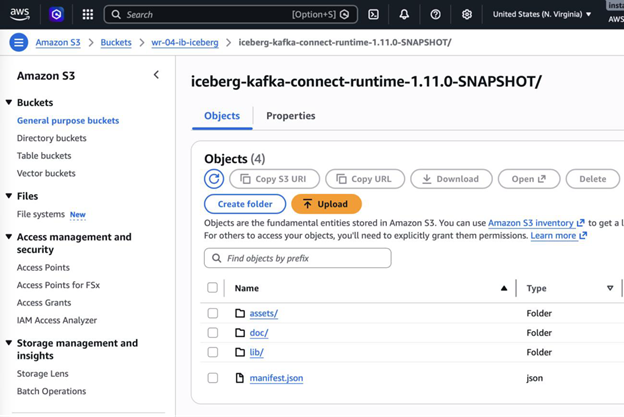
Once the build completes, the connector ZIP will be at kafka-connect/kafka-connect-runtime/build/distributions/. Instaclustr requires the UNZIP folder structure—not the ZIP file itself—so unzip it locally first and then upload the entire folder to your S3 bucket.
|
1 2 3 4 5 |
unzip kafka-connect/kafka-connect-runtime/build/distributions/iceberg-kafka-connect-runtime-<version>.zip \ -d iceberg-connector aws s3 cp iceberg-connector/iceberg-kafka-connect-runtime-<version> \ s3://<your-bucket>/iceberg-kafka-connect-runtime-<version> --recursive |
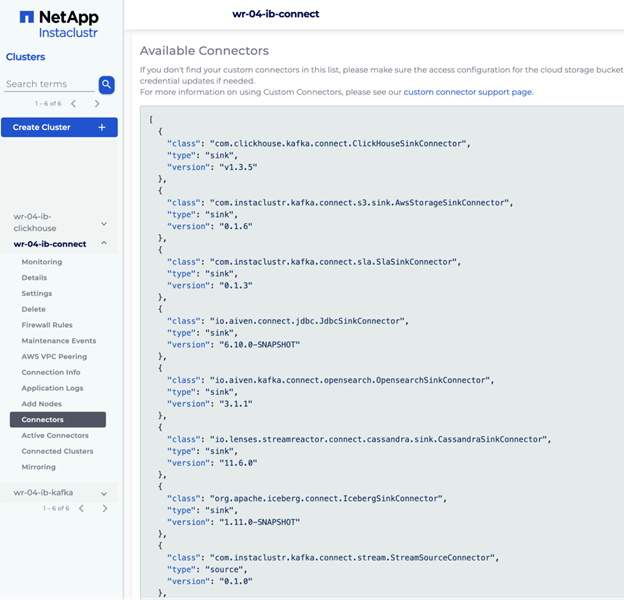
Go to Connectors -> Managing Custom Connectors -> Sync and allow 5-10 minutes. The connector appears as org.apache.iceberg.connect.IcebergSinkConnector in the Available Connectors list.
IAM permissions
After the cluster reaches RUNNING, go to Details and copy the Data Centre ID—this is the IAM instance role name. Add these two policies (minimum required, tested and confirmed):
|
1 2 3 4 5 6 7 8 9 10 11 |
aws iam put-role-policy --role-name <data-centre-id> --policy-name s3-iceberg \ --policy-document '{"Version":"2012-10-17","Statement":[{"Effect":"Allow", "Action":["s3:ListBucket","s3:PutObject"], "Resource":["arn:aws:s3:::<bucket>","arn:aws:s3:::<bucket>/*"]}]}' aws iam put-role-policy --role-name <data-centre-id> --policy-name glue-iceberg \ --policy-document '{"Version":"2012-10-17","Statement":[{"Effect":"Allow", "Action":["glue:GetTable","glue:GetDatabase"], "Resource":["arn:aws:glue:<region>:<account>:catalog", "arn:aws:glue:<region>:<account>:database/analytics", "arn:aws:glue:<region>:<account>:table/analytics/*"]}]}' |
These are the minimum permissions for the Kafka Connect write path, tested and confirmed—including with evolve-schema-enabled: true:
s3:ListBucket |
List files in the warehouse |
s3:PutObject |
Write Parquet files to S3 |
glue:GetTable |
Look up table metadata |
glue:GetDatabase |
Look up database metadata |
For query engines reading Iceberg (ClickHouse, Spark, DuckDB) the role or credentials used for querying also need:
glue:GetObject |
Fetch Parquet files during query execution |
s3:ListBucket |
List files in the warehouse |
Create the control topic and ACLs
The control topic coordinates commit state between connector tasks and is required for exactly-once writes. Create it manually to ensure it gets exactly one partition:
|
1 2 3 4 5 6 7 8 9 10 11 12 13 14 15 16 17 18 19 20 |
kafka-topics.sh --command-config command-config.props \ --bootstrap-server <kafka-bootstrap>:9092 \ --create --topic control-iceberg --partitions 1 kafka-acls.sh --command-config command-config.props \ --bootstrap-server <kafka-bootstrap>:9092 \ --add --allow-principal User:ickafka --operation Read --topic user-events kafka-acls.sh --command-config command-config.props \ --bootstrap-server <kafka-bootstrap>:9092 \ --add --allow-principal User:ickafka --operation Read \ --group connect-iceberg-sink-user-events kafka-acls.sh --command-config command-config.props \ --bootstrap-server <kafka-bootstrap>:9092 \ --add --allow-principal User:ickafka --operation Write --topic control-iceberg kafka-acls.sh --command-config command-config.props \ --bootstrap-server <kafka-bootstrap>:9092 \ --add --allow-principal User:ickafka --operation Read --topic control-iceberg |
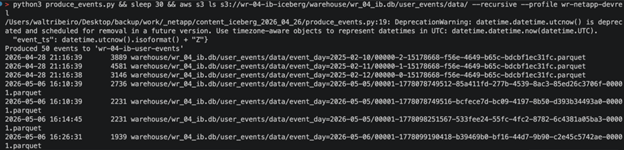
Step 4: Produce events to Kafka
|
1 2 |
pip install aiokafka python3 produce_events.py |

|
1 2 3 4 5 6 7 8 9 10 11 12 13 14 15 16 17 18 19 20 21 22 23 24 25 26 27 28 29 30 31 |
# produce_events.py import asyncio, json, random from aiokafka import AIOKafkaProducer from datetime import datetime, UTC event_types = ["page_view", "click", "signup", "purchase", "logout"] pages = ["/home", "/pricing", "/docs", "/blog/", "/signup", "/checkout"] async def produce(): producer = AIOKafkaProducer( bootstrap_servers="<kafka-bootstrap>:9092", security_protocol="SASL_PLAINTEXT", sasl_mechanism="SCRAM-SHA-256", sasl_plain_username="ickafka", sasl_plain_password="<your-kafka-password>", value_serializer=lambda v: json.dumps(v).encode(), ) await producer.start() try: for i in range(50): event = {"event_id": i+1, "user_id": f"u_{random.randint(1000,1099)}", "event_type": random.choice(event_types), "page": random.choice(pages), "event_ts": datetime.now(UTC).isoformat()} await producer.send("user-events", key=event["user_id"].encode(), value=event) await producer.flush() print("Produced 50 events to 'user-events'") finally: await producer.stop() asyncio.run(produce()) |
Step 5: Deploy the Iceberg Sink Connector
|
1 2 3 4 5 6 7 8 9 10 11 12 13 14 15 16 17 18 19 20 21 22 23 24 25 26 |
curl -X POST https://<connect-host>:8083/connectors \ -H "Content-Type: application/json" -k \ -u <kc-username>:<kc-password> \ -d '{ "name": "iceberg-sink-user-events", "config": { "connector.class": "org.apache.iceberg.connect.IcebergSinkConnector", "tasks.max": "2", "topics": "user-events", "iceberg.tables": "analytics.user_events", "iceberg.tables.auto-create-enabled": "false", "iceberg.tables.evolve-schema-enabled": "true", "iceberg.catalog.type": "glue", "iceberg.catalog.warehouse": "s3://<your-bucket>/warehouse", "iceberg.catalog.io-impl": "org.apache.iceberg.aws.s3.S3FileIO", "iceberg.catalog.client.region": "us-east-1", "iceberg.control.topic": "control-iceberg", "iceberg.control.commit.interval-ms": "60000", "key.converter": "org.apache.kafka.connect.storage.StringConverter", "value.converter": "org.apache.kafka.connect.json.JsonConverter", "value.converter.schemas.enable": "false", "consumer.override.security.protocol": "SASL_PLAINTEXT", "consumer.override.sasl.mechanism": "SCRAM-SHA-256", "consumer.override.sasl.jaas.config": "org.apache.kafka.common.security.scram.ScramLoginModule required username=\"ickafka\" password=\"<your-kafka-password>\";" } }' |
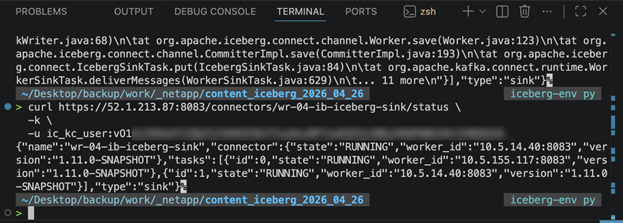
Verify it’s running and confirm files land in S3 after one commit interval:
Note: The escaped quotes inside consumer.override.sasl.jaas.config are required because the value is a JSON string containing its own key-value pairs. This is a common source of deployment errors.
Validating schema evolution
To confirm evolve-schema-enabled: true is working, add a new field (for example, device_type) to your produced events. Iceberg will automatically add the column to the table schema on the next commit—no connector restart or manual schema change required.
|
1 2 3 4 |
curl https://<connect-host>:8083/connectors/iceberg-sink-user-events/status -k \ -u <kc-username>:<kc-password> aws s3 ls s3://<your-bucket>/warehouse/analytics.db/user_events/data/ --recursive |
Step 6: Query Iceberg from ClickHouse
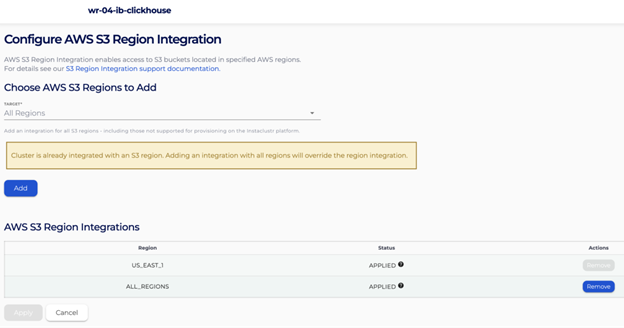
Before ClickHouse can read from S3, you need to enable S3 egress on the cluster. By default, Instaclustr ClickHouse nodes run in a private network with no outbound access to S3. The AWS S3 region integration opens that connection – without it, the iceberg() function will fail to reach your bucket.
Go to ClickHouse cluster -> Integrations -> AWS S3 Region -> Apply and select the region that your bucket is in:
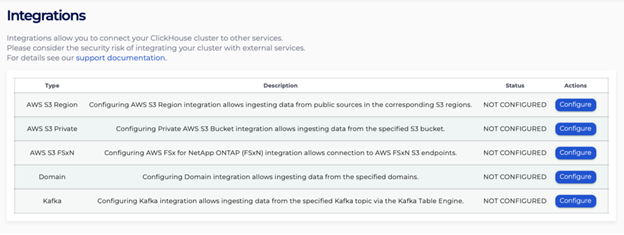
When you first see the Integrations page:
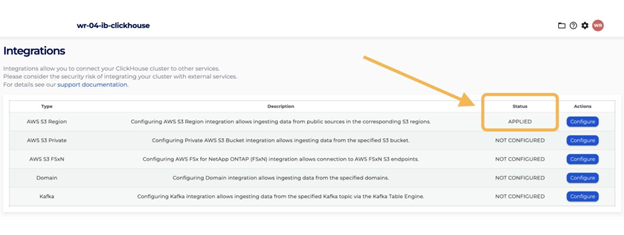
After your Integrations are complete:
Add a bucket policy so ClickHouse can read your data:
|
1 2 3 4 5 6 7 |
{ "Version": "2012-10-17", "Statement": [{"Effect": "Allow", "Principal": "*", "Action": ["s3:GetObject", "s3:ListBucket"], "Resource": ["arn:aws:s3:::<bucket>", "arn:aws:s3:::<bucket>/*"], "Condition": {"StringEquals": {"aws:PrincipalAccount": "<your-aws-account-id>"}}}] } |
Despite "Principal": "*", this is not public; the Condition restricts access to your AWS account only.
Open the ClickHouse Web UI and log in with icclickhouse credentials:
|
1 2 3 |
SELECT * FROM iceberg('https://<bucket>.s3.us-east-1.amazonaws.com/warehouse/analytics.db/user_events/') LIMIT 10; |
0.31 seconds. ClickHouse read the Iceberg metadata, identified which files to fetch, and returned results – no ETL, no loading step.
|
1 2 3 |
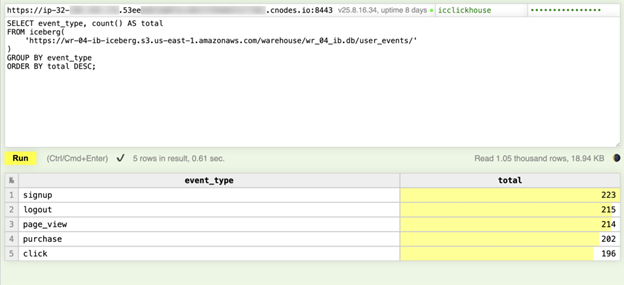
SELECT event_type, count() AS total FROM iceberg('https://<bucket>.s3.us-east-1.amazonaws.com/warehouse/analytics.db/user_events/') GROUP BY event_type ORDER BY total DESC; |
Five rows, one per event type: 0.14 seconds.
Summary: From Kafka to a queryable data lake
This pipeline turns Kafka events into a durable, queryable data lake without moving data into a separate warehouse layer. Each layer has a distinct job. Kafka absorbs event spikes and decouples producers from storage. Kafka Connect bridges Kafka and Iceberg reliably, without custom code. Iceberg organizes your files into a queryable, versioned table that any engine can read. ClickHouse queries that data at analytical speed without loading it first.
So, you didn’t build a pipeline that copies data into a warehouse. You built a system where S3 is the source of truth—and any engine can query it. That’s the architectural shift Iceberg makes possible, and it’s why the same pattern is running at scale many companies.
The Instaclustr engineering team has written in depth on both the Kafka Connect Iceberg Sink Connector and Iceberg Topics if you’re ready to go further. Want to build this pipeline without managing the infrastructure yourself? Instaclustr offers fully managed Kafka, Kafka Connect, and ClickHouse with production SLAs and 24×7 expert support. Start a free trial or talk to an expert to get your data lake running in minutes.
Frequently Asked Questions
How to stream Kafka events to S3
In this walkthrough, Kafka events are streamed to S3 by using the Kafka Connect Iceberg sink. Kafka Connect consumes records from the user-events topic and writes them into an Iceberg table stored in S3.
What is Apache Iceberg used for?
Apache Iceberg is used to add a table layer on top of files in S3. It tracks schema, metadata, partitions, and snapshots so query engines can work with the data as a table instead of a loose set of raw files.
How to configure Kafka Connect Iceberg sink?
You configure it by creating an Iceberg table first, building and uploading the connector, setting IAM permissions, creating the control topic, and then posting the connector configuration to the Kafka Connect REST API with the Glue catalog, warehouse path, topic, and security settings.
How to query S3 data in real time?
In this setup, ClickHouse queries the Iceberg table directly from S3 using the iceberg() function. It reads Iceberg metadata first, then fetches only the files needed for the query.
Why use Kafka Connect instead of a Python consumer?
Kafka Connect handles distributed execution, offset management, worker failover, and operational reliability. A custom script may work for development, but Kafka Connect is designed to run the pipeline in production.
How to connect Kafka to Clickhouse?
In this design, Kafka is connected to ClickHouse indirectly through Iceberg. Events flow from Kafka into Iceberg on S3 through Kafka Connect, and ClickHouse then queries the Iceberg table directly.

