


Generative AI and Large Language Models (LLMs) are booming, and they’ve put a spotlight on a crucial technology: vector search. It’s the engine that powers Retrieval-Augmented Generation (RAG), allowing us to provide relevant, timely context to AI models and prevent them from hallucinating. But as we move toward real-time and streaming GenAI applications, a key question emerges: how do we measure and ensure optimal performance? The answer lies in effective vector search benchmarking.
This isn’t just an academic curiosity for me—it comes straight from the trenches. Earlier this year, I had the opportunity to launch a vector search performance benchmarking project with an ex-colleague and co-author, Professor Ian Gorton (from CSIRO days, at the start of the millennium) and an international group of computer science students from Northeastern University. Our goal? Benchmarking RAG and vector search performance across open source databases.
This project wasn’t theoretical. These students dove into real-world challenges: integrating multiple databases, tackling unfamiliar technologies, and delivering insights under tight deadlines. Their work, which we’ll touch on throughout this post, highlights both what’s possible and the common pitfalls to watch for when optimizing vector search.
Many applications today demand high throughput, low latency, and constant availability for retrieving information. Slow vector search can become a significant bottleneck, delaying responses and degrading the user experience. This post will explore hands-on findings from our benchmarking project, the role of databases like PostgreSQL in vector search, how to set up vector search for embeddings, insertion and retrieval, and practical strategies for building faster, more efficient semantic search systems.
We’ll cover:
- Setting up the performance benchmarking project
- Why performance is critical for vector search.
- The role of databases in vector search
- How databases and extensions like
pgvectorsupport vector search, with first-hand project experience.
Setting up the performance benchmarking project
The project proposal was intentionally high-level to give the students flexibility in their approach, including use cases, data sources, and technologies. Two groups of eight students each worked for two weeks, building on the previous group’s findings—a total of 32 weeks of effort.
The final project, available on GitHub (my copy of the original), is an excellent prototype, especially given the time constraints and the students’ unfamiliarity with the tech. They built a modular RAG benchmarking application using Docker and Python, supporting three of the four suggested vector databases. Their solution included a custom Streamlit GUI for ease of use and sophisticated metrics gathering with tools like LangSmith and Grafana.
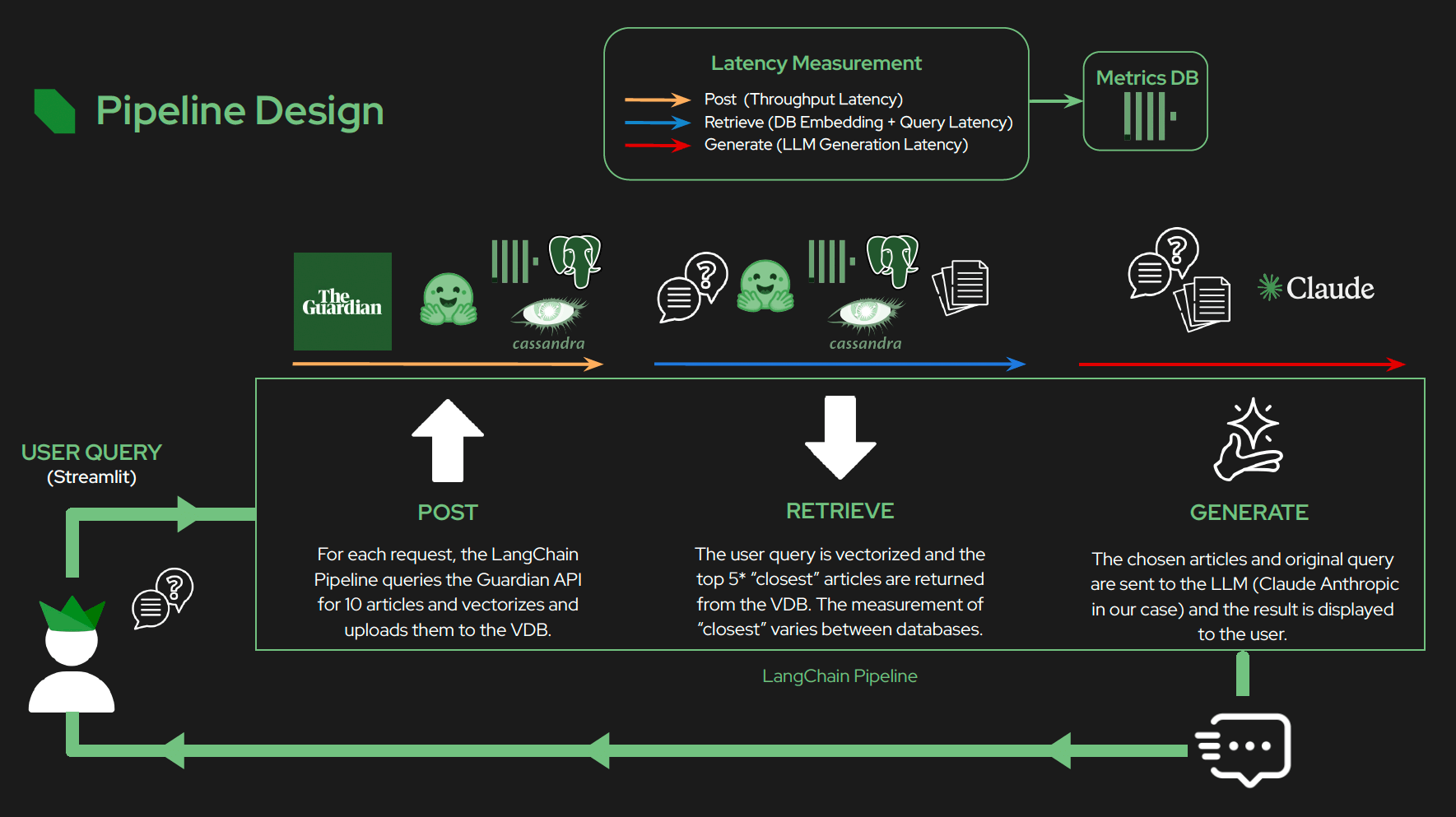
High-level pipeline design of the project
For their use case, they used The Guardian newspaper documents and API, which provides access to 1.9 million pieces of content. While the current workflow is somewhat artificial due to API constraints (e.g., retrieving new documents as a synchronous first step), it could be modified for a more realistic streaming use case later. Despite the challenges of finding good, open streaming data and dealing with API rate limits, the students did a fantastic job. For now, I’ll explore the code as if the document insertion and querying were independent activities.
Why is vector search benchmarking so important?
Vector search, at its core, is about finding similarities in data. It transforms text, images, or other data into numerical representations called embeddings and then finds the “closest” items in a high-dimensional space. This capability is fundamental to modern AI.
Prompted by the growing role of GenAI in enterprise search and context-driven LLMs, our benchmarking project set out to measure and improve the real-world speed and accuracy of vector-based search pipelines. Consider a system designed to answer questions based on a continuous stream of new information.
The process generally involves three main steps:
- Ingestion and indexing: New data is embedded and stored in a vector database, which may be asynchronous or synchronous
- Retrieval: When a query arrives, the system searches the database for relevant documents to use as context.
- Generation: The query and the retrieved context are sent to an LLM to generate a response.
Each of these steps takes time. For demanding use cases like real-time analytics or conversational AI, every millisecond counts. Poor vector search performance during the retrieval step creates noticeable lag and a frustrating user experience. Our student teams quickly realized that the ability to process, index, and retrieve data rapidly is the difference between a cutting-edge AI application and a clunky one.
The role of databases in vector search
You don’t necessarily need a specialized, single-purpose vector database to implement RAG. Many organizations are discovering the benefits of using their existing open source databases, now often equipped with robust vector search capabilities. Our benchmarking project was built on this principle—evaluating PostgreSQL (with pgvector), Apache Cassandra®, and ClickHouse®, and OpenSearch all of which natively support vector search. Focusing on PostgreSQL, we found it strikes an effective balance between maturity, ecosystem, and extensibility.
For the remainder of this blog, I thought I’d take a first look at some of the code they wrote with PostgreSQL, starting bottom up from the database and vector search side. Given that I don’t know Python, or any of the specific libraries or frameworks they used, this could be a useful learning experience—for me at least!
The code base has at least 21 Python files in multiple directories, giving a total of more than 3,000 lines of code! This is a sizeable programme to write in just a few weeks, and a challenge to read and understand, so my approach was to ask the GitHub Copilot AI for some help!
A hands-on look: Benchmarking vector search with PostgreSQL
Step 1: Embedding and insertion
Early in our project students needed to figure out how to enable streaming data insertion and indexing into the vector database. This file {services/postgres/pull_docs.py} handles step 1 of the pipeline (see above), and the code for each database has similar common steps, including getting the documents to insert (from The Guardian API), producing embeddings (the vector form of the text document), and finally inserting documents into the vector database. Embeddings are critical for vector search, so we’ll focus on this aspect and the specific database features that support them.
Embeddings in this file are handled using the SentenceTransformer model (all-MiniLM-L6-v2) from the sentence-transformers library. Here’s how embeddings are used and what they do in the context of this script.
First, the model is initialized:
|
1 |
model = SentenceTransformer("all-MiniLM-L6-v2") |
For each article fetched from the Guardian API, the script extracts the article’s body text:
|
1 |
body = article['bodyText'] |
The body text is then transformed into an embedding:
|
1 2 |
embedding = model.encode(body) embedding_list = embedding.tolist() |
.encode(body)converts the text into a high-dimensional vector representation (embedding)..tolist()converts the numpy array to a Python list for database storage- I’ve come across numpy arrays before when learning streaming Kafka data using TensorFlow.
But what exactly are embeddings, and how are they used? Embeddings are dense numeric vectors that capture the semantic meaning of text. Instead of representing text as discrete words or tokens, embeddings place similar texts near each other in vector space. This allows for efficient search, comparison, and clustering of text data based on meaning.
The model used is all-MiniLM-L6-v2, a transformer-based model trained to produce sentence-level embeddings. Here, the embedding represents the semantic content of an article’s body.
How are embeddings stored? The generated embedding is saved in the Postgres database as part of the articles table:
|
1 2 3 4 5 6 7 8 9 |
cur.execute( """ INSERT INTO articles (url, title, body, publication_date, vector) VALUES (%s, %s, %s, %s, %s) ON CONFLICT (url) DO NOTHING RETURNING url; """, (url, title, body, publication_date, embedding_list) ) |
The vector column stores the embedding for each article. This enables semantic search (searching for articles by meaning rather than just keywords), clustering and recommendations (articles with similar content will have similar embeddings), and even downstream ML tasks (e.g. classification, topic modeling, etc.)!
Learnings about data ingestion
From these early steps, students discovered vector search performance relies on many factors. This hands-on benchmarking project shed light on a few interesting insights around embeddings.
1. The choice of embedding model
Our project relied heavily on all-MiniLM-L6-v2 from the sentence-transformers library for generating vector embeddings. The model all-MiniLM-L6-v2 is a sentence-transformer, designed for semantic textual similarity, clustering, semantic search, and other natural language processing (NLP) tasks. It is efficient, lightweight and fast, and suitable for running locally (e.g. at the edge or running on resource-constrained devices). It has good performance despite its small size, and performs well on semantic similarity tasks, with a good trade-off between speed and accuracy. And it’s plug-and-play, easily usable via Hugging Face or SentenceTransformers library. It’s pre-trained and ready for use without needing fine-tuning for many generic text tasks.
However, the students quickly realized the limits of this approach:
- The model’s small context window made it less suited for lengthy documents.
- Performance and semantic accuracy varied across languages and domains (it’s primarily for English).
- The higher the dimension of the embeddings, the more storage and computational complexity we faced—impacting both indexing and query times.
For other teams, this might mean weighing generalization against domain-specific accuracy and always benchmarking the effect of model choice on search speed. More information is available here.
2. Data chunking—practical challenges
The first batch of students to work on this project reported that they had to spend some time and effort worrying about “Chunking”! Chunking can be necessary with embeddings when dealing with documents that are too large for an embedding model’s context window and must be broken down into meaningful “chunks”! This was probably due to the original choice of domain (which had larger documents).
They discovered that a more streaming-friendly domain (i.e. smaller and more frequent documents) more or less solved the chunking problem, and it was not addressed by the second batch of students. This suggests that Streaming RAG (e.g. with Apache Kafka) may be a good pairing. Here’s a good overview article on chunking if you are interested in finding out more, including streaming specific approaches such as sliding window chunking!)
Step 2: Semantic search and retrieval
Now, let’s dive into the “search” side of semantic search (that’s Step 2 in our pipeline!). You’ll find some familiar steps here: calculating embeddings for a query (just like we did for documents) and then performing a vector search to pinpoint and return those similar documents.
|
1 |
services/postgres/postgres_dao.py |
This file is where the magic happens for PostgreSQL-specific vector searches.
First, embeddings are created for the query*. The class PostgresDao initializes a SentenceTransformer model (we’ve seen this above):
|
1 |
self.model = SentenceTransformer('all-MiniLM-L6-v2') |
In the method related_articles, when a user provides a query string, the code generates its embedding:
|
1 |
emb = self.model.encode(query).tolist() |
This embedding represents the semantic meaning of the query in a vector format. The generated query embedding is then used to search for semantically similar articles in the Postgres database:
|
1 2 3 4 5 6 7 8 9 10 |
cur.execute( """ SELECT url, title, body, publication_date, 1 - (vector <=> %s::vector) AS similarity FROM articles ORDER BY vector <=> %s::vector LIMIT %s """, (emb, emb, limit) ) |
Here’s the clever part: every article in our database already has its pre-computed embedding stored in a vector column. The <=> operator (from pgvector, see the pgvector documentation for more information) computes the distance between the query embedding and the stored article embeddings. The results are ordered by distance (similarity), so the most semantically similar articles are returned.
In summary, embeddings are used to represent both the user’s query and each article in the database as high-dimensional vectors. The code finds articles whose vectors are closest (most similar) to the query vector, enabling semantic search for related content.
Can a “query” be a document?
Absolutely! It also occurred to me that the same core code can effortlessly find documents that are most like *another document*, not just a traditional “query.” Imagine using a recently published article as your “query” to instantly discover similar older documents. This beautifully illustrates how the underlying vector search mechanism is, at its heart, about clustering—grouping items by their inherent similarity.
This discovery process can even be automated for each new article, potentially in parallel with Step 1. The results could be pre-stored or cached, anticipating future queries. This pre-computation can dramatically speed up the entire pipeline. For certain queries (like “What’s the latest article about, and how has the story evolved?”), sufficient context might already be discovered, allowing Step 3 to kick off immediately, bypassing the synchronous semantic search delay. It’s all about working smarter, not harder, to deliver insights faster!
Data Access Objects: Your database powerhouse
I couldn’t help but notice how elegantly the code employs a Data Access Object (DAO), specifically our PostgresDao class, to wrap vector database operations. This design has lots of advantages, including encapsulation and abstraction, centralized connection handling, and database portability!
DAOs are the unsung heroes of clean architecture. By wrapping all direct database interactions within the DAO class, they gracefully separate database logic from your core business logic and controller layers. This keeps your codebase lean, focused, and incredibly easy to manage. Plus, other parts of your application don’t need to sweat the database’s inner workings or which library (like psycopg and pgvector) is being used. DAOs also present a unified, consistent API, making database interaction a breeze for the rest of your application.
For connection management, DAOs centralize all database connection logic. This means easier control over connection lifecycles, pooling, robust error handling, and streamlined configuration. And when it comes to environment configuration, credentials, and parameters are loaded from environment variables in one secure, accessible place.
Finally, DAOs shine brightest when integrating with multiple databases, a common scenario in ambitious projects like ours. They are the perfect design pattern to keep your data access robust and flexible.
More interesting findings with PostgreSQL for vector search
As I dug further into the project files, I wondered where the PostgreSQL database schema was defined and why the indexes were not enabled. Here is what I found:
1. PostgreSQL schema support for vector search
services/postgres/init/01-schema.sql
This schema supports vector search primarily through the following features:
pgvectorExtension- The line “CREATE EXTENSION IF NOT EXISTS vector”
- enables the
pgvectorextension in PostgreSQL, which allows storing and indexing vector embeddings.
- Vector column in table
- The articles table includes a column:
vector vector(384) - This column stores a 384-dimensional vector embedding for each article
- The articles table includes a column:
- Vector indexes for similarity search
- The schema provides some optional statements for creating vector indexes.
- These indexes (when enabled) optimize similarity search on the vector column using:
ivfflatis an index type provided bypgvectorfor efficient approximate nearest neighbor search.vector_cosine_opsandvector_l2_opsallow searching by cosine similarity or Euclidean (L2) distance.- Full-text search index using a GIN index on title and body, which enables fast keyword-based search. This is separate from vector search but can be used in combination.
2. PostgreSQL indexes
I was a bit puzzled that the indexes were not enabled, but the feedback I got was that they were commented out for testing, and data volume was small due to constraints around their use of The Guardian API. Talking with some of our internal PostgreSQL experts, I confirmed that:
- Indexes are optional with vector search
- Potentially, some indexes are best created after the data is inserted (e.g. IVFFlat needs training data)
- The performance varies with multiple factors
- For millions of records and when dimensions are high (e.g. 384), benchmarking is the best approach to choose the best vector index for the best performance
- Often, the HNSW index type is chosen as a starting point.
Conclusion: The path to benchmarking vector search with PostgreSQL
Optimizing your RAG system begins with understanding its performance. A thorough vector search benchmarking process, inspired by real-world project, is the best way to gain that understanding. Our benchmarking project, guided by real-world data and student ingenuity, shows that intelligent choices in database technology, indexing, model selection, and data handling can unlock major improvements.
That wraps up our exploration on vector search benchmarking with PostgreSQL! Part two of this series will explore benchmarking vector search with ClickHouse and Apache Cassandra.
Ready to start your own journey? NetApp Instaclustr for PostgreSQL supports pgvector, and you can explore more with our dedicated pgvector blog here.

