What Is a Managed Apache Kafka Service and Why Does Scalability Matter?
TL;DR: Managed Apache Kafka services run and maintain Kafka clusters for you, with a focus on high scalability. Instaclustr for Apache Kafka is best for teams scaling open source Kafka on any cloud or on-prem, Confluent Cloud suits GBps+ elastic workloads, Aiven for Apache Kafka separates compute from storage, and Amazon MSK fits AWS-centric pipelines.
Managed Apache Kafka services provide an environment for deploying, managing, and scaling Kafka clusters. These services offload the operational burden associated with manual deployment and upkeep, allowing organizations to focus on leveraging data streaming capabilities.
By using a managed service, teams gain access to automated monitoring, maintenance, and scaling features, ensuring optimal performance without the need for extensive in-house expertise. These services enable organizations to quickly integrate Kafka into their existing infrastructure while providing security and compliance assurances.
Why scalability matters in a managed Apache Kafka service:
- Growing event and message volumes: Kafka clusters must scale to handle higher throughput and storage needs as users, services, devices, and data sources increase.
- Scaling producers and consumers: Kafka supports scaling through more producer instances and consumer groups, but consumer parallelism depends on partition count.
- Avoiding performance bottlenecks: Monitoring broker resources, latency, lag, and partition balance helps identify constraints and scale the right parts of the system.
This is part of a series of articles about Apache Kafka
Editor’s note: Updated the article to cover recent market trends, updated product information to reflect features and capabilities in 2026, and added 1 new tool.
Highly Scalable Apache Kafka Services at a Glance
The table below summarizes the key differences between the services covered in this guide. We explore each of them in more detail in the sections that follow.
| Category | Solution | Best For | Scalability Features | Things to Consider |
|---|---|---|---|---|
| Data streaming specialists | Instaclustr for Apache Kafka | Scaling open source Kafka across cloud, on-prem, and hybrid | Horizontal and vertical scaling, up to 99.999% availability SLA, managed mirroring | Limited workload-pattern auto-scaling policies |
| Data streaming specialists | Confluent Cloud | Elastic Kafka scaling with GBps+ throughput across three clouds | Autoscaling Kora engine, Cluster Linking, 120+ connectors | Costs rise with data volume; some features are Enterprise-only |
| Data streaming specialists | Redpanda Cloud | Kafka API workloads needing throughput on fewer compute nodes | Tiered storage, automatic partition balancing, BYOC and serverless | Smaller ecosystem than Kafka; documentation gaps at depth |
| Cloud infrastructure providers | Amazon MSK | Kafka workloads scaling inside the AWS ecosystem | Express brokers scale 20x faster with 3x more throughput | Cost adds up on small workloads; sizing needs Kafka skill |
| Cloud infrastructure providers | Google Cloud Managed Service for Apache Kafka | Teams sizing Kafka by vCPU and RAM instead of broker counts | Automatic broker sizing and rebalancing, high availability by default | Three-zone layout is fixed; local storage is not configurable |
| Cloud infrastructure providers | Azure Event Hubs | Kafka clients streaming into Azure without running brokers | Dynamic throughput adjustment, geo-replication, Kafka endpoint | Not open source Kafka; long retention needs Capture to storage |
| Cloud infrastructure providers | DigitalOcean Managed Kafka | Smaller teams scaling Kafka on flat, predictable pricing | 3 to 15 brokers, storage autoscaling, dedicated vCPU option | 15-node ceiling; no backups, migration, or PITR support |
Why Scalability Matters for Apache Kafka
Growing Event and Message Volumes
As applications grow, Kafka clusters must handle increasing numbers of events without causing higher latency or reducing reliability. More users, services, connected devices, and data sources can increase both message throughput and storage requirements. A scalable deployment can add capacity as these workloads change.
Kafka scales horizontally by distributing topic partitions across multiple brokers. Adding brokers provides more compute, network, and storage resources, while partition reassignment can spread workloads across the expanded cluster. Managed Kafka services can simplify this process by provisioning infrastructure and handling operational tasks involved in cluster expansion.
Scaling Producers and Consumers
Kafka workloads depend on producers publishing records and consumers processing them at the required rate. As traffic increases, applications may need additional producer instances or consumer instances to maintain throughput. Kafka supports this model by allowing multiple producers to write to topics and consumer groups to process partitions in parallel.
Consumer scalability is closely tied to partition count. Within a consumer group, each partition is assigned to only one consumer at a time, so adding consumers beyond the number of partitions does not increase parallelism. Capacity planning should therefore consider partition counts, expected throughput, and how producer and consumer workloads are likely to grow.
Avoiding Performance Bottlenecks
Kafka performance can be limited by broker CPU, disk throughput, network bandwidth, partition distribution, or slow consumers. Uneven partition placement can also create hot brokers that reach resource limits while other brokers remain underused. These bottlenecks can increase producer latency, consumer lag, and replication delays.
Scaling should address the constrained resource rather than simply adding brokers. Monitoring metrics such as request latency, disk and network utilization, consumer lag, and under-replicated partitions helps identify the source of a slowdown. Managed Kafka platforms can automate parts of monitoring and scaling, but workload design and partition strategy still affect cluster performance.
Why choose a managed Kafka service over self-hosting?
There are several reasons for an organization to rely on a managed service rather than hosting Apache Kafka by itself.
Cost and resource efficiency
Managed Kafka services eliminate the need for organizations to invest in and maintain their own Kafka infrastructure, reducing upfront costs and ongoing resource allocation. With a managed service, enterprises avoid the expense of specialized hardware and the labor costs associated with operational staff. They pay a predictable subscription fee, allowing for better budgeting.
Managed services ensure resource allocation is optimal, leveraging economies of scale and resource optimization strategies that may be difficult to achieve independently. Organizations can allocate internal resources more strategically, focusing on core business activities instead of infrastructure management.
Reduced operational complexity
Managed Kafka abstracts the complexity inherent in operating a Kafka environment, allowing organizations to focus on leveraging data streaming capabilities rather than managing infrastructure minutiae. Organizations spend less time on configuration, deployment, monitoring, and scaling.
Managed services automatically handle these tasks, utilizing automation and algorithms to ensure reliable performance. By reducing operational overhead, managed Kafka enables faster deployment times and simplified scalability. Organizations benefit from reduced downtime, minimized risks of human error, and simplified system updates.
Access to expert support
One of the key advantages of a managed Kafka service is access to technical support from experienced professionals. This can be critical when navigating complex configurations, resolving performance bottlenecks, or implementing new functionalities. Expert support enables organizations to troubleshoot issues quickly.
Managed services often provide round-the-clock support, ensuring that expert assistance is available whenever needed. The continuous availability of guidance allows for rapid response to emerging challenges and proactive issue resolution. Access to Kafka specialists helps enterprises maintain the performance and reliability expected of data streaming applications.
Seamless upgrades and patches
Managed Kafka environments ensure seamless upgrades and patches, abstracting the complexities associated with maintenance and version updates. Service providers apply updates transparently, taking responsibility for compatibility testing. Organizations always run the most secure and efficient version without dedicating internal resources to upgrade tasks.
Automatic patching mitigates security vulnerabilities and improves reliability, as updates are tested and deployed by the service provider. Organizations can focus on innovation and business development, free from the need to manage routine maintenance activities.
Key Features of Highly Scalable Managed Apache Kafka Services
Scalable managed Apache Kafka services combine Kafka’s distributed architecture with tools that reduce the work required to operate growing clusters. Key capabilities typically include:
- Horizontal scaling: Add brokers and redistribute partitions to increase processing, network, and storage capacity as workloads grow.
- Automated cluster management: Automate provisioning, configuration, upgrades, patching, and other routine operational tasks.
- High availability: Replicate data across brokers and, where supported, availability zones to reduce the impact of infrastructure failures.
- Monitoring and alerting: Track metrics such as throughput, latency, consumer lag, disk usage, and broker health to identify capacity and performance issues.
- Security controls: Support encryption, authentication, access controls, and network isolation to protect Kafka clusters and data.
- Data durability: Use replication and configurable acknowledgment settings to reduce the risk of data loss during broker failures.
- Integration support: Connect Kafka with databases, data platforms, applications, and other systems through connectors and APIs.
Notable Managed Apache Kafka Services with High Scalability
How we selected these services: We shortlisted managed Apache Kafka services based on horizontal and vertical scaling behavior, partition rebalancing, storage architecture, multi-zone and multi-region availability, and built-in monitoring of throughput and consumer lag.
1. Instaclustr for Apache Kafka

Best for: Scaling open source Kafka across cloud, on-prem, and hybrid
Strengths: Horizontal and vertical scaling with up to 99.999% availability SLA
Things to consider: Limited workload-pattern auto-scaling policies
Scalability features: Horizontal and vertical scaling with dynamic capacity changes.
Instaclustr for Apache Kafka is NetApp’s managed service for open source Apache Kafka, currently running version 4.0. Clusters can be deployed in Instaclustr’s cloud account or the customer’s own, on-premises, or across hybrid environments, and are provisioned through the Instaclustr console, REST API, or Terraform provider.
The service covers performance optimization, built-in redundancy, automatic failover, managed upgrades and patching, and built-in monitoring, backed by 24×7 support from Kafka specialists. Availability SLAs reach 99.999% for enterprise deployments with dedicated ZooKeeper or KRaft nodes, and latency SLAs reach 99%.
Key features include:
- Horizontal and vertical cluster scaling: Nodes can be added or removed to scale a cluster horizontally, and instance sizes can be scaled vertically. Scaling works in both directions, so clusters can also be scaled down to reduce cost.
- Dynamic scaling for bursting workloads: Clusters adapt to fluctuating workloads through dynamic scaling options, and the same behavior applies whether the deployment runs on-premises, in the cloud, or in a hybrid setup.
- Dedicated or co-located ZooKeeper and KRaft nodes: Coordination nodes can be dedicated or co-located with brokers. Dedicated ZooKeeper or KRaft nodes carry a 99.999% SLA, while standard deployments carry 99.99%.
- Managed mirroring across regions: MirrorMaker 2 is offered as a managed service to mirror data between geographic regions, build active/active topologies, or maintain a failover cluster in a second region, with the operations team responsible for the mirroring service end to end.
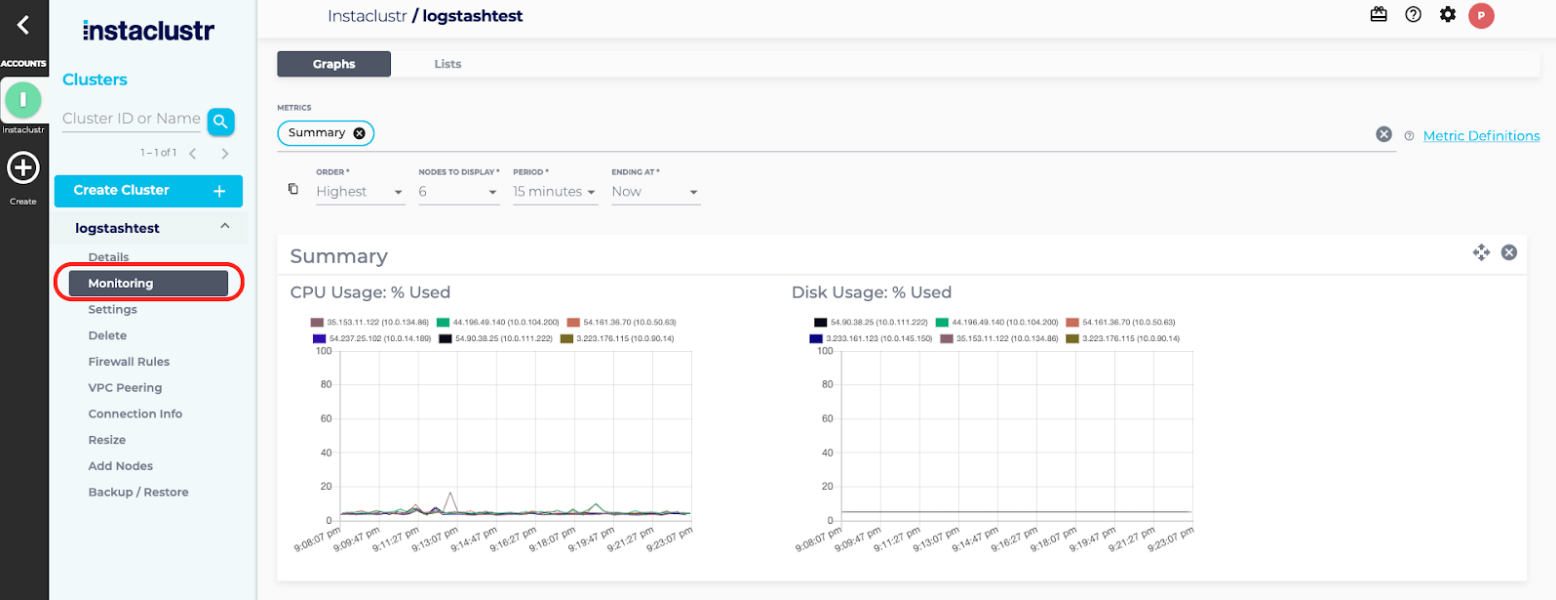
- Automated health checks and proactive monitoring: The platform monitors cluster health continuously, and a 24×7 team of Kafka engineers is alerted whenever action or investigation is required.
- Managed Kafka Connect: Kafka Connect can be added from the console, providing low-code connectors between Kafka and other products in the data layer.
- Pre-built infrastructure and configurations: Cluster configurations are built and tuned in advance based on workload requirements, so production-ready clusters can be provisioned in minutes rather than assembled manually.
Limitations (as reported by users on G2):
- Workload-based scaling policies: Reviewers noted that scaling policies driven by workload patterns, such as automatic scaling during peak hours, would improve both performance and cost efficiency.
- Console option depth: Some users found parts of the interface complex when locating and configuring specific options, though this eased with familiarity.
- Documentation and tutorials: Reviewers would like more comprehensive documentation and tutorial material to support self-service onboarding.
Source: NetApp Instaclustr
2. Confluent Cloud (now an IBM company)

Best for: Elastic Kafka scaling with GBps+ throughput across three clouds
Strengths: Autoscaling Kora engine, Cluster Linking, 120+ connectors
Things to consider: Costs rise with data volume; some features are Enterprise-only
Scalability features: Automatic Kora autoscaling with GBps+ elastic throughput.
Confluent Cloud is the fully managed deployment of Confluent’s data streaming platform, now part of IBM. It runs on a cloud-native Kafka engine called Kora, which was rebuilt to autoscale rather than run on statically provisioned brokers.
Clusters are available in Basic, Standard, Enterprise, Freight, and Dedicated tiers, spanning more than 100 regions across AWS, Microsoft Azure, and Google Cloud. Multi-AZ clusters carry a 99.99% uptime SLA, and pricing is consumption-based with optional annual commitments.
Key features include:
- Autoscaling clusters: The Kora engine scales cluster capacity automatically so infrastructure is sized to the current workload, which removes the need to pre-provision for peak and pay for idle capacity.
- Cluster tiers matched to scale points: Standard clusters add infinite storage and audit logs, Enterprise clusters add private networking and autoscaling at GBps+ scale, Freight clusters target high-volume workloads such as logging, observability, and AI/ML ingestion, and Dedicated clusters provide pre-provisioned resources.
- Cluster Linking for multi-region and multicloud: Data can be replicated, synced, and shared directly between Confluent Cloud clusters in different regions, public clouds, or organizations, forming a single global data plane instead of point-to-point connections.
- Fully managed connectors: The platform provides 120+ pre-built Kafka connectors and 80+ fully managed connectors for databases, data lakes, and data warehouses, removing the need to self-host connector infrastructure as pipelines grow.
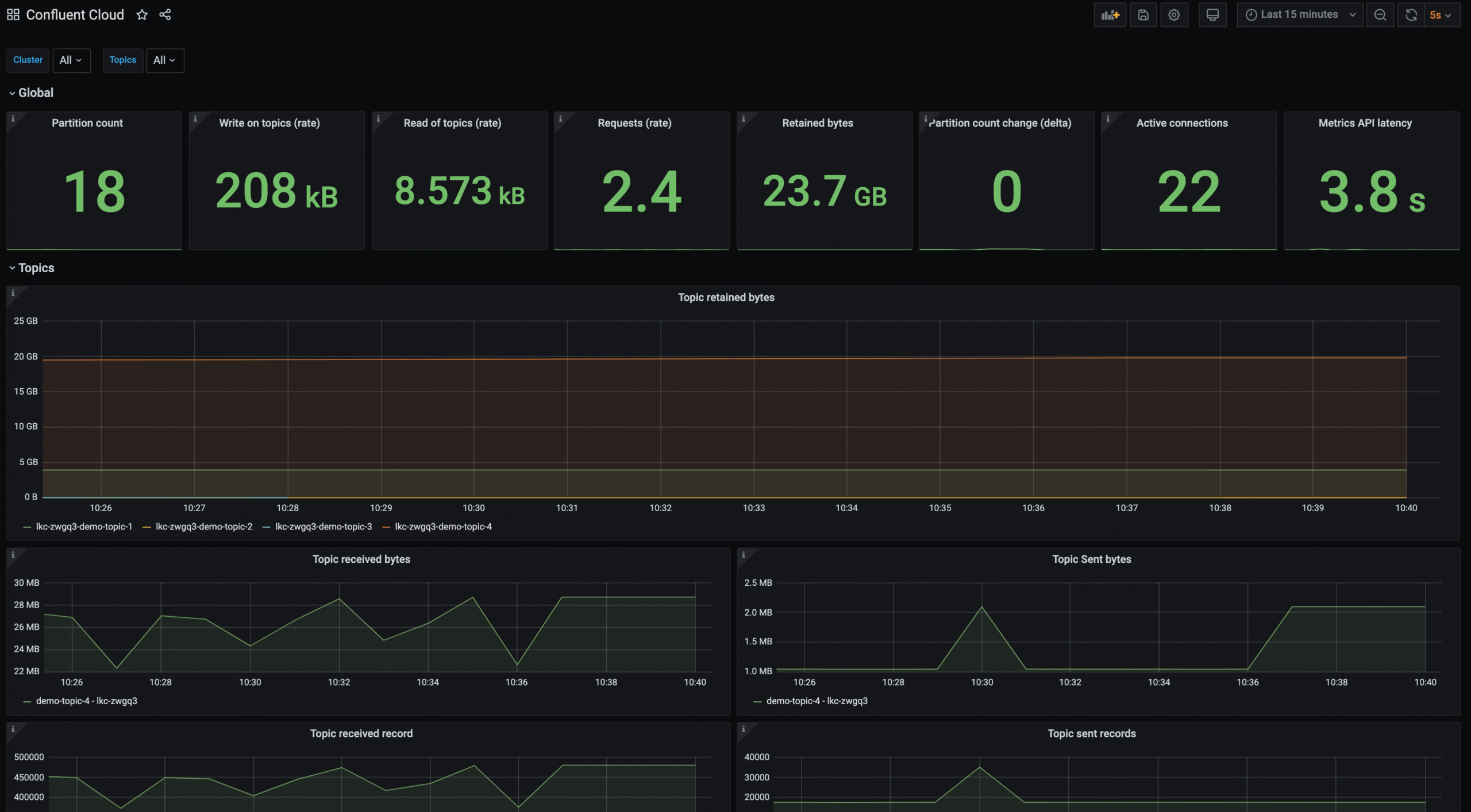
- Metrics API: A dedicated API exposes cluster performance data, consumer lag, and other metrics for external monitoring and alerting systems.
- Migration tooling: Kafka Copy Paste, an open source tool, automates cluster discovery, cost assessment, infrastructure provisioning, and data migration into Confluent Cloud.
- Stream processing and governance at the source: Confluent Cloud for Apache Flink and Stream Governance handle processing and data quality before data moves downstream, and Tableflow materializes Kafka topics as Apache Iceberg or Delta Lake tables.
Limitations (as reported by users on G2):
- Cost scaling with volume: Multiple reviewers reported that pricing climbs sharply as data volume grows, which can be a barrier for smaller teams.
- Feature tiering: Some capabilities are available only in higher editions, and certain authentication options require a separately licensed product.
- Learning curve: Users described a substantial time investment to understand the full workflow, connectors, and security model.
- Documentation gaps: Reviewers reported outdated or thin documentation in places, particularly around deployment, prompting external searches.
- Managed connector configuration: Some configuration settings are not exposed on managed connectors, and certain limits cannot be overridden.
- Console and API parity: The web interface does not expose every capability available through the APIs and CLI, and some resources are not fully covered by the Terraform provider.
Source: Confluent
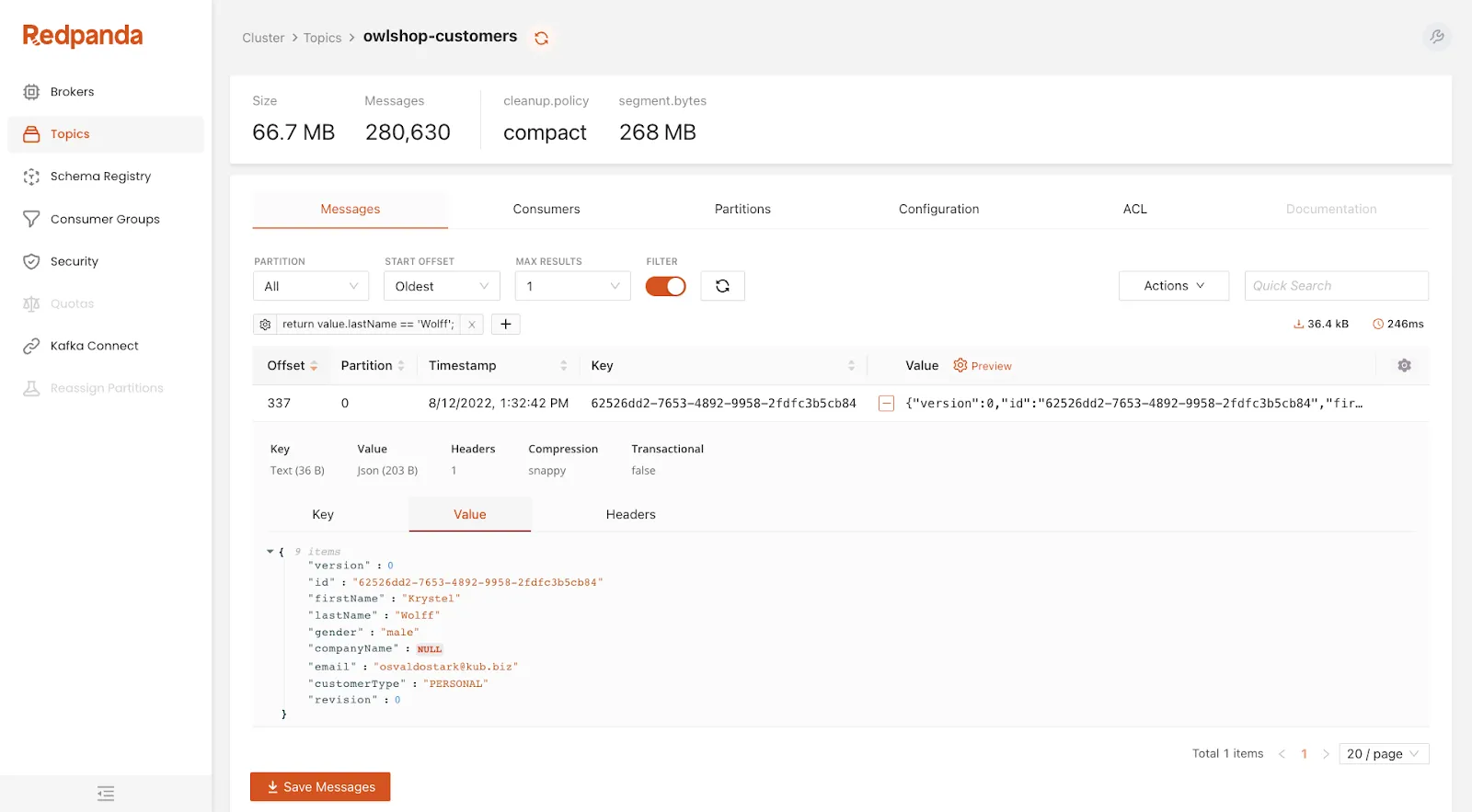
3. Redpanda Cloud

Best for: Kafka API workloads needing throughput on fewer compute nodes
Strengths: Tiered storage, automatic partition balancing, BYOC and serverless
Things to consider: Smaller ecosystem than Kafka; documentation gaps at depth
Scalability features: Automatic partition balancing, tiered storage, and elastic clusters.
Redpanda Cloud is a Kafka API compatible streaming platform delivered as a fully managed service. It covers automated upgrades and patching, data and partition balancing, built-in connectors, and 24×7 support, and carries a 99.99% uptime SLA.
The service is offered in three cluster models that trade off infrastructure control against operational simplicity, and it runs on AWS, GCP, and Azure from a single Redpanda account. Native Kafka API compatibility means existing Kafka ecosystem tools connect without client changes.
Key features include:
- Three cluster models for different scale profiles: BYOC clusters run in the customer’s own cloud but are managed by Redpanda, Dedicated clusters are single-tenant on Redpanda infrastructure with configurable instance types that expand as needs grow, and Serverless clusters run on shared isolated infrastructure with instant cluster creation and no base cost.
- Automatic cluster and partition balancing: Data and partitions are rebalanced automatically as clusters change, and upgrades and patching are managed by Redpanda.
- Tiered storage: Data is offloaded from brokers to object storage, which Redpanda states delivers up to 8-9x savings in long-term data retention costs.
- Compute efficiency: The platform runs on 3x fewer compute resources on average compared with Apache Kafka, which lowers the node count required for a given throughput.
- Raft-native architecture: Consensus is handled through Raft rather than an external coordination service, which the vendor positions as the basis for data safety and day-2 stability at scale.
- Single-service streaming environment: Brokers, HTTP proxy, and schema registry are delivered in one managed service with no external dependencies to operate separately.
- Built-in connectors and console: Connectors ship for systems including MongoDB, Snowflake, S3, MySQL, and PostgreSQL, and the integrated Redpanda Console provides topic visibility and consumer group management.
Limitations (as reported by users on G2):
- Web interface depth: Reviewers reported that advanced tasks such as ACL management push them back to the CLI, and that some functionality is missing from the console.
- Documentation completeness: Users described incomplete or confusing documentation across API layers and connector configuration, requiring experimentation.
- Ecosystem breadth: Several reviewers noted that third-party tooling, integrations, and community resources are less extensive than for Apache Kafka.
- Self-service cluster changes: Some reviewers reported that scaling cluster size or changing networking settings currently requires a support ticket rather than a self-service action.
- Retention and disk behavior: One reviewer described difficulty predicting disk usage and local retention cleanup behavior without vendor assistance.
- Metrics mapping: Metrics are Prometheus-native and do not line up one to one with existing Kafka dashboard names and semantics, requiring rework of alerting.
- Infrastructure as code maturity: Users described the Terraform provider and provisioning flow as less mature than the core streaming product.
Managed Kafka services from cloud infrastructure providers
4. Amazon MSK

Best for: Kafka workloads scaling inside the AWS ecosystem
Strengths: Express brokers scale 20x faster with 3x more throughput
Things to consider: Cost adds up on small workloads; sizing needs Kafka skill
Scalability features: Express brokers scale rapidly with higher broker throughput.
Amazon MSK is a streaming data service that manages Apache Kafka infrastructure and operations on AWS. It operates, maintains, and scales Apache Kafka clusters, provides security features out of the box, and includes built-in integrations with other AWS services.
The service offers a broker type called Express brokers that changes the scaling and recovery characteristics of a cluster. Pricing is pay-as-you-go with no commitments or upfront payments.
Key features include:
- Express brokers: These provide up to 3x more throughput per broker, scale up to 20x faster, and recover 90% quicker than standard Apache Kafka brokers, with support for up to 5x more partitions per broker.
- Partition-bound price-performance: For workloads constrained by partition count rather than raw throughput, Express brokers can improve price-performance by up to 50%.
- Managed cluster operations: Provisioning, configuration, and maintenance of highly available Kafka clusters are handled by the service, so scaling actions do not require in-house Kafka operations expertise.
- Multi-AZ resiliency: Clusters deploy across availability zones with automated detection, mitigation, and recovery of infrastructure issues covering ingestion, storage, and downstream analytics.
- Managed connector hosting: Data can be sourced from upstream systems and delivered to destinations such as S3 and S3 Tables using fully managed and no-code integrations with AWS services, or by hosting connectors on fully managed Kafka Connect.
- Migration into MSK: Topic data and metadata can be migrated from Kafka deployments running on-premises, on AWS, on other cloud providers, or on Kafka-protocol-compatible services.
- Native Apache Kafka APIs: Clusters expose standard Kafka APIs, so producers, consumers, and existing tooling connect without application changes.
Limitations (as reported by users on G2):
- Cost on smaller workloads: Running dedicated brokers was described as expensive for small workloads and early-stage projects compared with serverless messaging services.
- Kafka expertise still required: Reviewers noted that designing partitions, replication factors, and consumer groups for optimal performance still demands Kafka knowledge.
- Flexibility compared with self-managed: Several users found the service less flexible than running Kafka themselves in certain scenarios.
- Scaling friction reported historically: One reviewer reported being unable to scale vertically without performing their own data migration to a new cluster, which led their team to change providers.
- Account and broker limits: A reviewer described caps on brokers per account and per cluster and on storage per broker, requiring an approval request to exceed them.
- Monitoring charges: Additional monitoring metrics were reported to carry extra cost.
- Regional availability: Some users noted the service was not available in every region they needed.
5. Google Cloud Managed Service for Apache Kafka

Best for: Teams sizing Kafka by vCPU and RAM instead of broker counts
Strengths: Automatic broker sizing and rebalancing, high availability by default
Things to consider: Three-zone layout is fixed; local storage is not configurable
Scalability features: Automatic broker sizing and partition rebalancing as demand grows.
Google Cloud Managed Service for Apache Kafka runs open source Apache Kafka and Kafka Connect code, so existing Kafka applications work without modification. The service removes broker resizing and storage management from the operator’s responsibilities.
Clusters are created with automatic broker sizing and rebalancing, and every deployment is highly available by default. Pricing is pay-as-you-go across compute, storage, and networking, starting at $0.09 per CPU hour for compute, $0.17 per GiB per month for broker SSD, and $0.10 per GiB per month for persistent storage backed by Cloud Storage.
Key features include:
- Automatic broker sizing and rebalancing: Cluster creation handles broker sizing automatically, and the service rebalances partitions as capacity changes, which removes manual partition reassignment during growth.
- High availability by default: All deployments are created as highly available, so multi-zone resilience does not need to be configured separately.
- Automatic version updates: The service keeps clusters on a recent version of Apache Kafka without operator intervention.
- Kafka Connect data integration: Connect support, currently in preview, is used to migrate and replicate Kafka clusters or write data into BigQuery and Cloud Storage for lakehouse workloads.
- Standard schema registry API: The service implements the standard schema registry API in preview, which keeps producers and consumers aligned as the number of clients grows.
- Built-in operations tooling: Cloud Monitoring, Cloud Logging, and Identity and Access Management are included out of the box for tracking cluster behavior and controlling access.
- Security controls: The service integrates with Google Cloud IAM, customer-managed encryption keys, and Virtual Private Cloud.
Limitations (based on publicly available sources):
- Fixed three-zone topology: Every cluster must have equal resources in each of three zones. Single-zone and two-zone clusters are not supported, and the zones cannot be chosen at creation time.
- No local storage configuration: The volume of local storage on a cluster cannot be set by the operator.
- Deferred configuration changes: Broker configurations with read-only update mode take effect only when brokers restart, and restarts occur during Google’s maintenance processes with no way to trigger them manually.
- Service-managed broker settings: Certain parameters, including broker identifiers and storage-related settings, cannot be updated.
- No JMX metrics APIs: JMX APIs for metrics are not supported, so existing JMX-based monitoring needs to be replaced with Cloud Monitoring.
- Regional failure scope: The service does not protect against regional or dual-zone failures, so cross-region resilience requires running two clusters and synchronizing them with MirrorMaker 2.0.
- Cluster quota: The default quota is 5 clusters per project per region, with increases available on request.
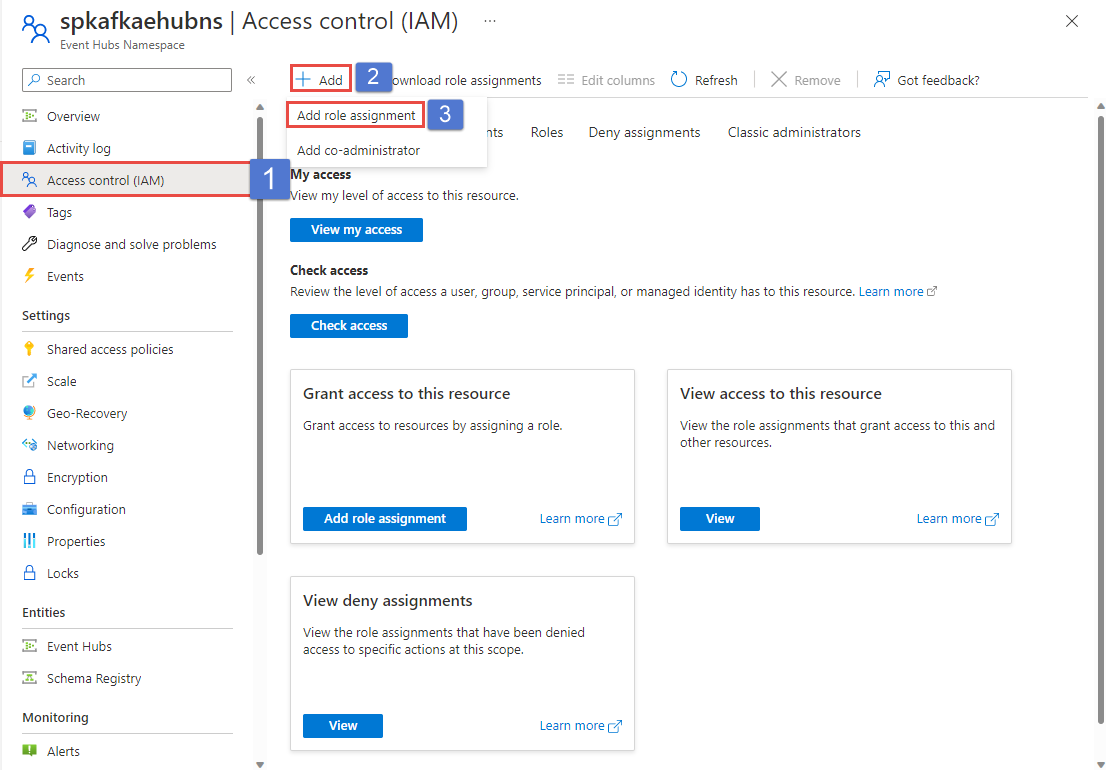
6. Azure Event Hubs

Best for: Kafka clients streaming into Azure without running brokers
Strengths: Dynamic throughput adjustment, geo-replication, Kafka endpoint
Things to consider: Not open source Kafka; long retention needs Capture to storage
Scalability features: Elastic throughput scaling to millions of events per second.
Azure Event Hubs is a fully managed real-time data ingestion service that accepts connections over AMQP, HTTPS, and the Apache Kafka protocol. Existing Kafka clients and applications connect to Event Hubs without code changes, which gives teams a managed Kafka-compatible endpoint without operating clusters.
The service is aimed at very high ingestion volumes, streaming millions of events per second from distributed software and devices. It carries certifications including CSA STAR, ISO, SOC, GxP, HIPAA, HITRUST, and PCI, and is available across more than 60 announced Azure regions.
Key features include:
- Elastic scale with operator control: Throughput scales from megabytes to terabytes of data while the operator retains control over when and how much to scale, and billing follows actual usage.
- High-volume ingestion: The service continuously ingests data from hundreds of thousands of sources with low latency and configurable time retention, handling millions of events per second.
- Apache Kafka endpoint: Azure Event Hubs for Apache Kafka lets Kafka applications, clients, connectors, and monitoring agents connect directly, so existing Kafka-based pipelines can be pointed at Event Hubs without refactoring.
- Geo-disaster recovery and geo-replication: Processing continues during regional incidents through built-in geo-disaster recovery and geo-replication features.
- Event Hubs Capture: Streams can be written to Blob Storage or Data Lake Storage for long-term retention or micro-batch processing, and real-time and micro-batch consumption can run concurrently against the same stream.
- Serverless downstream processing: Native integration with Stream Analytics builds an end-to-end serverless streaming pipeline without separate stream processing infrastructure.
- Hybrid ingestion: Events can be ingested and processed at scale on Azure Stack Hub, then passed to Azure services for further processing, visualization, or storage.
Limitations (as reported by users on G2):
- Abstracted internals: Reviewers noted that much of the underlying behavior is hidden, and achieving more flexible or custom handling requires writing additional functions.
- Longer retention handling: Persisting events beyond roughly a month was described as awkward without moving data into storage.
- Value tied to Azure: Several reviewers observed that the service is a weaker fit for teams not otherwise using Azure.
- Learning curve and documentation: Users without a cloud platform background found the service hard to pick up and asked for better documentation.
- Pricing perception: One reviewer described the wider Microsoft Azure stack as overpriced relative to competitors.
- Interface responsiveness: Occasional lag and navigation difficulty in the portal were reported.
Source: Microsoft
7. DigitalOcean Managed Kafka

Best for: Smaller teams scaling Kafka on flat, predictable pricing
Strengths: 3 to 15 brokers, storage autoscaling, dedicated vCPU option
Things to consider: 15-node ceiling; no backups, migration, or PITR support
Scalability features: Vertical scaling, up to 15 brokers, and storage autoscaling.
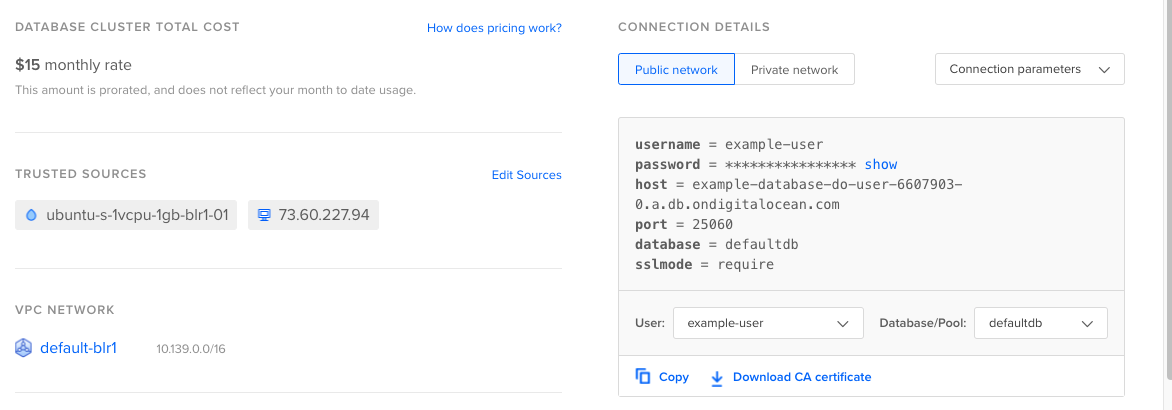
DigitalOcean Managed Kafka is a fully managed Apache Kafka service aimed at teams that want high-throughput streaming without provisioning, configuring, and running clusters. Clusters are created through the control panel, CLI, or API.
Pricing is flat and all-inclusive rather than usage-metered, with a three-node shared vCPU cluster listed at $148.80 and a three-node dedicated vCPU cluster at $599.25. Cluster configuration can be changed at any time as workloads grow.
Key features include:
- Vertical and horizontal scaling: The configuration plan, number of brokers, and total disk storage can each be adjusted at any time, so clusters can be resized in either direction to match capacity to demand.
- Storage autoscaling: Storage scales automatically as data volume grows, which avoids manual disk expansion as retention or throughput increases.
- Configurable broker counts: Clusters can be set to 3, 6, 9, or 15 brokers, with additional brokers used to raise total cluster availability during a failover.
- Automatic broker replacement: If a broker fails, a healthy broker is swapped in while the remaining brokers continue pushing and pulling messages without downtime.
- Dedicated vCPU option: Clusters can be provisioned on 100% dedicated virtual CPUs so throughput does not vary with noisy neighbors.
- Integrated metrics and alerting: Metrics, insights, and alerts are built in, and log data can be forwarded from the cluster to an external log management provider.
- Kafka Schema Registry: Centralized schema management enforces data consistency across producers and consumers as the number of topics and services grows.
- Private networking and encryption: Clusters run inside the account’s private network and are unreachable from the public internet unless a source is allowlisted, with data encrypted in transit and at rest.
Limitations (based on publicly available sources):
- Node ceiling per cluster: Each cluster is limited to 15 nodes, which caps how far a single cluster can scale horizontally.
- Missing data protection features: DigitalOcean Kafka does not currently support backups, forking, importing, connection pooling, migration, or point-in-time recovery.
- Single supported version: Only Kafka 3.8 is available for new clusters, and versions 3.5, 3.6, and 3.7 have already reached end of life.
- Account-level cluster quota: Accounts and teams are limited to 10 clusters by default, with increases available by request.
- Trusted source constraints: Clusters support up to 2,000 IP addresses as trusted sources by default, IPv6 rules cannot be added, and DigitalOcean Cloud Firewalls cannot be applied to database clusters.
- Storage and performance tradeoff: Adding storage can cause slight performance degradation in database clusters.
Source: DigitalOcean
How to choose scalable managed Apache Kafka services
Workload and Scalability Requirements
Start by estimating expected throughput, message sizes, retention periods, partition counts, and projected growth. These factors determine how much broker, storage, and network capacity the Kafka environment needs. Services should support adding capacity without causing significant downtime or operational disruption.
Review how scaling is performed and which resources can scale independently. Some services automate broker or storage expansion, while others require manual changes. Also check limits on partitions, cluster size, storage, and throughput to ensure the platform can support future workloads.
Availability and Disaster Recovery
Evaluate how the service protects Kafka workloads from broker, infrastructure, and availability zone failures. Look for replication across brokers and zones, automated failover, and clear service level agreements for availability. The architecture should match the organization’s tolerance for downtime and data loss.
Disaster recovery capabilities are also important for critical workloads. Review support for cross-region replication, backups, recovery procedures, and recovery time and recovery point objectives. Organizations operating across multiple regions should understand how quickly workloads can be restored after a regional outage.
Security and Compliance
Managed Kafka services should provide controls for protecting data both in transit and at rest. Important features include TLS encryption, authentication, role-based access control, private networking, and integration with identity management systems. Fine-grained permissions can help restrict access to specific clusters, topics, or consumer groups.
Organizations with regulatory requirements should also review supported compliance certifications and audit capabilities. Check whether the service provides audit logs, configurable data residency, encryption key management, and network isolation. These controls should align with existing security policies and compliance requirements.
Operational Tooling and Kafka Compatibility
Compare the monitoring, alerting, and administration tools provided by each service. Useful capabilities include visibility into throughput, latency, consumer lag, disk usage, broker health, and partition distribution. Strong operational tooling can help teams identify capacity problems and failures before they affect applications.
Compatibility with the Apache Kafka ecosystem should also be reviewed. Check supported Kafka versions, APIs, client libraries, connectors, schema management tools, and stream processing integrations. Services that introduce proprietary APIs or restrictions may require additional work when migrating applications or integrating existing tools.
Support and Service Levels
Review the level of technical support available and whether it matches the importance of the Kafka workloads being deployed. Production environments may require 24/7 support, short response times, and direct access to engineers with Kafka expertise. Support can be especially important when diagnosing replication, partitioning, or performance problems.
Service level agreements should clearly define availability commitments and provider responsibilities. Organizations should also examine support tiers, escalation procedures, maintenance policies, and response targets for critical incidents. These details affect how quickly operational issues can be resolved.
Pricing and Total Cost
Compare pricing using realistic workload estimates rather than advertised entry-level rates. Managed Kafka costs can include broker capacity, storage, data transfer, networking, connectors, and additional management features. Workloads with high retention or cross-region traffic can generate costs that are not obvious from base pricing.
Total cost should also account for the operational work the managed service removes. A service with a higher infrastructure price may reduce expenses related to staffing, monitoring, upgrades, troubleshooting, and capacity management. Comparing both direct service costs and internal operational costs provides a more accurate basis for selection.
Conclusion
Managed Apache Kafka services abstract the complexity of operating Kafka infrastructure, offering automated scalability, integrated monitoring, expert support, and seamless upgrades. These services help organizations quickly adopt Kafka for real-time data processing without needing to build or maintain in-house expertise.
When selecting a provider, evaluate deployment flexibility, performance architecture, ecosystem compatibility, and the strength of operational support. A well-chosen managed Kafka solution allows teams to focus on data-driven applications rather than infrastructure maintenance.