



What should you do with messages that can’t be delivered?
If you have spent time developing Kafka Streams applications in Java, you’ve probably felt the gap between what Kafka Connect and Kafka Streams offer when something goes wrong on the wire. Connect has a familiar pattern: poison messages land in a dead letter queue (DLQ) topic, with enough context to skip, replay, alert, or inspect them. For example, see this blog on how to add error handling to Kafka Connect pipelines, and a more recent OpenSearch sink connector example.
Streams, historically, were limited to logging or failing the processing thread—somewhat suboptimal and not as good as routing bad work to a durable, consumer-friendly topic with structured metadata.
KIP-1034: Dead letter queue in Kafka Streams closes the gap—especially around deserialization and similar errors—by letting you name a DLQ topic and receive producer-ready records (raw bytes plus headers) that you can treat like any other Kafka topic.
The developer problem before KIP-1034
Before KIP-1034, when a Deserializer threw, your options were largely framed by the handler you configured: log and continue, log and fail, or a custom handler you wrote yourself. Continuing meant you might log a line and drop the problematic bytes; failing meant unwinding the thread or the app unless you built your own side channel to copy bytes to a “DLQ-like” topic inside the handler. Custom handlers could always send to a topic, but there was no single, documented contract aligned with Connect’s idea of a DLQ, and default behaviour did not give you a standard record shape (key, value, headers) for downstream processing.
For Java developers, this pain shows up in three crucial areas:
- Tests: Asserting that a bad message is preserved is difficult.
- Observability: Alerting on a SerializationException without scraping logs is tedious.
- Replay: Re-injecting fixed payloads without guessing partitioning requires excessive effort.
A DLQ topic answers those the same way Connect does: Kafka as the system of record for failure.
What KIP-1034 brings to your Kafka Streams DLQ
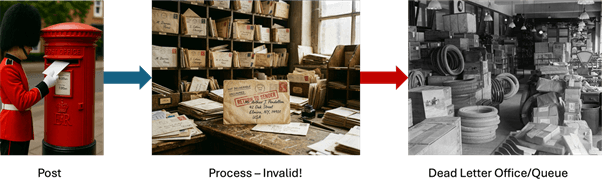
A dead letter post office (c.f. a dead letter queue) is where undeliverable mail (including tyres and “Jell-o”) ended up.
At a high level, the KIP introduces a configuration hook and a richer handler response model:
Errors.dead.letter.queue.topic.name: When this is set to a topic name, the default deserialization (and related) handlers can emitProducerRecord<byte[], byte[]>rows to that topic. When it isnull, you do not get DLQ emission from those defaults. Custom handlers are unchanged unless they choose to use the same mechanism.- Structured responses: Handlers return a structured response: whether to resume, fail, or retry (where applicable), together with any DLQ records to send. That keeps control flow and side effects (writing to the DLQ) explicit instead of ad hoc logging.
- DLQ record contents: Where the platform still has them, key and value are the raw input bytes from the source consumer record—this is what you need for replay and forensic comparison. Headers carry normalised metadata: exception class name, message, stack trace, and pointers back to the source (
__streams.errors.*style names for topic, partition, offset). The KIP also acknowledges metadata-only DLQ rows in cases where full source bytes are not available—worth calling out to reduce surprises. - Operational contract: Streams does not auto-create the DLQ topic. You choose partitions, replication, retention, and compaction policy like any application topic. If producing to the DLQ fails, the KIP typically routes that failure through the Streams uncaught exception handling path, so it is not silently dropped.
Also note that the DLQ primarily applies to deserialization and handler-driven error paths—it does not replace general exception handling inside processors.
If you already think in terms of ConsumerRecord → ProcessorContext, the mental shift is small: the failure path now has a first-class, Kafka-native sink with a documented header schema.
Configuring a Kafka Streams DLQ: A simple example
Most developers will set DLQ properties on StreamsConfig alongside their application id and bootstrap servers. A minimal test configuration might look like this:
|
1 2 3 4 5 6 7 8 9 |
Properties props = new Properties(); props.put(StreamsConfig.APPLICATION_ID_CONFIG, "payments-dlq-demo"); props.put(StreamsConfig.BOOTSTRAP_SERVERS_CONFIG, "localhost:9092"); props.put(StreamsConfig.DESERIALIZATION_EXCEPTION_HANDLER_CLASS_CONFIG, LogAndContinueExceptionHandler.class); props.put(StreamsConfig.ERRORS_DEAD_LETTER_QUEUE_TOPIC_NAME_CONFIG, "payments-streams-dead-letter"); props.put(StreamsConfig.DEFAULT_KEY_SERDE_CLASS_CONFIG, Serdes.String().getClass().getName()); props.put(StreamsConfig.DEFAULT_VALUE_SERDE_CLASS_CONFIG, Serdes.Integer().getClass().getName()); |
All of the StreamsConfig options are documented here, but watch out for deprecated field names (some starting with “DEFAULT_” are now deprecated and/or replaced with other names).
A realistic “bad” message is not something obvious such as a malformed UTF-8 string with StringDeserializer—many decoders replace ill-formed sequences instead of throwing, which means nothing appears in the DLQ! If we ingest integers as four-byte big-endian values, we’ll use IntegerDeserializer for a clearer example: anything that is not four bytes will throw a SerializationException.
And a simple passthrough topology is enough to prove the pipeline:
|
1 2 3 4 5 6 |
StreamsBuilder builder = new StreamsBuilder(); KStream<String, Integer> input = builder.stream( "payments-input", Consumed.with(Serdes.String(), Serdes.Integer())); input.to("payments-output"); |
In a test main, you can publish lots of valid integers and then one invalid payload:
|
1 2 3 4 5 6 |
byte[] key = "account-7".getBytes(StandardCharsets.UTF_8); byte[] bad = "not-an-int".getBytes(StandardCharsets.UTF_8); try (KafkaProducer<byte[], byte[]> producer = new KafkaProducer<>(producerProps)) { producer.send(new ProducerRecord<>("payments-input", key, bad)).get(); } |
After the bad send, you will see one record on payments-streams-dead-letter whose key and value byte arrays match what you produced, plus headers you can assert in JUnit by name (exception class contains SerializationException, message mentions size not equal to four, and so on). Your business output topic should not contain that logical message, because it never deserialised into the stream.
How about a more realistic Streams application?
So, how about a more realistic Streams application—joins or windows come to mind? Here’s a better example with averaging over a time window. DLQ behaviour attaches to the source deserialization path and composes with the rest of the topology unchanged. A compact example is a tumbling window average per key as follows:
|
1 2 3 4 5 6 7 8 9 10 11 12 13 14 15 16 17 18 19 20 21 22 23 24 25 |
StreamsBuilder builder = new StreamsBuilder(); KStream<String, Integer> input = builder.stream( "payments-input", Consumed.with(Serdes.String(), Serdes.Integer())); input.groupByKey(Grouped.with(Serdes.String(), Serdes.Integer())) .windowedBy(TimeWindows.ofSizeWithNoGrace(Duration.ofSeconds(10))) .aggregate( () -> "0,0", // sum,count as a tiny string aggregate—replace with a proper type + Serde in real code (key, value, agg) -> { int comma = agg.lastIndexOf(','); long sum = Long.parseLong(agg.substring(0, comma)) + value; long cnt = Long.parseLong(agg.substring(comma + 1)) + 1; return sum + "," + cnt; }, Materialized.with(Serdes.String(), Serdes.String())) .toStream() .mapValues(sumCount -> { int comma = sumCount.lastIndexOf(','); long sum = Long.parseLong(sumCount.substring(0, comma)); long cnt = Long.parseLong(sumCount.substring(comma + 1)); return cnt == 0 ? 0.0 : sum / (double) cnt; }) .selectKey((windowedKey, avg) -> windowedKey.key()) .to("payments-output-windowed", Produced.with(Serdes.String(), Serdes.Double())); |
Note that aggregation math is irrelevant to the DLQ until a record successfully deserialises. The poison pill is rejected before your windowed store sees it, which is exactly how you want failure isolation to work.
With some AI assistance (Cursor this time), I produced some example Java Kaka Streams code for the simple and complex test cases above. These are available in our code samples on GitHub here, including instructions on how to run them. Note that they only work with Kafka 4.2.0 (which was released on 17 February 2026) and above, so you’ll have to test this out by running Kafka 4.2.0 locally to get the benefits of KIP-1034. Check back in a few months for more information regarding being able to run in production on Instaclustr’s managed Kafka platform. Also check out Streams API changes in 4.2.0 in the Apache Kafka documentation. I had some fun and games with Cursor, trying to generate correct and testable code for the windowing example – time, and verification over time windows, is tricky! Here are a few things I had to watch out for when developing and running the tests.
Deterministic timestamps for integration tests
My test asserts expected windowed averages, but I found that records produced in quick succession can still end up in different windows. Kafka Streams assigns windows based on each record’s timestamp (event-time), and by default, the producer assigns each record a timestamp based on the current system time. Even small differences between record timestamps can cause them to fall into different windows, leading to non-deterministic test results.
A practical pattern is to assign a fixed, window-aligned timestamp to all records in a test batch:
|
1 2 3 4 5 6 7 8 9 |
long windowMs = 10_000L; long now = System.currentTimeMillis(); long batchEventTs = (now / windowMs) * windowMs; producer.send(new ProducerRecord<>( "payments-input", null, batchEventTs, keyBytes, intBytes)).get(); |
This ensures all test records fall into the same window and makes windowed assertions deterministic. It is a testing technique, but also a useful reminder to think in terms of event-time when reasoning about DLQ handling alongside stateful operators.
Testing your Kafka Streams DLQ
I ended up with a JUnit (or Testcontainers) integration test that:
- Starts Kafka (often Docker Compose locally).
- Starts
KafkaStreamswithLogAndContinueanderrors.dead.letter.queue.topic.nameset. - Subscribes a
KafkaConsumer<byte[], byte[]>to the DLQ withauto.offset.reset=latest, waits for partition assignment, then seeks to end so stale DLQ rows from earlier runs do not satisfy matchers. - Produces the batch, then awaits a DLQ record that matches both the expected raw key and raw value (not value alone—duplicate bad payloads happen across reruns).
- Optionally enable a trace flag (
-Dstreams.trace=true) that logs eachProducerRecordsent and each record consumed, including timestamps. This makes it easy to debug test failures—especially when dealing with timestamps and windowing—by showing exactly what data (including timestamps) flowed through the system.
The headers are part of the contract. Even if you do not parse stack traces in CI, assert that __streams.errors.exception contains SerializationException and that __streams.errors.topic points at the input topic. That catches configuration regressions where the DLQ topic is wired but the wrong handler class is still on the classpath.
What do the DLQ record and metadata look like?
I was curious to understand what the DLQ records and metadata looked like in more detail.
For deserialization failures, the DLQ ProducerRecord is built with the same raw byte[] key and byte[] value that came off the log (what Streams would have deserialized). In the demo code this is:
| Part | Bytes (conceptually) | What you’d see if you interpret as UTF‑8 |
|---|---|---|
| Key | UTF‑8 of “valid-key” | valid-key |
| Value | UTF‑8 of “not-an-int” | not-an-int |
So, the DLQ “payload” is not a JSON envelope; it’s opaque bytes carrying the original record (which, in terms of the KIP motivation, is to avoid guessing serializers).
Metadata is mostly in record headers, not in the key/value. Kafka 4.2’s helper ExceptionHandlerUtils works as follows.
- Copy any existing headers from the failing consumer record’s context onto the DLQ record (so your app headers survive).
- Append these UTF‑8 string headers (values produced with
StringSerializer):
| Header name | Typical content |
|---|---|
__streams.errors.exception |
Exception class name, e.g.containsSerializationException |
__streams.errors.message |
exception.getMessage() |
__streams.errors.stacktrace |
Full stack trace text |
__streams.errors.topic |
Source topic (here kip1034-dlq-input) |
__streams.errors.partition |
Partition as decimal string (here "0") |
__streams.errors.offset |
Offset as decimal string |
Here’s an example from the simple test.
| Field | Value |
|---|---|
| topic | kip1034-dlq-dead-letter |
| partition | 0 |
| offset | 5 |
| timestamp | 1777940476557 (CreateTime) |
| serializedKeySize | 7 |
| serializedValueSize | 10 |
| leaderEpoch | Optional[0] |
| key (hex) | 6b65792d303737 → UTF‑8: key-077 |
| value (hex) | 6e6f742d616e2d696e74 → UTF‑8: not-an-int |
Headers (2 out of 6 headers):
| Header | UTF‑8 meaning |
|---|---|
__streams.errors.exception |
org.apache.kafka.common.errors.SerializationException |
__streams.errors.message |
Size of data received byIntegerDeserializeris not 4 |
Things to watch out for!
At the best of times, Kafka Streams processing is tricky (particularly as time is involved). But Streams + DLQs is trickier!
While the new DLQ support in Kafka Streams is a big step forward, there are a few nuances to keep in mind.
- DLQ records are produced independently of the main processing flow, so their partitioning may not match the source topic unless explicitly controlled, which can matter for replay strategies.
- Similarly, DLQ writes are not part of the Streams processing transaction and should be treated as best‑effort side output: records may arrive out of order and are not covered by exactly-once guarantees. In fact, DLQ production is typically handled outside the main transactional context, often via a separate producer, so you should not assume EOS semantics for failure paths.
- Finally, while handler responses can include retry decisions, retry behaviour is implementation-dependent and does not guarantee repeated or infinite attempts to process a failing record.
Conclusion and next steps
KIP-1034 doesn’t make poison messages disappear, which is just as well because they are often a sign of something going seriously wrong upstream and may need repairs carried out. What it does do is enable Streams applications to keep processing and make failures detectable and potentially actionable.
For Java and Kafka developers, that’s the real win. You can configure a DLQ in Kafka Streams, preserve raw bytes, attach structured __streams.errors.* metadata, and test the whole path properly.
Once a record lands in the DLQ you have already won the easy part: the bytes are preserved, and the headers tell you where it broke.
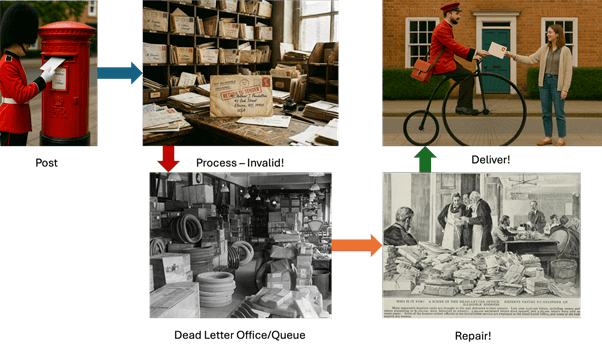
Dead-letter offices were not a final dump for undelivered letters; experts were often successful in redelivering many of them.
The hard part is what happens next—hard-coded and brittle replay rules (“if message looks like X, try fix Y”) or a human trying to fix the queue do not scale. Maybe there’s a future for GenAI to examine the failures and attempt some types of fixes, then republish the repaired records back into the Streams application… Check back soon for an update to this blog.
You can test out KIP-1034 for development in the open source version of Kafka 4.2.0 available for download here, and use it in production when it becomes available and supported on our managed Kafka platform in the future.
Want to build resilient, scalable streaming applications without the operational overhead? We can help you focus on your code rather than your infrastructure. Explore our managed Apache Kafka offerings and try a free trial today to experience stress-free data streaming and innovations such as this in the future.

