Starting today, AWS customers can use self-service Bring Your Own Cloud (BYOC) for AWS to go from zero to a fully managed, production-ready supported open-source clusters running in their own AWS account in under five minutes. Previously, connecting your cloud to NetApp Instaclustr meant raising a support ticket and working with our support team to complete the setup manually, which could take days. Now it’s entirely self-service. Sign up, connect, deploy. Done.
What Is Bring Your Own Cloud (BYOC)?
Bring Your Own Cloud (BYOC), previously known as Run In Your Own Account (RIYOA), lets you run fully managed clusters and keep your data in your own AWS account. Your cloud commitments are honored. NetApp handles the rest, including provisioning, monitoring, upgrades, and 24/7 support.
You keep full ownership of your cloud environment and economics — whether you need tighter control over networking, must meet data residency requirements, or simply want the benefits of a managed service without giving up control of your infrastructure or data.
With BYOC, pricing consists of:
- Infrastructure costs — paid directly to the cloud provider through your cloud account. You retain full visibility and control over your cloud spend, and can apply your existing pricing agreements, reserved instances, savings plans, and enterprise discounts directly to your Instaclustr-managed workloads.
- Management fee — a per-node, per-month management fee from NetApp Instaclustr covering operations and support.
Self-Service BYOC
BYOC isn’t new. What’s new is how you set it up. Previously, onboarding a new BYOC environment meant raising a support ticket, following setup documentation, manually creating and configuring cloud resources, and working with the Instaclustr team to validate the configuration before clusters could be deployed. While the process was straightforward, it often took days before customers were ready to get started.
Self-service BYOC removes the manual onboarding steps previously required to connect a cloud account. You can now initiate the setup directly from the Instaclustr Console, API, or Terraform Provider. The platform generates the required CloudFormation or Terraform templates, guides you through the setup process, and validates the configuration once the template is deployed in your AWS account.
The result is a faster and more repeatable onboarding experience that reduces setup time from hours to minutes.
Benefits
- Instant time-to-value: Connect your cloud account and deploy clusters in minutes. The entire onboarding flow is self-service and fully automated.
- Built for automation: Full support via the Instaclustr Console, APIs, and the Terraform Provider. A single Terraform apply provisions all AWS resources, registers your account, and validates the setup end-to-end.
- Scale across teams and environments: Connect your cloud account once and share it across multiple Instaclustr accounts using Instaclustr Organisations, eliminating the need to repeat the same cloud onboarding process for every account.
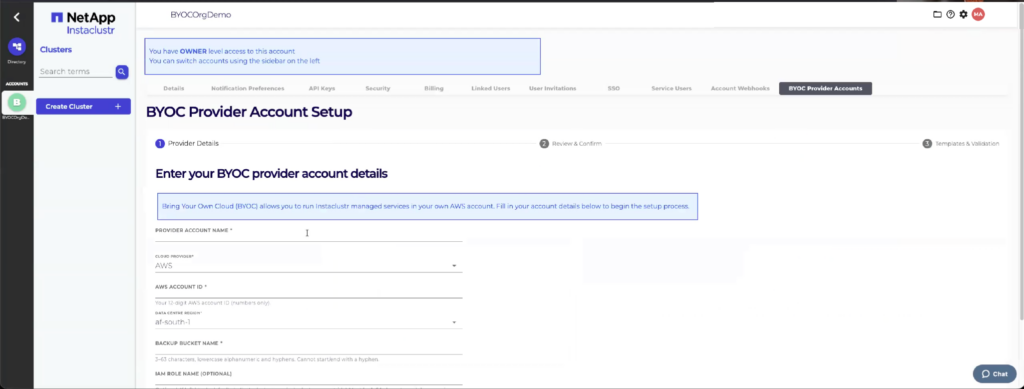
How do you set up BYOC for AWS?
To set up self-service BYOC for AWS using Console:
- Open the Instaclustr Console.
- Go to Account Settings and click Manage BYOC.
- Provide your AWS Account ID, data center region, and a unique S3 bucket name.
- Deploy by running the generated CloudFormation template in AWS or download the Terraform template to apply yourself.
- Return to the Instaclustr Console and click Validate to confirm your provider account is ready.
Done. Start deploying clusters.
| Full step-by-step guide with screenshots: BYOC Setup Documentation |
When you set up BYOC, we’ll automatically create an Instaclustr Organisation for you if you don’t already have one. This is powerful because it will allow you to share the BYOC provider account across multiple Instaclustr accounts – that way, you don’t have to connect your cloud again in different accounts.
What does self-service BYOC mean for existing customers?
Nothing changes with your current setup. Your existing BYOC environments and clusters continue to run exactly as they are.
However, if you’d like to connect a new AWS cloud account, you can now do so entirely through the self-service flow (Console/API/Terraform Provider) without requiring a support ticket.
What does self-service BYOC mean for new customers?
If you’re new to Instaclustr and want to use BYOC, the self-service signup flow is now your fastest path to production. Sign up, connect your AWS account, and deploy your first cluster — all in a single session.
Is there a free trial for BYOC?
Yes. Our 30-day free trial now extends to BYOC setups:
- Developer node sizes are managed completely free for 30 days — no management fee.
- You only pay for the underlying AWS infrastructure costs during the free trial period.
- Experience the full managed service — monitoring, support, upgrades — at zero management cost.
Get started with self-service BYOC for AWS
New to Instaclustr? Sign up and start your 30-day free trial
Existing customer? Log in to the Instaclustr Console, navigate to Account Settings, and click Manage BYOC
For infrastructure-as-code workflows, the updated API documentation and Instaclustr Terraform Provider include new BYOC resources and data sources ready to go.
Curious about the savings? Use our ROI Calculator to see how much you could save by running managed clusters in your own cloud.
Not ready for BYOC? Run In Instaclustr Account (RIIA) is still available
Not sure if you are ready to connect your cloud? Prefer a fully hosted experience?
Our RIIA model, or Run In Instaclustr Account, is the classic managed service approach — NetApp owns and manages the entire infrastructure on your behalf. You get a single, all-inclusive price covering both infrastructure and management. No cloud account setup, no IAM configuration — just provision and go.
RIIA is ideal for teams that want the simplest possible path to production without managing their own cloud infrastructure.
Have Questions?
We’d love to hear from you — whether you need help getting started, want to connect your Azure or GCP accounts, have custom IAM or onboarding requirements, or need help migrating your existing setup. Contact Instaclustr Support and we’ll take it from there.
Frequently Asked Questions
What is the difference between BYOC and RIIA?
With BYOC (Bring Your Own Cloud), clusters run in your AWS account — you pay AWS directly for infrastructure, and Instaclustr charges a management fee. With RIIA (Run In Instaclustr Account), everything runs in Instaclustr’s cloud account — you pay a single all-inclusive price. BYOC gives you more control over networking, security, and cloud spend; RIIA gives you the simplest possible managed experience.
What happened to RIYOA?
RIYOA (Run In Your Own Account) has been renamed to BYOC (Bring Your Own Cloud). It’s the same capability — just a clearer name. No changes to functionality or your existing setup. See more details here.
Do I need an enterprise plan for BYOC?
No. Self-service BYOC is available on pay-as-you-go pricing. You don’t need a pre-signed contract or an enterprise agreement to get started. Simply sign up, connect your cloud account, and start deploying.
I’d like annual pricing — what do I do?
We offer annual and multi-year pricing with volume discounts. For more details, see the pricing details here or contact our sales team to discuss a custom pricing plan that fits your needs.
Who can set up a BYOC provider account?
Only users with the Instaclustr Owner role can set up a BYOC cloud provider connection.
Can I share my BYOC setup across multiple Instaclustr accounts?
Yes! BYOC provider accounts are linked at the organisation level. The organisation owner can share the connected cloud account across multiple Instaclustr accounts, so different teams and projects can deploy clusters without repeating the setup process.
What applications are supported with BYOC?
Self-Service BYOC is available with all the NetApp Instaclustr supported technologies including Apache Cassandra, Apache Kafka, PostgreSQL, ClickHouse, OpenSearch, Cadence and MCP Gateway.
Will my existing BYOC setup be affected?
Not at all. Existing BYOC environments and clusters continue to operate exactly as they are. The self-service flow is for new cloud account connections. If you’d like to add an additional cloud account, you can now do so through the self-service wizard.
Is GCP or Azure supported?
Not yet — but they’re coming soon. Self-service BYOC is currently available for AWS, with GCP and Azure actively in development.

