Introduction
TL;DR: Kafka as a Service delivers fully managed Apache Kafka without the operational overhead. Top solutions for mission critical workloads include NetApp Instaclustr (best for open source and SLAs); Confluent Cloud (for solution breadth); Amazon MSK (for AWS-native teams).
Kafka as a Service (KaaS) refers to the practice of using a managed Apache Kafka platform provided by a third-party vendor, rather than self-managing a Kafka cluster. This approach allows users to leverage the benefits of Kafka’s distributed streaming capabilities without the infrastructure setup.
Why Kafka as a Service is important for mission critical applications:
- High availability and fault tolerance: Specialized Kafka hosting uses redundant brokers, storage, networking, and availability zones to keep clusters running during failures.
- Consistent performance at scale: Optimized infrastructure helps Kafka maintain throughput, reduce latency, and scale as event volumes grow.
- Operational reliability: Managed monitoring, alerting, maintenance, and recovery reduce the risk of outages caused by manual administration.
- Data durability: Proper replication, acknowledgments, backups, and cross-cluster protection help prevent message loss in critical systems.
Editor’s note: Updated the article to cover recent market trends, updated product information to reflect features and capabilities in 2026.
What Is Kafka as a service and how does it serve mission critical applications?
Kafka as a Service (KaaS) refers to the practice of using a managed Apache Kafka platform provided by a third-party vendor, rather than self-managing a Kafka cluster. This approach allows users to leverage the benefits of Kafka’s distributed streaming capabilities without the complexities of infrastructure setup, scaling, and maintenance. The vendor handles the underlying infrastructure, while users focus on building and running their applications that utilize Kafka for data streaming.
Providers offer access to fully managed Kafka through APIs or web-based dashboards, abstracting away the cluster management layer. By handling the heavy lifting, Kafka as a Service gives organizations faster time-to-value for event streaming projects. The provider ensures reliable performance, handles scaling, automates backups, and provides patches for vulnerabilities.
Customers pay for what they use and can rely on consistent SLAs around uptime, data retention, and throughput. As a result, teams can rapidly integrate real-time data pipelines into their products, analytics, and business processes, benefiting from Kafka’s reliability and scalability without the intensive overhead.
Kafka as a Service platforms for mission critical applications: quick comparison
The table below summarizes the key differences between the platforms covered in this guide. Each is explored in more detail in the sections that follow.
| Category | Solution | Best for | Key strengths | Things to consider |
|---|---|---|---|---|
| Fully managed multi-cloud | NetApp Instaclustr | Fully managed open source Kafka with high SLAs | SLAs to 99.999%, run-in-your-account option, 24/7 experts | Managed premium over self-hosting; docs could be deeper |
| Fully managed multi-cloud | Confluent Cloud | Broad, serverless multi-cloud Kafka estates | Kora autoscaling, 120+ connectors, Flink, Tableflow | Costs climb with volume; some features Enterprise-only |
| Cloud-native / cloud-provider | Amazon MSK | Teams standardized on AWS | Express brokers, multi-AZ, deep AWS integration | Limited config options; cost for smaller workloads |
| Cloud-native / cloud-provider | Google Cloud Managed Service for Apache Kafka | GCP-native streaming into BigQuery | Automated sizing, PSC networking, IAM, tiered storage | Preview features; three-zone only; pinned to Kafka 3.7.1 |
| Cloud-native / cloud-provider | AutoMQ | Cost-driven, high-volume Kafka on object storage | Diskless S3 design, seconds-scale elasticity, no cross-AZ cost | Low latency needs a WAL layer; younger vendor |
Why Mission-Critical Applications Need Specialized Kafka Hosting
Mission-critical applications depend on continuous access to data and reliable event processing. In these environments, even a short Kafka outage can disrupt transactions, delay downstream systems, affect customer-facing services, or create inconsistencies across applications. Specialized Kafka hosting helps reduce these risks by providing infrastructure and operational practices designed specifically for high-availability, high-throughput workloads.
High Availability and Fault Tolerance
Mission-critical Kafka environments must remain operational even when individual infrastructure components fail. A specialized Kafka hosting service should therefore be designed around redundancy at multiple levels, including brokers, storage, networking, and availability zones.
Kafka itself supports replication across brokers, but the reliability of the cluster depends heavily on how the hosting environment is configured. Brokers should be distributed across separate failure domains so that the loss of a server or availability zone does not take multiple replicas offline at the same time. Proper replication factors, leader election, and automated broker recovery can help maintain access to topics during infrastructure failures.
The hosting provider should also be able to detect failed components quickly and replace or restart them without requiring lengthy manual intervention. For mission-critical applications, automated recovery is especially valuable because it reduces the amount of time the system operates in a degraded state.
Consistent Performance at Scale
Mission-critical applications often generate large and unpredictable volumes of events. Kafka infrastructure must be able to handle this traffic without introducing excessive latency, message backlogs, or performance instability.
Specialized Kafka hosting services typically provide infrastructure optimized for sustained throughput, including adequate CPU, memory, storage I/O, and network bandwidth. These resources are important because Kafka performance depends on more than broker count alone. Disk throughput, partition distribution, replication traffic, producer behavior, and consumer demand can all influence overall cluster performance.
Scalability is also essential. As applications grow, organizations may need to add brokers, increase storage capacity, create additional partitions, or support more producers and consumers. A hosting provider should make these changes possible without lengthy maintenance windows or major interruptions.
Operational Reliability
Running Kafka reliably requires continuous operational attention. Brokers must be monitored, storage capacity must be managed, partitions need to remain balanced, upgrades must be performed carefully, and abnormal conditions must be investigated before they become larger incidents.
For mission-critical applications, relying entirely on manual Kafka administration can increase operational risk. Specialized hosting services reduce this burden by providing automated health checks, monitoring, alerting, maintenance, and infrastructure management.
A strong hosting provider should continuously track metrics such as broker availability, consumer lag, partition health, disk utilization, replication status, throughput, and request latency. Alerts should identify conditions such as under-replicated partitions, failing brokers, excessive consumer lag, or storage approaching capacity.
Operational reliability also includes routine maintenance. Kafka versions, operating systems, and supporting infrastructure require periodic upgrades and security patches. These changes should be performed using controlled procedures, such as rolling maintenance, to avoid unnecessary downtime.
Data Durability
Kafka is often used as a central transport layer for important business data, so losing messages can have serious consequences. Mission-critical environments therefore require strong data durability mechanisms.
Kafka protects data by replicating partitions across multiple brokers. If one broker fails, another replica can continue serving the data. However, the effectiveness of this protection depends on proper configuration. Replication factors, acknowledgment settings, minimum in-sync replica requirements, and storage architecture all influence how well the cluster protects against data loss.
A specialized Kafka hosting provider should configure these mechanisms according to the criticality of the workload rather than relying on minimal defaults. The environment should also monitor replication health continuously so that degraded redundancy can be identified and corrected quickly.
Durability should extend beyond individual broker failures. Organizations may need additional protection against accidental topic deletion, infrastructure corruption, major outages, or regional failures. Depending on the requirements, this may involve backups, cross-cluster replication, or replication to another geographic region.
Why organizations choose managed Kafka over self-hosted
Running Kafka in-house requires deep expertise in distributed systems and significant resources to ensure stability, performance, and security. Self-hosting means that internal teams are responsible for provisioning hardware, managing operating systems, configuring clusters, upgrading software, scaling infrastructure, and responding to incidents.
This operational overhead can distract from a team’s core business objectives, slow innovation, and introduce risk if not managed effectively. Keeping pace with Kafka’s rapid evolution, tuning clusters for performance, and ensuring regulatory compliance make it even more challenging.
Managed Kafka services eliminate much of this burden, shifting operational responsibility to experts who maintain the underlying infrastructure day and night. Organizations benefit from rapid provisioning, hands-off scaling, and included monitoring. Critical incident response and data protection are handled by the service provider, often with higher reliability than in-house operations can guarantee. Managed Kafka has also become foundational for real-time AI, feeding fresh data into retrieval-augmented generation, agents, and recommendation systems, which raises the bar for the reliability these providers must deliver.
Related content: Read our guide to Kafka architecture
Key Features to Look for in Kafka Hosting Services for Mission-critical Applications
High Availability and Fault Tolerance
High availability is one of the most important requirements for mission-critical Kafka environments. A hosting provider should design Kafka clusters so that the failure of a single broker, physical server, storage device, or availability zone does not cause a complete service interruption.
Look for services that support multi-broker clusters, replication across independent failure domains, automatic leader election, and deployment across multiple availability zones. These capabilities help Kafka continue processing messages even when part of the infrastructure becomes unavailable.
The underlying infrastructure also matters. Brokers should not all depend on the same host, rack, or storage system. A properly designed service distributes Kafka components so that a localized infrastructure failure does not affect the entire cluster.
Reliable Performance and Scalability
Kafka is commonly used because it can process large volumes of events with low latency, but achieving consistent performance requires careful infrastructure management. The hosting service should provide enough compute, memory, disk throughput, and network capacity to support the application’s peak workload.
Scalability is equally important. Message volumes may increase because of customer growth, new applications, seasonal demand, or additional producers and consumers. A suitable Kafka hosting service should make it possible to expand cluster resources without lengthy outages or complicated infrastructure changes.
Evaluate how the provider handles broker scaling, storage expansion, partition growth, and changes in throughput requirements. Some services provide automated or assisted scaling, while others require manual capacity adjustments.
Monitoring and Observability
Kafka generates a large number of operational metrics, and monitoring them is essential for maintaining a healthy production environment. A strong Kafka hosting service should provide detailed visibility into both the Kafka cluster and the infrastructure underneath it.
Important metrics include broker health, message throughput, request latency, CPU utilization, memory usage, disk capacity, network traffic, partition distribution, replication status, and consumer lag.
Consumer lag deserves particular attention because it can indicate that downstream applications are unable to process events as quickly as they are being produced. Without adequate monitoring, lag may increase unnoticed until applications begin serving stale data or falling behind business processes.
The service should also provide alerts for conditions such as under-replicated partitions, offline partitions, high disk utilization, broker failures, unusual latency, and replication problems.
Automated Backup and Disaster Recovery
High availability protects against many common infrastructure failures, but it does not eliminate the need for disaster recovery. Organizations must prepare for scenarios such as major infrastructure outages, configuration errors, accidental deletion, corruption, or regional cloud failures.
A Kafka hosting provider should offer clear mechanisms for protecting data and restoring service after serious incidents. These may include automated backups, topic replication, cluster snapshots, or replication between separate Kafka environments.
Organizations should define their recovery point objective and recovery time objective before selecting a hosting service.
The recovery point objective, or RPO, determines how much recent data the organization can afford to lose. The recovery time objective, or RTO, determines how quickly Kafka must be restored after an outage.
Multi-Region Deployment Options
Some mission-critical applications require protection against the failure of an entire geographic region. In these cases, a multi-region Kafka architecture may be necessary.
A Kafka hosting provider should support mechanisms for replicating topics or events between geographically separate clusters. This can allow applications to continue operating from a secondary region if the primary environment becomes unavailable.
Organizations may choose between active-passive and active-active designs. In an active-passive architecture, one region handles normal production traffic while another remains available for disaster recovery. In an active-active architecture, multiple regions may process workloads simultaneously.
Each approach introduces different considerations around replication lag, consistency, operational complexity, and cost.
Multi-region deployments can also help global organizations reduce latency by keeping Kafka infrastructure closer to applications and users. However, network latency between regions and the cost of inter-region data transfer should be carefully evaluated.
Notable Kafka as a service solutions for Mission-critical Applications
How we selected these tools: We shortlisted Kafka as a Service platforms based on managed operations, scalability and elasticity, high availability, security and compliance, ecosystem and connector support, and cost model.
Fully managed multi-cloud Kafka platforms
1. NetApp Instaclustr

Best for: Fully managed, 100% open source Kafka with high-availability SLAs
Strengths: SLAs to 99.999%, run-in-your-account option, 24/7 Kafka experts
Things to consider: Managed pricing sits above self-hosting; documentation could be deeper
NetApp Instaclustr provides fully managed Apache Kafka clusters that run in the cloud, on-premises, or across hybrid environments. It provisions production-ready clusters in minutes through a console, API, or Terraform provider, and now runs Apache Kafka 4.0. The service can run inside the customer’s own cloud provider account or in Instaclustr’s, and stays 100% open source with no proprietary licensing.
The platform pairs automated operations with 24/7 access to Kafka specialists. It carries SOC 2, ISO 27001, and ISO 27018 certifications and supports PCI-DSS and HIPAA workloads, with encryption in transit and at rest, role-based access control, and private networking.
Key features include:
- High-availability SLAs: Enterprise deployments with dedicated Apache ZooKeeper or KRaft nodes carry a 99.999% availability SLA, standard deployments a 99.99% SLA, and latency SLAs up to 99%. Automatic failover keeps streams running through hardware, network, or zone failures.
- Dedicated or co-located ZooKeeper and KRaft nodes: The service offers dedicated or co-located Apache ZooKeeper and KRaft nodes to handle metadata management and improve performance and availability as clusters grow in size.
- Managed mirroring with MirrorMaker 2: Managed mirroring replicates data between geographic regions, builds active/active topologies, or maintains a failover copy in another region, with the operations team taking end-to-end responsibility for the service.
- Kafka Connect integration: Kafka Connect can be added from the console to move data between products in the data layer using low-code, enterprise-grade connectors between systems.
- Elastic scaling and zero-downtime migration: Clusters scale horizontally by adding or removing nodes and vertically without downtime, and scaling works in both directions, including scaling down to reduce cost.
- Model Context Protocol (MCP) Gateway: An MCP Gateway gives AI applications and agents standardized, governed access to Kafka data infrastructure, supporting workloads such as RAG and agentic AI.
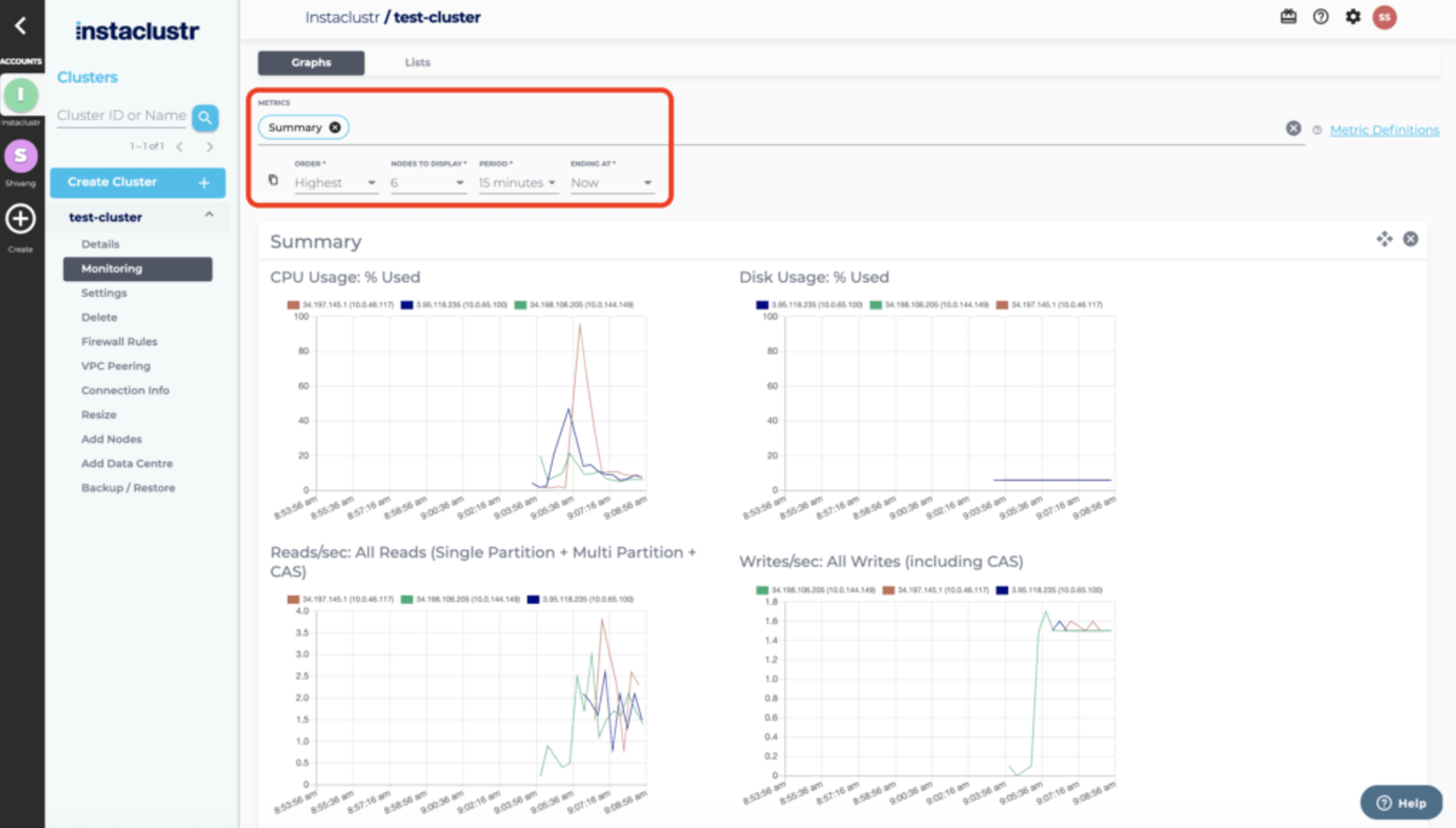
- Provisioning and monitoring options: Clusters are provisioned through the console, API, or Terraform provider, with built-in monitoring and automated health checks surfaced to a 24/7 team of Kafka engineers.
Limitations (as reported by users on G2):
- Documentation depth: Some users would like more comprehensive documentation and tutorials to support configuration and self-service.
- Scaling automation: Reviewers note that workload-based automatic scaling, such as scaling during peak hours, could be more intelligent.
- Managed-service premium: As with managed Kafka generally, the service carries a cost premium over self-hosted Kafka for teams that already have in-house expertise.
Source: NetApp Instaclustr
2. Confluent Cloud

Best for: Broad, serverless Kafka estates that span multiple clouds
Strengths: Kora autoscaling, 120+ connectors, Flink, Tableflow, governance
Things to consider: Costs climb with data volume; some features are Enterprise-only
Confluent Cloud is a fully managed, serverless deployment of Confluent’s data streaming platform, built on the Kora cloud-native Kafka engine and available across AWS, Microsoft Azure, and Google Cloud in more than 100 regions. Confluent became a wholly owned subsidiary of IBM in March 2026.
It autoscales cluster capacity to match workload demand and is offered in Basic, Standard, Enterprise, and Freight cluster types. The platform extends Kafka with stream processing, governance, and integration services, provides a 99.99% uptime SLA for multi-AZ clusters, and holds FedRAMP Moderate authorization.
Key features include:
- Kora engine with elastic autoscaling: The Kora cloud-native Kafka engine scales cluster capacity up and down automatically to match workload, which Confluent states reduces the total cost of ownership of self-managed Kafka by up to 60%.
- Cluster types for different workloads: Basic and Standard clusters cover development and production, Enterprise clusters add private networking and GBps-scale autoscaling, and Freight clusters target high-volume logging, observability, and AI/ML ingestion.
- Cluster Linking across regions and clouds: Cluster Linking replicates and shares data from one Confluent Cloud cluster to another across regions, public clouds, or organizations, and connects Confluent Platform and Confluent Cloud clusters.
- Managed connectors: The platform offers 120+ pre-built and 80+ fully managed connectors for databases, data lakes, data warehouses, and SaaS tools, available through Confluent Hub.
- Stream processing and governance: Confluent Cloud for Apache Flink provides serverless stream processing with AI model inference, and Stream Governance adds schema management and stream lineage.
- Tableflow to open table formats: Tableflow materializes Kafka topics and schemas as Apache Iceberg or Delta Lake tables for data lakes, warehouses, and analytics engines.
- Enterprise security controls: Security features include role-based access control, encryption at rest and in transit, self-managed and client-side field-level encryption, audit logs, and private networking.
Limitations (as reported by users on G2):
- Cost at scale: Users report that pricing rises steeply as data volume grows, and that the platform can be expensive for smaller organizations.
- Feature gating: Some capabilities are available only in higher tiers such as the Enterprise edition.
- Learning curve: Reviewers describe a steep learning curve and time needed to understand the full workflow and advanced features.
- Connector and scaling friction: Some users mention challenges configuring connectors, and note that scaling clusters down can risk data loss.
Source: Confluent
Cloud-native and cloud-provider Kafka services
3. Amazon Managed Streaming for Apache Kafka (MSK)
Best for: Teams standardized on AWS wanting native Kafka integration
Strengths: Express brokers, multi-AZ resiliency, deep AWS service integration
Things to consider: Configuration options are limited; connectors need setup; cost
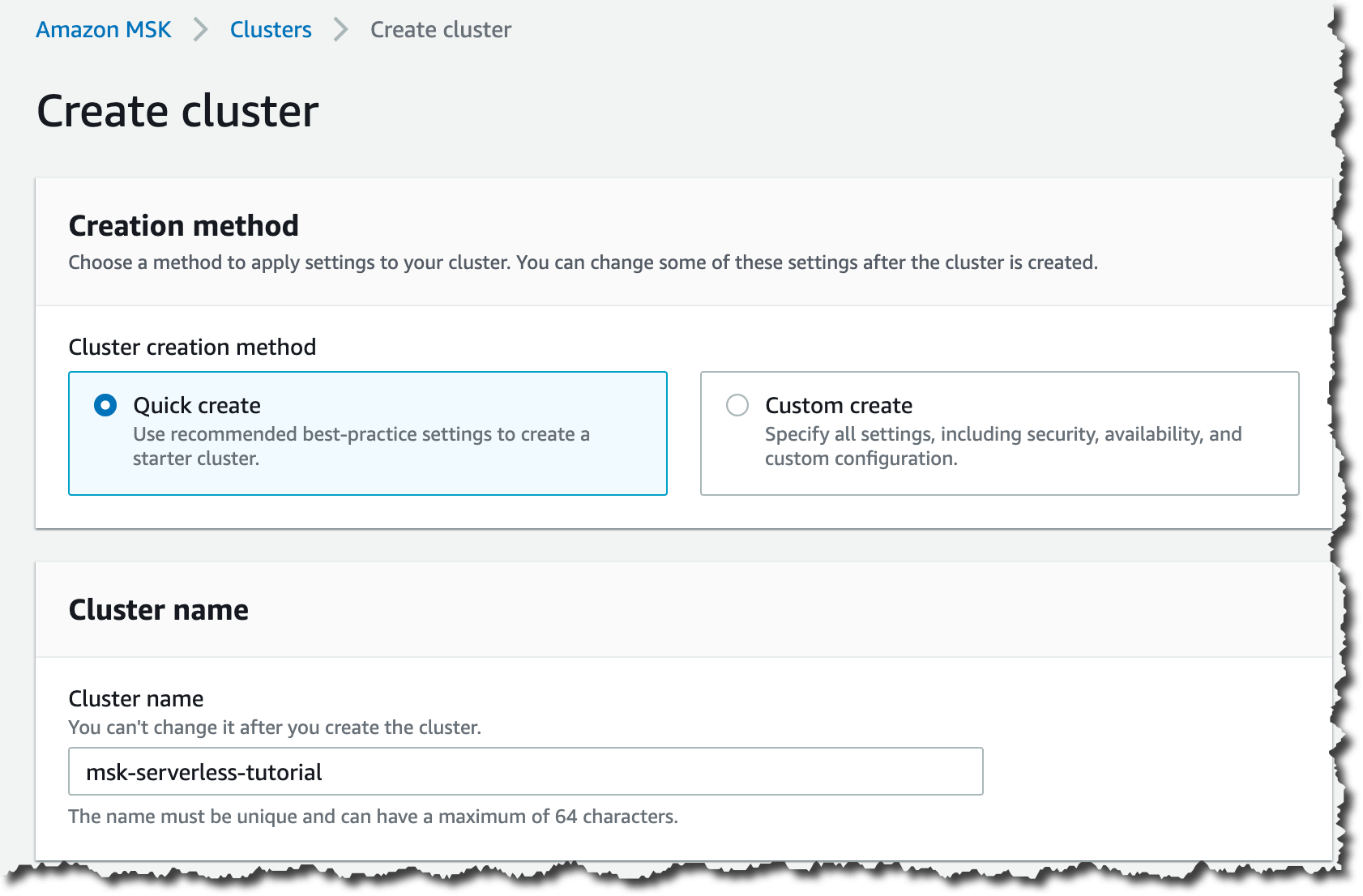
Amazon Managed Streaming for Apache Kafka (Amazon MSK) is a fully managed service that provisions, maintains, and scales Apache Kafka clusters on AWS. It lets teams run Kafka applications and Kafka Connect connectors without operating the underlying infrastructure, and offers both provisioned and serverless deployment.
MSK provides multi-AZ deployments with automated detection, mitigation, and recovery of infrastructure, enterprise-grade security, and built-in integrations with other AWS services. Its Express brokers add higher throughput and faster scaling and recovery for Kafka workloads.
Key features include:
- Express brokers: MSK Express brokers provide up to 3x more throughput per broker, scale up to 20x faster, recover about 90% quicker than standard brokers, and support up to 5x more partitions per broker, improving price-performance by up to 50% for partition-bound workloads.
- Provisioned and serverless options: MSK offers both provisioned clusters and a serverless option, with pay-as-you-go pricing intended to lower the cost of running Kafka workloads on AWS.
- Multi-AZ resiliency: Clusters deploy across multiple Availability Zones with automated detection, mitigation, and recovery of infrastructure failures to protect availability and durability.
- Managed Kafka Connect: Fully managed and no-code integrations source data from upstream systems and deliver it downstream, and connectors can be hosted on fully managed Kafka Connect.
- AWS service integration: Native integration connects clusters to other AWS services for stream processing and analytics, including notebook-based processing to derive insights from data streams.
- Migration tooling: MSK can migrate topic data and metadata from Kafka deployments running on-premises, on AWS, on other clouds, or on Kafka-protocol-compatible services.
- Common streaming use cases: The service supports log and event ingestion, centralized and privately accessible data buses, and event-driven applications that respond to changes in real time.
Limitations (as reported by users on G2):
- Cost for smaller workloads: Users report that pricing can be high, particularly for smaller workloads or early-stage projects.
- Less flexible than self-managed Kafka: Some reviewers find MSK less flexible than self-managed Kafka, with limited configuration options for specific use cases.
- Learning curve: Users note a learning curve when getting started, though they credit the documentation with easing it.
- Regional and integration constraints: Reviewers mention limited availability in some regions and integration complexity in certain scenarios.
Source: Amazon
4. Google Cloud Managed Service for Apache Kafka

Best for: GCP-native teams streaming into BigQuery and Google Cloud tools
Strengths: Automated sizing, Private Service Connect, IAM, tiered storage
Things to consider: Preview features; three-zone only; no JMX API; pinned to Kafka 3.7.1
Google Cloud Managed Service for Apache Kafka runs secure, scalable open-source Apache Kafka clusters in KRaft mode, integrated with Google Cloud IAM, networking, monitoring, and logging. Sizing is simplified to setting total vCPU and RAM, after which the service provisions and resizes brokers and can rebalance partitions automatically.
Clusters are provisioned across three zones in a rack-aware configuration for high availability, and storage uses tiered storage based on KIP-405. The service exposes REST and gRPC APIs and supports Terraform, the Google Cloud console, the gcloud CLI, and client libraries.
Key features include:
- Automated sizing and rebalancing: Administrators set total vCPU and RAM, and the service handles broker provisioning, vertical scaling up to a per-broker limit, creation of new brokers, and optional automatic partition rebalancing.
- Tiered storage: Storage is automated using tiered storage based on KIP-405, combining persistent disk on brokers with regional Cloud Storage so retention is managed per topic without provisioning disks.
- Three-zone high availability: All clusters run across three zones with a default of three replicas and two in-sync replicas, and failed brokers are replaced automatically, so a cluster tolerates the loss of a zone or broker.
- Flexible networking with Private Service Connect: Clusters are reachable from multiple VPCs, projects, and regions using Private Service Connect, with private IP addresses and a single bootstrap URL that stays consistent across environments.
- Security and access control: Connections require TLS, authentication uses SASL with IAM or mutual TLS, authorization uses IAM role bindings and Kafka ACLs, data at rest is encrypted with Google-managed or customer-managed keys, and clusters run in isolated tenant projects.
- Schema registry and Kafka Connect: A schema registry API implementing the Confluent Schema Registry REST API is in Preview, and Kafka Connect moves data between clusters and systems such as BigQuery, Cloud Storage, Pub/Sub, and external Kafka using MirrorMaker 2.
- Monitoring and patching: The service exports metrics to Cloud Monitoring and broker logs to Cloud Logging, and it automatically patches critical security vulnerabilities in the open-source code.
Limitations (based on publicly available sources):
- Preview features: The schema registry is in Preview and supports only Avro and Protobuf, not JSON, and some integrations remain in Preview.
- Fixed cluster topology: Clusters must use three zones with equal resources per zone; single-zone or two-zone clusters are not supported, and zones cannot be chosen at creation.
- Limited low-level control: Local storage volume cannot be configured, JMX APIs for metrics are not supported, and some broker configurations are managed by the service and cannot be changed.
- Version and region constraints: Clusters run Apache Kafka 3.7.1 without automatic minor-version upgrades, and a deployment is tied to a single region.
5. AutoMQ

Best for: Cost-driven, high-volume Kafka workloads on object storage
Strengths: Diskless S3 design, seconds-scale elasticity, no cross-AZ cost
Things to consider: Low latency needs a WAL layer; younger vendor and ecosystem
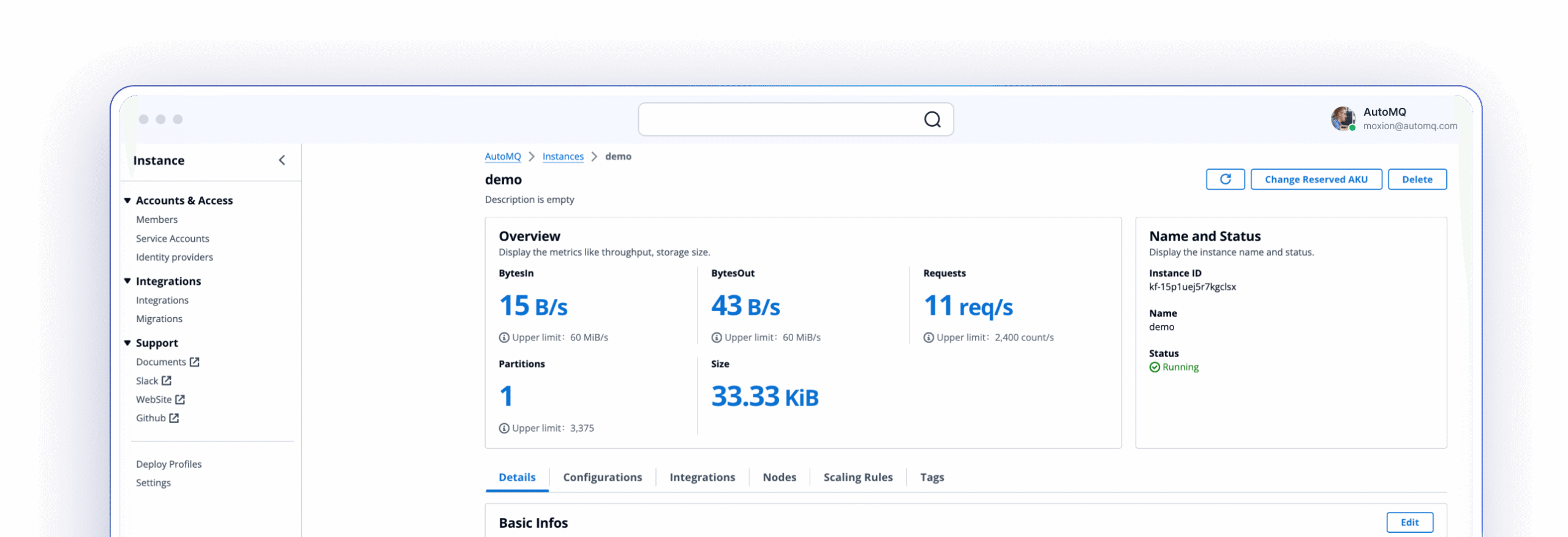
AutoMQ is a cloud-native, 100% Kafka-compatible streaming platform that runs Kafka directly on object storage such as Amazon S3, Google Cloud Storage, and Azure Blob. It separates compute from storage so brokers are stateless, which lets clusters auto-scale in seconds and reassign partitions without moving data between brokers.
AutoMQ uses Kafka’s KRaft for metadata and keeps the Kafka wire protocol and ecosystem tools unchanged, with compatibility across Kafka 3.6 through 4.x. It is offered as a managed BYOC service and as software for teams that run their own Kubernetes, and it runs on AWS, Google Cloud, Azure, and Oracle Cloud.
Key features include:
- Diskless architecture on object storage: Data is stored on S3, GCS, or Azure Blob rather than local disks, which removes EBS volumes and RAID configuration and provides durable, effectively unlimited capacity with pay-per-GiB storage.
- Low-latency write path with a WAL layer: A write-ahead log acceleration layer keeps produce latency low, with reported P99 latency around 10ms on AWS single-AZ, 20ms multi-AZ, and 30ms on Azure and GCP, using EBS, regional EBS, or NFS WAL options.
- Elastic, stateless brokers: Stateless brokers auto-scale based on demand without capacity planning, auto-balance partitions across brokers, and complete partition reassignment in seconds using metadata updates rather than data movement.
- Zero cross-AZ traffic cost: Clients connect to brokers in their local zone and shared storage removes replica synchronization, which eliminates cross-AZ data transfer charges.
- Kafka ecosystem compatibility: AutoMQ keeps the Kafka APIs and protocol, works as a drop-in replacement without code changes, and supports Kafka Connect, Streams, Schema Registry, and more than 300 connectors.
- Table Topic for lakehouse: Table Topic converts Kafka topics into Apache Iceberg or Delta Lake tables directly, without separate ETL pipelines, for query-ready analytics.
- Migration and disaster recovery: AutoMQ Linking replicates data for zero-downtime migration from existing Kafka or MSK clusters, and a multi-cluster disaster recovery feature routes access across clusters through proxy metadata.
Limitations (based on publicly available sources):
- Latency depends on WAL choice: A direct-to-object-storage write path adds latency, so low-latency workloads require a WAL acceleration layer; the open-source default uses an S3 WAL that trades latency for a simpler setup.
- Workload fit: Without a low-latency WAL layer, object-storage-first diskless designs suit log ingestion, observability, and near real-time analytics more than the most latency-sensitive workloads.
- Cross-AZ savings vary: The cost advantage from removing cross-AZ traffic is smaller in environments where inter-zone networking is already inexpensive.
- Younger vendor and ecosystem: AutoMQ was founded in 2023, so its community and third-party ecosystem are smaller than those of longer-established managed Kafka providers.
Source: AutoMQ
Conclusion
Adopting Kafka as a Service allows organizations to focus on delivering streaming-driven applications instead of managing the complexities of distributed messaging infrastructure. With built-in scalability, fault tolerance, security, and observability, these platforms simplify operations while ensuring high performance and reliability. This approach reduces operational risk, accelerates time to production, and enables teams to adapt quickly to evolving data demands.