Introduction
Ever since the first distributed system—i.e. 2 or more computers networked together (in 1969)—there has been the problem of distributed data consistency: How can you ensure that data from one computer is available and consistent with the second (and more) computers? This problem can be uni-directional (one computer is considered the source of truth, others are just copies), or bi-directional (data must be synchronized in both directions across multiple computers).
Some approaches to this problem I’ve come across in the last 8 years include Kafka Connect (for elegantly solving the heterogeneous many-to-many integration problem by streaming data from source systems to Kafka and from Kafka to sink systems, some earlier blogs on Apache Camel Kafka Connectors and a blog series on zero-code data pipelines), MirrorMaker2 (MM2, for replicating Kafka clusters, a 2 part blog series), and Debezium (Change Data Capture/CDC, for capturing changes from databases as streams and making them available in downstream systems, e.g. for Apache Cassandra and PostgreSQL)—MM2 and Debezium are actually both built on Kafka Connect.
Recently, some “sink” systems have been taking over responsibility for streaming data from Kafka into themselves, e.g. OpenSearch pull-based ingestion (c.f. OpenSearch Sink Connector), and the ClickHouse Kafka Table Engine (c.f. ClickHouse Sink Connector). These “pull-based” approaches are potentially easier to configure and don’t require running a separate Kafka Connect cluster and sink connectors, but some downsides may be that they are not as reliable or independently scalable, and you will need to carefully monitor and scale them to ensure they perform adequately.
And then there’s “zero-copy” approaches—these rely on the well-known computer science trick of sharing a single copy of data using references (or pointers), rather than duplicating the data. This idea has been around for almost as long as computers, and is still widely applicable, as we’ll see in part 2 of the blog.
The distributed data use case we’re going to explore in this 2-part blog series is streaming Apache Kafka data into Apache Iceberg, or “Freezing streaming Apache Kafka data into an (Apache) Iceberg”! In part 1 we’ll introduce Apache Iceberg and look at the first approach for “freezing” streaming data using the Kafka Connect Iceberg Sink Connector.
What is Apache Iceberg?
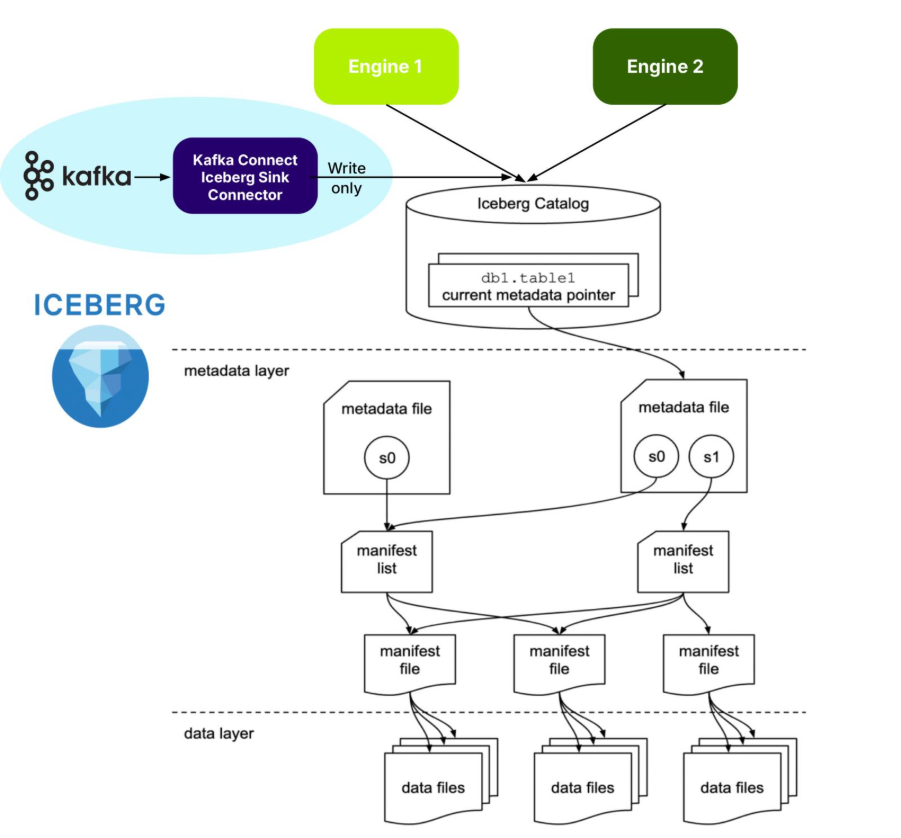
Apache Iceberg is an open source specification open table format optimized for column-oriented workloads, supporting huge analytic datasets. It supports multiple different concurrent engines that can insert and query table data using SQL—and Iceberg is organized like, well, an iceberg!
The tip of the Iceberg is the Catalog. An Iceberg Catalog acts as a central metadata repository, tracking the current state of Iceberg tables, including their names, schemas, and metadata file locations. It serves as the “single source of truth” for a data Lakehouse, enabling query engines to find the correct metadata file for a table to ensure consistent and atomic read/write operations.
Just under the water, the next layer is the metadata layer. The Iceberg metadata layer tracks the structure and content of data tables in a data lake, enabling features like efficient query planning, versioning, and schema evolution. It does this by maintaining a layered structure of metadata files, manifest lists, and manifest files that store information about table schemas, partitions, and data files, allowing query engines to prune unnecessary files and perform operations atomically.
The data layer is at the bottom. The Iceberg data layer is the storage component where the actual data files are stored. It supports different storage backends, including cloud-based object storage like Amazon S3 or Google Cloud Storage, or HDFS. It uses file formats like Parquet or Avro. Its main purpose is to work in conjunction with Iceberg’s metadata layer to manage table snapshots and provide a more reliable and performant table format for data lakes, bringing data warehouse features to large datasets.

As shown in the above diagram, Iceberg supports multiple different engines, including Apache Spark and ClickHouse. Engines provide the “database” features you would expect, including:
- Data Management
- ACID Transactions
- Query Planning and Optimization
- Schema Evolution
- And more!
I’ve recently been reading an excellent book on Apache Iceberg (“Apache Iceberg: The Definitive Guide”), which explains the philosophy, architecture and design, including operation, of Iceberg. For example, it says that it’s best practice to treat data lake storage as immutable—data should only be added to a Data Lake, not deleted. So, in theory at least, writing infinite, immutable Kafka streams to Iceberg should be straightforward!
But because it’s a complex distributed system (which looks like a database from above water but is really a bunch of files below water!), there is some operational complexity. For example, it handles change and consistency by creating new snapshots for every modification, enabling time travel, isolating readers from writes, and supporting optimistic concurrency control for multiple writers. But you need to manage snapshots (e.g. expiring old snapshots). And chapter 4 (performance optimisation) explains that you may need to worry about compaction (reducing too many small files), partitioning approaches (which can impact read performance), and handling row-level updates. The first two issues may be relevant for Kafka, but probably not the last one. So, it looks like it’s good fit for the streaming Kafka use cases, but we may need to watch out for Iceberg management issues.
“Freezing” streaming data with the Kafka Iceberg Sink Connector
But Apache Iceberg is “frozen”—what’s the connection to fast-moving streaming data? You certainly don’t want to collide with an iceberg from your speedy streaming “ship”—but you may want to freeze your streaming data for long-term analytical queries in the future. How can you do that without sinking? Actually, a “sink” is the first answer: A Kafka Connect Iceberg Sink Connector is the most common way of “freezing” your streaming data in Iceberg!
Kafka Connect is the standard framework provided by Apache Kafka to move data from multiple heterogeneous source systems to multiple heterogeneous sink systems, using:
- A Kafka cluster
- A Kafka Connect cluster (running connectors)
- Kafka Connect source connectors
- Kafka topics and
- Kafka Connect Sink Connectors
That is, a highly decoupled approach. It provides real-time data movement with high scalability, reliability, error handling and simple transformations.
Here’s the Kafka Connect Iceberg Sink Connector official documentation.
It appears to be reasonably complicated to configure this sink connector; you will need to know something about Iceberg. For example, what is a “control topic”? It’s apparently used to coordinate commits for exactly-once semantics (EOS).
The connector supports fan-out (writing to multiple Iceberg tables from one topic), fan-in (writing to one Iceberg table from multiple topics), static and dynamic routing, and filtering.
In common with many technologies that you may want to use as Kafka Connect sinks, they may not all have good support for Kafka metadata. The KafkaMetadata Transform (which injects topic, partition, offset and timestamp properties) is only experimental at present.
How are Iceberg tables created with the correct metadata? If you have JSON record values, then schemas are inferred by default (but may not be correct or optimal). Alternatively, explicit schemas can be included in-line or referenced from a Kafka Schema Registry (e.g. Karapace), and, as an added bonus, schema evolution is supported. Also note that Iceberg tables may have to be manually created prior to use if your Catalog doesn’t support table auto-creation.
From what I understood about Iceberg, to use it (e.g. for writes), you need support from an engine (e.g. to add raw data to the Iceberg warehouse, create the metadata files, and update the catalog). How does this work for Kafka Connect? From this blog I discovered that the Kafka Connect Iceberg Sink connector is functioning as an Iceberg engine for writes, so there really is an engine, but it’s built into the connector.
As is the case with all Kafka Connect Sink Connectors, records are available immediately they are written to Kafka topics by Kafka producers and Kafka Connect Source Connectors, i.e. records in active segments can be copied immediately to sink systems. But is the Iceberg Sink Connector real-time? Not really! The default time to write to Iceberg is every 5 minutes (iceberg.control.commit.interval-ms) to prevent multiplication of small files—something that Iceberg(s) doesn’t/don’t like (“melting”?). In practice, it’s because every data file must be tracked in the metadata layer, which impacts performance in many ways—proliferation of small files is typically addressed by optimization and compaction (e.g. Apache Spark supports Iceberg management, including these operations).
So, unlike most Kafka Connect sink connectors, which write as quickly as possible, there will be lag before records appear in Iceberg tables (“time to freeze” perhaps)!
The systems are separate (Kafka and Iceberg are independent), records are copied to Iceberg, and that’s it! This is a clean separation of concerns and ownership. Kafka owns the source data (with Kafka controlling data lifecycles, including record expiry), Kafka Connect Iceberg Sink Connector performs the reading from Kafka and writing to Iceberg, and is independently scalable to Kafka. Kafka doesn’t handle any of the Iceberg management. Once the data has landed in Iceberg, Kafka has no further visibility or interest in it. And the pipeline is purely one way, write only – reads or deletes are not supported.
Here’s a summary of this approach to freezing streams:
- Kafka Connect Iceberg Sink Connector shares all the benefits of the Kafka Connect framework, including scalability, reliability, error handling, routing, and transformations.
- At least, JSON values are required, ideally full schemas and referenced in Karapace—but not all schemas are guaranteed to work.
- Kafka Connect doesn’t “manage” Iceberg (e.g. automatically aggregate small files, remove snapshots, etc.)
- You may have to tune the commit interval – 5 minutes is the default.
- But it does have a built-in engine that supports writing to Iceberg.
- You may need to use an external tool (e.g. Apache Spark) for Iceberg management procedures.
- It’s write-only to Iceberg. Reads or deletes are not supported
But what’s the best thing about the Kafka Connect Iceberg Sink Connector? It’s available now (as part of the Apache Iceberg build) and works on the NetApp Instaclustr Kafka Connect platform as a “bring your own connector” (instructions here).
In part 2, we’ll look at Kafka Tiered Storage and Iceberg Topics!

