


What Is semantic search in OpenSearch?
Semantic search in OpenSearch goes beyond simple keyword matching by focusing on the context and intent behind a user’s query. Traditional search engines typically retrieve documents that contain the exact terms a user has entered, which can lead to irrelevant results if the language differs slightly between the query and the indexed data.
Semantic search processes queries in a way that takes meaning and relationships between words into account, often leveraging techniques like natural language processing and machine learning models. By implementing semantic search, OpenSearch enables more accurate and relevant search results, even in scenarios where users use synonyms or related terms instead of exact phrases.
For organizations working with massive, diverse datasets, this can improve the user’s ability to find pertinent information, reduce time spent searching, and help surface data that might otherwise remain hidden due to traditional keyword limitations. Semantic search is valuable in industries where the vocabulary used by users often differs from that in the underlying data.
This is part of a series of articles about OpenSearch
How semantic search works in OpenSearch
Semantic search in OpenSearch works by understanding the context and intent of a search query, rather than just matching the exact words. This is achieved through techniques such as natural language processing (NLP), vector embeddings, and machine learning models.
When a query is submitted, OpenSearch transforms the query into a vector representation using pre-trained models or custom-trained embeddings. These vectors capture the meaning of the words in the query in a way that allows OpenSearch to compare it to the vectors of indexed documents. The semantic similarity between the query vector and document vectors determines the relevance of the results.
OpenSearch also supports features like entity recognition and query expansion, where synonyms or related terms are incorporated into the search process. This allows the engine to identify and return results that are semantically similar, even if they don’t contain the exact keywords from the query.
To improve the accuracy of search results, OpenSearch can integrate with external machine learning models, providing customized semantic search capabilities tailored to specific domains or use cases. By leveraging these techniques, OpenSearch makes search more intelligent, delivering results based on meaning, rather than just keywords.
Learn more in our detailed guide to OpenSearch architecture
OpenSearch semantic search vs. hybrid search
Semantic search and hybrid search in OpenSearch are both search approaches, but they differ in how they handle queries and retrieve results.
Semantic search relies primarily on the meaning behind a user’s query and the content of indexed documents. It uses natural language processing (NLP), vector embeddings, and machine learning models to capture the semantic relationships between words, allowing it to return results based on intent and context rather than exact matches. This is effective for handling complex queries, synonyms, and varied phrasing, as it prioritizes the relevance of results based on their meaning.
Hybrid search combines traditional keyword-based search with semantic search. It allows OpenSearch to combine exact keyword matching (using inverted indexes) with semantic search (using vector embeddings). In a hybrid approach, users can retrieve results that are both relevant in terms of keywords and context, providing a broader set of results. This is useful when the search query has a mix of exact terms and broader contextual meanings, ensuring that both highly relevant and semantically related results are considered.
Tips from the expert

Kassian Wren
Open Source Technology Evangelist
Kassian Wren is an Open Source Technology Evangelist specializing in OpenSearch. They are known for their expertise in developing and promoting open-source technologies, and have contributed significantly to the OpenSearch community through talks, events, and educational content.
In my experience, here are tips that can help you better leverage semantic search in OpenSearch:
- Use domain-adapted models: Pre-trained models like BERT are powerful, but customizing them on domain-specific corpora (e.g., legal or medical texts) can dramatically improve semantic relevance and accuracy in specialized environments.
- Combine semantic scoring with metadata filters: Enhance precision by combining vector similarity with structured filters like date ranges, categories, or user roles. This hybrid filtering prevents semantically similar but contextually irrelevant documents from surfacing.
- Deploy multi-vector representation: For long documents, embed and index multiple segments (e.g., paragraphs or sections) instead of a single vector. This increases granularity and helps surface relevant parts of documents rather than entire mismatched texts.
- Dynamically re-rank with user interaction feedback: Integrate implicit signals (clicks, dwell time) to adjust scoring weights post-retrieval. This fine-tunes relevance dynamically based on real-world usage without retraining the core model.
- Use ensemble retrieval strategies: Combine results from semantic, keyword, and category-based queries into a final ranked list. Weight each strategy based on content type or query intent to improve robustness and diversity of results.
Use cases and applications for semantic search in OpenSearch
eCommerce
eCommerce platforms can use semantic search in OpenSearch to deliver shopping results that better match user intent rather than only direct keyword hits. For example, when customers search for “comfortable office chair,” they might get relevant listings for “ergonomic desk chair” or “mesh back computer chair,” which traditional keyword search would struggle to rank highly.
Semantic search also improves product recommendations, faceted navigation, and voice-driven interfaces. When shoppers use natural language queries (such as asking for “something for back pain”) OpenSearch’s vector embeddings can interpret this and retrieve products targeted to those needs.
Enterprise search
Enterprise environments often struggle with vast and fragmented information sources, including documents, emails, and internal databases. Semantic search in OpenSearch transforms the employee experience by surfacing relevant information regardless of how it’s described or where it’s stored.
For example, employees looking for “annual sales performance” may not need to know the exact filename or storage location; OpenSearch can return quarterly reports and presentations whose content closely matches the request. This reduces time wasted on unsuccessful searches, simplifies knowledge sharing.
Multimedia search
Searching through multimedia content like images, audio, and video presents unique challenges since this content lacks straightforward textual metadata. Semantic search in OpenSearch can leverage text extracted from captions, transcripts, and descriptions, converting it into semantic embeddings, making media assets more discoverable through contextual queries.
For example, searching “CEO speaking on product roadmap” can return relevant video or audio segments even if the exact phrase is never mentioned. Semantic search enables features like automatic tagging, cross-language retrieval, and discovery of similar content, improving the findability of rich media.
Conversational AI
Conversational AI applications like chatbots, digital assistants, and customer support systems benefit greatly from semantic search in OpenSearch. When a user enters a query in natural language, semantic search ensures the system retrieves answers contextually relevant to the user’s intent, not just literal keyword matches.
Dialogue systems must handle diverse phrasing, colloquialisms, and ambiguity in real-time interactions. By integrating semantic search, conversational agents can tap into FAQs, documentation, and other resources to provide precise and helpful answers. A user asking, “How can I reset my password if I forgot my email?” can be matched with solutions covering multiple variations of the issue.
Tutorial: Configuring semantic search in OpenSearch
This tutorial shows how to configure semantic search in OpenSearch using either an automated workflow or manual setup. Below are the steps for both methods. Instructions are adapted from the OpenSearch documentation.
Automated Workflow (Recommended for quick setup)
1. Create a workflow
OpenSearch provides a simple template for creating an ingest pipeline and index for semantic search. The workflow requires the model ID to be specified for the configured model. Here’s how you can create the workflow:
|
1 2 3 4 |
POST /_plugins/_flow_framework/workflow?use_case=semantic_search&provision=true { "create_ingest_pipeline.model_id": "nGFxibRB2gmLjkv_cOaN" } |

This request initiates the creation of an ingest pipeline and an index. OpenSearch will respond with a workflow_id, which can be used to track the status of the workflow.
2. Check workflow status
After initiating the workflow, check its status to ensure it’s completed:
|
1 2 |
GET /_plugins/_flow_framework/workflow/F_bMXKUDx_3FZQvMNU4D/_status |

3. Ingest documents and search
Once the workflow completes, documents can be ingested into the created index (my-nlp-index), and semantic search can begin. The workflow automatically creates:
- An ingest pipeline named
nlp-ingest-pipeline - An index named
my-nlp-index
Manual setup (recommended for custom configurations)
For a more flexible approach, you can manually configure each component of the semantic search process. This approach provides more control over how vector embeddings and semantic search are handled.
Step 1: Create an ingest pipeline
The first step is to create an ingest pipeline that includes a text_embedding processor to convert text fields into vector embeddings. For example:
|
1 2 3 4 5 6 7 8 9 10 11 12 13 14 |
PUT /_ingest/pipeline/nlp-ingest-pipeline { "description": "A text embedding pipeline", "processors": [ { "text_embedding": { "model_id": "F_bMXKUDx_3FZQvMNU4D", "field_map": { "passage_text": "passage_embedding" } } } ] } |
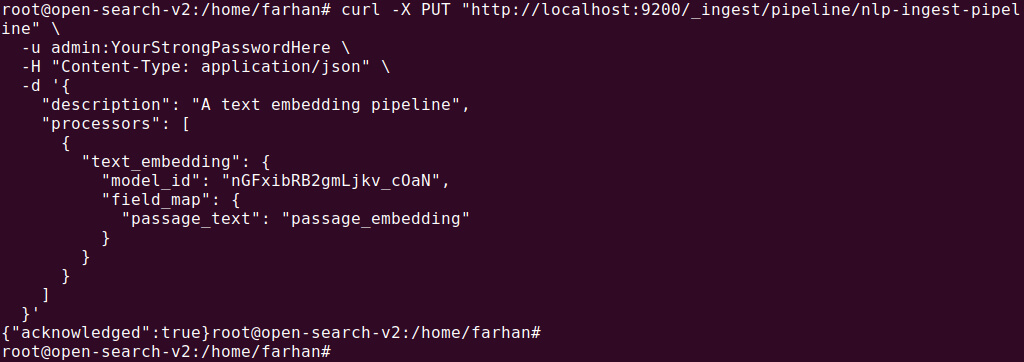
This pipeline processes the passage_text field and generates a passage_embedding field that stores the vector embeddings.
Step 2: Create an index for ingestion
Next, create an index that will store the documents and allow vector searches. The index should be configured to use the ingest pipeline you created in Step 1. Additionally, ensure the passage_embedding field is set as a k-NN vector type, which allows for semantic searches.
|
1 2 3 4 5 6 7 8 9 10 11 12 13 14 15 16 17 18 19 20 21 22 23 24 25 26 |
PUT /my-nlp-index { "settings": { "index.knn": true, "default_pipeline": "nlp-ingest-pipeline" }, "mappings": { "properties": { "id": { "type": "text" }, "passage_embedding": { "type": "knn_vector", "dimension": 768, "method": { "engine": "lucene", "space_type": "l2", "name": "hnsw" } }, "passage_text": { "type": "text" } } } } |
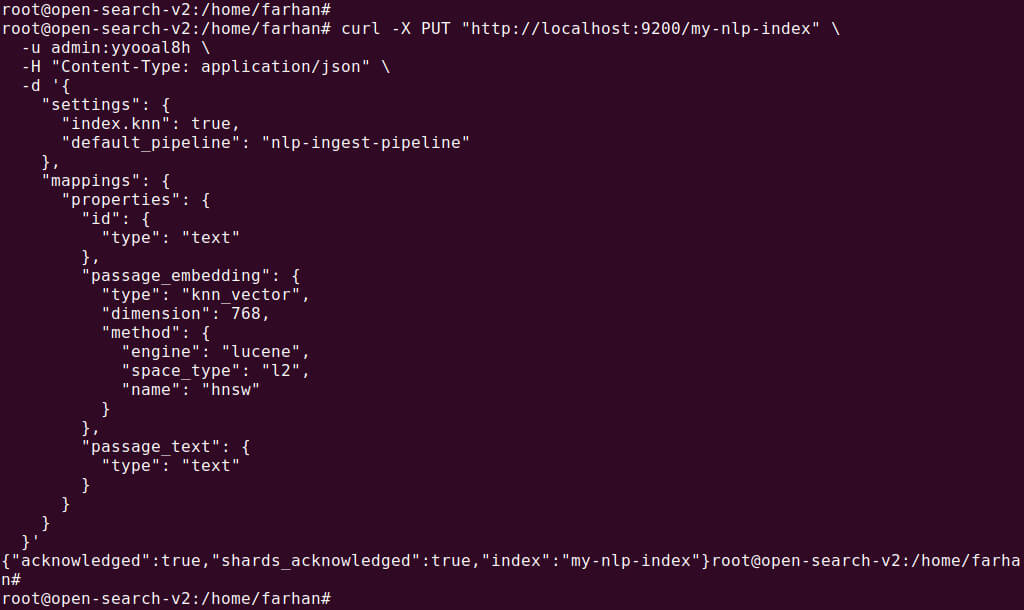
Step 3: Ingest documents into the index
Now that the pipeline and index are configured, you can start ingesting documents. As documents are ingested, the text from the passage_text field is converted into vector embeddings.
|
1 2 3 4 5 |
PUT /my-nlp-index/_doc/1 { "passage_text": "Hello world", "id": "s1" } |

Once the documents are ingested, they will contain both the original text and the generated vector embeddings.
Step 4: Search the index
To search for semantically similar documents, use the neural query in your search. This involves specifying the query text, the model ID, and the number of nearest neighbors to retrieve.
|
1 2 3 4 5 6 7 8 9 10 11 12 13 14 15 16 17 18 19 20 21 22 23 24 25 26 27 28 29 30 31 32 33 |
GET /my-nlp-index/_search { "_source": { "excludes": [ "passage_embedding" ] }, "query": { "bool": { "filter": { "wildcard": { "id": "*1" } }, "should": [ { "script_score": { "query": { "neural": { "passage_embedding": { "query_text": "Hi world", "model_id": "F_bMXKUDx_3FZQvMNU4D", "k": 100 } } }, "script": { "source": "_score * 1.5" } } } ] } } } |
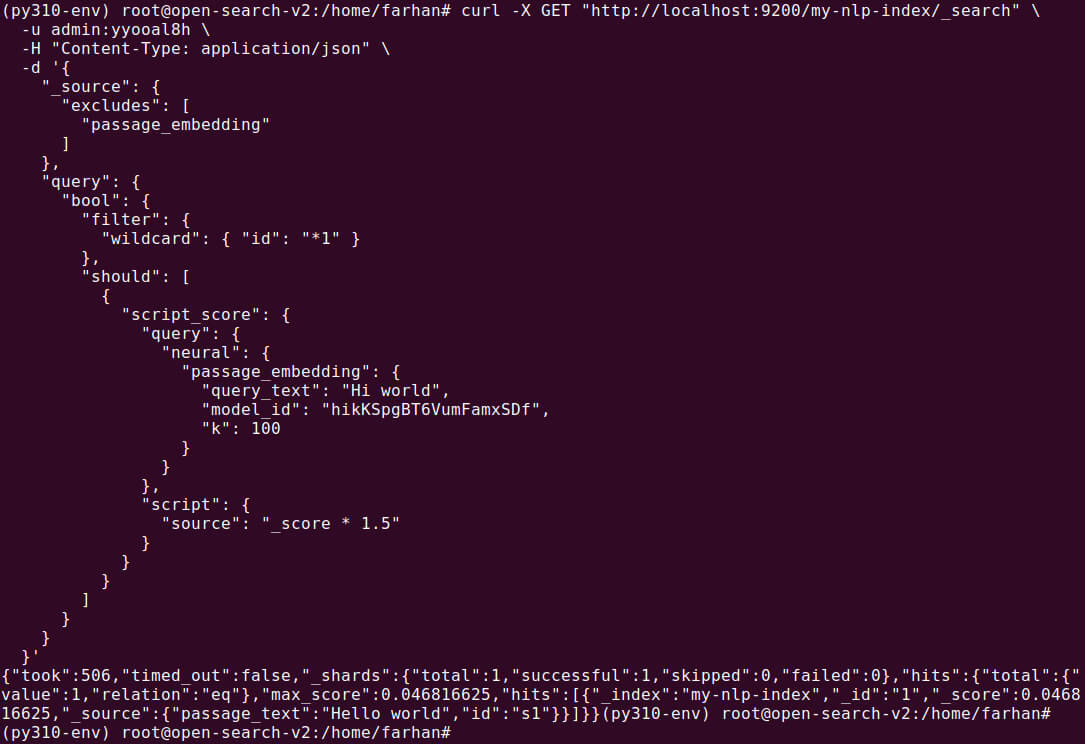
The search results will be based on the semantic similarity between the query and the document embeddings, providing more relevant results based on meaning, rather than just keyword matching.
Using a semantic field (quick setup with optional customization)
Alternatively, you can simplify the setup by using semantic fields. OpenSearch automatically generates vector embeddings when the semantic field is indexed. This approach is best for scenarios where quick setup is needed with minimal configuration.
Step 1: Create an index with a semantic field
Create an index with a semantic field where OpenSearch automatically handles embedding generation during indexing:
|
1 2 3 4 5 6 7 8 9 10 11 12 13 14 15 16 17 |
PUT /nlp-idx { "settings": { "index.knn": true }, "mappings": { "properties": { "id": { "type": "text" }, "passage_text": { "type": "semantic", "model_id": "_p3swZgBl3tzgDsyu4C8" } } } } |
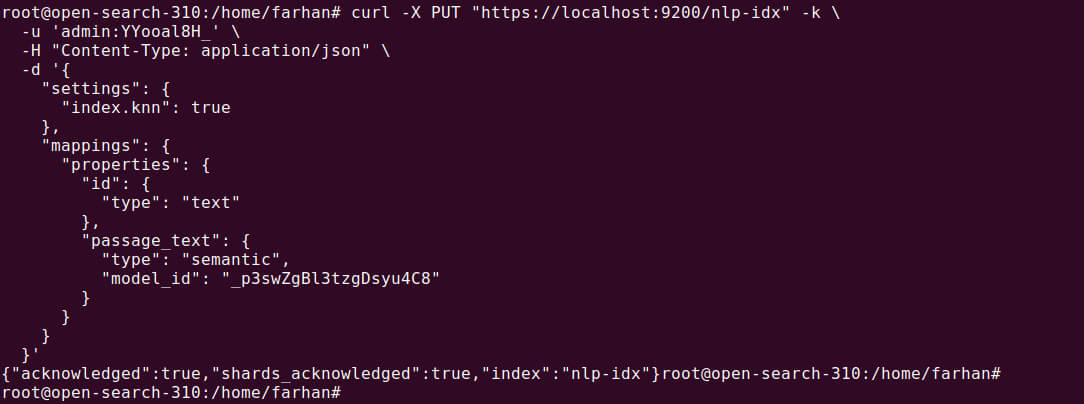
This configuration automatically creates the embeddings for the passage_text field using the specified model ID.
Note: The selected model must have meta data like space_type: cosine. You must register it via REST or .pt model registration with config.
Step 2: Ingest documents into the index
Once the index is created, you can ingest documents as follows. OpenSearch will automatically generate embeddings and store them in a separate passage_text_semantic_info field:
|
1 2 3 4 5 |
PUT /nlp-idx/_doc/1 { "passage_text": "Hello world", "id": "s1" } |

Step 3: Search the index
You can query the semantic field directly without needing to specify the model ID. OpenSearch will automatically use the model defined in the index mapping:
|
1 2 3 4 5 6 7 8 9 10 11 12 13 14 15 |
GET /nlp-idx/_search { "_source": { "excludes": [ "passage_text_semantic_info" ] }, "query": { "neural": { "passage_text": { "query_text": "Hi world" } } } } |
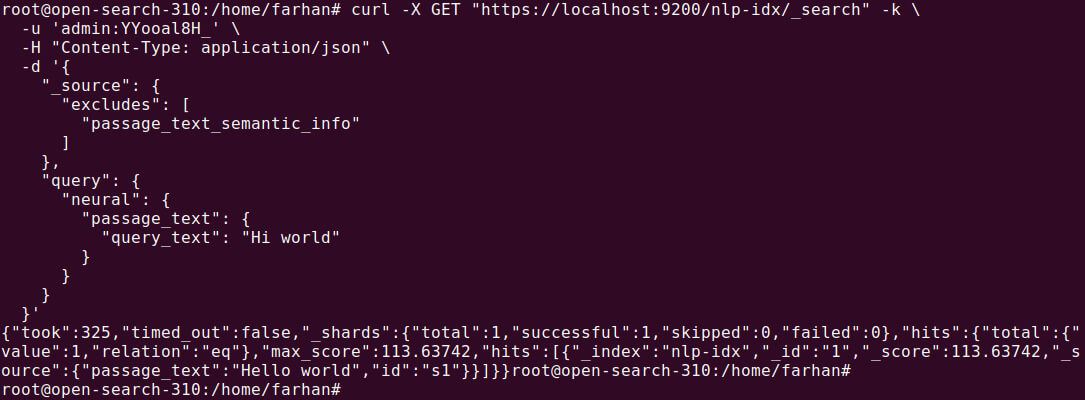
The search results will return documents based on the semantic meaning of the query text, not just keyword matches.
Related content: Read our OpenSearch tutorial
Revolutionizing search with Instaclustr for OpenSearch: Semantic search made simple
In a world overflowing with data, finding exactly what is needed can feel like searching for a needle in a haystack. Traditional keyword-based search often falls short, struggling to understand the user’s true intent behind their query. This is where semantic search changes the game. By understanding the meaning and context of words, not just the words themselves, semantic search delivers far more relevant and accurate results. For businesses aiming to provide a superior user experience, harnessing this technology is no longer a luxury—it’s essential. Instaclustr for OpenSearch provides a powerful, managed platform that makes implementing sophisticated semantic search not just possible, but seamless.
Instaclustr empowers organizations to unlock the full potential of OpenSearch’s advanced capabilities, including natural language understanding and contextual relevance. The Instaclutr Managed Platform handles the complex setup and ongoing maintenance, so teams can focus on innovation. With Instaclustr, building search functions that understand user intent, interpret conversational language, and deliver results that feel intuitive and intelligent. This capability transforms the user journey, whether it’s a customer finding the perfect product on an e-commerce site, a doctor quickly accessing relevant patient data in a healthcare system, or a student discovering crucial information for their research.
Instaclutr is designed for enterprise-grade performance, offering unmatched scalability and reliability. As data grows and user bases expand, Instaclustr for OpenSearch scales effortlessly to meet demand without compromising speed or accuracy. Instaclustr provides a robust infrastructure that ensures high availability and resilience, giving users peace of mind to know that the search application will always be performing at its best. Furthermore, integrating Instaclustr into existing technology stacks is straightforward. Instaclustr enables a smooth transition to more advanced search functionalities. By partnering with Instaclustr, organizations gain a trusted guide dedicated to simplifying complexity and delivering exceptional experiences.
For more information:
