Self-Service Tag Management feature is now available on the NetApp Instaclustr Managed Platform
Manually managing tags across multiple data centres? Not anymore! Today NetApp announces a new self-service feature for managing tags on the NetApp Instaclustr Managed platform. This new feature allows customers to create, update, and delete tags for clusters at the data centre level via the Console, Cluster Management API and Terraform Provider v2.
This release extends existing functionality, which already supports:
- Configuring tags at the account level, ensuring they are automatically applied to all new clusters created within that account.
- Adding tags during cluster creation via API or Terraform
- Viewing existing tags through the console and API/Terraform requests.
Why This Matters
Previously, customers had to request tag updates through our support team. With the new self-service tag management, customers now benefit from:
- Self-Service: Manage tags directly via Console, API, or Terraform provider without needing to contact support.
- Faster operations: Eliminate delays from manual intervention, allowing for quicker tag management.
- Improved Efficiency: Use the Tag Management APIs to integrate tagging into internal pipelines, automating updates and ensuring consistent, accurate tagging without manual intervention.
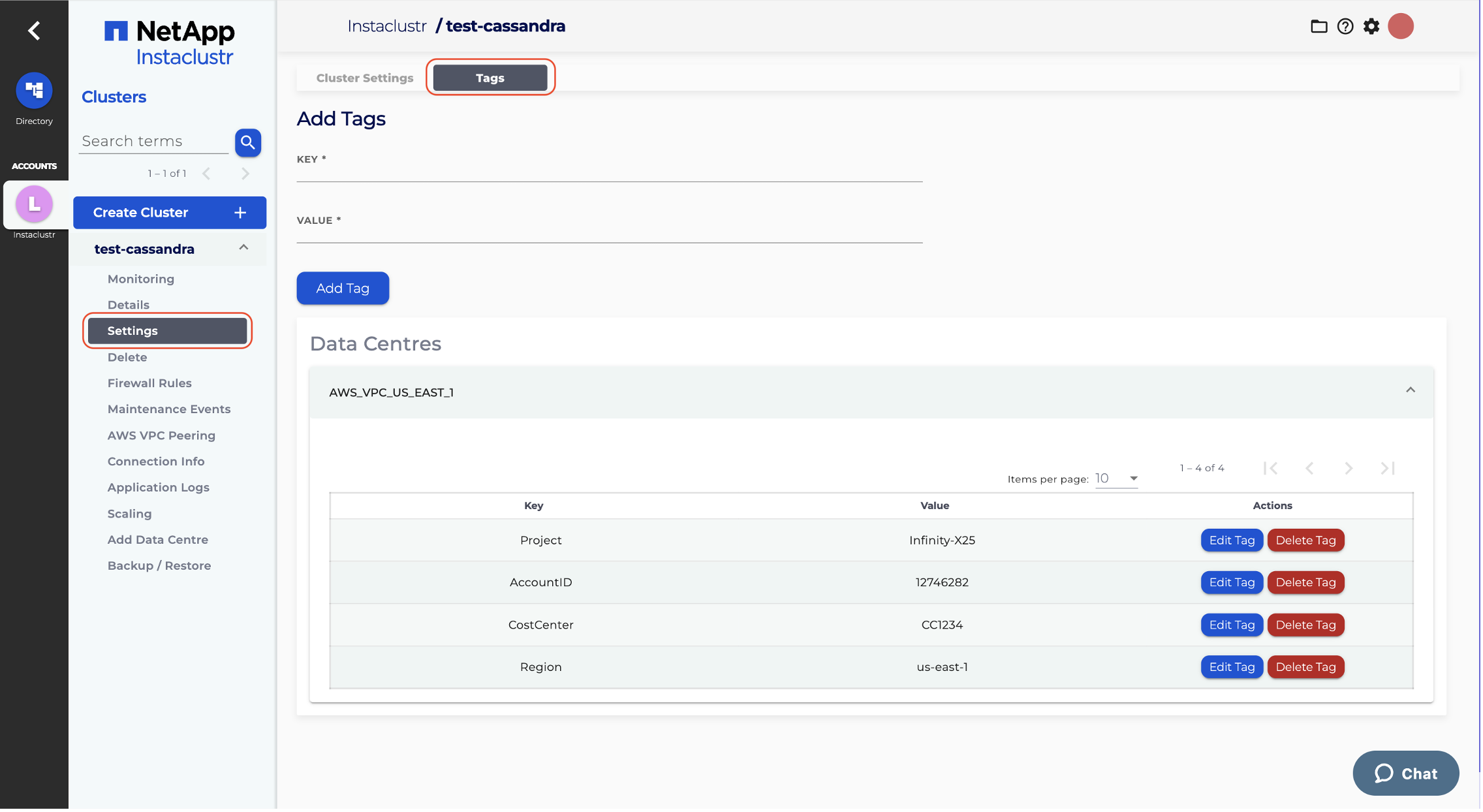
Tag Management in Console
Enable Tag Management for Existing Clusters
Tag Management is off by default for existing clusters to prevent accidental tag deletion, and on by default for clusters created after the feature release.
This feature can be enabled at the data centre level for individual clusters using the console, APIs, or Terraform provider.
To enable Tag Management for existing clusters,
- Use the optional data-centre-level property tagManagementEnabled for Cluster Management API PUT endpoints and tag_management_enabled for Terraform configurations.
- Note: Updates made via PUT API or Terraform are processed asynchronously; changes may take a short time to apply.
- Confirm its enablement via the GET API or Terraform state file.
- Alternatively via the Instaclustr Console, you can enable the tag management feature on a cluster by navigating to cluster Settings -> Tags page and clicking on the Enable Tag Management button.
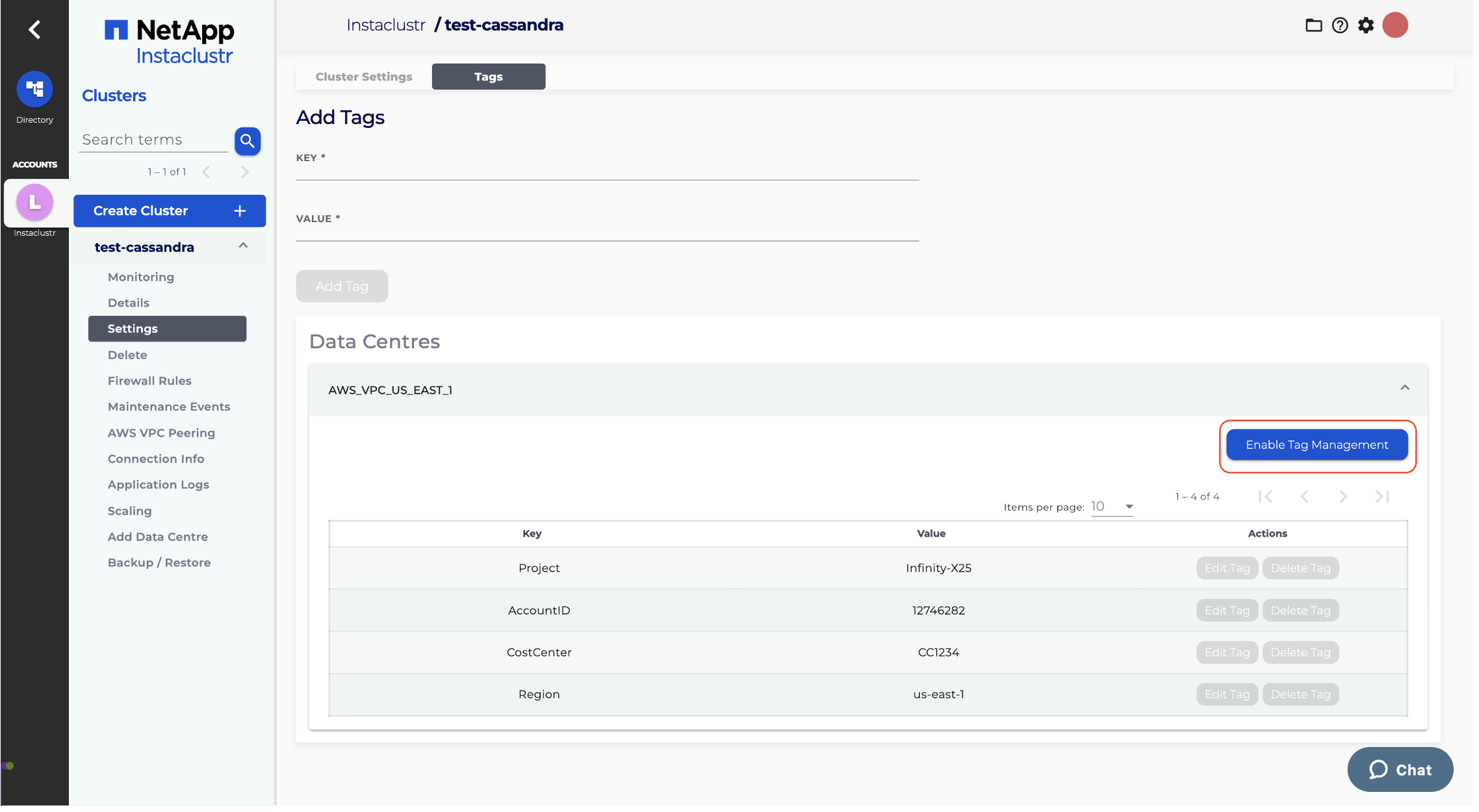
Once Tag Management is enabled, you can remove the optional property from PUT requests or Terraform configurations without affecting its status. For new clusters created after this feature’s release, Tag Management is enabled by default, and there is no need to include this optional property.
For comprehensive details and step-by-step instructions on how to use this feature, please refer to our Tag Management documentation. If you need further assistance, don’t hesitate to contact Instaclustr Support.
Key points to remember
- Only Owners and Admins have permission to edit tags.
- Custom tags are available to customers with the RIYOA deployment model.
- Tags are not supported at the node level.
- Some tag names are reserved by Hyperscalers. Read more about Tag Naming Restrictions here.
- Once the feature has been enabled, always fetch and review existing tags using the GET API before making updates to avoid accidental deletion.
- When Tag Management is enabled, ensure all existing tags are included in Terraform configurations or PUT requests to prevent accidental deletion. Not including the existing tags will result in their deletion.
- If Tag Management is not enabled, do not supply tags in PUT requests or Terraform configurations. Supplying tags when Tag Management is disabled will result in an error.
- Double-check Terraform plan output before applying changes.
Try the Feature Today!
Discover the new self-service tag management feature on the NetApp Instaclustr Managed Platform. Log in to your account to get started. Don’t have an account? Sign up for a free trial on the Instaclustr platform and explore all the products and features we offer.
Related readings
- Visit our documentation portal to learn how to enable the tag management feature via the console, API, and the Terraform provider.
- Learn more about our Cluster Management API
- Read more about account-level tags here.
