


Changing the Apache Cassandra default user password
When you create an Apache Cassandra cluster with authentication enabled on the Instaclustr platform, we’ll create a new super user for you to connect to the database, referred to as the iccassandra role. The password for this role is randomly generated when the cluster is created, and stored in our system for 5 days from cluster creation, after which it is removed from our records. We recommend that you change the password for this role as soon as possible after the cluster has been created.
You can do this using the CQLSH tool (please see https://www.instaclustr.com/support/documentation/cassandra/using-cassandra/connect-to-cassandra-with-cqlsh/ for details on how to connect to the cluster).
1 – Login to the cluster as the iccassandra role. You will be promoted for the password by CQLSH, alternatively you can provide it via the -p flag.
|
1 |
cqlsh -u iccassandra <public/private ip address> 9042 |
2 – Run the following CQL to change the password of the iccassandra role (please remember to change the ‘changeme’ to something more secure).
|
1 |
ALTER ROLE 'iccassandra' WITH PASSWORD = 'changeme'; |
3 – After this update anything that relies on the iccassandra role to use this updated password. Please ensure you store this new password somewhere secure, we will not be able to recover it for you and will need to reset it if lost.
This same procedure can be used on other roles in an Apache Cassandra deployment, please note roles with a default level of permissions can only change their own password, not the password of other roles. Please note that the console will NOT show passwords set manually in this way.
Regenerating default user password
If you need to regenerate a new random password (that lasts five days), you can do that using the console self service button from your cluster’s “Connection Info” page, where you can also force immediate removal of the default generated password for this role. This can be useful in cases where the original default has been removed from our records and you lost your notes.
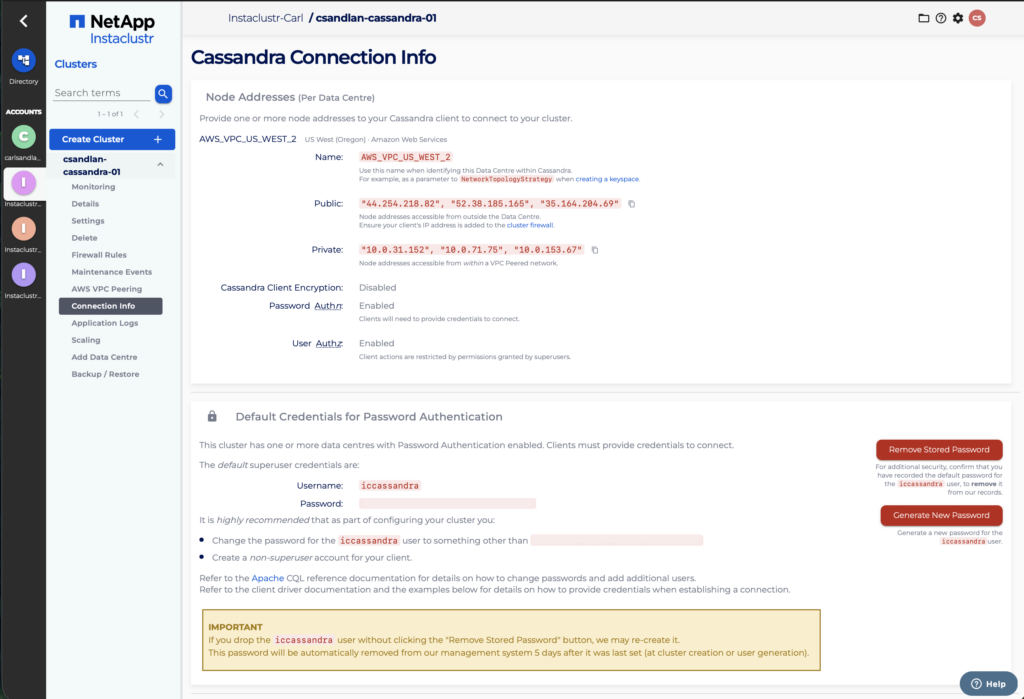
Whilst it’s not recommended, you could keep regenerating your password like this every five days, but it’s better that you use a secret known only to you and your Cassandra clients. This reset action is recorded for auditing purposes and can be found on the cluster’s user-actions view.
