Setting Up a Multi-Datacentre Cluster with Instaclustr
Instaclustr’s automated provisioning system, with some help from our technical operations team, makes provisioning a multi-datacentre cluster easy. However, there are still several steps to co-ordinate – this article provides a step-by-step guide. (This article uses the abbreviation dc for data centre from here on)
Table of Contents
New Clusters
If you are creating a cluster and plan on multiple data centres (multi-DC) from the beginning, then the process is simple:
- Go to the Instaclustr console and create a multi-DC cluster. Refer our support articles on how to signup for an Instaclustr account.
- Use the slider at the top of the Data Centre page to select up to 5 data centres when provisioning multi-DC clusters via console. To create a cluster with a single DC, leave the slider on 1 (default).
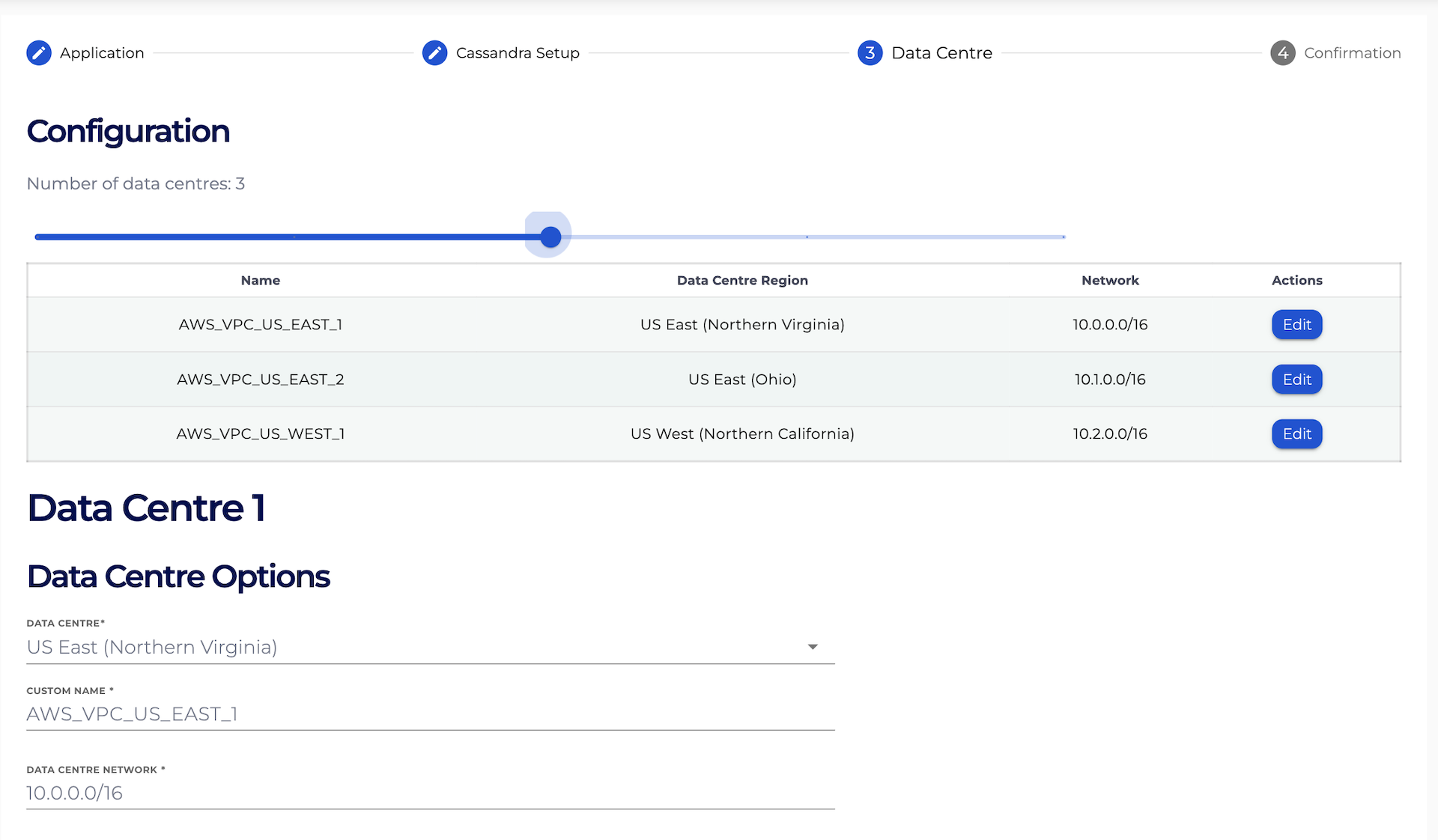
- Configure each DC by filling out the related form. Use the Edit buttons on the table at the top of the Data Centre page to navigate through the configuration forms.
- Validate that each individual DC is configured appropriately by checking the collapsed sections on the Confirmation. Each section is marked with the custom name of each DC that is added. Once the cluster configuration is confirmed, accept the Instaclustr terms of service and click on the Create Cluster button.

- Congratulations! You have now finished creating your Cassandra multi-DC cluster.
Existing Clusters
If you wish to add a DC to a cluster that is in use then there a few more steps required to set up the new replica while minimising impact to your existing cluster:
- Ensure all keyspaces are configured with NetworkTopologyStrategy and replication for the existing DC.
- Ensure your application is using LOCAL_* consistency factor when connecting to your existing DC (even if you plan to use cross-DC consistency at a later date you probably don’t want cross-DC queries to start until the new DC is fully set up).
- Use the “Add Data Centre” button on the cluster details page of the console to configure and request an additional DC. (for a step by step guide see Expanding your cluster).
- Instaclustr Support will receive the request, verify with you that your cluster is prepared and then allow the provisioning system to provision the new DC. Support will confirm that the system keyspaces are correctly synced to the new DC.
- When advised by Instaclustr Support that the new DC is ready, alter the replication strategy for your keyspaces to specify the number of replicas in the new DC and advise Instaclustr Support when complete.
- Instaclustr Support will perform a consistent rebuild in the new DC to sync data from the existing DC.
Network Usage
Be aware that cross-region and cross-provider replication will count towards your network usage under Instaclustr’s fair use policy and may incur additional charges when running in Instaclustr’s cloud provider account. If you are planning on using multiple DCs in this configuration then please contact Instaclustr Support to assist with capacity planning.
Further Questions
As always, Instaclustr Support is available to provide additional information and guide you through this process.
