


Using Kafka Client Telemetry
Kafka Client Telemetry feature on the Instalcustr managed platform is based on KIP-714, KIP-1000 and KIP-1076. This enables the collection of performance and behavioral metrics directly from Kafka clients and exports them to a designated OpenTelemetry (OTLP) endpoint.
For Instaclustr’s managed Apache Kafka clusters, Kafka Client Telemetry can be enabled for new clusters via console, Terraform or Instaclustr API. To enable this feature for your account or existing clusters, please contact our support team.
Prerequisites:
The Kafka Client Telemetry feature has the following prerequisites which come from the Apache Kafka project’s implementation:
- Kafka clients must be on version 3.7.0 or later.
- Kafka cluster must be running in KRaft mode.
In addition, Instaclustr’s implementation has the following requirement:
- Kafka cluster must be running Apache Kafka 3.9.1 or later.
- Prometheus server 3.0 or later as an endpoint running in your environment, accessible by the Kafka cluster, and configured for Kafka Client Telemetry. You can set up Prometheus as your OpenTelemetry backend; see appendix for details.
To use Kafka Client Telemetry, client telemetry configurations must be defined to specify the export settings to your OpenTelemetry supported endpoint.
Client telemetry subscriptions should exist for collecting metrics. Metrics are only emitted for clients that have an active subscription.
Additional Requirements for Kafka Client Telemetry
The following conditions apply to this feature:
- To use Kafka Client Telemetry, client telemetry configurations must be defined. These specify your OpenTelemetry-supported endpoint, including the endpoint URL and optional basic authentication. Updating or deleting client telemetry configurations from the cluster using Instaclustr API or Terraform is not supported at this time. Please submit a request to our support team to update the client telemetry configurations.
- Kafka Client Telemetry with AWS Private Link and GCP Private Service Connect clusters is currently unsupported.
- Subscribing to a large number of metrics can introduce additional load on the cluster and impact overall performance. Based on our performance testing, CPU load increases 2-5%, depending on CPU specifics and other variables, can be expected per 40,000 metrics. We strongly recommend limiting metric subscriptions to only those that are required for your use case. Broad or excessive subscriptions may lead to unintended resource consumption and reduced cluster efficiency. There is currently no enforced limit on metric subscriptions. Please monitor cluster resource usage carefully and ensure that metric subscriptions remain within acceptable performance thresholds.
Step 1. Configuring a Kafka Cluster with Kafka Client Telemetry
You can create Kafka Client Telemetry via the console or configure it during cluster creation using the Instaclustr API or the Terraform provider by including client telemetry details in the request body.
Creating from console
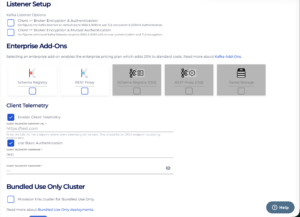
For clusters that meet the above requirements, click Enable Client Telemetry, set the Client Telemetry endpoint URL, and optionally configure basic authentication via the console.
To ensure predictable performance and avoid excessive load on the cluster, metric subscriptions are intentionally constrained. Wildcard-based and overly broad subscriptions across metrics and clients are not supported, as the load generated by client telemetry scales proportionally with the number of subscribed metrics.
Note: IP addresses are not supported by default. To use an IP address with the endpoint URL, please contact our support team.
Sending a request from Instaclustr API
You can send a POST request to
|
1 |
https://api.instaclustr.com/cluster-management/v2/resources/applications/kafka/clusters/v3 |
The body should include the optional clientTelemetry configuration. The basicAuthentication is also optional, but highly recommended.
|
1 2 3 4 5 6 7 8 9 10 |
"clientTelemetry": [ { "endpointUrl" : "<customer_url>", "enabled" : true, "basicAuthentication" : [{ "username" : "test", "password" : "testpw" }] } ], <span data-ccp-props="{"201341983":0,"335559739":0,"335559740":240}"> </span> |
Sending a request from Terraform
Similar to the Instaclustr API, Terraform also provides an optional configuration block for client_telemetry.
|
1 2 3 4 5 6 7 8 |
client_telemetry { enabled = true endpoint_url = "<customer_url>" basic_authentication { username = "test" password = "testpw" } } |
Step 2. Subscribing to Kafka Client Telemetry
A client telemetry subscription defines which metrics should be collected from matching Kafka metrics, how frequently they are reported, and which clients the configuration applies to. Only clients that match an active subscription will emit telemetry data.
We support adding, updating, and deleting client telemetry subscriptions from the console in the Client Telemetry subtab under Monitoring. Metrics and clients are required for the subscription.
For the metrics property:
- We strongly recommend you subscribe to only one metric per subscription. This will allow you to gradually add subscriptions and review their impact on the cluster before adding more. See here for common producer and consumer metrics.
- Broad or encompassing metrics subscriptions are not supported. This includes using prefixes or wildcard (.) at the end to match multiple metrics. For example, the following are not allowed:
- org. and org
- org.apache. and org.apache
- org.apache.kafka. and org.apache.kafka
- org.apache.kafka.consumer. and org.apache.kafka.consumer
- org.apache.kafka.producer. and org.apache.kafka.producer
Each subscription must specify the exact metric name (e.g., org.apache.kafka.consumer.node.request.latency.avg).
For the clients property:
- At least one valid identifier from the following list is needed for the client property (e.g. client_software_name=apache-kafka-java). Wildcards (.) at the end are not permitted;
- client_id,
- client_instance_id,
- client_software_name,
- client_software_version,
- client_source_address,
- client_source_port
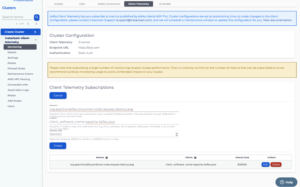
We support POST, GET, UPDATE, DELETE and GET ALL in cluster endpoints for client telemetry subscriptions.
POST
Use the POST endpoint below to create a client telemetry subscription. If the request is successful, it will return the ID of the client telemetry subscription.
|
1 |
POST https://api.instaclustr.com/cluster-management/v2/resources/applications/kafka/client-telemetry-subscriptions |
Body of the request with examples;
|
1 2 3 4 5 6 |
{ "clusterId": "<cluster-id>", "metrics": "org.apache.kafka.producer.,org.apache.kafka.consumer.", "clients": " client_software_name=apache-kafka-java", "interval": 20000 } |
- The metrics property is required. Single metric for per subscription. Wildcard values are not supported.
- The clients property is required. It must contain a valid matcher from the following list:
- client_id,
- client_instance_id,
- client_software_name,
- client_software_version,
- client_source_address,
- client_source_port
- The interval property is optional. If not set, it defaults to 20000ms(20 seconds), which is also the minimum supported value.
GET
Use the GET endpoint provided below to return information for a specific client telemetry subscription.
|
1 |
GET https://api.instaclustr.com/cluster-management/v2/resources/applications/kafka/client-telemetry-subscriptions/<CLIENT_TELEMETRY_SUBSCRIPTION_ID> <span data-ccp-props="{"201341983":0,"335559739":0,"335559740":240}"> </span> |
PUT
Use the PUT endpoint to update an existing client telemetry subscription:
|
1 |
PUT https://api.instaclustr.com/cluster-management/v2/resources/applications/kafka/client-telemetry-subscriptions/<CLIENT_TELEMETRY_SUBSCRIPTION_ID> |
DELETE
Use the DELETE endpoint provided below to delete the client telemetry subscription:
|
1 |
DELETE https://api.instaclustr.com/cluster-management/v2/resources/applications/kafka/client-telemetry-subscriptions/<CLIENT_TELEMETRY_SUBSCRIPTION_ID> |
GET ALL
You can also use the GET endpoint below to query all client telemetry subscriptions for the cluster:
|
1 |
GET https://api.instaclustr.com/cluster-management/v2/data-sources/ kafka_cluster/<CLUSTER_ID>/client-telemetry-subscriptions/ |
Appendix:
Configuring Prometheus Endpoint
- Prometheus needs to be started with the option –web.enable-otlp-receiver followed by –otlp-deltatocumulative
- Only Basic Authentication is supported for use with Kafka Client Telemetry
Details about these options and other details for this can be found from Using Prometheus as your OpenTelemetry backend | Prometheus.
Configuring Datadog Endpoint
We also support the Datadog endpoint. To authenticate using the Datadog API key, you can configure HTTP authentication headers durning cluster creation.
Creating from console
- Enable the “Use HTTP authentication headers” option when creating a Client Telemetry cluster.
- In the Authentication Headers section, enter the API key pair using the format shown below:
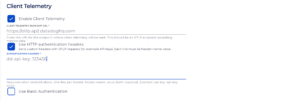
Please note that for an API key pair, it must be provided in a single line.
Creating from API
When creating the Client Telemetry cluster via the API, include the authenticationHeaders field in the request body, as shown below:
|
1 2 3 4 5 6 7 8 9 10 11 12 |
"clientTelemetry": [ { "enabled": true, "endpointUrl": "https://otlp.ap2.datadoghq.com", "authenticationHeaders": [ { "key": "dd-api-key", "value": "123456"} ], "basicAuthentication": [ { "username": "test", "password": "testpw" } ] } ], |
Authentication header keys and values must be provided as string values. For example:
|
1 2 3 4 |
"authenticationHeaders": [ { "key": "dd-api-key", "value": "123456"}, { "key": "dd-application-key", "value": "{\"resource_attributes_as_tags\": true}"} ], |
If you need to add authentication headers to an existing Client Telemetry cluster, please contact our support team.
Questions
Please contact [email protected] for any further inquiries.
