Single CA
This feature allows all client-encrypted clusters with supported software under the same account or organisation to be connected via the same certificate
Overview
By default, our current way of utilizing a Certificate Authority (CA) is to create one CA per cluster. This means each cluster is provisioned with its own unique CA and certificates are created from the cluster level CA with and each cluster with client encryption enabled using its own unique certificates.
The Single CA feature, when enabled and where organization or account level CA exists will now prompt to use the single CA during cluster provisioning. A certificate will be created from this singular CA and all clusters under the account or organisation with client-encryption enabled will be connectable with the same certificate.
Prerequisites
To start utilizing Single CA with Instaclustr offerings, the follow conditions must be met:
- Single CA feature is enabled by our support staff. If you are interested, please contact us via [email protected]
- The software of the clusters you are provisioning needs to be supported by Single CA. Currently following software is supported:
- Apache Cassandra (All add-ons supported)
- Apache Kafka (All add-ons supported)
- If you wish to enable Single CA for your organization and you currently do not have an organization setup on our Console, you will need to follow the guide at Create a New Organization
Limitations
Once Single CA is enabled on your account or organization, the existing regular client-encrypted clusters with supported software would not be migrated to using Single CA as to avoid client disruption. The same is true for the inverse when Single CA is disabled.
If you wish to migrate these regular clusters to use Single CA, or migrate Single CA clusters back to regular, please contact us via [email protected].
How it works after Single CA is enabled
In the following screenshots, we will be using account level Single CA and an Apache Cassandra cluster as examples.
On our managed platform,
- Follow Creating an Apache Cassandra Cluster to provision a client-encrypted Apache Cassandra cluster to your desired configurations.
- Or follow Creating an Apache Kafka Cluster to provision a client-encrypted Apache Kafka cluster to your desired configurations.
After the cluster is provisioned and running, you will be able to find the level of Single CA under Details page’s Cluster Info section.
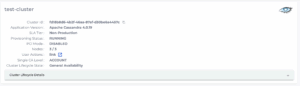
To download the Single CA certificates, go to Connections Info page’s Certificates for Client <> Node Encryption section.
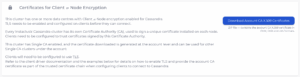
Once decompressed, the certificate files will be named with corresponding prefixes. For this example, it is named with “account-” prefix. And while using organisation level Single CA, it will be named with “organisation-” prefix.
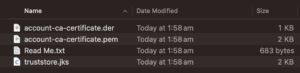
You will now be able to connect to the cluster using the account level certificates. For more details, see following for your cluster’s software
To test connecting to another cluster with the same certificate,
- Follow Creating an Apache Cassandra Cluster again to provision a client-encrypted Apache Cassandra cluster to your desired configurations.
- Or follow Creating an Apache Kafka Cluster again to provision a client-encrypted Apache Kafka cluster to your desired configurations.
You will now be able to connect to the cluster using the certificates downloaded under the first cluster.
Questions
Please contact us via [email protected] for any further inquiries.
