


Creating a ClickHouse Cluster in the Same VPC as an Existing FSx ONTAP
Overview
NetApp Instaclustr-managed ClickHouse clusters provisioned within AWS BYOC (previously RIYOA) accounts can be integrated with Amazon FSx for NetApp ONTAP configured to host S3-compatible services. NetApp Instaclustr-managed ClickHouse can be integrated with a newly provisioned or existing FSx for ONTAP.
This guide explains how to provision a NetApp Instaclustr-managed ClickHouse cluster into the same AWS VPC as an existing Amazon FSx for NetApp ONTAP, using the NetApp Instaclustr Console, API, or Terraform Provider.
For next steps after following this guide, or for general information on FSx for ONTAP, please refer to the overview page for FSx for ONTAP.
Before You Begin:
Follow these steps if you have specific networking requirements and want your NetApp Instaclustr-managed ClickHouse cluster provisioned in the same VPC as your FSx for ONTAP.
Limitations
- FSx for NetApp ONTAP integration is only supported for NetApp Instaclustr-managed ClickHouse clusters provisioned within AWS BYOC accounts. Contact NetApp Instaclustr Support if you would like FSx for NetApp ONTAP integration with NetApp Instaclustr RIIA accounts.
- Ensure that each NetApp Instaclustr managed ClickHouse cluster and FSx for ONTAP uses a unique CIDR range. The CIDR ranges must not overlap.
Using the NetApp Instaclustr Console
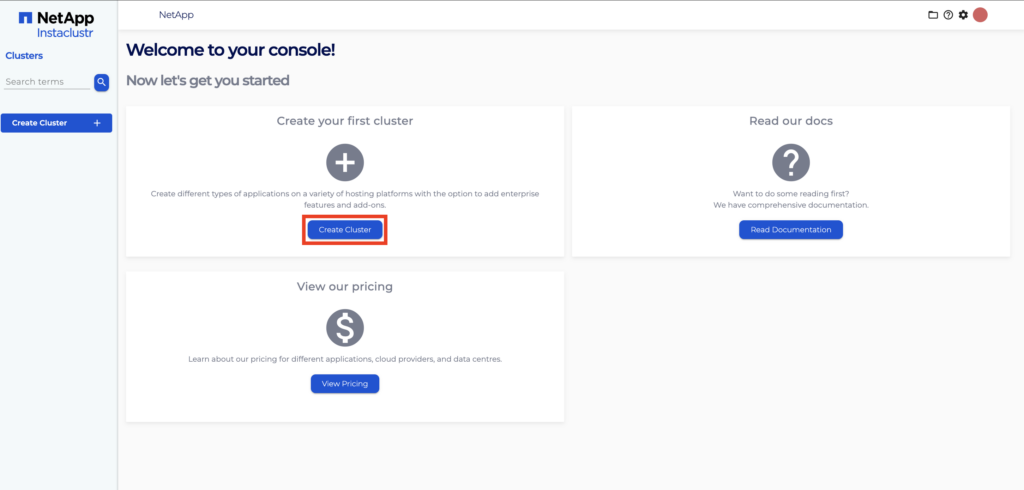
- Click Create Cluster.
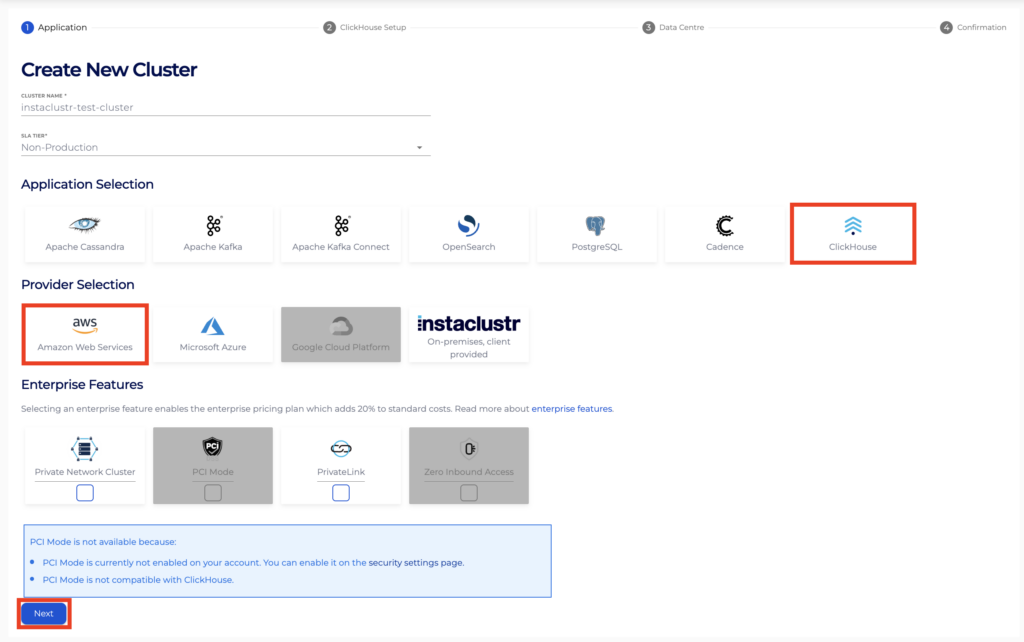
- Under the applications page, select ClickHouse as the application and AWS as the provider. Configure any other settings as you wish, then click Next.
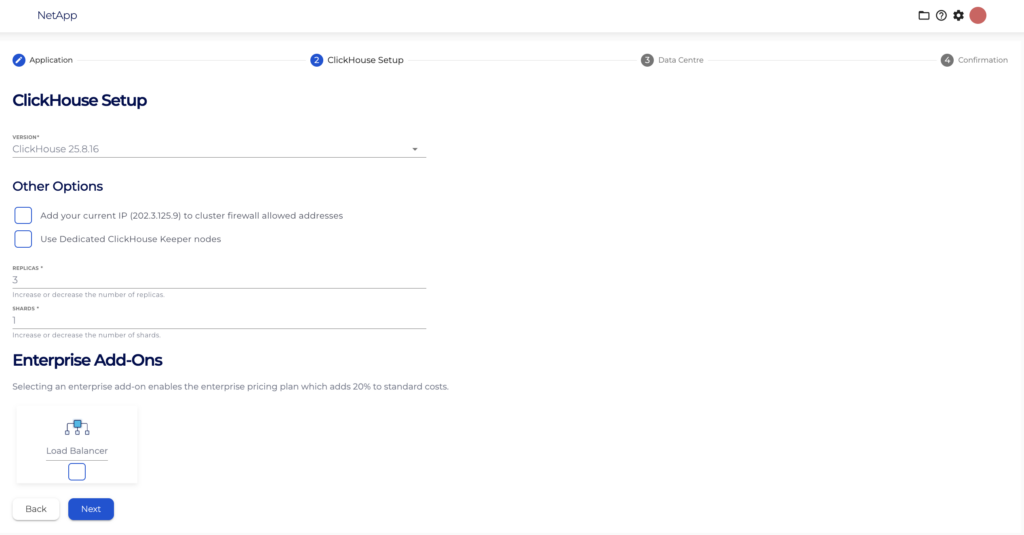
- On the ClickHouse Setup page, configure the settings as you wish then click Next. For detailed guidance, see Creating a NetApp Instaclustr-Managed ClickHouse Cluster.
- On the Data Centre Options page, click the Provider Account dropdown box and ensure your own provider account has been selected.
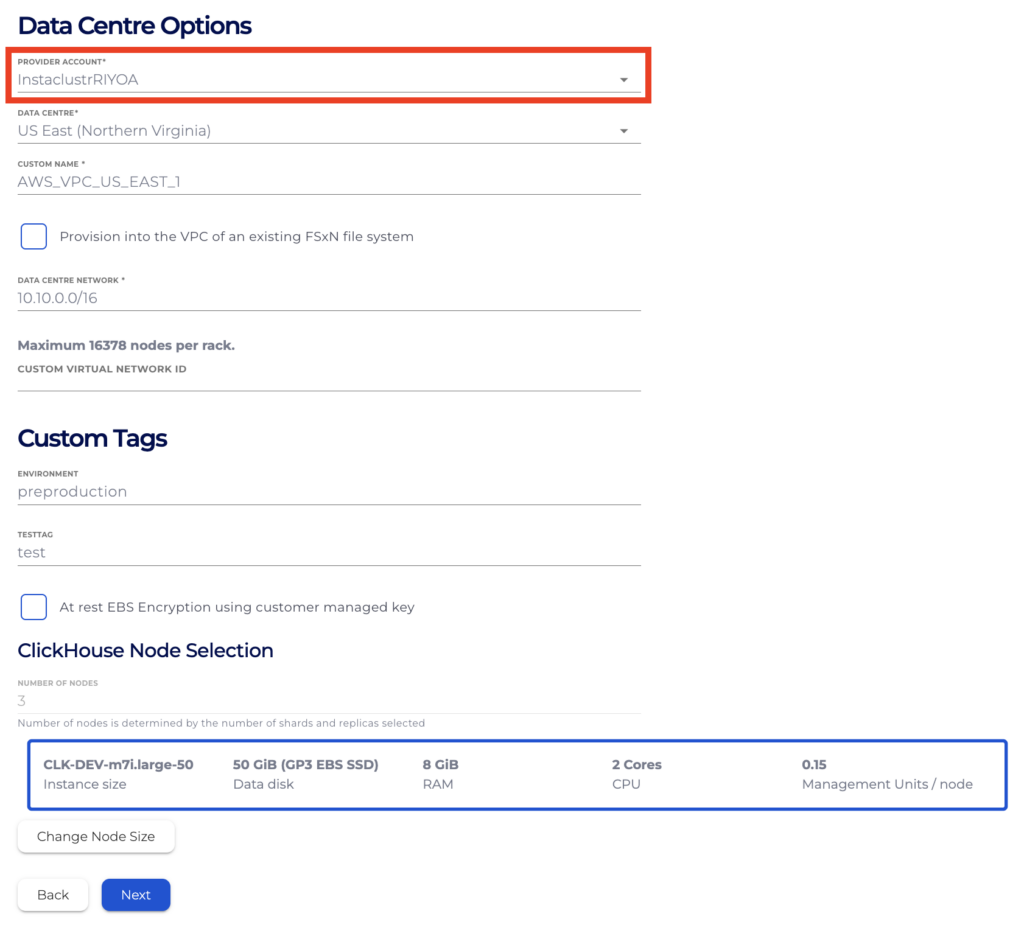
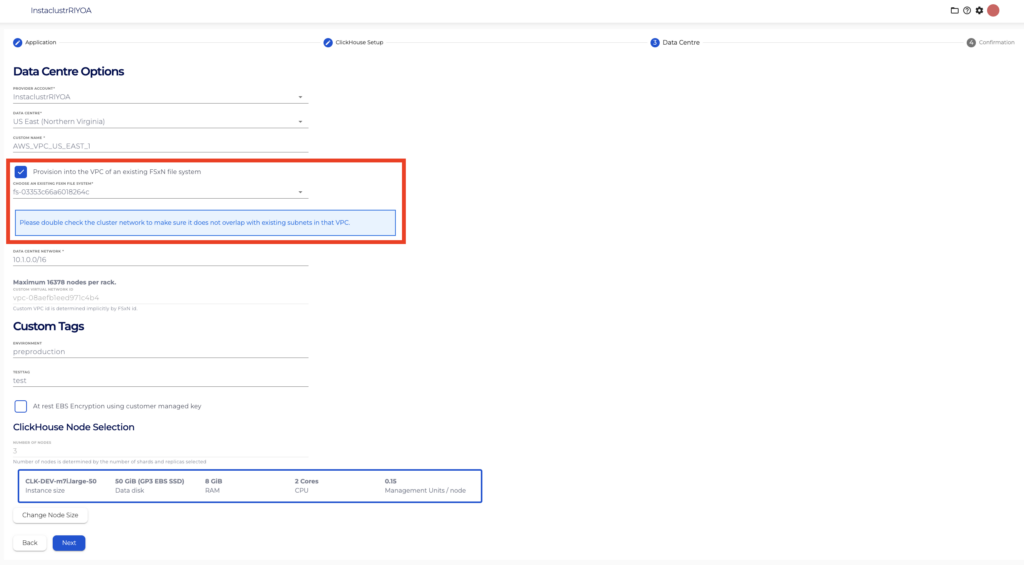
- If you wish to provision your cluster in the same VPC as your FSx for ONTAP select the Provision into the VPC of an existing FSxN file system checkbox. Then select the ID for the file system you want to integrate with from the dropdown list. Based on your selection, the Custom Virtual Network ID field will be populated automatically.
Alternatively, if you wish to provision your cluster in a different VPC to your existing file system and you already know the ID for the VPC in which your file system resides, enter it directly in the Custom Virtual Network ID field.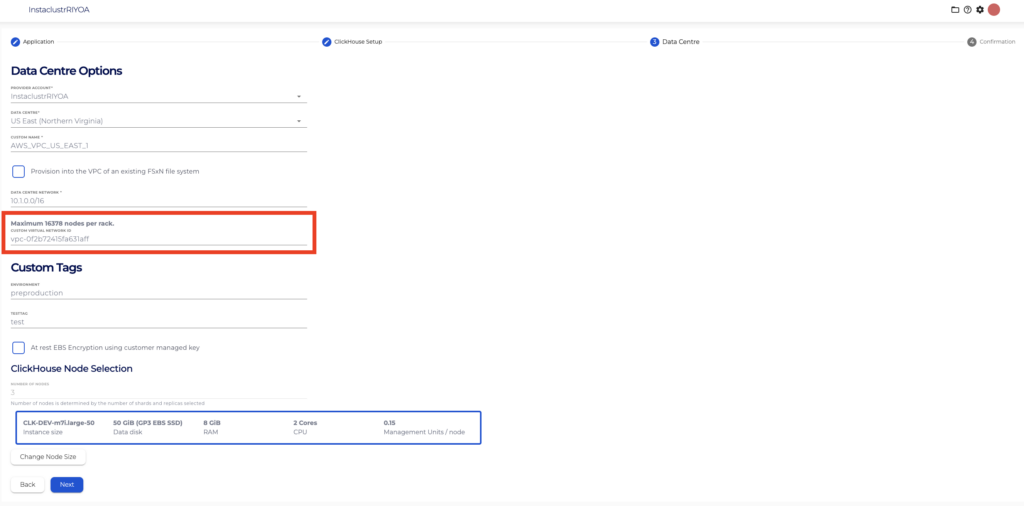
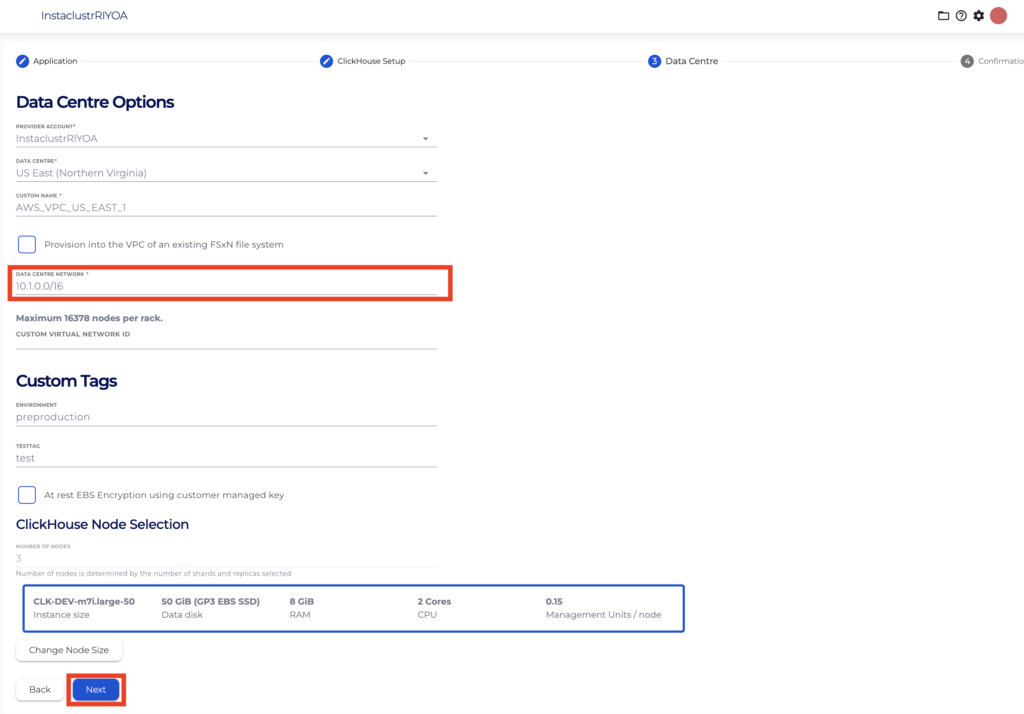
- Ensure the value inputted in the Cluster Network field does not overlap with any subnet within the selected VPC, then click Next.
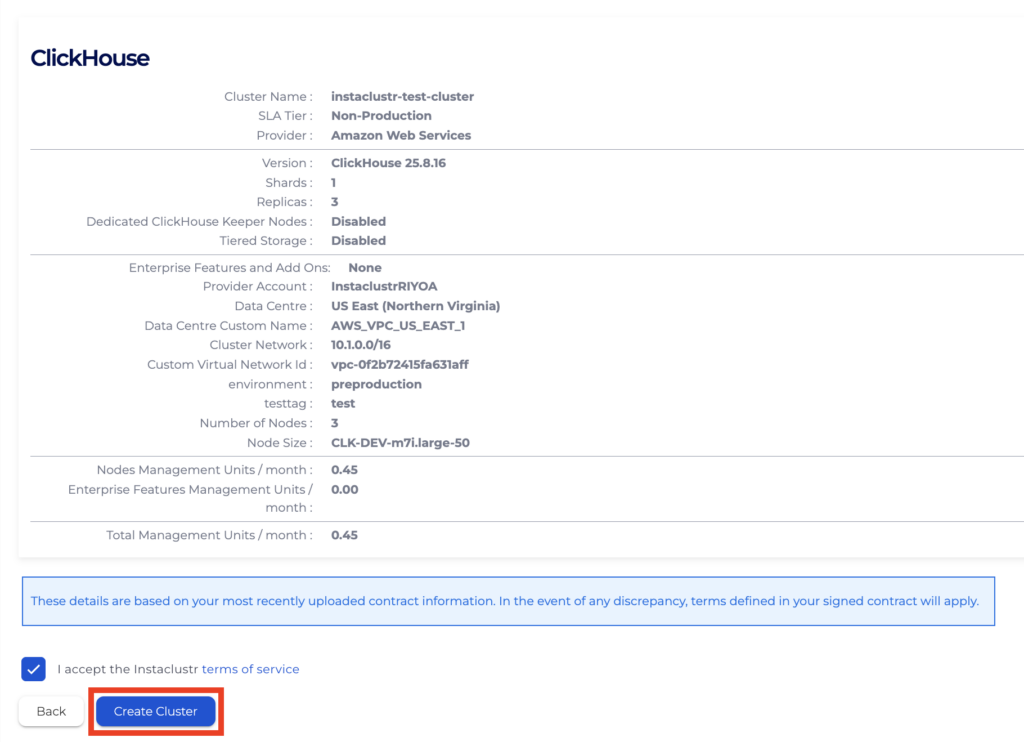
- On the Confirmation page, ensure all cluster configurations are as expected, accept the Instaclustr terms and conditions, then click Create Cluster.
Using the NetApp Instaclustr API
You can create, view, and remove NetApp Instaclustr managed ClickHouse clusters using the NetApp Instaclustr API. An example payload for the POST endpoint is provided below.
Please refer to the endpoint documentation page for further details on all configurable parameters.
Endpoint:
|
1 |
POST https://api.instaclustr.com/cluster-management/v2/resources/applications/clickhouse/clusters/v2 |
Payload:
|
1 2 3 4 5 6 7 8 9 10 11 12 13 14 15 16 17 18 19 |
{ ... dataCentres: [ { ... network: '<DESIRED CLUSTER NETWORK IP RANGE – ENSURE NO OVERLAP WITH VPC SUBNETS>', ... awsSettings: [ { ... customVirtualNetworkId: '<VPC ID FOR FSX FOR ONTAP FILE SYSTEM>' ... } ], ... } ], ... } |
Using the NetApp Instaclustr Terraform Provider
You can manage your NetApp Instaclustr-managed ClickHouse clusters with FSx for ONTAP integrations using NetApp Instaclustr Terraform. The steps are as follows:
- Follow this support document to set up your NetApp Instaclustr Terraform Provider V2.
- Follow the resource template below for guidance on cluster details required for compatibility with FSx for ONTAP integration. Refer to the resource documentation page for details on all configurable parameters.
12345678910111213resource "instaclustr_clickhouse_cluster_v2" "example" {...data_centre {...network = "<DESIRED CLUSTER NETWORK IP RANGE – ENSURE NO OVERLAP WITH FSX FOR ONTAP NETWORK>"...aws_settings {...custom_virtual_network_id = "<VPC ID FOR FSX FOR ONTAP FILE SYSTEM>"...}...} - Follow the Terraform init, plan and apply cycle to provision the cluster.
For further details on Terraform resources, refer to the NetApp Instaclustr Terraform documentation.
Questions
Please contact NetApp Instaclustr Support for any further inquiries.
