Creating a PCI Compliant Cassandra Cluster
Overview
The PCI compliance standards relate to the security of user data and transactional information. Customers who require their application to be PCI compliant, or would like to take advantage of its additional security features, can choose to create a PCI Mode Cassandra Cluster. You can read more about PCI and our support for it here.
Table of Contents
Enable PCI Mode account security settings
Before Creating a PCI Mode cluster, we need to enable PCI Mode on the account. Navigate to Account Settings under the Settings Cog in the top right of Console. Then select the Security tab.
Select the checkbox under PCI Mode to make your account PCI compliant. This allows you to access the requirements for using PCI with a cluster. Then press the Save Security Settings button to save.
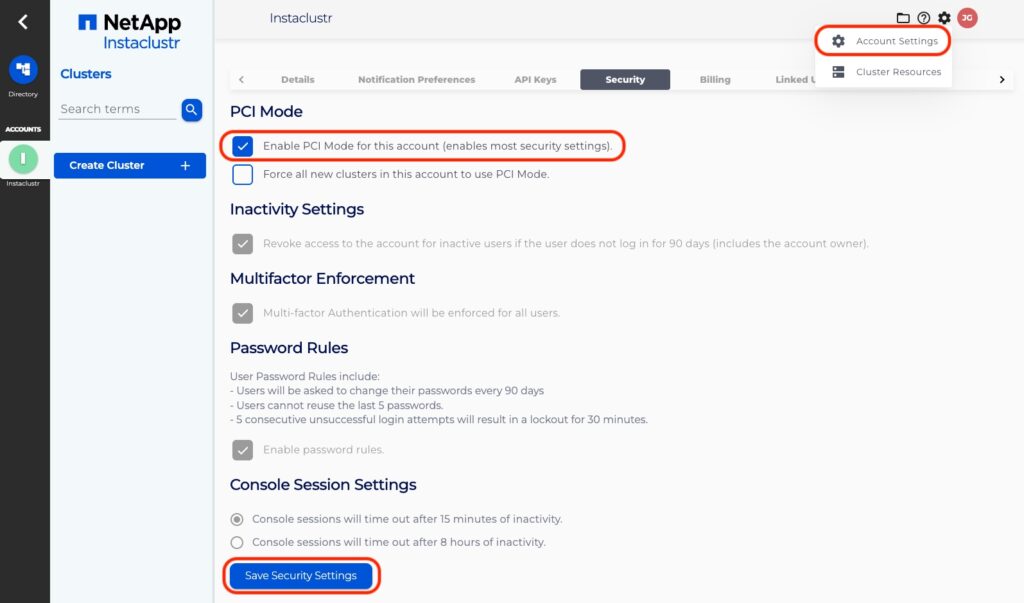
Note that PCI Mode relies on multi-user access, so we require having 2 account owners in case of loss of access for one person. This satisfies the first section of the PCI requirements.
Creating a cluster
You can continue with the Console Interface to provision a PCI Mode cluster or alternatively you can use the Instaclustr Provisioning API.
Navigate to the Create Cluster wizard and create a cluster according to your requirements but be sure to enable the PCI Mode checkbox under Enterprise features. You can refer to our support article on Creating a Cassandra Cluster and Creating a Kafka Cluster for more information.
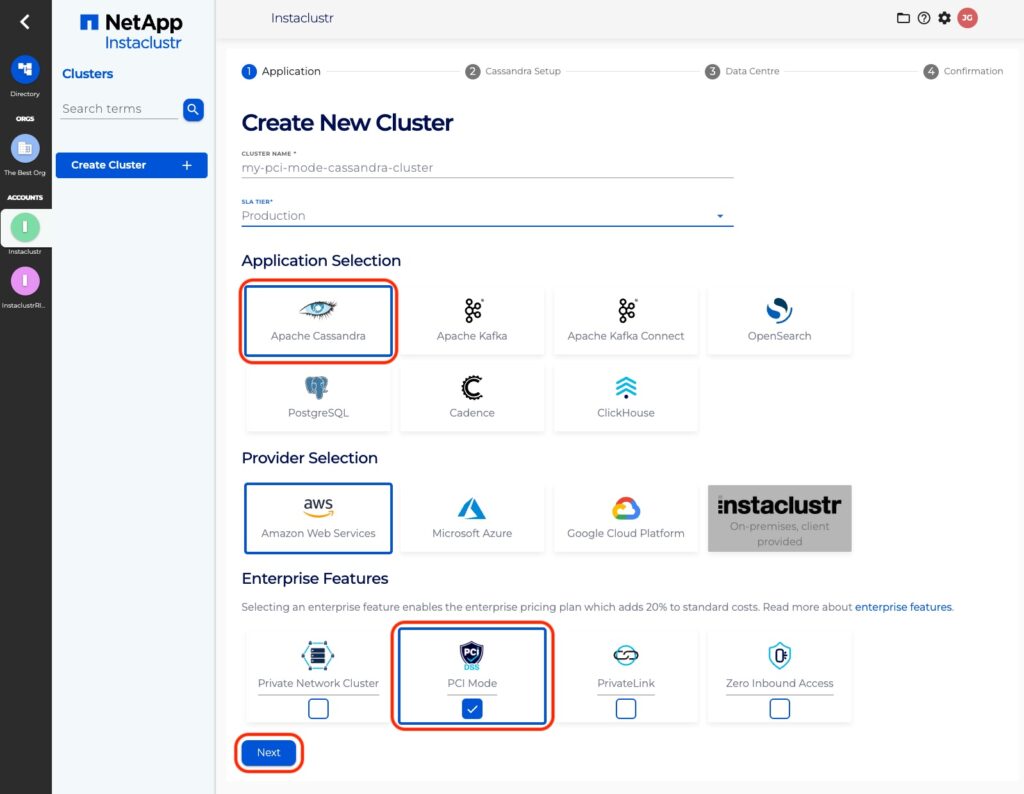
Currently, PCI Mode for Apache Cassandra is only available for Amazon Web Services or Google Cloud Platform as the infrastructure provider.
For a Cassandra 3 PCI cluster, if you create a non-iccassandra superuser, you can go into the node and run the below query to reduce high latency.
|
1 |
ALTER ROLE <role_name> WITH OPTIONS = { 'GRANT AUDIT WHITELIST FOR ALL' : 'data' }; |
<role_name> = user created by the customer. It doesn’t include instaclustr and cassandra.
Transitioning an existing cluster
If you are looking to transition an existing cluster to a PCI Mode cluster, or have additional questions around our PCI Mode clusters, please contact our support team at [email protected].
