


Partition Reassignment
What is partition reassignment?
The process of changing which brokers host which replicas to ensure an even spread of data and leaders across the cluster is called partition reassignment. Kafka does not automatically rebalance existing topic data when the cluster’s membership or layout changes.
For instance, on adding brokers to a Kafka cluster partitions for topics created after the brokers are added may land on them. However, these will not automatically be assigned any data partitions for existing topics.So unless partitions are moved to them, the newly added brokers won’t be sharing any read or write load for topics that were created before these brokers were added. Hence, this is an operation immediately after which you would want to reassign partitions to these new brokers.
Similarly, while removing brokers from your Kafka cluster, there is a need to first drain partitions off the brokers being decommissioned so those nodes can be taken out safely without losing replicas or breaking replication factor. Hence, you would want to reassign partitions to the brokers that are not being removed.
When does partition reassignment run?
Currently, on the NetApp Instaclustr Managed Platform, partition reassignment is triggered automatically after new brokers are added to your Kafka Cluster. You can add new brokers via the NetApp Instaclustr API, the NetApp Instaclustr Terraform provider, or via the NetApp Instaclustr Console. You can read more about our horizontal scaling feature for Kafka here.
You do not start partition reassignment yourself on our managed Kafka. Reassignment is run by us, automatically during automated horizontal upscaling, or by the NetApp Instaclustr support team after other operational changes if we determine that it is necessary. We are already working on including our automated partition reassignment system with other topological changes such as horizontal downscaling, i.e., removing brokers, and changing the replication factor for topics.
It should be noted that the partition reassignment system does not run on a schedule. Neither does it run automatically in case the load across the brokers looks uneven.
How does our system run partition reassignment?
Our automated partition reassignment feature is divided into 2 broad states:
Planning
In the planning phase, our automated system works out which partition replicas should move and in what order, before any data is moved. Based on the current cluster layout the system calculates, a target replica assignment that spreads partitions across brokers and across racks. The goal here is to balance load and disk usage after reassignment is complete.
Before execution, the system also validates, that the projected disk usage across brokers after all moves finish is not unacceptably uneven.
Replicas cannot all move at once without risking brokers running out of free disk while copies are in flight. Our system therefore splits work into groups and steps:
- Each step submits a bounded number of partition moves to Kafka.
- Groups are structured so that, while copies run, brokers retain a minimum level of free disk space.
- After all steps in a group are submitted, our system waits until every reassignment in that group has been completed before starting the next one.
These steps are then written to a healthy Kafka broker selected as the coordinator for this run in your cluster, so they can be later picked up when reassignment starts.
Reassigning
In this phase, a coordinating broker in your cluster starts the managed reassignment job and executes the step files produced during planning, using Kafka’s partition reassignment tooling. For each step in the plan generated in the planning phase, the corresponding move is submitted to Kafka. After all steps in a group are submitted, the system waits until that group’s moves are fully complete before starting reassignment for the next group.
Dynamic throttle adjustment during reassignment
A reassignment throttle (limit on how fast data is copied) is applied from the beginning at a conservative setting for your cluster. This is to ensure that brokers do not get overwhelmed and remain ready to accept new traffic.
About every 30 seconds while reassignment runs, the automation evaluates broker metrics (such as disk I/O pressure and request-handler load). Based on the metrics, it raises or lowers the reassignment throttle, so copies proceed as quickly as practical without overloading brokers.
When all groups and steps finish, the system runs Kafka’s reassignment verify step against the full target plan to confirm that every partition’s replicas match the intended layout.
A preferred leader election is then triggered, so partition leadership aligns with the new replica placement where appropriate.
What to expect during partition reassignment?
It should be noted here that reassignment duration may range from several minutes to several hours depending on the number of partitions and the amount of data that needs to be moved.
You should expect producers and consumers to continue working, but you may see elevated disk I/O while the reassignment completes. You need not worry about this. Your clients keep connecting, and your topics stay available throughout. Additionally, our dynamic throttle adjuster is continuously evaluating disk I/O pressure and adjusting the throttle to ensure that your cluster is not overwhelmed and that your workflows are unaffected.
Note if for some reason, reassignment fails during automated horizontal upscaling; you will see a message on the NetApp Instaclustr Console scaling page as follows:
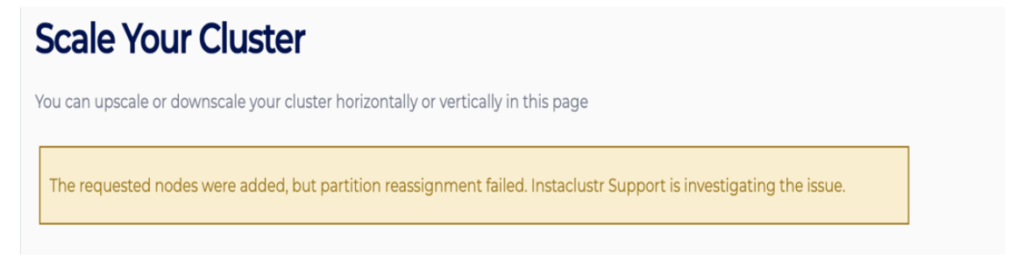
Be assured that the NetApp Instaclustr support will be notified automatically and will proceed with the investigation, and you do not need to contact them.
FAQ
What exactly gets balanced during reassignment?
Replica and leader counts across brokers, partition size on disk, and rack placement for fault tolerance. The goal is even capacity and partition load.
Can I trigger reassignment directly via the Console, API, or Terraform?
No, partition reassignment is not available as a self-service feature. Reassignment is run by us, automatically during automated horizontal scaling, or by the NetApp Instaclustr support team after other operational changes if we determine that it is necessary.
Will it rebalance if one broker is bearing more load than the others?
No, it is not designed as a continuous load-based auto healing system. It does not run on a schedule, and it does not detect skewed partitions unless triggered either automatically after a horizontal scaling operation or manually by the NetApp Instaclustr support team.
Does an In-place (Vertical) resize trigger partition reassignment?
No. Vertical resizing does not change the broker count; we do not need to move replicas from one broker to the other.
What happens to producers/consumers, ISR, and under-replicated partitions during the copy?
Producers and consumers should continue to operate normally. As partitions are moved, individual partitions may undergo leader election. When that happens, clients usually see short-lived effects (for example, a metadata refresh or a moment of higher latency), typically on the order of seconds and only for the partitions being moved at that step. Replicas join the in-sync set as they catch up. Brief under replicated partitions can appear while the replicas move, but we do not expect this to be sustained under normal conditions.
How long does partition reassignment operation typically take?
It can take a few minutes to several hours, depending on the number of partitions and the amount of data that needs to be moved. Our dynamic throttle adjustment is designed specifically to ensure that we move data as fast as possible whilst ensuring that the brokers are not overwhelmed, and that your clients continue to function as usual.
Will there be a performance impact on my cluster while partition reassignment is running? If so, how are you managing any negative implications from that to my workloads?
Yes, there can be some impact, mostly limited to extra inter-broker network and disk I/O while replicas copy, plus some modest controller/broker work for leadership changes. That is expected for any Kafka rebalance. To mitigate impact to your workloads our system:
- Applies a replication throttle to ensure that brokers do not get overwhelmed during reassignment.
- Adjusts the throttle dynamically based on broker I/O wait and request handler headroom.
- Submits moves in batches so not all data is moving at once.
- Evaluates the health of your cluster including checking any under replicated partitions, before starting a horizontal scaling operation and only triggers the operation if the cluster is deemed healthy.
How does Instaclustr’s automated partition reassignment system compare to Cruise Control?
Cruise Control is a comprehensive, general-purpose Kafka optimization system that continuously monitors a cluster and rebalances it against configured goals. NetApp Instaclustr implements reassignment as a managed operation instead: it runs when a scaling operation requires it, using rack-aware placement, pre-operation health checks, controlled batching, and throttling that adapts to live cluster conditions. For the outcome customers need during scaling, balanced replica and leader placement achieved safely, both approaches are equivalent. The NetApp Instaclustr implementation is the production algorithm the platform has used to run these operations for years, fine-tuned so it contains only the reassignment capabilities managed scaling requires. Cruise Control 2.5.146, the latest release at the time of this writing, is approximately 77,000 lines of code; the NetApp Instaclustr implementation is a small, purpose-built engine with around 600 lines of code. Because NetApp owns that implementation, needed improvements can be made on the platform’s timeline. Coordinating the same change through an open source project is possible, but it is not always possible to do it quickly enough.
Why did we decide against using Cruise Control?
Either approach would have been operated by NetApp on the managed platform, so the decision came down to which produces better outcomes for customer clusters. Cruise Control is built around continuous, goal-based optimization, and most of its capability is outside what managed scaling requires. Its always-on rebalancing also overlaps with the monitoring and remediation NetApp already runs, which risks moving data at times when it should not, such as during peak load or an active incident. NetApp instead productized reassignment logic refined through years of running these operations on customer clusters and integrated it with platform health checks, throttling, and support processes. Customers get the reassignment behavior scaling depends on, under NetApp’s operational control, without automation acting on their clusters outside of the operations that require it.
Related documentation
